メッセージ

This is the product's own frame. Your conversations appear here once you have an account.

Get started now
通知

This is the product's own frame. Alerts about your business appear here once you have an account.

日本語
The register, the shelf and the books agreed

Retail, running on one brain.

Products, sales, inventory and customers for businesses that sell things — in person, online, or both.

The idea, drawn

Three places a shop keeps its truth, and one figure.

A shop usually keeps three separate truths: what the till took, what is left on the shelf, and what the month came to. Reconciling them is somebody’s evening. Here they are one record, so the month is already counted when you open it.

The counter, the shelf and the month arriving at one figure

Drawn: the counter, the shelf and the month arriving at one figure rather than three that have to be argued into agreement.

Sold is sold, wherever

Over the counter, through the site, in a message — every sale lands in the same ledger and moves the same stock. There is no second system to tell afterwards.

The shelf moves with the sale

Stock changes as the sale happens rather than at a stock–take, so the number on the screen is the number on the shelf.

Retail feeds the month

Takings flow straight into the business’s own money view, so the shop is a room in the business rather than a separate set of books.

Why it matters

One screen where the counter, the shelf and the month agree.

Sell anywhereCounter, site or DM — every sale lands in the same ledger.
Shelf truthInventory that matches reality, because it moves with each sale.
Retail feeds the monthSales flow straight into Money Flow — no reconciliation night.
Part of one platform — works hand-in-hand withマネーフロー·商品

Maven adds this one: the counter, the shelf and the catalogue each know their own part of the day — this is the screen that opens with all of it already added up.

Retail Dashboard

The shop’s own opening screen: what sold, what the register took, and what to do next.
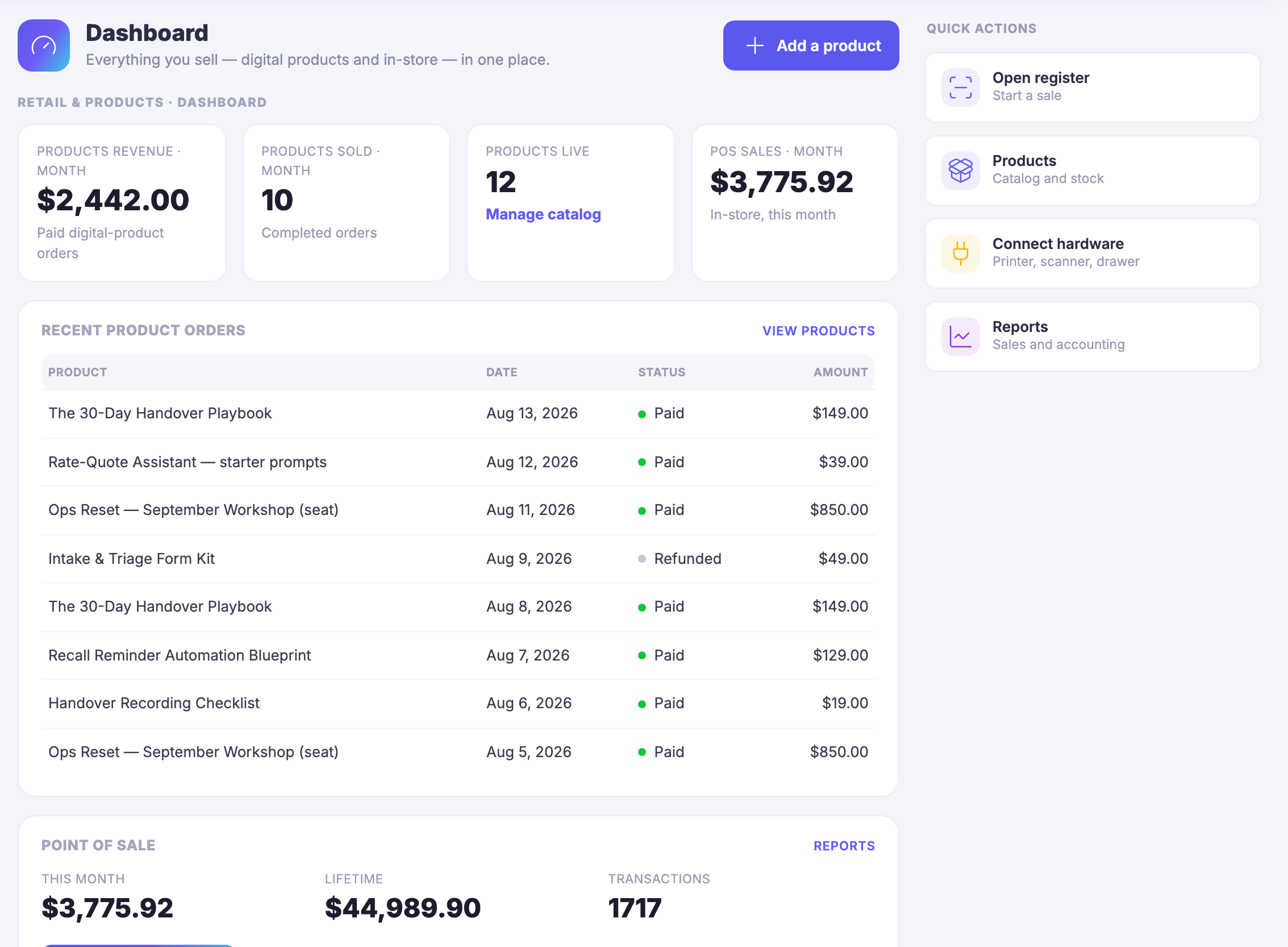
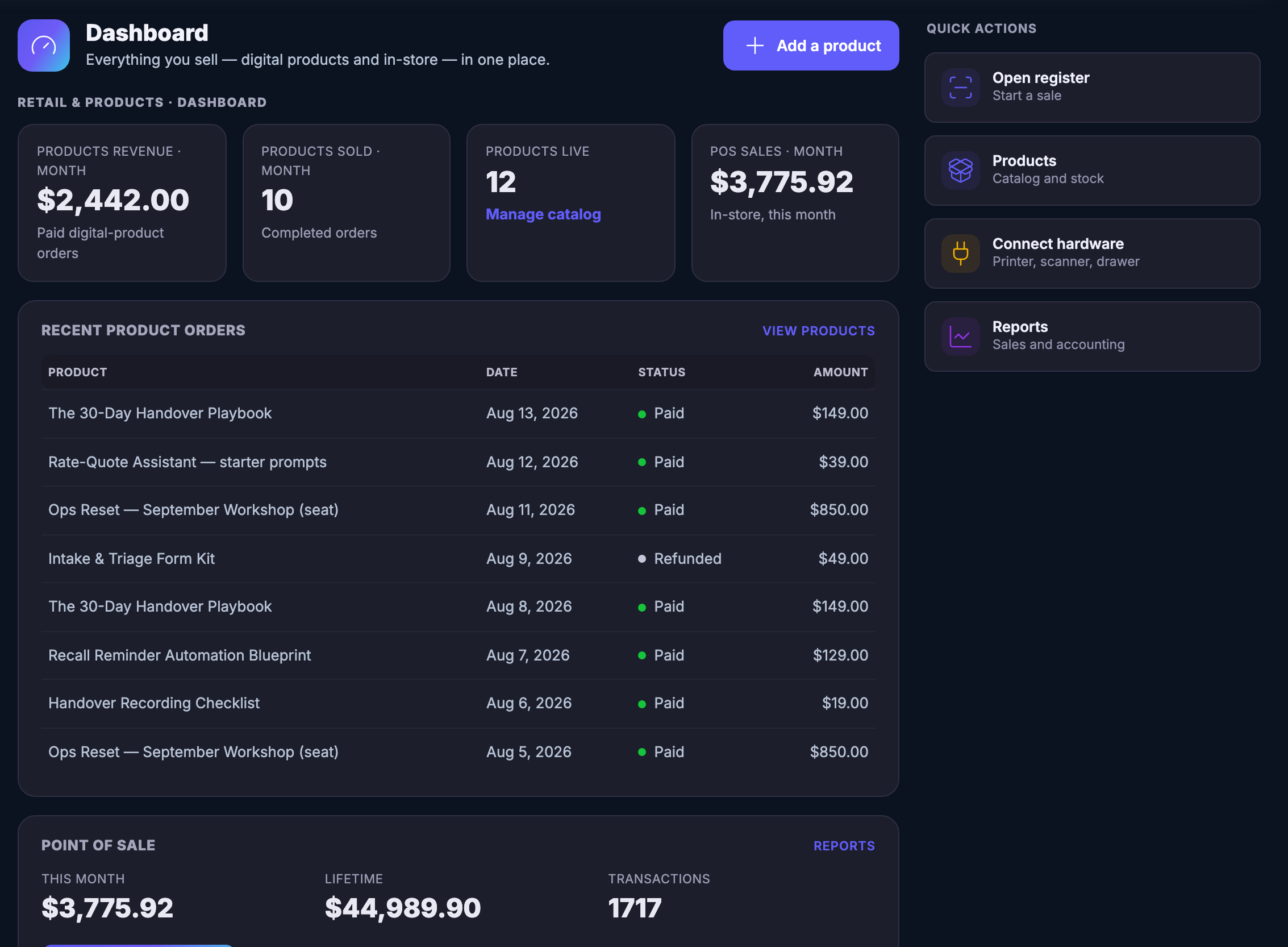
The month is already counted when you open itWhat sold as a download and what went through the till are on the same screen, for the same month, without you asking either of them for a figure. Opening the shop is reading, not assembling.
The last orders, and the ones that came backThe most recent product orders sit under the counters in the order they happened, each with its date, what it was worth and whether it was paid or refunded. A return is not filed somewhere else — it reads on the same line as the sale it undoes.
The next thing to do is on the same screenOpen the register, go to the catalogue, connect the counter hardware, read the sales and accounting reports. Each is one control away on the same page, so noticing something and doing something about it stop being two errands.
Read more about Retail Dashboard

You should be able to tell how the shop is doing by opening one screen, not by adding two of them together.

A shop that sells a parcel in the room and a file on the internet usually ends up with two half-answers — the till’s and the website’s — and somebody adding them up on a Sunday. This screen is the addition, done already. The month’s product revenue and the month’s counter takings sit beside each other because they were always the same month.

Underneath the counters is the part that actually tells you something: the last orders, newest first, each with the day it happened and what it was worth. Refunds are on that list too, marked as refunds rather than quietly missing, so the run of the week reads honestly instead of flatteringly.

Nothing on this page is a second copy of anything. The takings were rung up on the register, the products that sold are rows in the catalogue, and what left the shelf moved the count that Inventory keeps. This screen is the place all three report to — which is also why the money on it is the same money the rest of the business counts in Money Flow.

And it is a place to leave from. The register, the catalogue, the counter hardware and the sales reports each have their own control in the same column, so the screen you check the shop on is the screen you act from. You are not navigating back to the beginning to do the obvious next thing.

What it actually does

  • The month’s digital and in-store takings counted on one screen
  • The most recent orders with their dates, their amounts and their refunds
  • A control back into the register, the catalogue, the hardware and the reports

What that changes for you

  • Opening the shop stops being a job you have to prepare for
  • A refund is part of the picture instead of a surprise at month end
  • Noticing something and doing something about it happen on the same page

You come away with one screen that says how the shop is doing, and what to do next.

A look inside Retail Dashboard

Retail Dashboard — platform screenshots

Real screens from the product. Open any one full size, or switch the set to light or dark.

閉じる
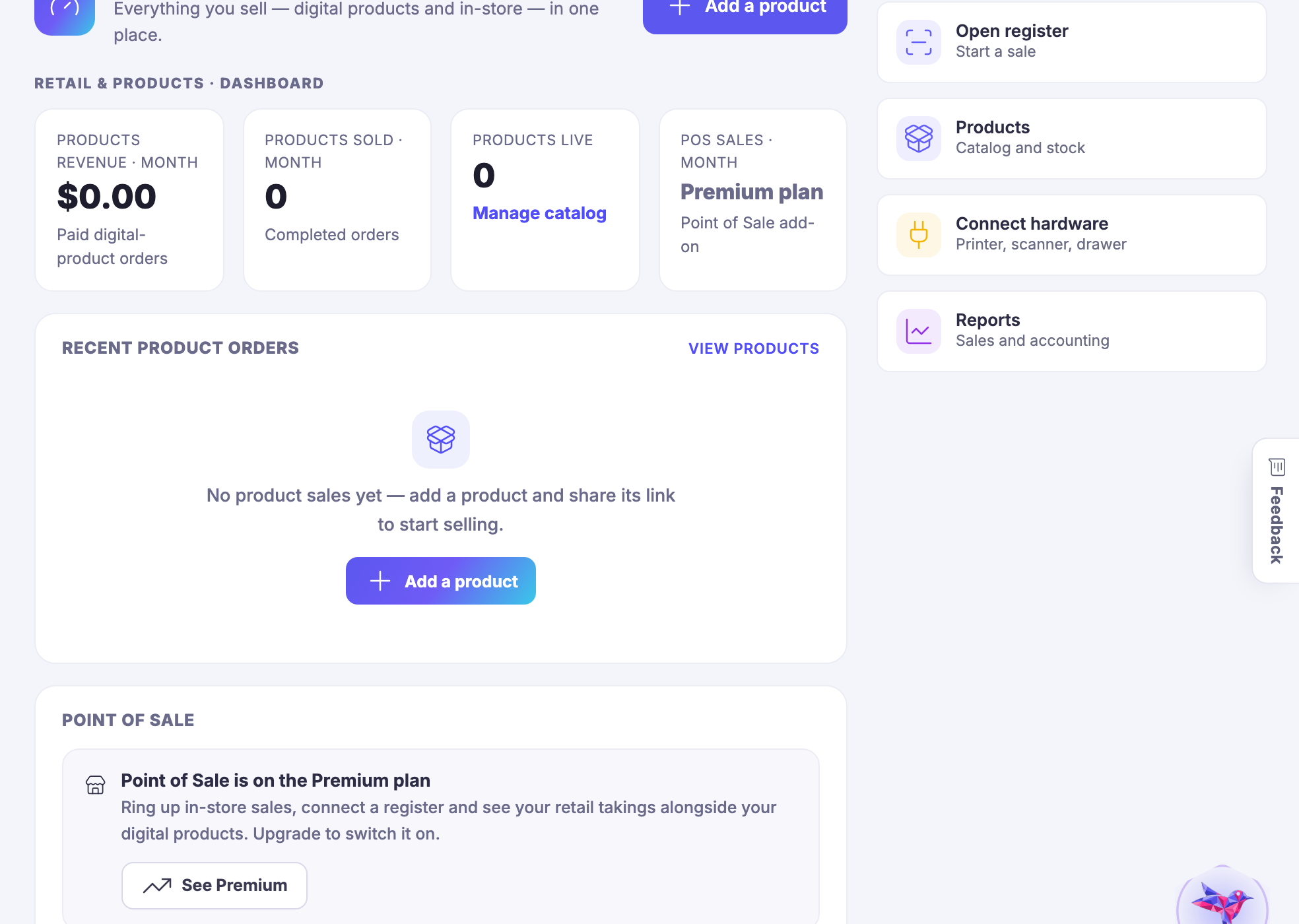
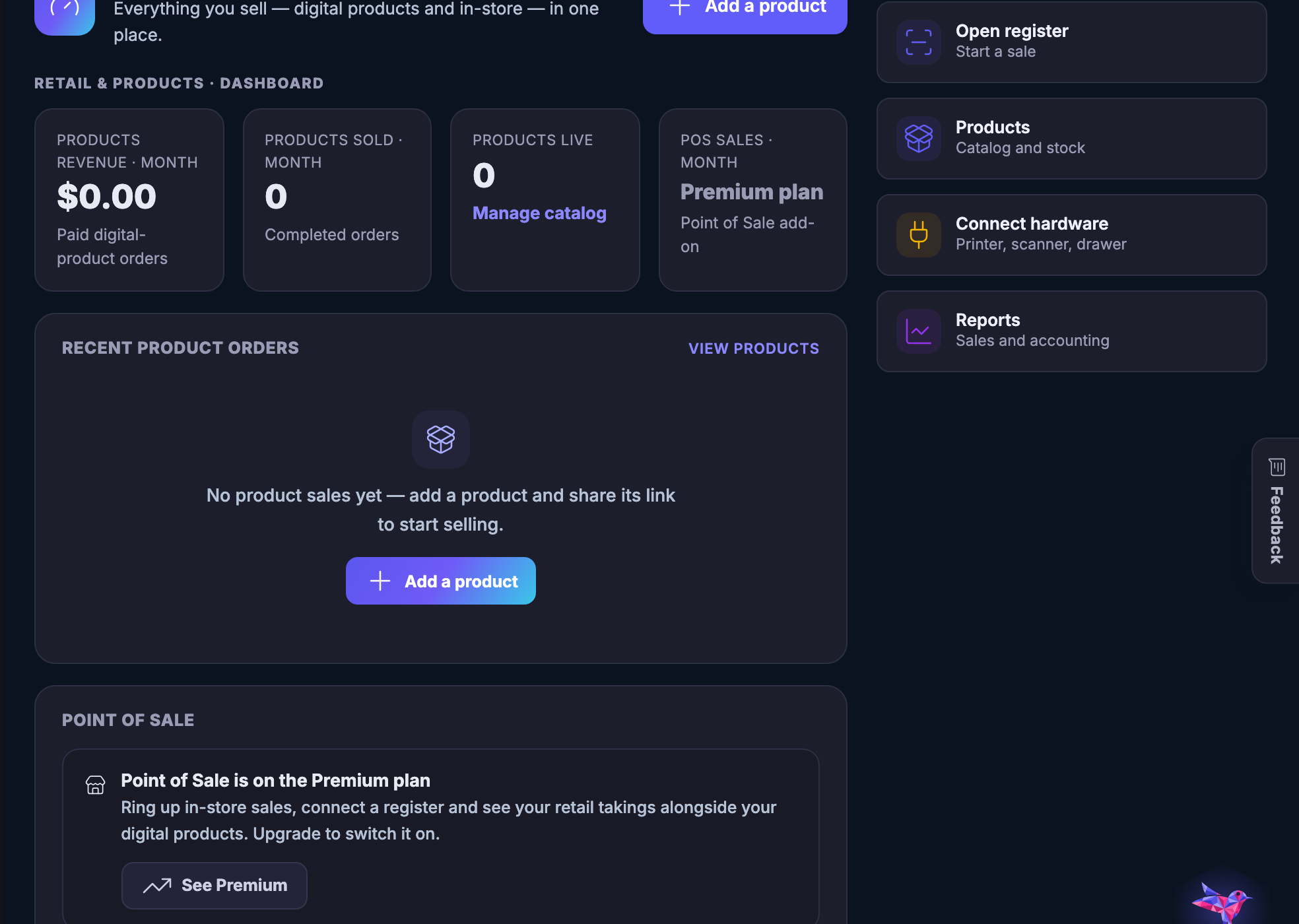
The shop’s Dashboard screen. A heading reading Dashboard sits over a line saying everything you sell — digital products and in-store — in one place, with a control to add a product on the right, and under it a small label placing the screen in Retail and Products. Then a row of four counters: products revenue for the month, written as money, under it the words paid digital-product orders; products sold for the month, a count, under it completed orders; products live, a count, with a link reading manage catalog; and point-of-sale takings for the month, written as money, under it the words in-store, this month. Below them a panel headed recent product orders, with a link across to the products themselves, and a table of eight orders — a handover playbook, a set of starter prompts for quoting, a workshop seat, an intake and triage form kit, the playbook again, an automation blueprint for recall reminders, a recording checklist and the workshop seat again. Each row carries the date it happened, a status marked with a coloured dot, and the amount written as money. Seven read Paid and one, the form kit, reads Refunded. Under that a panel headed point of sale, with a link to its reports and three figures beside each other: this month and lifetime, both written as money, and a count of transactions. Down the right-hand side a column headed quick actions holding four shortcuts, each with its own small icon: open the register to start a sale, products for catalogue and stock, connect hardware for a printer, scanner or drawer, and reports for sales and accounting. The screen is cut off at the foot of the frame, mid-way through the point-of-sale panel, where a control to open the register is beginning.The shop’s Dashboard screen. A heading reading Dashboard sits over a line saying everything you sell — digital products and in-store — in one place, with a control to add a product on the right, and under it a small label placing the screen in Retail and Products. Then a row of four counters: products revenue for the month, written as money, under it the words paid digital-product orders; products sold for the month, a count, under it completed orders; products live, a count, with a link reading manage catalog; and point-of-sale takings for the month, written as money, under it the words in-store, this month. Below them a panel headed recent product orders, with a link across to the products themselves, and a table of eight orders — a handover playbook, a set of starter prompts for quoting, a workshop seat, an intake and triage form kit, the playbook again, an automation blueprint for recall reminders, a recording checklist and the workshop seat again. Each row carries the date it happened, a status marked with a coloured dot, and the amount written as money. Seven read Paid and one, the form kit, reads Refunded. Under that a panel headed point of sale, with a link to its reports and three figures beside each other: this month and lifetime, both written as money, and a count of transactions. Down the right-hand side a column headed quick actions holding four shortcuts, each with its own small icon: open the register to start a sale, products for catalogue and stock, connect hardware for a printer, scanner or drawer, and reports for sales and accounting. The screen is cut off at the foot of the frame, mid-way through the point-of-sale panel, where a control to open the register is beginning.

Retail Dashboard

閉じる
The shop’s Dashboard screen. A heading reading Dashboard sits over a line saying everything you sell — digital products and in-store — in one place, with a control to add a product on the right, and under it a small label placing the screen in Retail and Products. Then a row of four counters: products revenue for the month, written as money, under it the words paid digital-product orders; products sold for the month, a count, under it completed orders; products live, a count, with a link reading manage catalog; and point-of-sale takings for the month, written as money, under it the words in-store, this month. Below them a panel headed recent product orders, with a link across to the products themselves, and a table of eight orders — a handover playbook, a set of starter prompts for quoting, a workshop seat, an intake and triage form kit, the playbook again, an automation blueprint for recall reminders, a recording checklist and the workshop seat again. Each row carries the date it happened, a status marked with a coloured dot, and the amount written as money. Seven read Paid and one, the form kit, reads Refunded. Under that a panel headed point of sale, with a link to its reports and three figures beside each other: this month and lifetime, both written as money, and a count of transactions. Down the right-hand side a column headed quick actions holding four shortcuts, each with its own small icon: open the register to start a sale, products for catalogue and stock, connect hardware for a printer, scanner or drawer, and reports for sales and accounting. The screen is cut off at the foot of the frame, mid-way through the point-of-sale panel, where a control to open the register is beginning.The shop’s Dashboard screen. A heading reading Dashboard sits over a line saying everything you sell — digital products and in-store — in one place, with a control to add a product on the right, and under it a small label placing the screen in Retail and Products. Then a row of four counters: products revenue for the month, written as money, under it the words paid digital-product orders; products sold for the month, a count, under it completed orders; products live, a count, with a link reading manage catalog; and point-of-sale takings for the month, written as money, under it the words in-store, this month. Below them a panel headed recent product orders, with a link across to the products themselves, and a table of eight orders — a handover playbook, a set of starter prompts for quoting, a workshop seat, an intake and triage form kit, the playbook again, an automation blueprint for recall reminders, a recording checklist and the workshop seat again. Each row carries the date it happened, a status marked with a coloured dot, and the amount written as money. Seven read Paid and one, the form kit, reads Refunded. Under that a panel headed point of sale, with a link to its reports and three figures beside each other: this month and lifetime, both written as money, and a count of transactions. Down the right-hand side a column headed quick actions holding four shortcuts, each with its own small icon: open the register to start a sale, products for catalogue and stock, connect hardware for a printer, scanner or drawer, and reports for sales and accounting. The screen is cut off at the foot of the frame, mid-way through the point-of-sale panel, where a control to open the register is beginning.

A look inside Retail Dashboard

Stills from the product, one after the next.

The shop’s Dashboard screen. A heading reading Dashboard sits over a line saying everything you sell — digital products and in-store — in one place, with a control to add a product on the right, and under it a small label placing the screen in Retail and Products. Then a row of four counters: products revenue for the month, written as money, under it the words paid digital-product orders; products sold for the month, a count, under it completed orders; products live, a count, with a link reading manage catalog; and point-of-sale takings for the month, written as money, under it the words in-store, this month. Below them a panel headed recent product orders, with a link across to the products themselves, and a table of eight orders — a handover playbook, a set of starter prompts for quoting, a workshop seat, an intake and triage form kit, the playbook again, an automation blueprint for recall reminders, a recording checklist and the workshop seat again. Each row carries the date it happened, a status marked with a coloured dot, and the amount written as money. Seven read Paid and one, the form kit, reads Refunded. Under that a panel headed point of sale, with a link to its reports and three figures beside each other: this month and lifetime, both written as money, and a count of transactions. Down the right-hand side a column headed quick actions holding four shortcuts, each with its own small icon: open the register to start a sale, products for catalogue and stock, connect hardware for a printer, scanner or drawer, and reports for sales and accounting. The screen is cut off at the foot of the frame, mid-way through the point-of-sale panel, where a control to open the register is beginning.The shop’s Dashboard screen. A heading reading Dashboard sits over a line saying everything you sell — digital products and in-store — in one place, with a control to add a product on the right, and under it a small label placing the screen in Retail and Products. Then a row of four counters: products revenue for the month, written as money, under it the words paid digital-product orders; products sold for the month, a count, under it completed orders; products live, a count, with a link reading manage catalog; and point-of-sale takings for the month, written as money, under it the words in-store, this month. Below them a panel headed recent product orders, with a link across to the products themselves, and a table of eight orders — a handover playbook, a set of starter prompts for quoting, a workshop seat, an intake and triage form kit, the playbook again, an automation blueprint for recall reminders, a recording checklist and the workshop seat again. Each row carries the date it happened, a status marked with a coloured dot, and the amount written as money. Seven read Paid and one, the form kit, reads Refunded. Under that a panel headed point of sale, with a link to its reports and three figures beside each other: this month and lifetime, both written as money, and a count of transactions. Down the right-hand side a column headed quick actions holding four shortcuts, each with its own small icon: open the register to start a sale, products for catalogue and stock, connect hardware for a printer, scanner or drawer, and reports for sales and accounting. The screen is cut off at the foot of the frame, mid-way through the point-of-sale panel, where a control to open the register is beginning.
A woman sitting on a shopping bag with her phone, a browser window and a shopping trolley beside her

The real screens

This is the shop, signed in.

Three screens from a real account: the shop’s opening view, the catalogue behind it, and the till itself. Photographs of the product, captured as they render.

The shop's own screen — What sold, what the register took and what to do next - with the last orders, and the ones that came back, on the same lines.
The shop’s own screen

What sold, what the register took and what to do next — with the last orders, and the ones that came back, on the same lines.

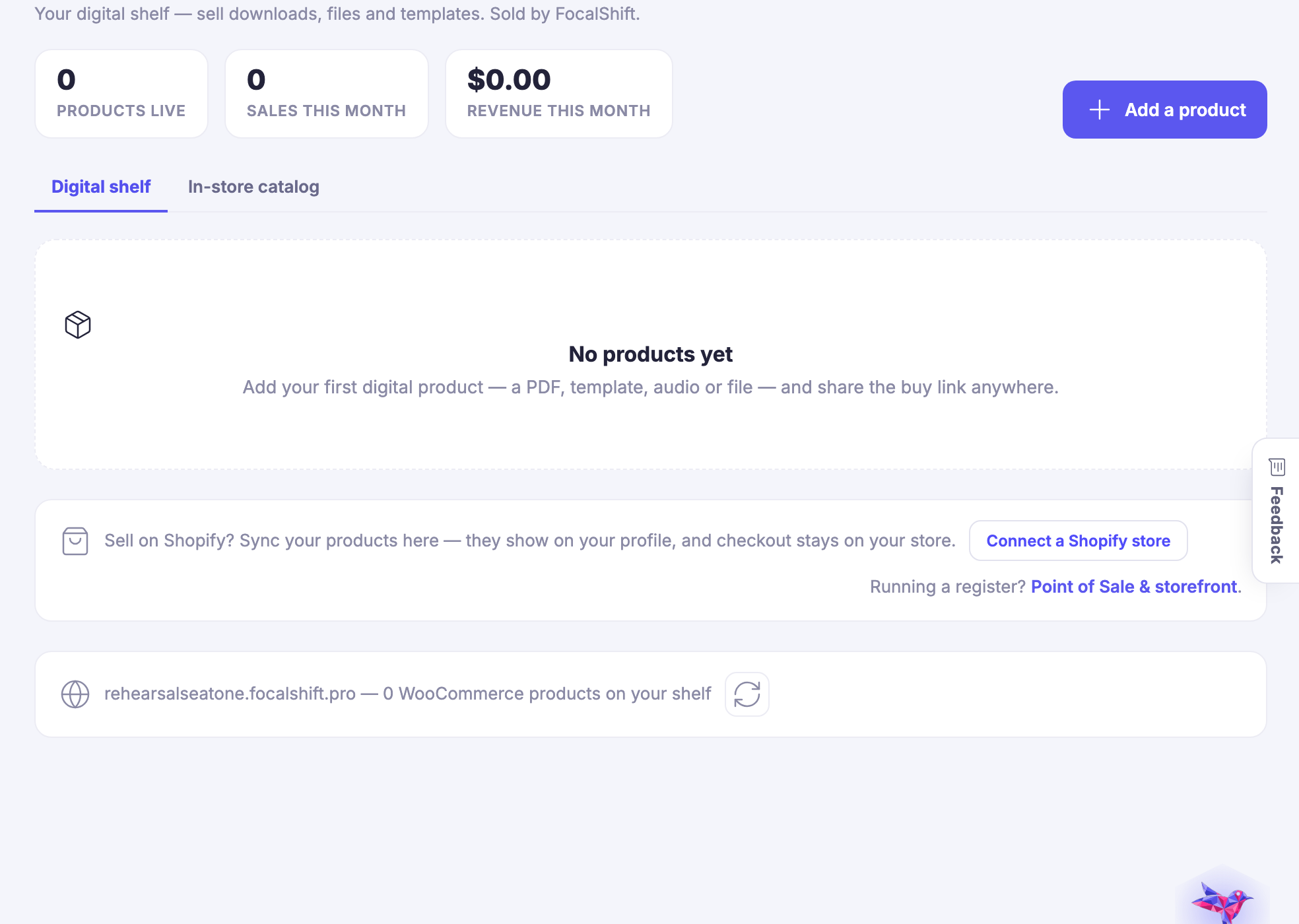
The catalogue — What you sell, in one list, feeding the counter and the site from the same record.
The catalogue

What you sell, in one list, feeding the counter and the site from the same record.

The till — The point of sale itself: the screen somebody actually stands at, with the same stock and the same customers behind it.
The till

The point of sale itself: the screen somebody actually stands at, with the same stock and the same customers behind it.

Captured from a demo business on a live account, in a browser kept apart from anyone’s own. The demo shop has been set up and has not traded, so the takings read empty — which is what a shop looks like the morning it opens.

The register, the shelf and the books, agreeing.

Join the beta program

See it in your own business.

Everything on this page comes with the platform — start free and try it on your real work.

Get started now
One connected destination

Go deeper without losing the thread.

Each title beginning with a hashtag is a direct destination. The navigation can bring you to the exact part of the story without creating another disconnected page.

Remember the customer across every visit.

Know who keeps you open.

Your buyers, remembered — purchase history, preferences and visits — so the people who sustain the shop feel like it.

Connect the counter to the rest of the business.

Plays well with hardware.

Barcode scanners, receipt printers and card readers — the physical kit of retail, connected without a consultant.

Keep the sale and the return in one history.

Sales you can read.

Daily, weekly and seasonal sales views that answer real shop questions: what's moving, when to staff, what to reorder.

Set the rules once.

The shop's control room.

Taxes, receipts, tips and store policies — configured once, applied everywhere, changeable without fear.

Give each person the right working access.

Your counter team, equipped.

Staff accounts with the right permissions — sell, manage stock, or run reports — without handing everyone the keys.

One business, every location visible.

Every location, one view.

Run multiple stores from a single command center — per-location stock and sales, combined books.

Know what is coming in before it reaches the shelf.

Suppliers on speed dial.

Vendors, catalogs, costs and order history in one place — restocking as a routine, not a research project.

Next Up: Network

Build relationships, share opportunities and grow in the FocalShift Network.

Maven に質問