Pesan

This is the product's own frame. Your conversations appear here once you have an account.

Get started now
Notifikasi

This is the product's own frame. Alerts about your business appear here once you have an account.

Bahasa
Checkout took nine seconds

A register that keeps up.

Point of sale for the counter — a fast counter, clean receipts, and every sale feeding your real books instantly.

Why it matters

Sell in the room, on the shelf you already keep.

Fast at the counterRing it up and hand it over — no lag while a line forms.
Receipts that reconcileEach sale posts to inventory and Money Flow in the same second.
Works on what you haveA tablet becomes a register. No proprietary hardware ransom.
Part of one platform — works hand-in-hand withRitel·Persediaan

Because you said I sell what I make.

Kasir

The counter, the receipt and the shelf behind it — one register, one record.
A register that opens on the shelf you already keepThe same catalogue your online buyers pick from is the one on the counter. You are not keeping a second list of what you sell and what it costs, and a price you change once is changed in the room as well.
Every sale written down as it happensWhat the till does is recorded while it is happening — the sale, the receipt, the return — against the same shelf and the same month as the rest of the business. Nobody sits down on a Sunday to type the week back in.
Runs on a device you already ownA tablet on the counter is a register. A scanner, a printer and a drawer connect through Connect Hardware when you have them, and not one of them is required before you can sell anything.
Read more about Point of Sale

The counter and the catalogue are the same thing, so a sale in the room is a sale in the books.

A register is only useful if it knows what you sell. This one opens on the catalogue you already keep — the same rows, the same prices, the same names — so the shelf on the wall and the shelf on your website never drift apart. Change a price once and the counter has it.

What happened at the till is recorded as it happens: the sale, the receipt, the return. Sales and Returns holds the whole transaction history, searchable by receipt, by the person who served it or by the amount, so a refund three weeks later is a lookup rather than an argument.

The register does not live on its own. The count on the shelf moves with the sale, the customer who bought is the same person your letters read from, and the day’s takings sit in the same month as everything else you earn. One counter, one business.

It runs on what you have. A tablet becomes the register; the printer, the scanner and the cash drawer connect through Connect Hardware when you own them. Each of your Stores and Locations can carry its own registers, and the people serving get the working access their role needs through Staff and Roles.

What it actually does

  • A register that opens on the shelf you already keep
  • Every sale, receipt and return held as one searchable history
  • One counter or a chain — each location with its own registers

What that changes for you

  • A price only ever has to be changed once
  • The counter and the website stop disagreeing about what is in stock
  • Closing the day is reading a screen, not rebuilding one

You come away with a day at the counter that is already counted.

A look inside Point of Sale

Point of Sale — platform screenshots

Real screens from the product. Open any one full size, or switch the set to light or dark.

Tutup
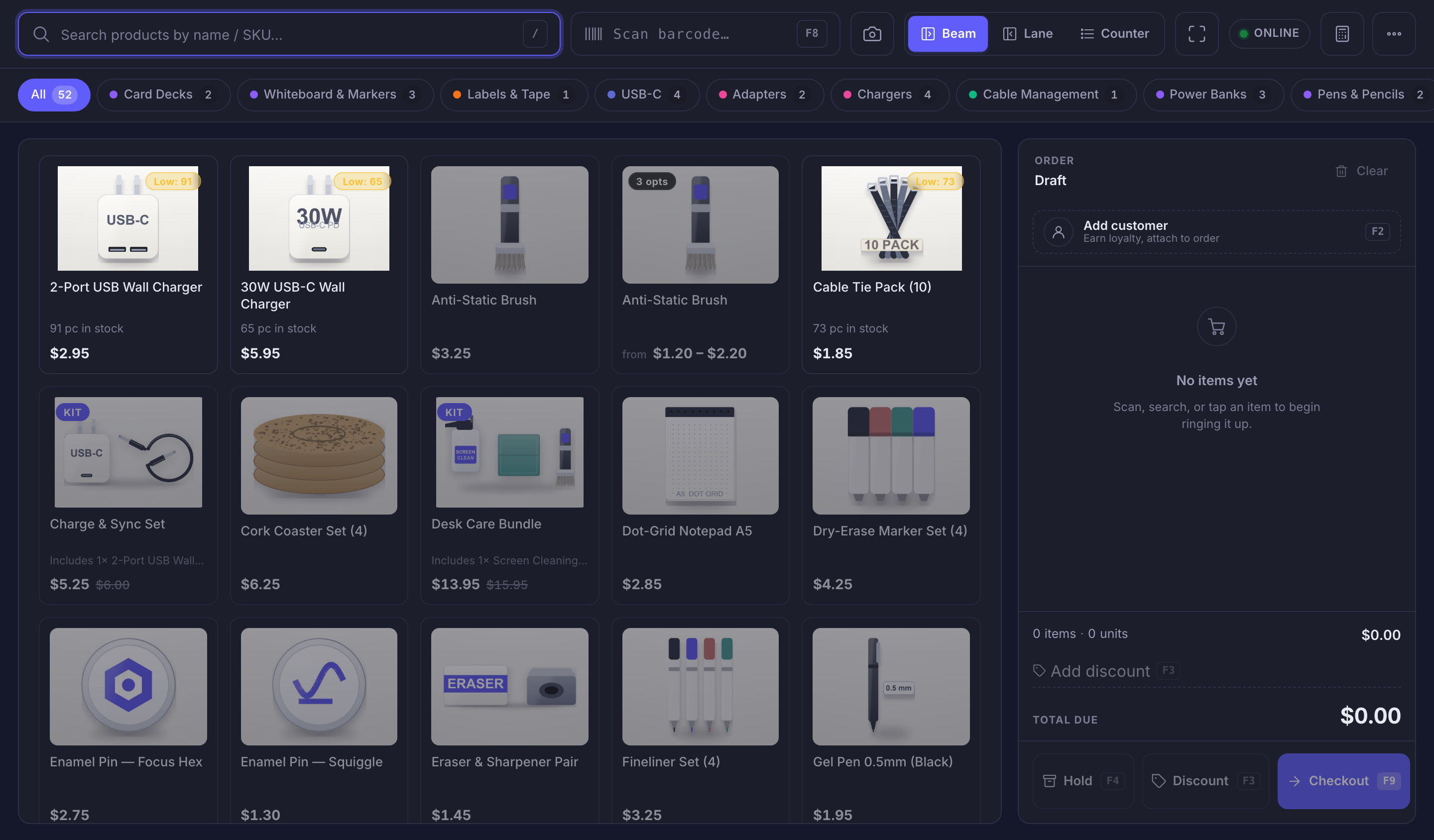
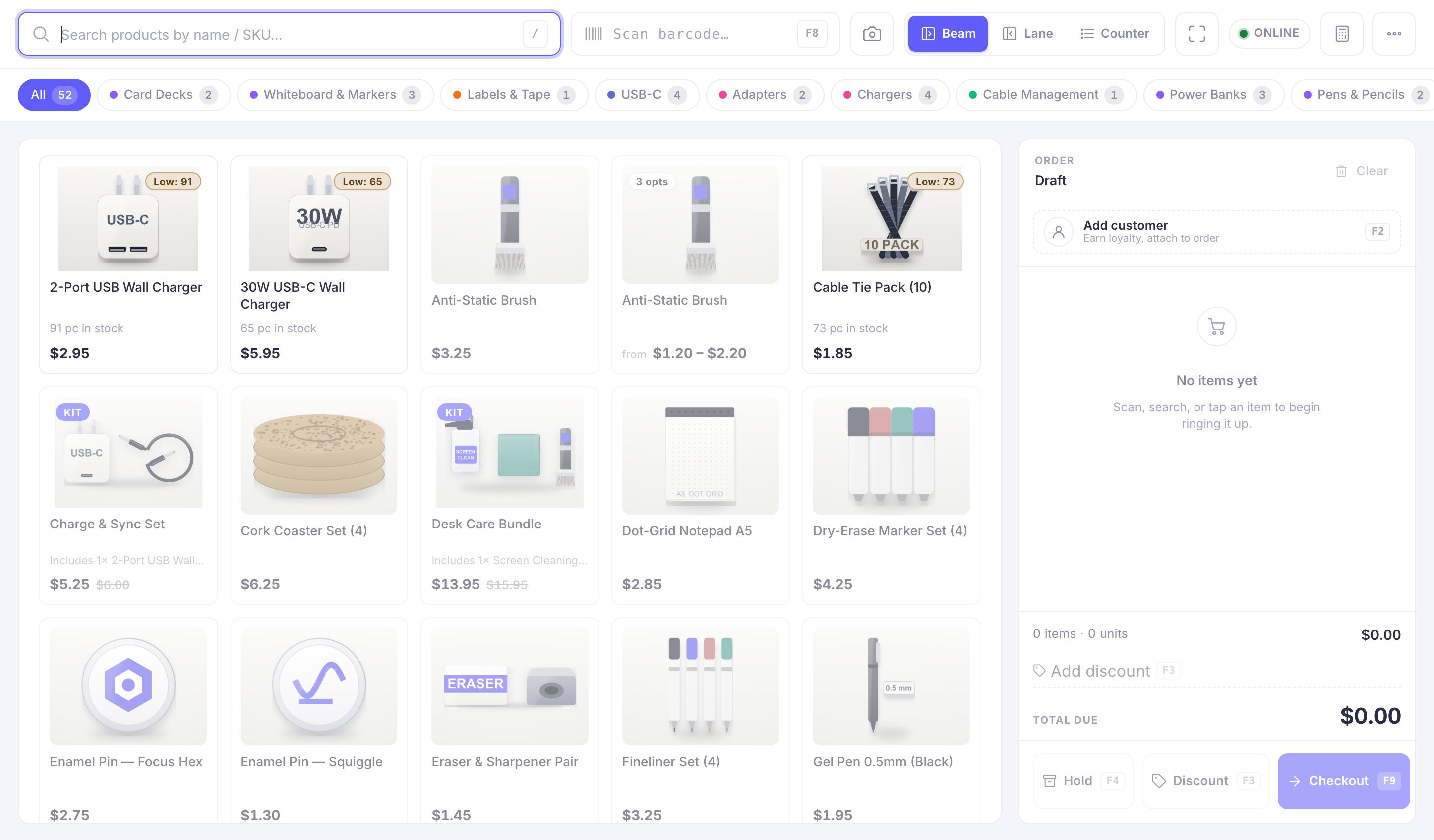
The register, open on the counter. Along the top a field for searching products by name or code, a barcode-scan field beside it with a camera control, a switch between the beam, lane and counter ways of ringing up, and a mark reading online. Under that a row of category chips — everything first, then a chip for card decks, whiteboard markers, labels, USB-C, adapters, chargers, cable management, power banks, pens and pencils. The grid below is the shelf itself: tile after tile, each carrying its own photograph of the product, with its name and its price, several carrying a low-stock badge, two marked as kits with what is inside them named underneath, two showing a reduced price beside the price it was, and one offering a choice of options rather than a single figure. Down the right-hand side the order rail, headed order and draft, with a control to attach a customer to the sale and earn them loyalty. The rail is empty: in the product’s own words, no items yet, and an invitation to scan, search or tap an item to begin ringing it up. Its counters read nothing on the order and nothing due, and it closes with controls to hold the order, add a discount, or go to checkout.The register, open on the counter. Along the top a field for searching products by name or code, a barcode-scan field beside it with a camera control, a switch between the beam, lane and counter ways of ringing up, and a mark reading online. Under that a row of category chips — everything first, then a chip for card decks, whiteboard markers, labels, USB-C, adapters, chargers, cable management, power banks, pens and pencils. The grid below is the shelf itself: tile after tile, each carrying its own photograph of the product, with its name and its price, several carrying a low-stock badge, two marked as kits with what is inside them named underneath, two showing a reduced price beside the price it was, and one offering a choice of options rather than a single figure. Down the right-hand side the order rail, headed order and draft, with a control to attach a customer to the sale and earn them loyalty. The rail is empty: in the product’s own words, no items yet, and an invitation to scan, search or tap an item to begin ringing it up. Its counters read nothing on the order and nothing due, and it closes with controls to hold the order, add a discount, or go to checkout.

Kasir

Tutup
The register, open on the counter. Along the top a field for searching products by name or code, a barcode-scan field beside it with a camera control, a switch between the beam, lane and counter ways of ringing up, and a mark reading online. Under that a row of category chips — everything first, then a chip for card decks, whiteboard markers, labels, USB-C, adapters, chargers, cable management, power banks, pens and pencils. The grid below is the shelf itself: tile after tile, each carrying its own photograph of the product, with its name and its price, several carrying a low-stock badge, two marked as kits with what is inside them named underneath, two showing a reduced price beside the price it was, and one offering a choice of options rather than a single figure. Down the right-hand side the order rail, headed order and draft, with a control to attach a customer to the sale and earn them loyalty. The rail is empty: in the product’s own words, no items yet, and an invitation to scan, search or tap an item to begin ringing it up. Its counters read nothing on the order and nothing due, and it closes with controls to hold the order, add a discount, or go to checkout.The register, open on the counter. Along the top a field for searching products by name or code, a barcode-scan field beside it with a camera control, a switch between the beam, lane and counter ways of ringing up, and a mark reading online. Under that a row of category chips — everything first, then a chip for card decks, whiteboard markers, labels, USB-C, adapters, chargers, cable management, power banks, pens and pencils. The grid below is the shelf itself: tile after tile, each carrying its own photograph of the product, with its name and its price, several carrying a low-stock badge, two marked as kits with what is inside them named underneath, two showing a reduced price beside the price it was, and one offering a choice of options rather than a single figure. Down the right-hand side the order rail, headed order and draft, with a control to attach a customer to the sale and earn them loyalty. The rail is empty: in the product’s own words, no items yet, and an invitation to scan, search or tap an item to begin ringing it up. Its counters read nothing on the order and nothing due, and it closes with controls to hold the order, add a discount, or go to checkout.

A look inside Point of Sale

Stills from the product, one after the next.

The register, open on the counter. Along the top a field for searching products by name or code, a barcode-scan field beside it with a camera control, a switch between the beam, lane and counter ways of ringing up, and a mark reading online. Under that a row of category chips — everything first, then a chip for card decks, whiteboard markers, labels, USB-C, adapters, chargers, cable management, power banks, pens and pencils. The grid below is the shelf itself: tile after tile, each carrying its own photograph of the product, with its name and its price, several carrying a low-stock badge, two marked as kits with what is inside them named underneath, two showing a reduced price beside the price it was, and one offering a choice of options rather than a single figure. Down the right-hand side the order rail, headed order and draft, with a control to attach a customer to the sale and earn them loyalty. The rail is empty: in the product’s own words, no items yet, and an invitation to scan, search or tap an item to begin ringing it up. Its counters read nothing on the order and nothing due, and it closes with controls to hold the order, add a discount, or go to checkout.The register, open on the counter. Along the top a field for searching products by name or code, a barcode-scan field beside it with a camera control, a switch between the beam, lane and counter ways of ringing up, and a mark reading online. Under that a row of category chips — everything first, then a chip for card decks, whiteboard markers, labels, USB-C, adapters, chargers, cable management, power banks, pens and pencils. The grid below is the shelf itself: tile after tile, each carrying its own photograph of the product, with its name and its price, several carrying a low-stock badge, two marked as kits with what is inside them named underneath, two showing a reduced price beside the price it was, and one offering a choice of options rather than a single figure. Down the right-hand side the order rail, headed order and draft, with a control to attach a customer to the sale and earn them loyalty. The rail is empty: in the product’s own words, no items yet, and an invitation to scan, search or tap an item to begin ringing it up. Its counters read nothing on the order and nothing due, and it closes with controls to hold the order, add a discount, or go to checkout.

See it in your own business.

Everything on this page comes with the platform — start free and try it on your real work.

Get started now

Next Up: Retail — Reports

What sold, what came back, and what it means for next week.

Tanya Maven