Mensajes

This is the product's own frame. Your conversations appear here once you have an account.

Get started now
Notificaciones

This is the product's own frame. Alerts about your business appear here once you have an account.

Español
The plan fit on one screen

Your business, blueprinted.

Maven helps you map the machine — offers, funnels, systems — into a living blueprint the whole platform executes against.

Why it matters

What you told Maven, written down as a plan.

Strategy that staysThe plan lives where the work happens — not in a forgotten doc.
Gaps made visibleSee which parts of the machine exist and which are wishes.
Blueprint to buildEach block links to the tool that makes it real.
Part of one platform — works hand-in-hand withConoce a Maven·Automatización

Maven adds this one: a plan is worth more when the tools that have to carry it out already know it.

Entrevista con Maven

A short conversation about how your business actually works, and a plan on the other side of it.
It asks; you answerWhat you sell, who buys it, where the work comes from, what usually goes wrong. Plain questions, answered in your own words — and you can leave one and come back to it.
What you said becomes a planThe offers, the paths people take to reach them, and the order the pieces should be built in, written down where you can read it and disagree with it. A plan you can argue with is a plan you will use.
Every block has a doorEach piece of the plan carries the control that opens the tool it belongs to, so the plan and the work are never two documents.
Read more about Maven interview

You tell Maven how the business works. It writes the plan down where the tools can read it.

Maven asks a short set of questions — what you sell, who buys it, where the work comes from, what usually goes wrong — and you answer in your own words. It is a conversation rather than a form, which is why it gets a real answer instead of the tidy one.

What you said becomes the plan: the offers, the paths people take to reach them, and the order the pieces should be built in. You can read it, disagree with it and change it. Maven knows what you told it and nothing more than that, so a question you left is a gap you can go back and fill rather than something guessed at on your behalf.

It is honest about gaps. The plan shows which parts of the machine exist and which are still a wish, so the next thing to do is a decision rather than a guess.

Goals change, and so does the plan. Sit down with the interview again and Maven rebuilds it around where you are now — not around the business you described the first time.

What it actually does

  • A short interview, in your words, not a questionnaire
  • A plan you can see, edit and run again whenever things change
  • Every block on it opens the tool that makes it real

What that changes for you

  • The strategy lives where the work happens, not in a forgotten document
  • You can see which parts of the machine exist and which are wishes
  • Nobody has to guess what you meant six months later

You come away with a plan of your own business you could hand to somebody else.

A look inside Maven interview

Maven interview — platform screenshots

Real screens from the product. Open any one full size, or switch the set to light or dark.

Cerrar
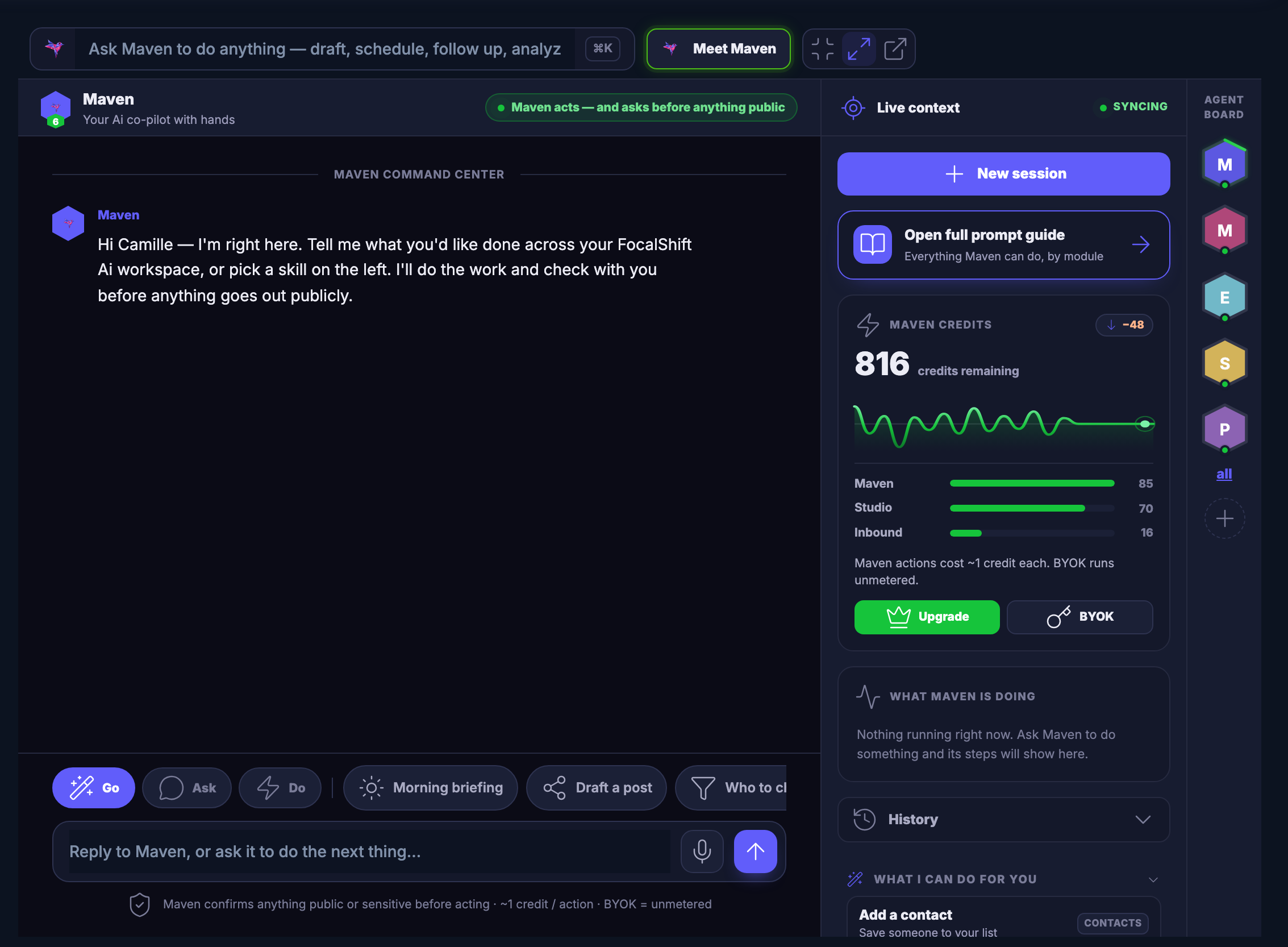
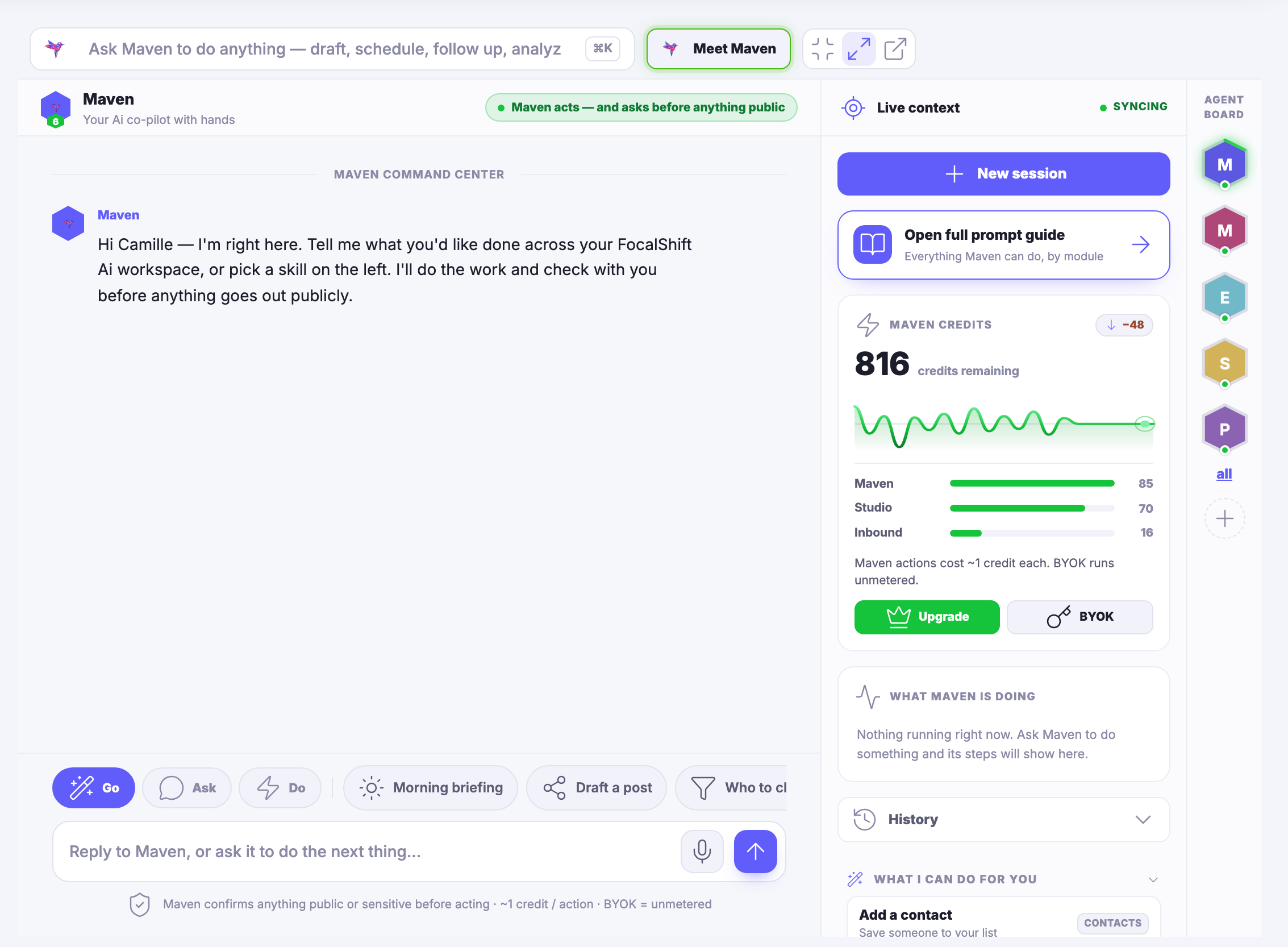
The Maven workspace — the room you work in with Maven. Across the top a field inviting you to ask Maven to do anything: draft, schedule, follow up, analyse; beside it the control that introduces you to your agent, and the ones that shrink the room, widen it, or open it in a window of its own. Under that Maven itself, named, described as your co-pilot with hands, with a green note saying Maven acts — and asks before anything goes out publicly. The middle is the command centre: Maven’s opening message, saying it is right here and asking what you would like done across your workspace, or which skill you want to pick from the left. A row of one-tap jobs runs beneath the conversation — go, ask, do, a morning briefing, drafting a post, and one more that carries on past the right edge of the frame — and under them the reply field, waiting and empty, with a line reminding you that Maven confirms anything public or sensitive before it acts. Down the right a column headed live context: the control that starts a new session, a card opening the full prompt guide of everything Maven can do, by module; a panel of remaining credits with its trend line and a bar for each part of the product; a panel headed what Maven is doing, which says nothing is running right now; and beneath it your history, closed, and what Maven can do for you, open on its first suggestion and cut off by the lower edge of the frame. At the far right edge the agent board: a stack of hexagon badges, one for each specialist on call.The Maven workspace — the room you work in with Maven. Across the top a field inviting you to ask Maven to do anything: draft, schedule, follow up, analyse; beside it the control that introduces you to your agent, and the ones that shrink the room, widen it, or open it in a window of its own. Under that Maven itself, named, described as your co-pilot with hands, with a green note saying Maven acts — and asks before anything goes out publicly. The middle is the command centre: Maven’s opening message, saying it is right here and asking what you would like done across your workspace, or which skill you want to pick from the left. A row of one-tap jobs runs beneath the conversation — go, ask, do, a morning briefing, drafting a post, and one more that carries on past the right edge of the frame — and under them the reply field, waiting and empty, with a line reminding you that Maven confirms anything public or sensitive before it acts. Down the right a column headed live context: the control that starts a new session, a card opening the full prompt guide of everything Maven can do, by module; a panel of remaining credits with its trend line and a bar for each part of the product; a panel headed what Maven is doing, which says nothing is running right now; and beneath it your history, closed, and what Maven can do for you, open on its first suggestion and cut off by the lower edge of the frame. At the far right edge the agent board: a stack of hexagon badges, one for each specialist on call.
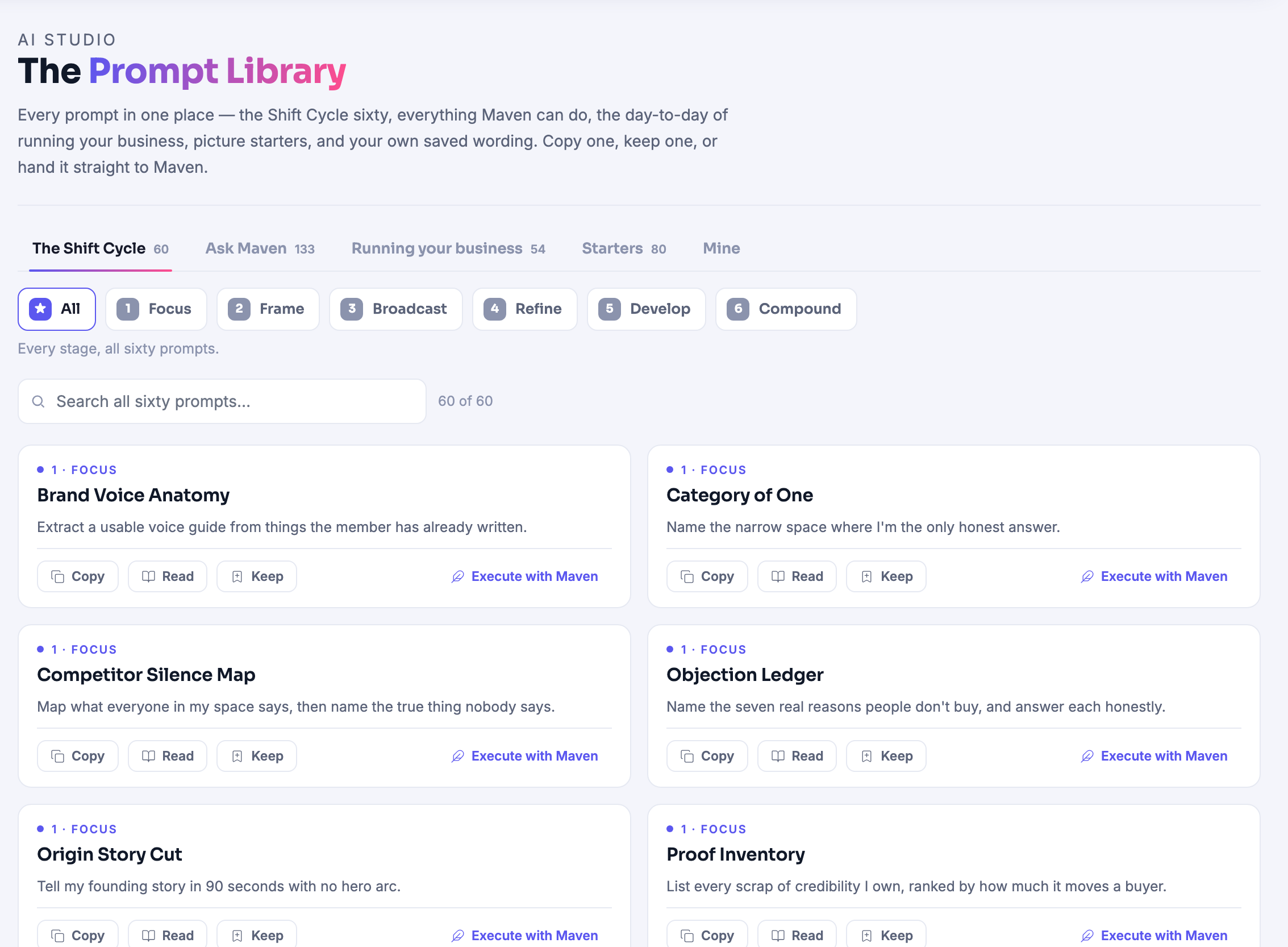
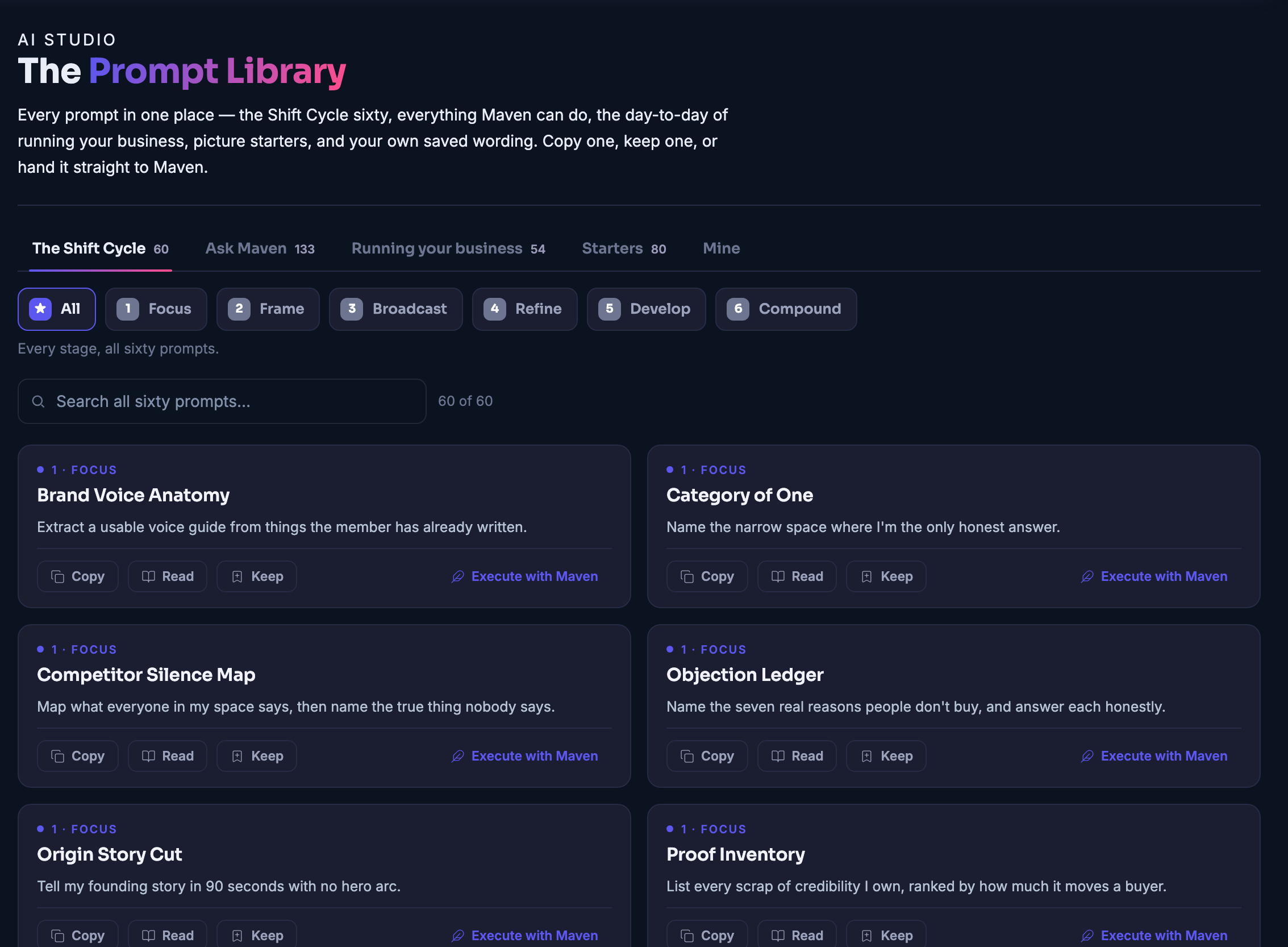
The Prompt Library: every prompt in one place — the shift cycle Maven teaches, the questions worth asking Maven, the day-to-day of running your business, picture starters, and the wording you saved yourself, each behind its own tab, over a line saying you can copy one, keep one, or hand it straight to Maven. Under the tabs the cycle broken into its stages, so you can show one stage at a time, and a field for searching the whole set. Then the prompts themselves, two to a row: each carries the stage it belongs to, its name, one line saying what it is for, and controls to copy it, read it in full, keep it, or hand it to Maven.The Prompt Library: every prompt in one place — the shift cycle Maven teaches, the questions worth asking Maven, the day-to-day of running your business, picture starters, and the wording you saved yourself, each behind its own tab, over a line saying you can copy one, keep one, or hand it straight to Maven. Under the tabs the cycle broken into its stages, so you can show one stage at a time, and a field for searching the whole set. Then the prompts themselves, two to a row: each carries the stage it belongs to, its name, one line saying what it is for, and controls to copy it, read it in full, keep it, or hand it to Maven.
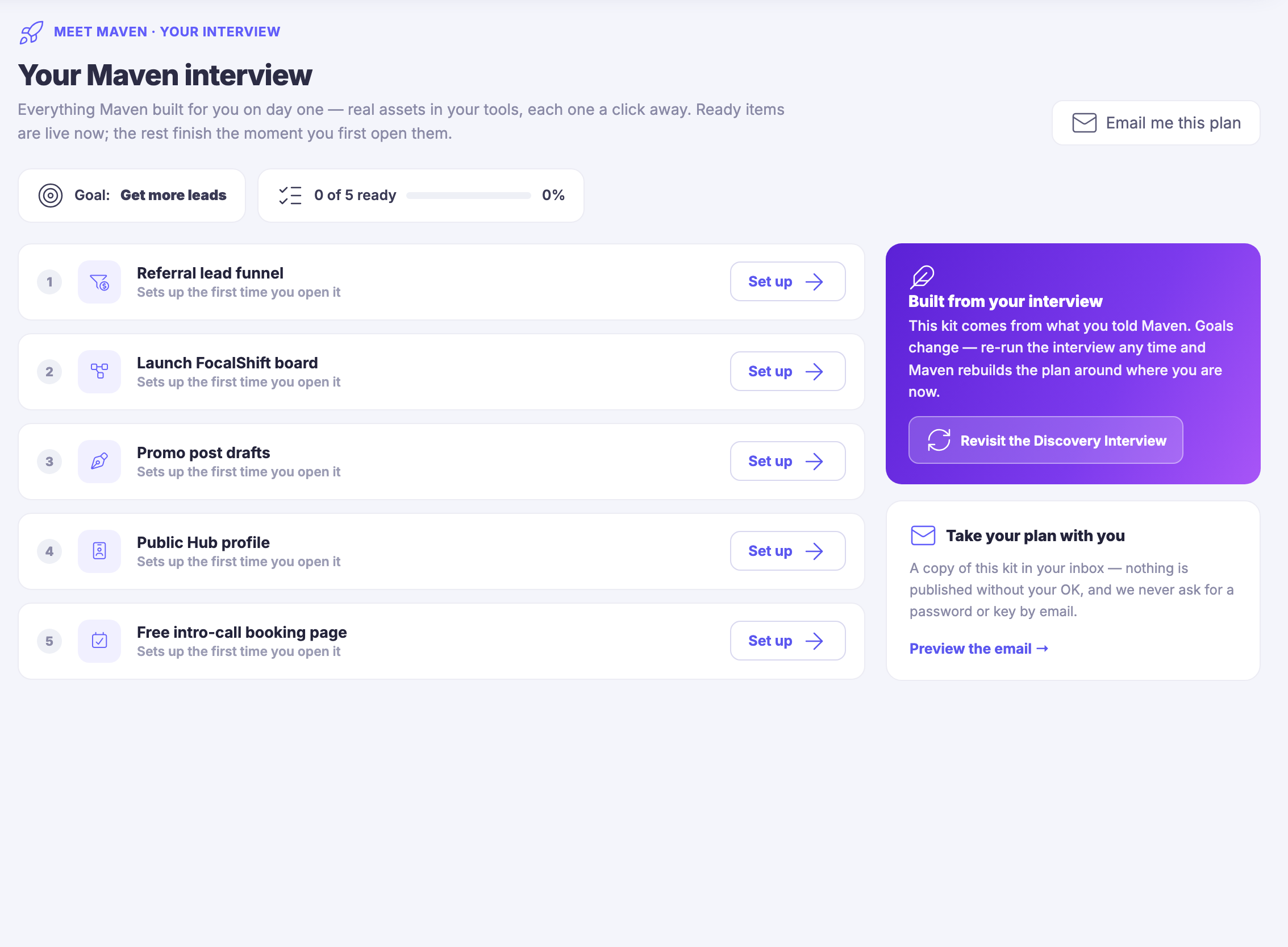
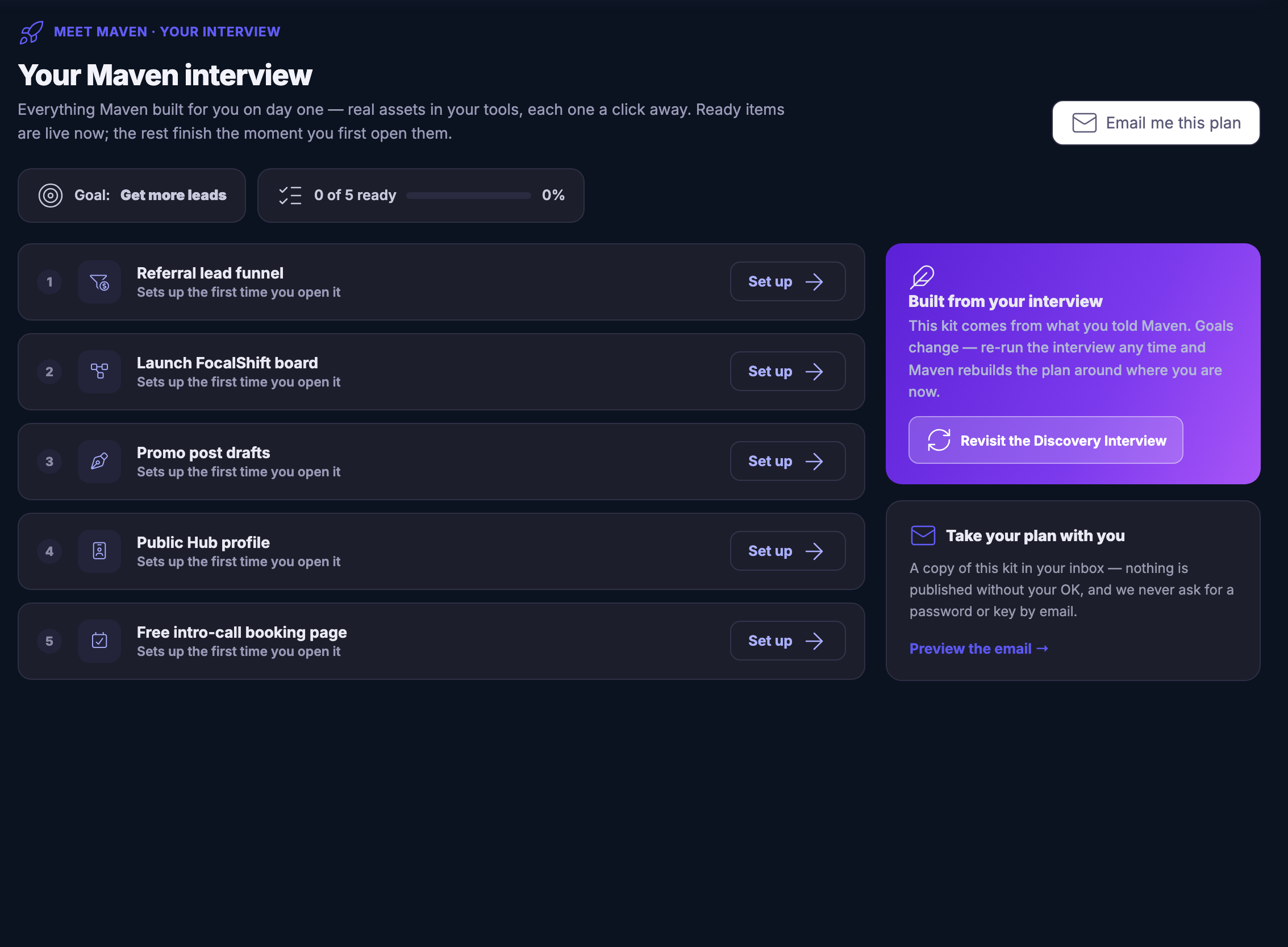
The Maven interview screen with a day-one kit on it: a heading reading your Maven interview, a line saying everything Maven built for you on day one is a real asset in your tools, each one a click away, that ready items are live now and the rest finish the moment you first open them; beneath it the goal taken from the interview — get more leads — beside a readiness bar showing that none of the kit has been opened yet. Then the kit itself, numbered rows one under another: a referral lead funnel, a board, promo post drafts, a public hub profile and a free intro-call booking page, each saying it sets up the first time you open it and each carrying its own set-up control. Down the right, a panel headed built from your interview, explaining that the kit comes from what you told Maven, that goals change, and that re-running the interview rebuilds the plan around where you are now, with the control that revisits it; and under that a card offering to send a copy of the kit to your inbox, noting that nothing is published without your say-so and that you will never be asked for a password or a key by email.The Maven interview screen with a day-one kit on it: a heading reading your Maven interview, a line saying everything Maven built for you on day one is a real asset in your tools, each one a click away, that ready items are live now and the rest finish the moment you first open them; beneath it the goal taken from the interview — get more leads — beside a readiness bar showing that none of the kit has been opened yet. Then the kit itself, numbered rows one under another: a referral lead funnel, a board, promo post drafts, a public hub profile and a free intro-call booking page, each saying it sets up the first time you open it and each carrying its own set-up control. Down the right, a panel headed built from your interview, explaining that the kit comes from what you told Maven, that goals change, and that re-running the interview rebuilds the plan around where you are now, with the control that revisits it; and under that a card offering to send a copy of the kit to your inbox, noting that nothing is published without your say-so and that you will never be asked for a password or a key by email.

Entrevista con Maven

Cerrar
The Maven workspace — the room you work in with Maven. Across the top a field inviting you to ask Maven to do anything: draft, schedule, follow up, analyse; beside it the control that introduces you to your agent, and the ones that shrink the room, widen it, or open it in a window of its own. Under that Maven itself, named, described as your co-pilot with hands, with a green note saying Maven acts — and asks before anything goes out publicly. The middle is the command centre: Maven’s opening message, saying it is right here and asking what you would like done across your workspace, or which skill you want to pick from the left. A row of one-tap jobs runs beneath the conversation — go, ask, do, a morning briefing, drafting a post, and one more that carries on past the right edge of the frame — and under them the reply field, waiting and empty, with a line reminding you that Maven confirms anything public or sensitive before it acts. Down the right a column headed live context: the control that starts a new session, a card opening the full prompt guide of everything Maven can do, by module; a panel of remaining credits with its trend line and a bar for each part of the product; a panel headed what Maven is doing, which says nothing is running right now; and beneath it your history, closed, and what Maven can do for you, open on its first suggestion and cut off by the lower edge of the frame. At the far right edge the agent board: a stack of hexagon badges, one for each specialist on call.The Maven workspace — the room you work in with Maven. Across the top a field inviting you to ask Maven to do anything: draft, schedule, follow up, analyse; beside it the control that introduces you to your agent, and the ones that shrink the room, widen it, or open it in a window of its own. Under that Maven itself, named, described as your co-pilot with hands, with a green note saying Maven acts — and asks before anything goes out publicly. The middle is the command centre: Maven’s opening message, saying it is right here and asking what you would like done across your workspace, or which skill you want to pick from the left. A row of one-tap jobs runs beneath the conversation — go, ask, do, a morning briefing, drafting a post, and one more that carries on past the right edge of the frame — and under them the reply field, waiting and empty, with a line reminding you that Maven confirms anything public or sensitive before it acts. Down the right a column headed live context: the control that starts a new session, a card opening the full prompt guide of everything Maven can do, by module; a panel of remaining credits with its trend line and a bar for each part of the product; a panel headed what Maven is doing, which says nothing is running right now; and beneath it your history, closed, and what Maven can do for you, open on its first suggestion and cut off by the lower edge of the frame. At the far right edge the agent board: a stack of hexagon badges, one for each specialist on call.

Entrevista con Maven

Cerrar
The Prompt Library: every prompt in one place — the shift cycle Maven teaches, the questions worth asking Maven, the day-to-day of running your business, picture starters, and the wording you saved yourself, each behind its own tab, over a line saying you can copy one, keep one, or hand it straight to Maven. Under the tabs the cycle broken into its stages, so you can show one stage at a time, and a field for searching the whole set. Then the prompts themselves, two to a row: each carries the stage it belongs to, its name, one line saying what it is for, and controls to copy it, read it in full, keep it, or hand it to Maven.The Prompt Library: every prompt in one place — the shift cycle Maven teaches, the questions worth asking Maven, the day-to-day of running your business, picture starters, and the wording you saved yourself, each behind its own tab, over a line saying you can copy one, keep one, or hand it straight to Maven. Under the tabs the cycle broken into its stages, so you can show one stage at a time, and a field for searching the whole set. Then the prompts themselves, two to a row: each carries the stage it belongs to, its name, one line saying what it is for, and controls to copy it, read it in full, keep it, or hand it to Maven.

Entrevista con Maven

Cerrar
The Maven interview screen with a day-one kit on it: a heading reading your Maven interview, a line saying everything Maven built for you on day one is a real asset in your tools, each one a click away, that ready items are live now and the rest finish the moment you first open them; beneath it the goal taken from the interview — get more leads — beside a readiness bar showing that none of the kit has been opened yet. Then the kit itself, numbered rows one under another: a referral lead funnel, a board, promo post drafts, a public hub profile and a free intro-call booking page, each saying it sets up the first time you open it and each carrying its own set-up control. Down the right, a panel headed built from your interview, explaining that the kit comes from what you told Maven, that goals change, and that re-running the interview rebuilds the plan around where you are now, with the control that revisits it; and under that a card offering to send a copy of the kit to your inbox, noting that nothing is published without your say-so and that you will never be asked for a password or a key by email.The Maven interview screen with a day-one kit on it: a heading reading your Maven interview, a line saying everything Maven built for you on day one is a real asset in your tools, each one a click away, that ready items are live now and the rest finish the moment you first open them; beneath it the goal taken from the interview — get more leads — beside a readiness bar showing that none of the kit has been opened yet. Then the kit itself, numbered rows one under another: a referral lead funnel, a board, promo post drafts, a public hub profile and a free intro-call booking page, each saying it sets up the first time you open it and each carrying its own set-up control. Down the right, a panel headed built from your interview, explaining that the kit comes from what you told Maven, that goals change, and that re-running the interview rebuilds the plan around where you are now, with the control that revisits it; and under that a card offering to send a copy of the kit to your inbox, noting that nothing is published without your say-so and that you will never be asked for a password or a key by email.

A look inside Maven interview

Stills from the product, one after the next.

The Maven workspace — the room you work in with Maven. Across the top a field inviting you to ask Maven to do anything: draft, schedule, follow up, analyse; beside it the control that introduces you to your agent, and the ones that shrink the room, widen it, or open it in a window of its own. Under that Maven itself, named, described as your co-pilot with hands, with a green note saying Maven acts — and asks before anything goes out publicly. The middle is the command centre: Maven’s opening message, saying it is right here and asking what you would like done across your workspace, or which skill you want to pick from the left. A row of one-tap jobs runs beneath the conversation — go, ask, do, a morning briefing, drafting a post, and one more that carries on past the right edge of the frame — and under them the reply field, waiting and empty, with a line reminding you that Maven confirms anything public or sensitive before it acts. Down the right a column headed live context: the control that starts a new session, a card opening the full prompt guide of everything Maven can do, by module; a panel of remaining credits with its trend line and a bar for each part of the product; a panel headed what Maven is doing, which says nothing is running right now; and beneath it your history, closed, and what Maven can do for you, open on its first suggestion and cut off by the lower edge of the frame. At the far right edge the agent board: a stack of hexagon badges, one for each specialist on call.The Maven workspace — the room you work in with Maven. Across the top a field inviting you to ask Maven to do anything: draft, schedule, follow up, analyse; beside it the control that introduces you to your agent, and the ones that shrink the room, widen it, or open it in a window of its own. Under that Maven itself, named, described as your co-pilot with hands, with a green note saying Maven acts — and asks before anything goes out publicly. The middle is the command centre: Maven’s opening message, saying it is right here and asking what you would like done across your workspace, or which skill you want to pick from the left. A row of one-tap jobs runs beneath the conversation — go, ask, do, a morning briefing, drafting a post, and one more that carries on past the right edge of the frame — and under them the reply field, waiting and empty, with a line reminding you that Maven confirms anything public or sensitive before it acts. Down the right a column headed live context: the control that starts a new session, a card opening the full prompt guide of everything Maven can do, by module; a panel of remaining credits with its trend line and a bar for each part of the product; a panel headed what Maven is doing, which says nothing is running right now; and beneath it your history, closed, and what Maven can do for you, open on its first suggestion and cut off by the lower edge of the frame. At the far right edge the agent board: a stack of hexagon badges, one for each specialist on call.
The Prompt Library: every prompt in one place — the shift cycle Maven teaches, the questions worth asking Maven, the day-to-day of running your business, picture starters, and the wording you saved yourself, each behind its own tab, over a line saying you can copy one, keep one, or hand it straight to Maven. Under the tabs the cycle broken into its stages, so you can show one stage at a time, and a field for searching the whole set. Then the prompts themselves, two to a row: each carries the stage it belongs to, its name, one line saying what it is for, and controls to copy it, read it in full, keep it, or hand it to Maven.The Prompt Library: every prompt in one place — the shift cycle Maven teaches, the questions worth asking Maven, the day-to-day of running your business, picture starters, and the wording you saved yourself, each behind its own tab, over a line saying you can copy one, keep one, or hand it straight to Maven. Under the tabs the cycle broken into its stages, so you can show one stage at a time, and a field for searching the whole set. Then the prompts themselves, two to a row: each carries the stage it belongs to, its name, one line saying what it is for, and controls to copy it, read it in full, keep it, or hand it to Maven.
The Maven interview screen with a day-one kit on it: a heading reading your Maven interview, a line saying everything Maven built for you on day one is a real asset in your tools, each one a click away, that ready items are live now and the rest finish the moment you first open them; beneath it the goal taken from the interview — get more leads — beside a readiness bar showing that none of the kit has been opened yet. Then the kit itself, numbered rows one under another: a referral lead funnel, a board, promo post drafts, a public hub profile and a free intro-call booking page, each saying it sets up the first time you open it and each carrying its own set-up control. Down the right, a panel headed built from your interview, explaining that the kit comes from what you told Maven, that goals change, and that re-running the interview rebuilds the plan around where you are now, with the control that revisits it; and under that a card offering to send a copy of the kit to your inbox, noting that nothing is published without your say-so and that you will never be asked for a password or a key by email.The Maven interview screen with a day-one kit on it: a heading reading your Maven interview, a line saying everything Maven built for you on day one is a real asset in your tools, each one a click away, that ready items are live now and the rest finish the moment you first open them; beneath it the goal taken from the interview — get more leads — beside a readiness bar showing that none of the kit has been opened yet. Then the kit itself, numbered rows one under another: a referral lead funnel, a board, promo post drafts, a public hub profile and a free intro-call booking page, each saying it sets up the first time you open it and each carrying its own set-up control. Down the right, a panel headed built from your interview, explaining that the kit comes from what you told Maven, that goals change, and that re-running the interview rebuilds the plan around where you are now, with the control that revisits it; and under that a card offering to send a copy of the kit to your inbox, noting that nothing is published without your say-so and that you will never be asked for a password or a key by email.
A man reclining in a lounge chair with a laptop, glowing lightbulbs above him

See it in your own business.

Everything on this page comes with the platform — start free and try it on your real work.

Get started now

Next Up: Maven Tour

A guided walk through what your teammate can actually do.

Pregunta a Maven