Messages

This is the product's own frame. Your conversations appear here once you have an account.

Get started now
Notifications

This is the product's own frame. Alerts about your business appear here once you have an account.

Français
Thirty people RSVP'd by dinner

Events that fill themselves.

Workshops, meetups and launches — event pages, RSVPs and reminders, wired to your community and your calendar.

Why it matters

What this does for your business.

Pages in minutesAn event page that looks deliberate, fast.
RSVPs become peopleAttendees land in contacts, not a spreadsheet.
Reminders do the chasingTurnout handled by automation, not anxiety.
Part of one platform — works hand-in-hand withThe Network·Espaces

Seats and the door

Seats on sale, and the list at the door.

You decide what a seat is and how many there are; the page takes the claims, the ledger keeps them, and where there is money to collect it is collected at the door.

Ticket types and seat counts you set yourself.Name each kind of seat, say what it includes and how many of it there are. Free seats and paid seats sit on the same event, so a workshop with a full price and a handful of guest places is one event rather than two.

Every claimed seat becomes a person you can reach.A seat taken writes a real record — a name, a way to reach them, and the event it belongs to — so the room you filled is a list you still have afterwards.

A door list that is the same list you have been watching.On the day you open the check-in list and mark people in, one row at a time. Same list, no printout, no second app, and what was taken at the door sits against the booking it belongs to.

Because you said a room full of regulars.

Gestion des événements

Put the seats out, watch them go, and walk to the door with the list already in your hand.
Seats you decideSet the ticket types, what each one includes and how many there are. Free seats and paid seats sit on the same event.
A claim is a personEvery seat taken writes a real record: a name, a way to reach them, and the event it belongs to.
The door already knowsOn the day you open the check-in list and mark people in. Same list, no printout, no second app.
Read more about Event Management

Every seat you put on sale, and every person who took one.

You set the ticket types and how many seats each one holds; the page takes the claims and the ledger keeps them. Free seats and paid seats live on the same event, so a workshop with a full price and a handful of guest places is one event, not two.

Where there is money to collect, it is collected at the door. Pay in person is set up in one switch, and the ledger records what was taken against the booking it belongs to, so the takings and the guest list are never two different truths.

Everyone who claims a seat becomes a person in your book — reachable, attached to the event, and there the next time you run one. An audience built from a room is a better list than an audience built from a form. And the people you asked by name sit on their own list beside them, with what each one said back — coming, might come, not coming, or still to answer — so you know the shape of the room before the day.

Speakers, a running order and a schedule you can reuse all sit behind the same door. Build the programme once and drop it into the next event instead of rebuilding it every time.

What it actually does

  • Ticket types and seat counts you set yourself
  • Every claimed seat becomes a person you can reach
  • A door list that is the same list you have been filling

What that changes for you

  • You know the room is full before you get to it
  • Nobody arrives as a stranger to you
  • Checking someone in takes a second and no paper

You come away with a full room, and the names of everyone in it.

A look inside Event Management

Event Management — platform screenshots

Real screens from the product. Open any one full size, or switch the set to light or dark.

Fermer
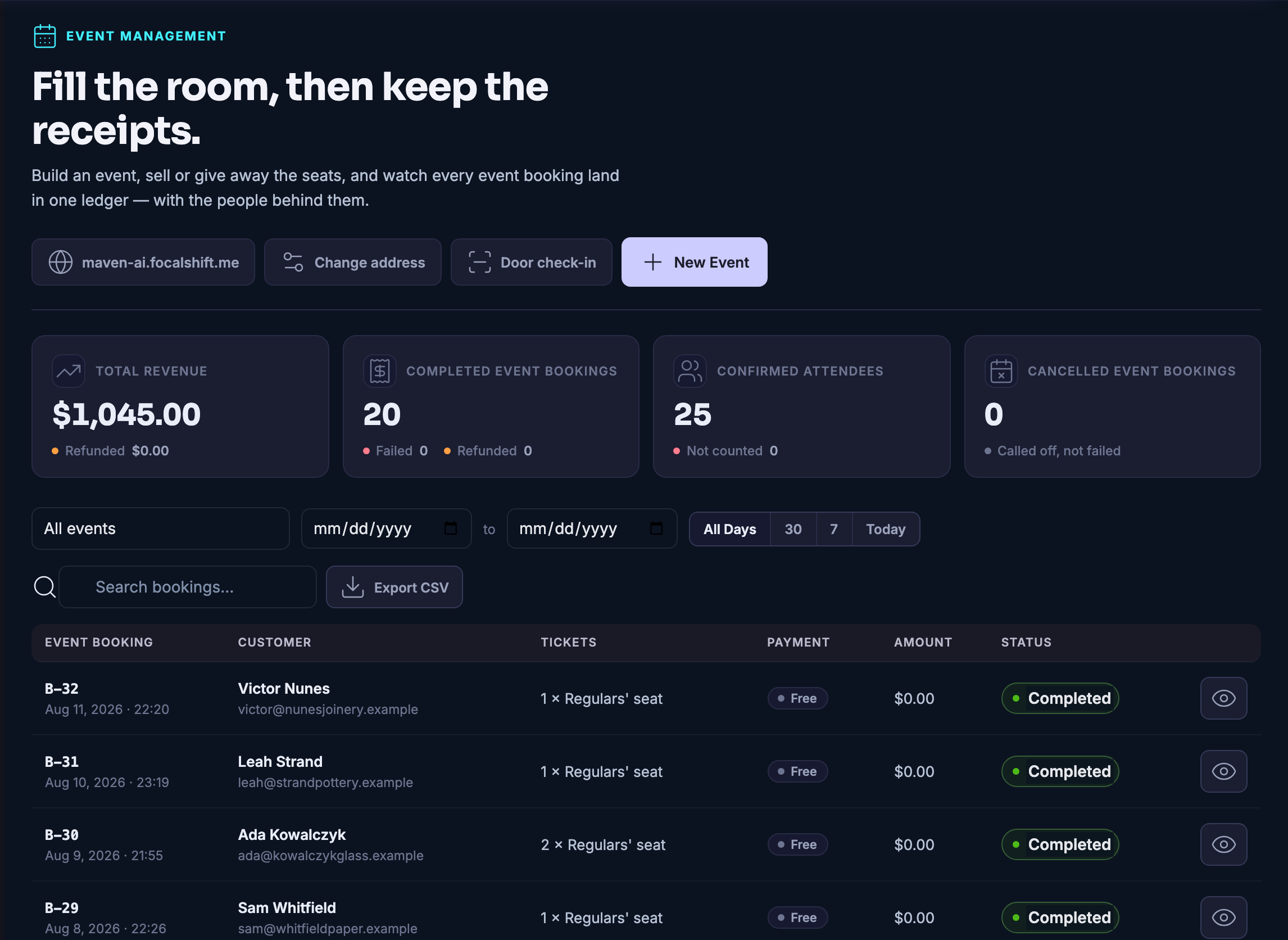
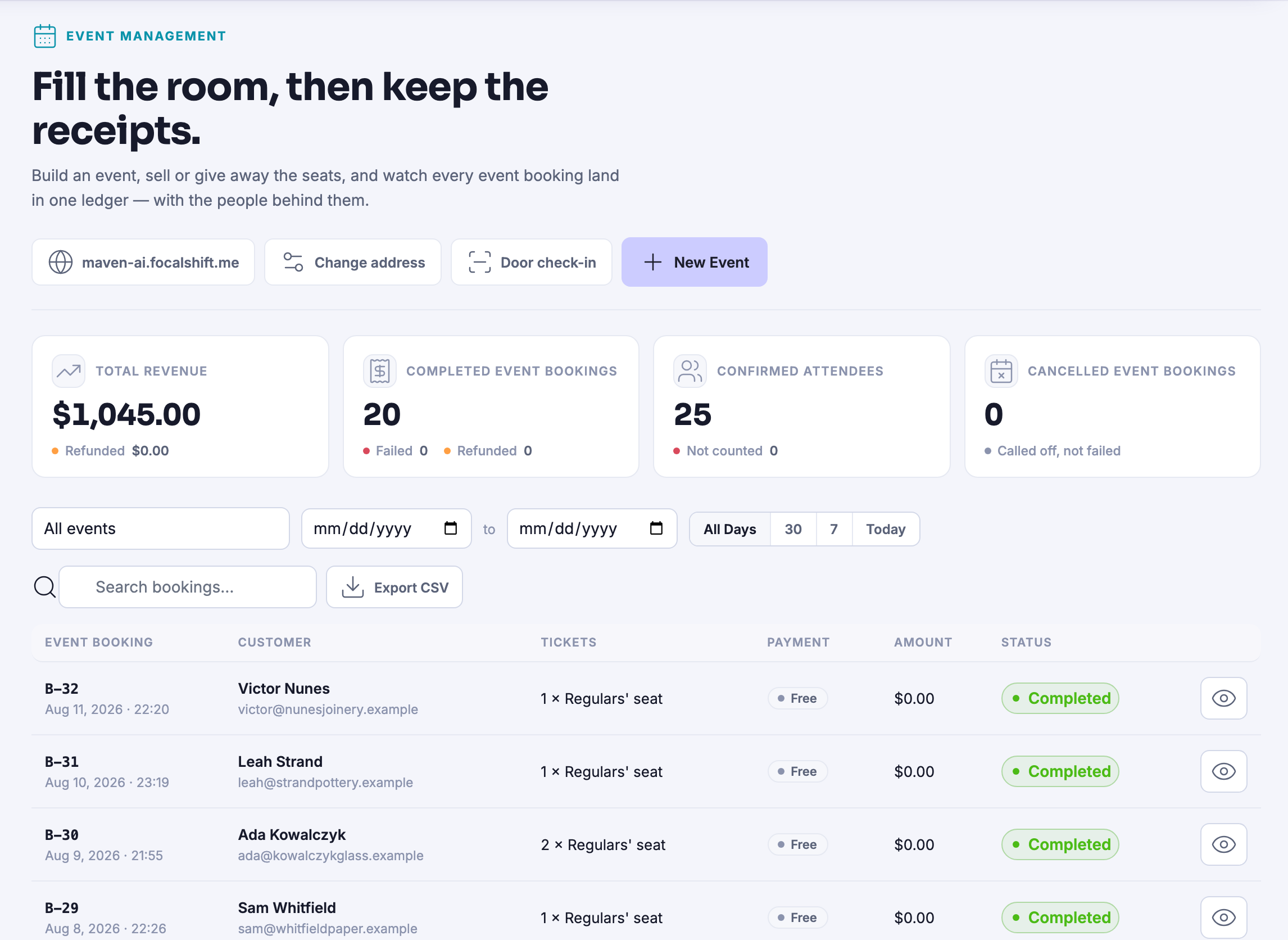
Every booking across your events in one list — some free, some paid offline — and every row reads as completed.Every booking across your events in one list — some free, some paid offline — and every row reads as completed.
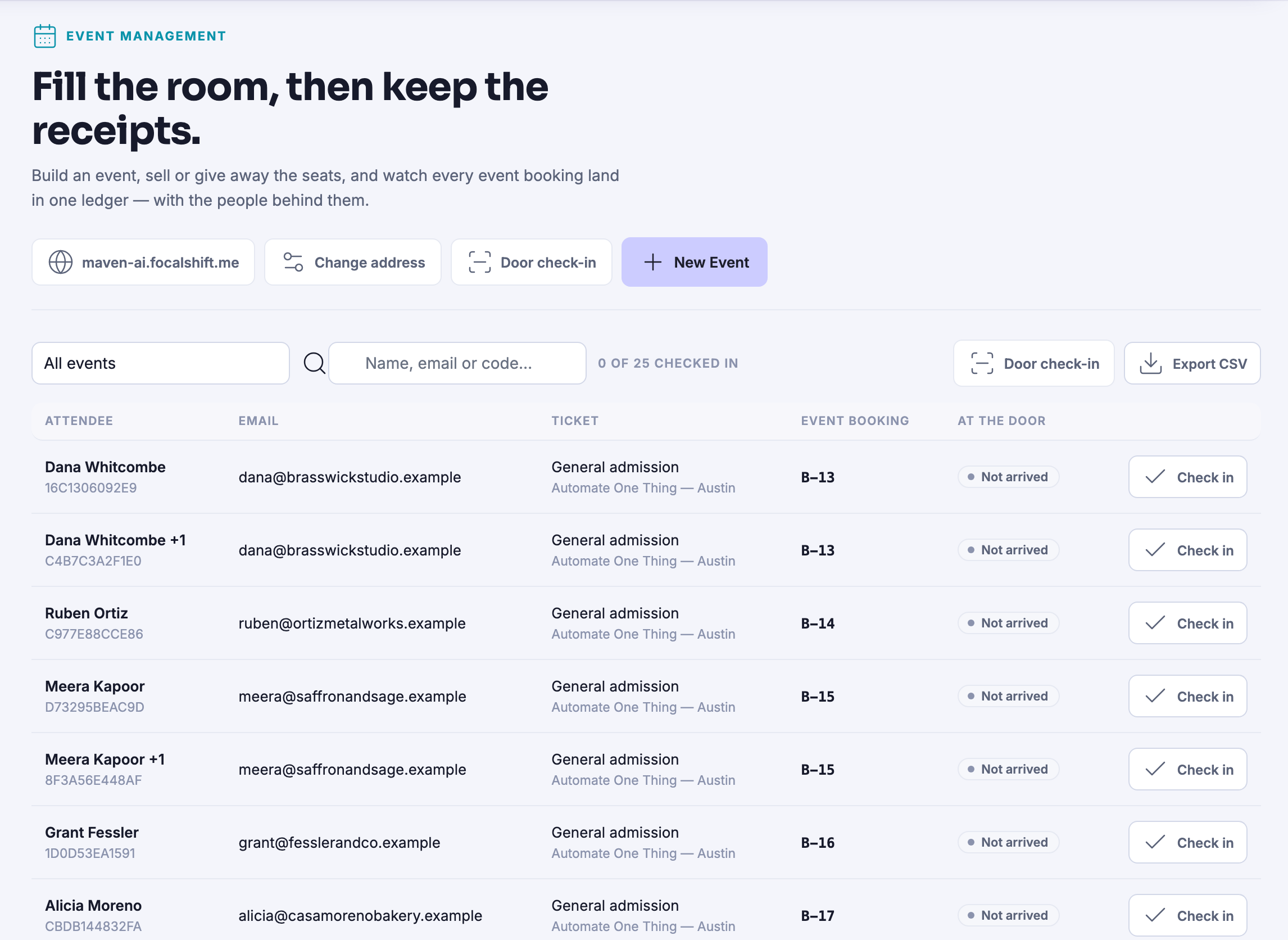
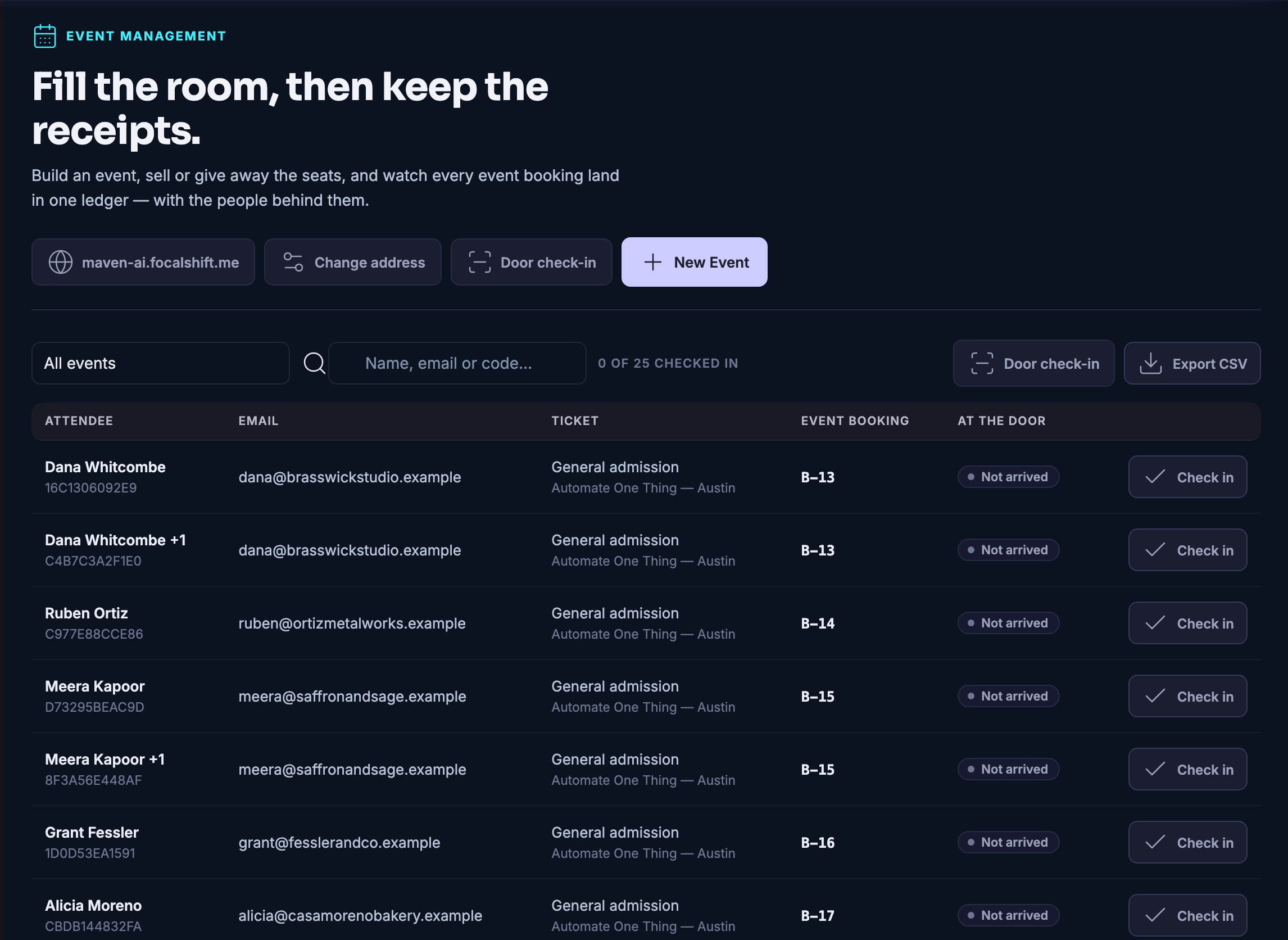
Attendees, which is the list you work at the door: every person expected, the ticket they hold and the code on it, the event and the booking their seat came from, whether they have arrived, and a check-in control on their own row — with the count of how many of the expected have been checked in sitting above the list. Nobody has arrived yet in this frame, so every row still reads not arrived.Attendees, which is the list you work at the door: every person expected, the ticket they hold and the code on it, the event and the booking their seat came from, whether they have arrived, and a check-in control on their own row — with the count of how many of the expected have been checked in sitting above the list. Nobody has arrived yet in this frame, so every row still reads not arrived.
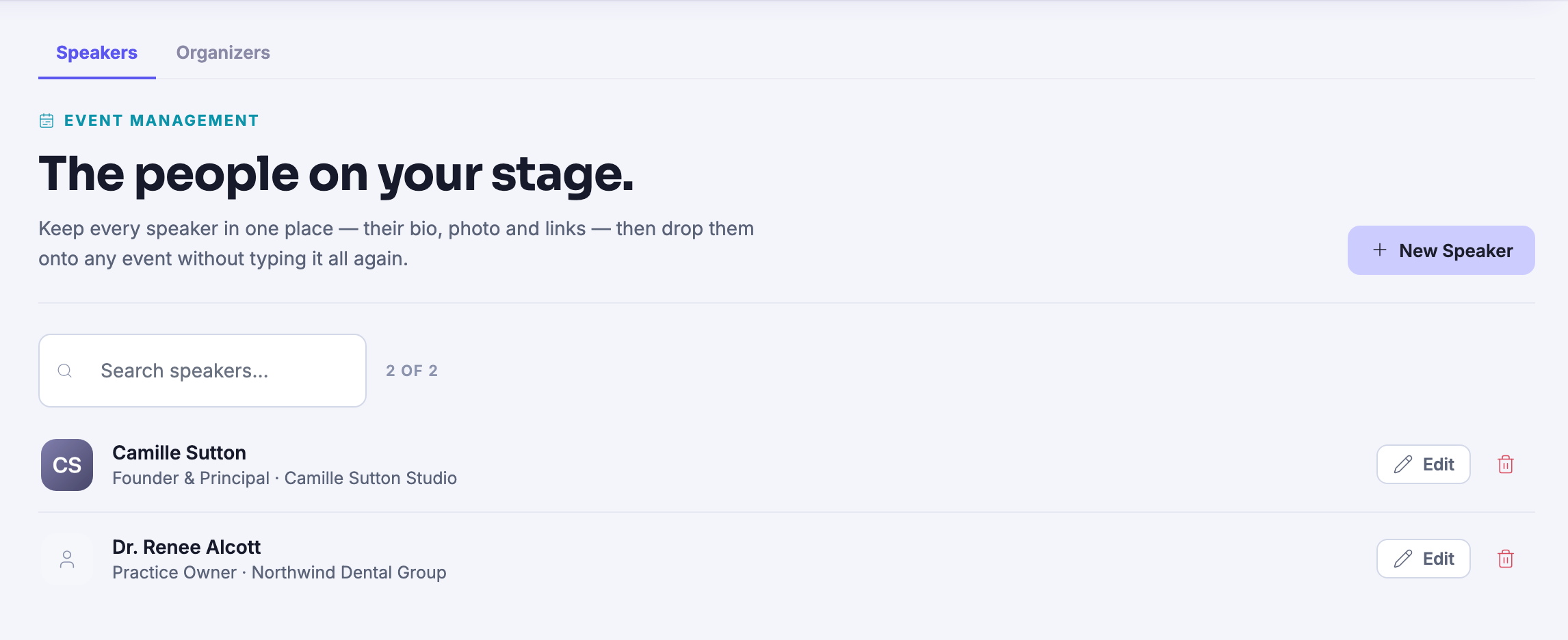
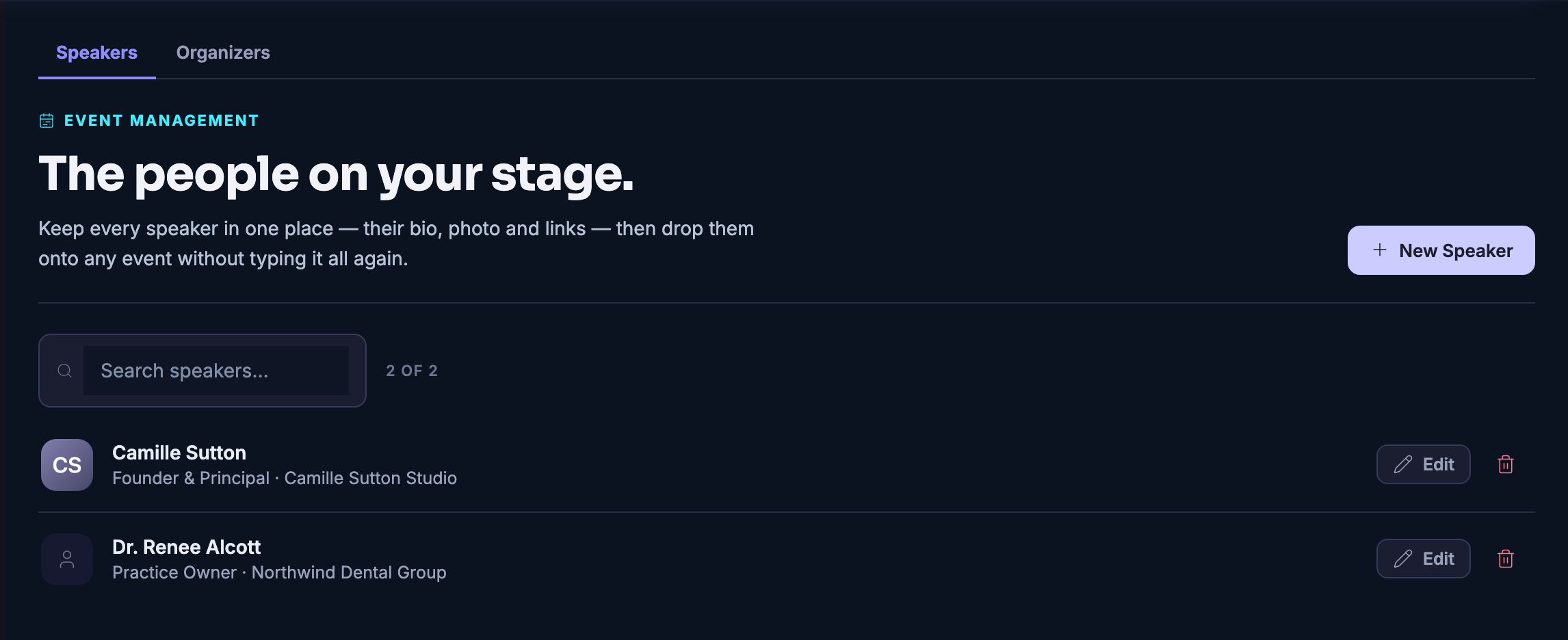
People: the speakers kept in one place and dropped onto any event rather than typed out again — each with a name, a role and the business they come from, and an edit control beside them — under tabs that keep the speakers and the organisers apart.People: the speakers kept in one place and dropped onto any event rather than typed out again — each with a name, a role and the business they come from, and an edit control beside them — under tabs that keep the speakers and the organisers apart.
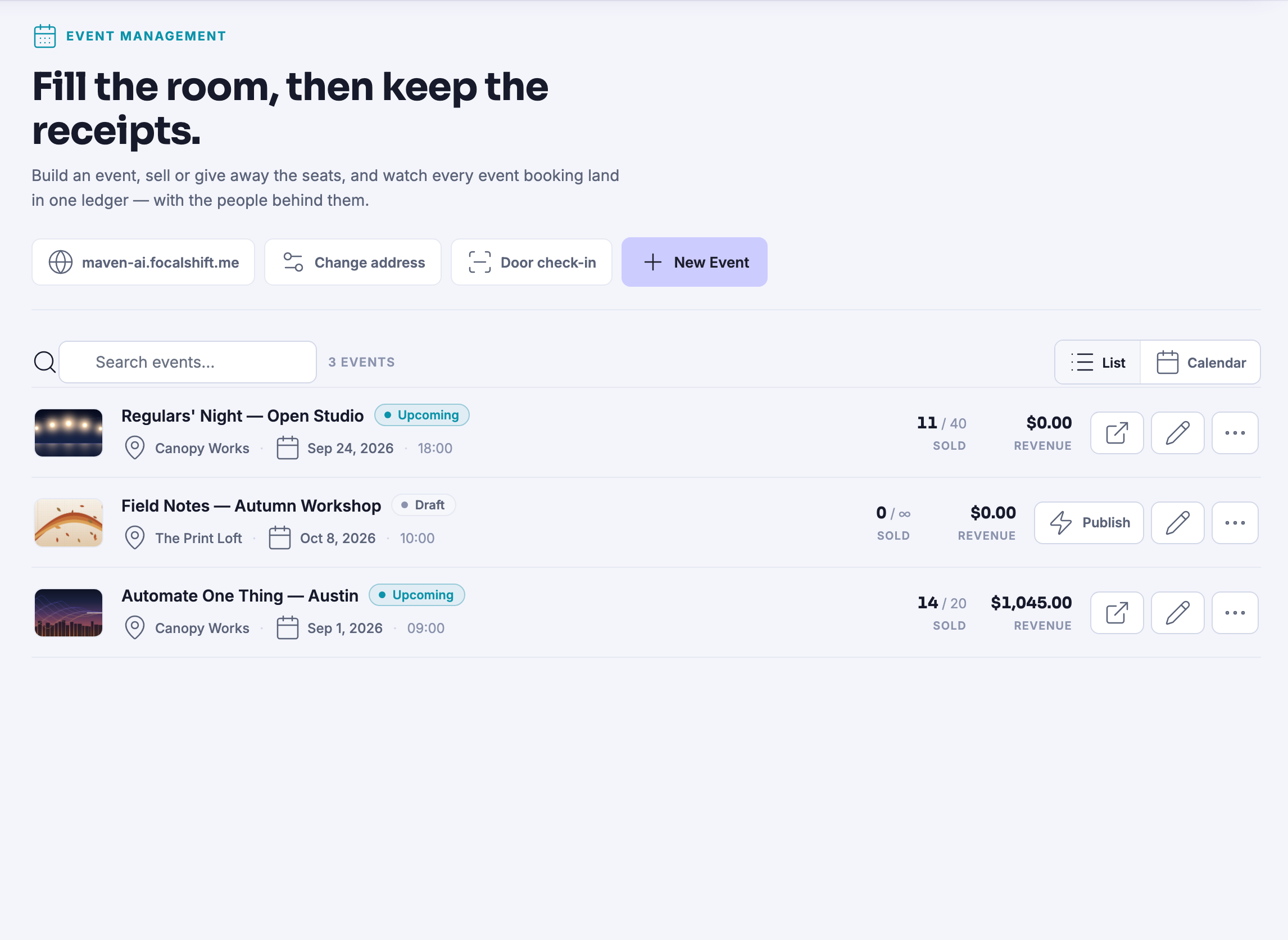
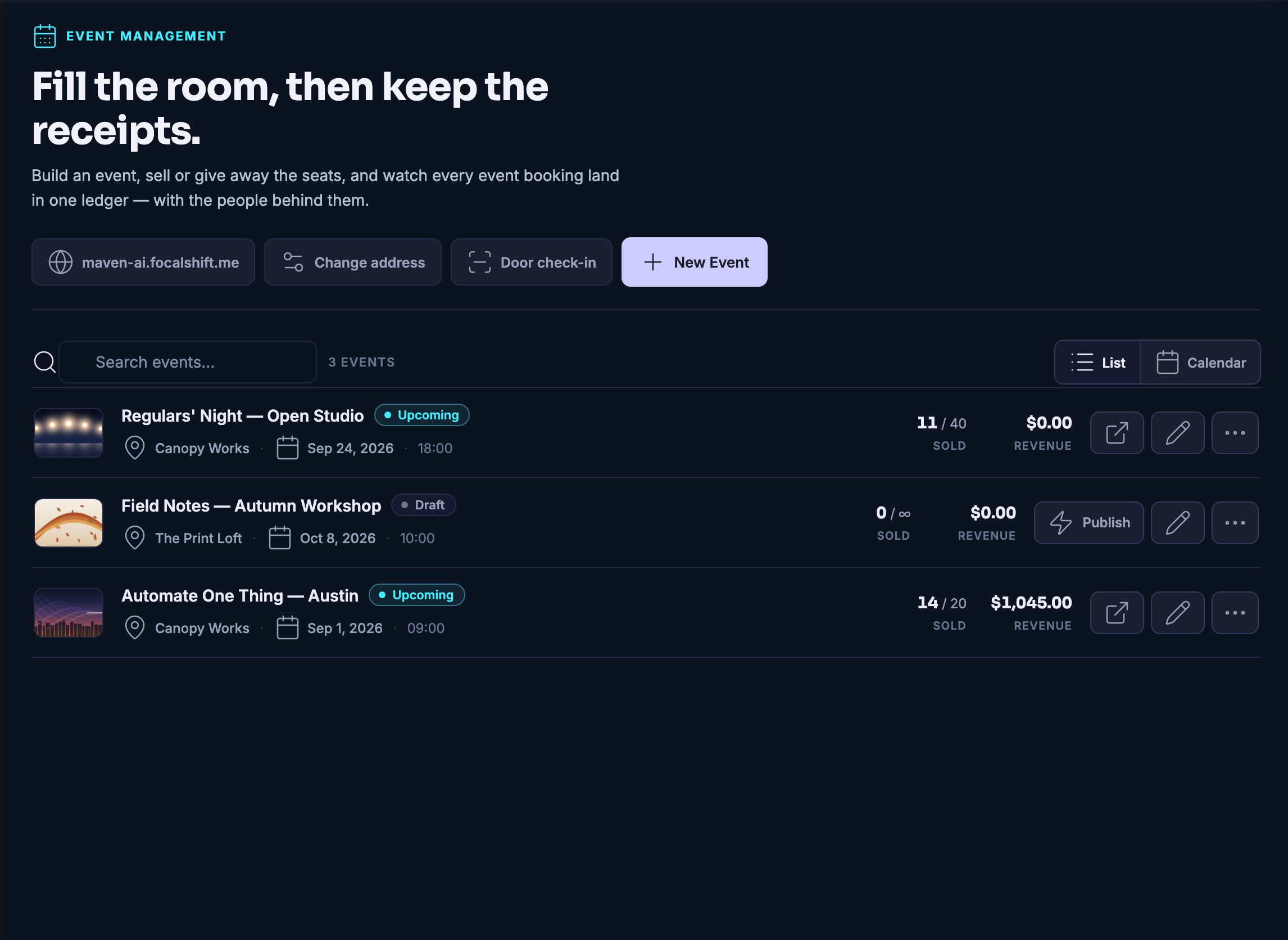
Events: every event you have made, gathered in one list — each with its own cover picture, the place it happens and the day, the seats claimed against the seats put out, and the takings beside them. A draft sits among the published ones with a publish control of its own, and the same list can be read as a calendar instead.Events: every event you have made, gathered in one list — each with its own cover picture, the place it happens and the day, the seats claimed against the seats put out, and the takings beside them. A draft sits among the published ones with a publish control of its own, and the same list can be read as a calendar instead.
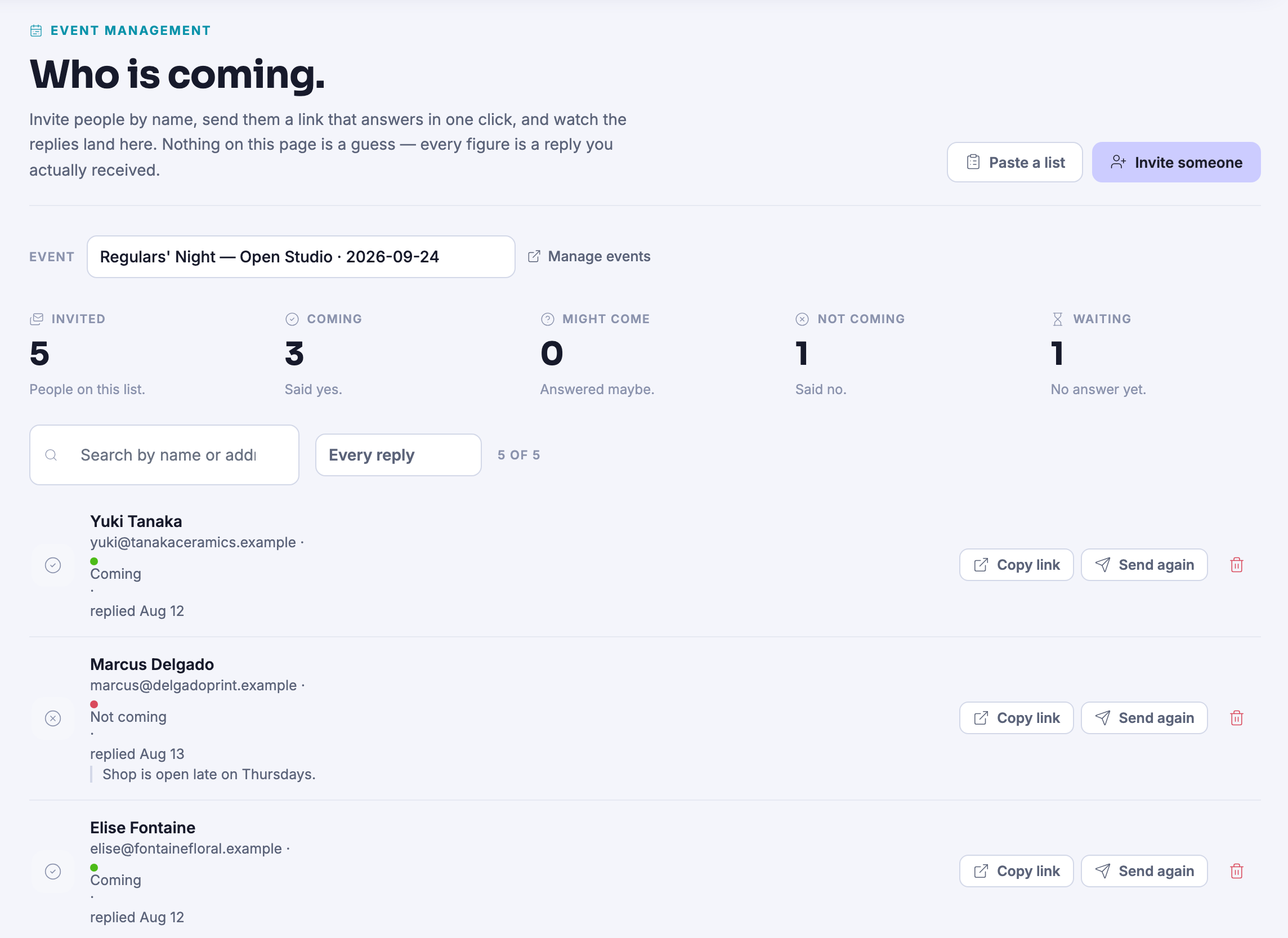
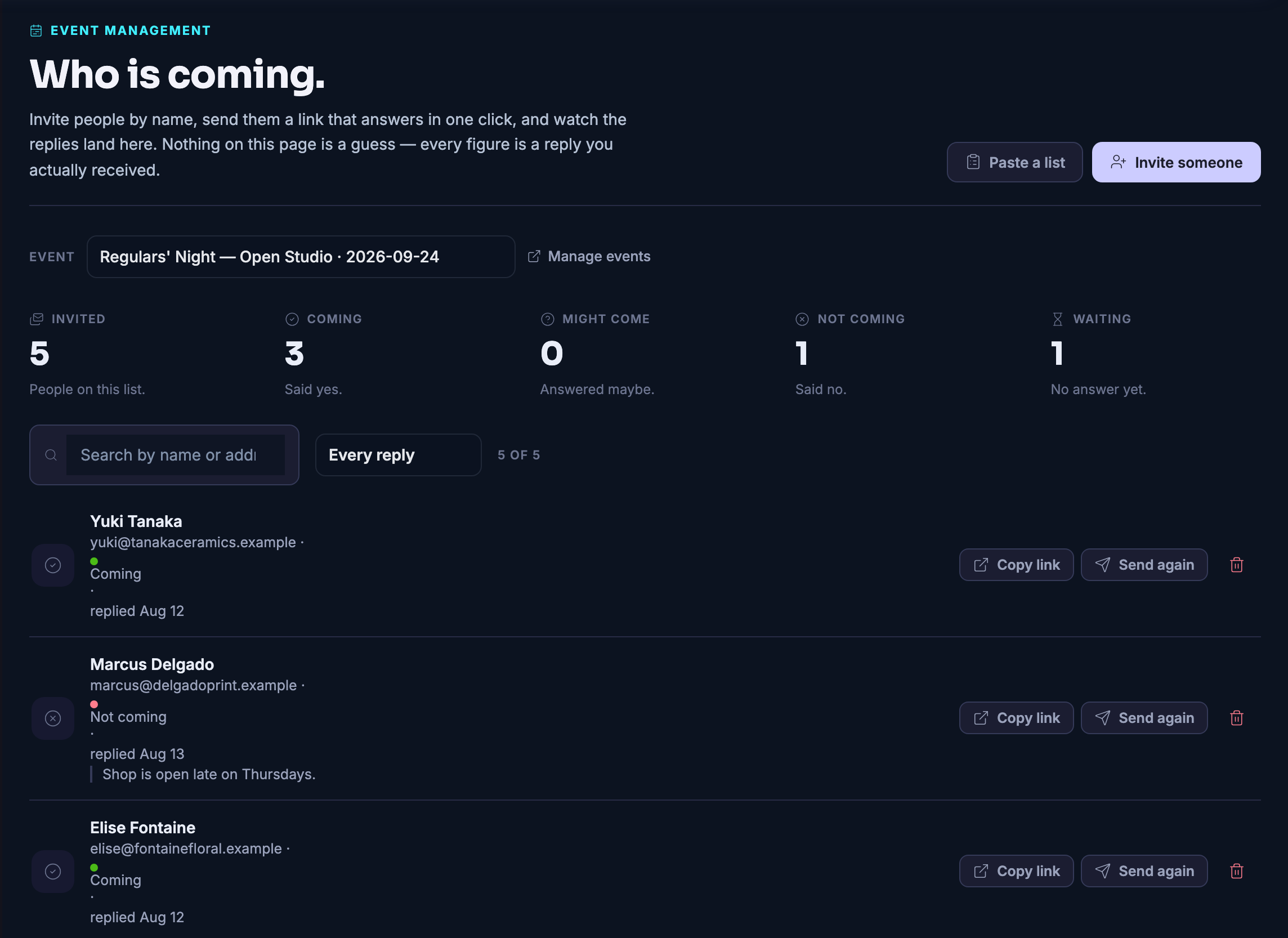
Invitations: the people you asked by name, and what each of them said back. Across the top the replies are counted into the states the product names — invited, coming, might come, not coming, and still waiting — each counter under a plain line saying what it means, over the event this list belongs to and a way through to the rest of your events. Under them the list itself, searchable by name and narrowed by the kind of reply, with a row for each person: their state, the day their answer landed, and a control that copies that person’s own link. One of them has written a line explaining why they cannot make it, and it sits on the row under the answer.Invitations: the people you asked by name, and what each of them said back. Across the top the replies are counted into the states the product names — invited, coming, might come, not coming, and still waiting — each counter under a plain line saying what it means, over the event this list belongs to and a way through to the rest of your events. Under them the list itself, searchable by name and narrowed by the kind of reply, with a row for each person: their state, the day their answer landed, and a control that copies that person’s own link. One of them has written a line explaining why they cannot make it, and it sits on the row under the answer.

Gestion des événements

Fermer
Every booking across your events in one list — some free, some paid offline — and every row reads as completed.Every booking across your events in one list — some free, some paid offline — and every row reads as completed.

Gestion des événements

Fermer
Attendees, which is the list you work at the door: every person expected, the ticket they hold and the code on it, the event and the booking their seat came from, whether they have arrived, and a check-in control on their own row — with the count of how many of the expected have been checked in sitting above the list. Nobody has arrived yet in this frame, so every row still reads not arrived.Attendees, which is the list you work at the door: every person expected, the ticket they hold and the code on it, the event and the booking their seat came from, whether they have arrived, and a check-in control on their own row — with the count of how many of the expected have been checked in sitting above the list. Nobody has arrived yet in this frame, so every row still reads not arrived.

Gestion des événements

Fermer
People: the speakers kept in one place and dropped onto any event rather than typed out again — each with a name, a role and the business they come from, and an edit control beside them — under tabs that keep the speakers and the organisers apart.People: the speakers kept in one place and dropped onto any event rather than typed out again — each with a name, a role and the business they come from, and an edit control beside them — under tabs that keep the speakers and the organisers apart.

Gestion des événements

Fermer
Events: every event you have made, gathered in one list — each with its own cover picture, the place it happens and the day, the seats claimed against the seats put out, and the takings beside them. A draft sits among the published ones with a publish control of its own, and the same list can be read as a calendar instead.Events: every event you have made, gathered in one list — each with its own cover picture, the place it happens and the day, the seats claimed against the seats put out, and the takings beside them. A draft sits among the published ones with a publish control of its own, and the same list can be read as a calendar instead.

Gestion des événements

Fermer
Invitations: the people you asked by name, and what each of them said back. Across the top the replies are counted into the states the product names — invited, coming, might come, not coming, and still waiting — each counter under a plain line saying what it means, over the event this list belongs to and a way through to the rest of your events. Under them the list itself, searchable by name and narrowed by the kind of reply, with a row for each person: their state, the day their answer landed, and a control that copies that person’s own link. One of them has written a line explaining why they cannot make it, and it sits on the row under the answer.Invitations: the people you asked by name, and what each of them said back. Across the top the replies are counted into the states the product names — invited, coming, might come, not coming, and still waiting — each counter under a plain line saying what it means, over the event this list belongs to and a way through to the rest of your events. Under them the list itself, searchable by name and narrowed by the kind of reply, with a row for each person: their state, the day their answer landed, and a control that copies that person’s own link. One of them has written a line explaining why they cannot make it, and it sits on the row under the answer.

A look inside Event Management

Stills from the product, one after the next.

Every booking across your events in one list — some free, some paid offline — and every row reads as completed.Every booking across your events in one list — some free, some paid offline — and every row reads as completed.
Attendees, which is the list you work at the door: every person expected, the ticket they hold and the code on it, the event and the booking their seat came from, whether they have arrived, and a check-in control on their own row — with the count of how many of the expected have been checked in sitting above the list. Nobody has arrived yet in this frame, so every row still reads not arrived.Attendees, which is the list you work at the door: every person expected, the ticket they hold and the code on it, the event and the booking their seat came from, whether they have arrived, and a check-in control on their own row — with the count of how many of the expected have been checked in sitting above the list. Nobody has arrived yet in this frame, so every row still reads not arrived.
People: the speakers kept in one place and dropped onto any event rather than typed out again — each with a name, a role and the business they come from, and an edit control beside them — under tabs that keep the speakers and the organisers apart.People: the speakers kept in one place and dropped onto any event rather than typed out again — each with a name, a role and the business they come from, and an edit control beside them — under tabs that keep the speakers and the organisers apart.
Events: every event you have made, gathered in one list — each with its own cover picture, the place it happens and the day, the seats claimed against the seats put out, and the takings beside them. A draft sits among the published ones with a publish control of its own, and the same list can be read as a calendar instead.Events: every event you have made, gathered in one list — each with its own cover picture, the place it happens and the day, the seats claimed against the seats put out, and the takings beside them. A draft sits among the published ones with a publish control of its own, and the same list can be read as a calendar instead.
Invitations: the people you asked by name, and what each of them said back. Across the top the replies are counted into the states the product names — invited, coming, might come, not coming, and still waiting — each counter under a plain line saying what it means, over the event this list belongs to and a way through to the rest of your events. Under them the list itself, searchable by name and narrowed by the kind of reply, with a row for each person: their state, the day their answer landed, and a control that copies that person’s own link. One of them has written a line explaining why they cannot make it, and it sits on the row under the answer.Invitations: the people you asked by name, and what each of them said back. Across the top the replies are counted into the states the product names — invited, coming, might come, not coming, and still waiting — each counter under a plain line saying what it means, over the event this list belongs to and a way through to the rest of your events. Under them the list itself, searchable by name and narrowed by the kind of reply, with a row for each person: their state, the day their answer landed, and a control that copies that person’s own link. One of them has written a line explaining why they cannot make it, and it sits on the row under the answer.

See it in your own business.

Everything on this page comes with the platform — start free and try it on your real work.

Get started now

Next Up: Spaces — Directory

Rooms where members gather around work worth doing together.

Demander à Maven