Messages

This is the product's own frame. Your conversations appear here once you have an account.

Get started now
Notifications

This is the product's own frame. Alerts about your business appear here once you have an account.

English
Your knowledge became a product line

Teach what you know.

Package what you've learned into courses and cohorts — with the builder, the community and the payments already here.

Why it matters

What this does for your business.

Everything includedBuilder, hosting, community and checkout — no tool shopping.
Students on tapThe network is full of builders looking to learn exactly your thing.
Income, diversifiedTeaching becomes a stream beside your main business.
Part of one platform — works hand-in-hand withAcademy Instructor·Academy Earnings

See it in your own business.

Everything on this page comes with the platform — start free and try it on your real work.

Get started now
One connected destination

Go deeper without losing the thread.

Each title beginning with a hashtag is a direct destination. The navigation can bring you to the exact part of the story without creating another disconnected page.

Your classroom, your rules.

The instructor's desk.

Build courses, manage cohorts, see student progress and get paid — the whole teaching operation in one place.

Because you said I want to get paid for what I know.

Instructor Studio

The thing you keep explaining, built into a course and run from the workspace you already work in.

Build it by moving itChapters hold lessons, a lesson is something to watch or something to read, and one of them can be opened free to anyone looking. The outline is reordered by hand — publishing is a control in the corner, and so is taking it back down.
Your classroom, your rulesYour price, your students, your announcements. Quizzes, assignments, live sessions, co-instructors and the certificate the course issues are tabs on the course itself, not five more tools to keep open.
The teaching side has a door hereInstructor Studio and Earnings sit in the same rail as the rest of the business. What you teach is not a second company with its own login — it is another room in the one you already run.
Read more about Instructor Studio

The thing you explain over and over, built properly, and run from where you already work.

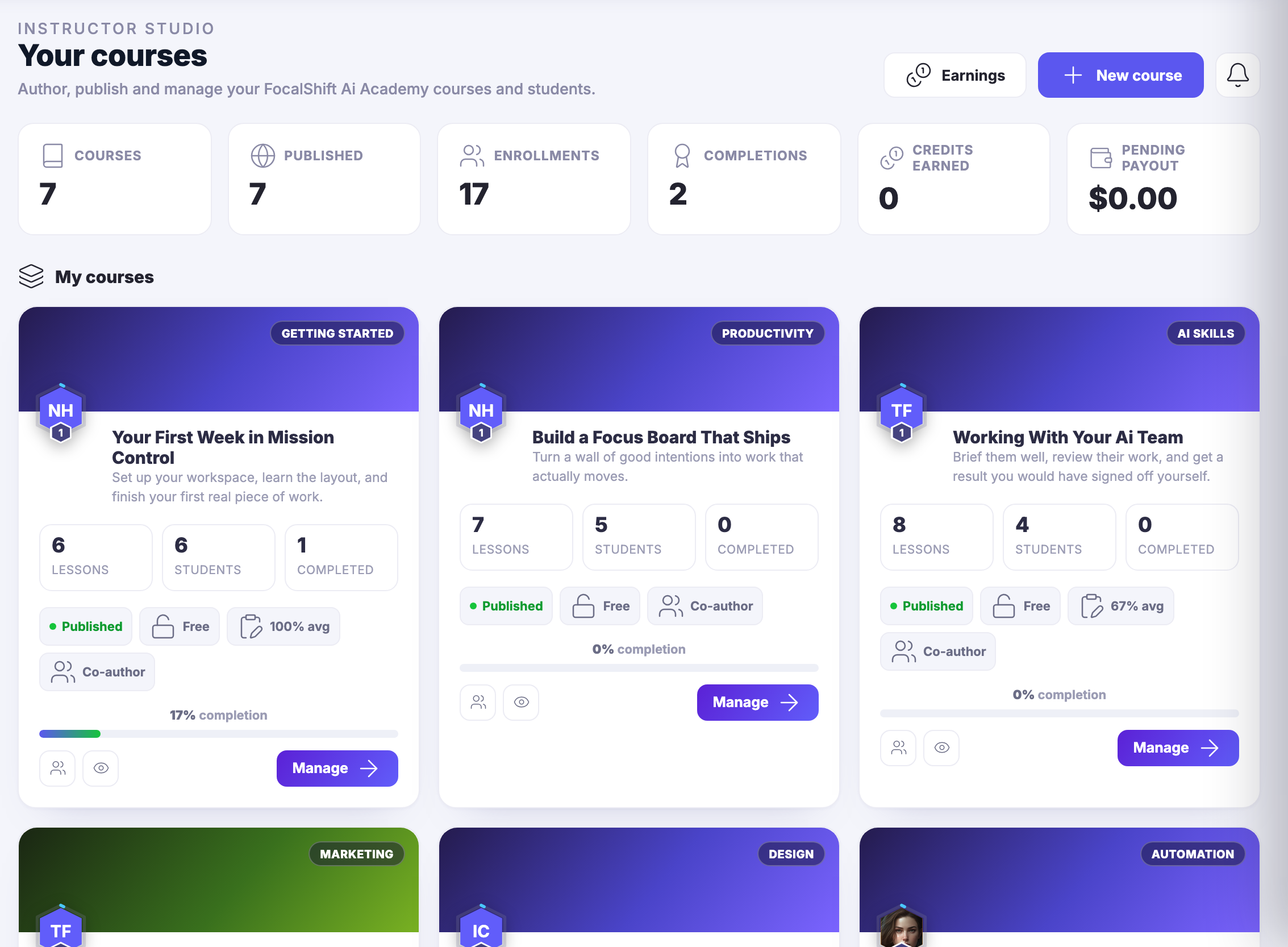
The instructor side of the Academy is a workspace rather than a submission form. Instructor Studio lists the courses you teach and what each one is currently doing — whether it is published, who is enrolled, who has come out the other side — and every one of them opens into the same set of tabs.

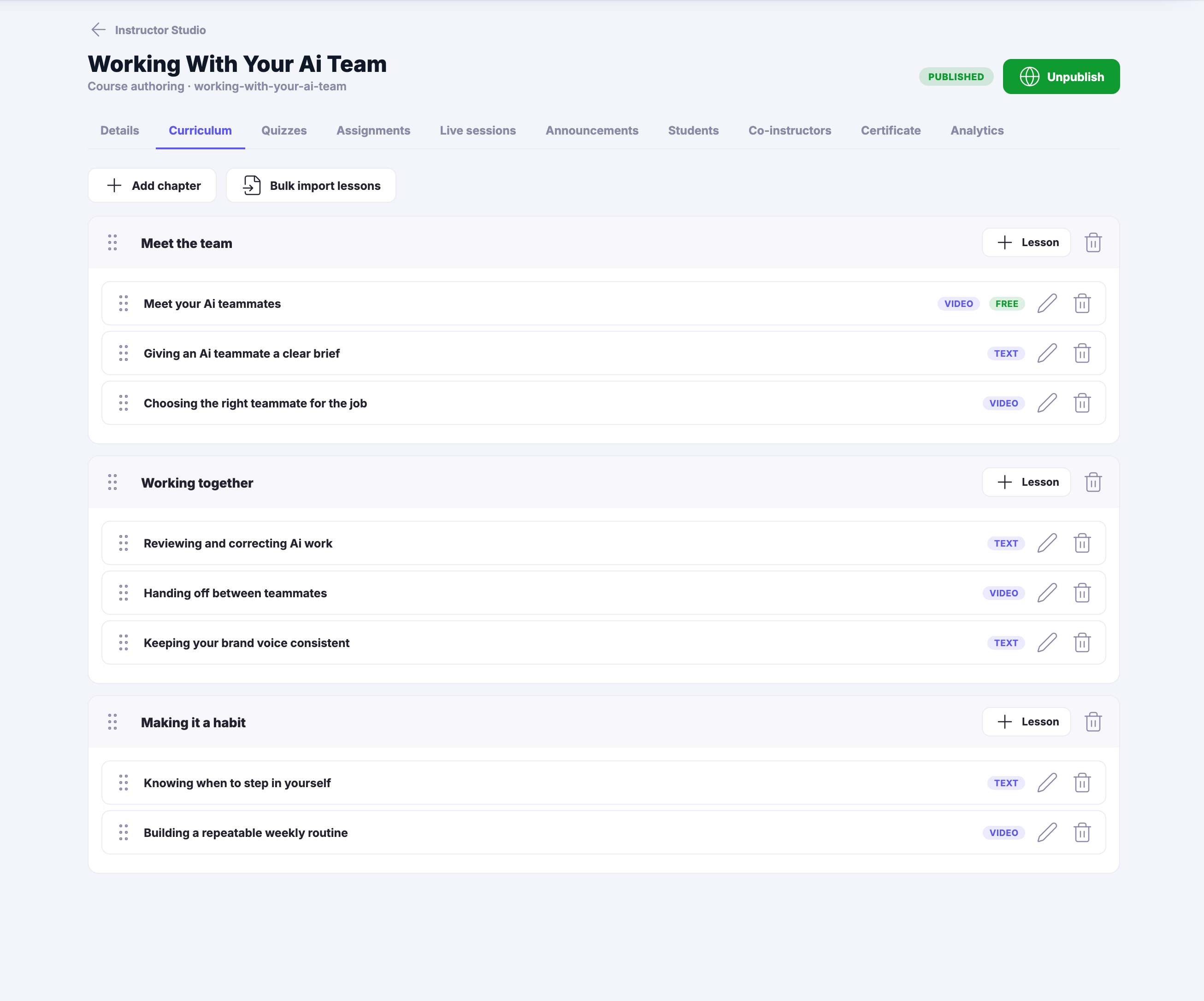
The curriculum is something you move. Chapters hold lessons, each lesson is marked as something to watch or something to read, any one of them can be opened free to anyone looking, and the whole outline reorders by hand. Publishing is one control, and so is taking it back down while you fix something.

Running the cohort happens behind the same door as building it. Quizzes, assignments, live sessions, announcements, the student roster, co-instructors and the certificate the course issues are tabs on the course — not seven more places to be at once.

And the teaching has a room of its own here. Instructor Studio and Earnings sit in the same rail as Money Flow and everything else the business does, which is what keeps teaching from quietly becoming a separate operation you have to account for on the side.

What it actually does

  • A curriculum you build by moving it, chapter by chapter
  • The cohort, the quizzes and the certificate behind one door
  • Instructor Studio and Earnings in the same rail as the rest

What that changes for you

  • You explain it properly once instead of badly forever
  • Running a cohort is not a second job in a second tool
  • Your name is on the certificate your course issues

You come away with a published course, and the room where its students are.

A look inside Instructor Studio

Instructor Studio — platform screenshots

Real screens from the product. Open any one full size, or switch the set to light or dark.

Close
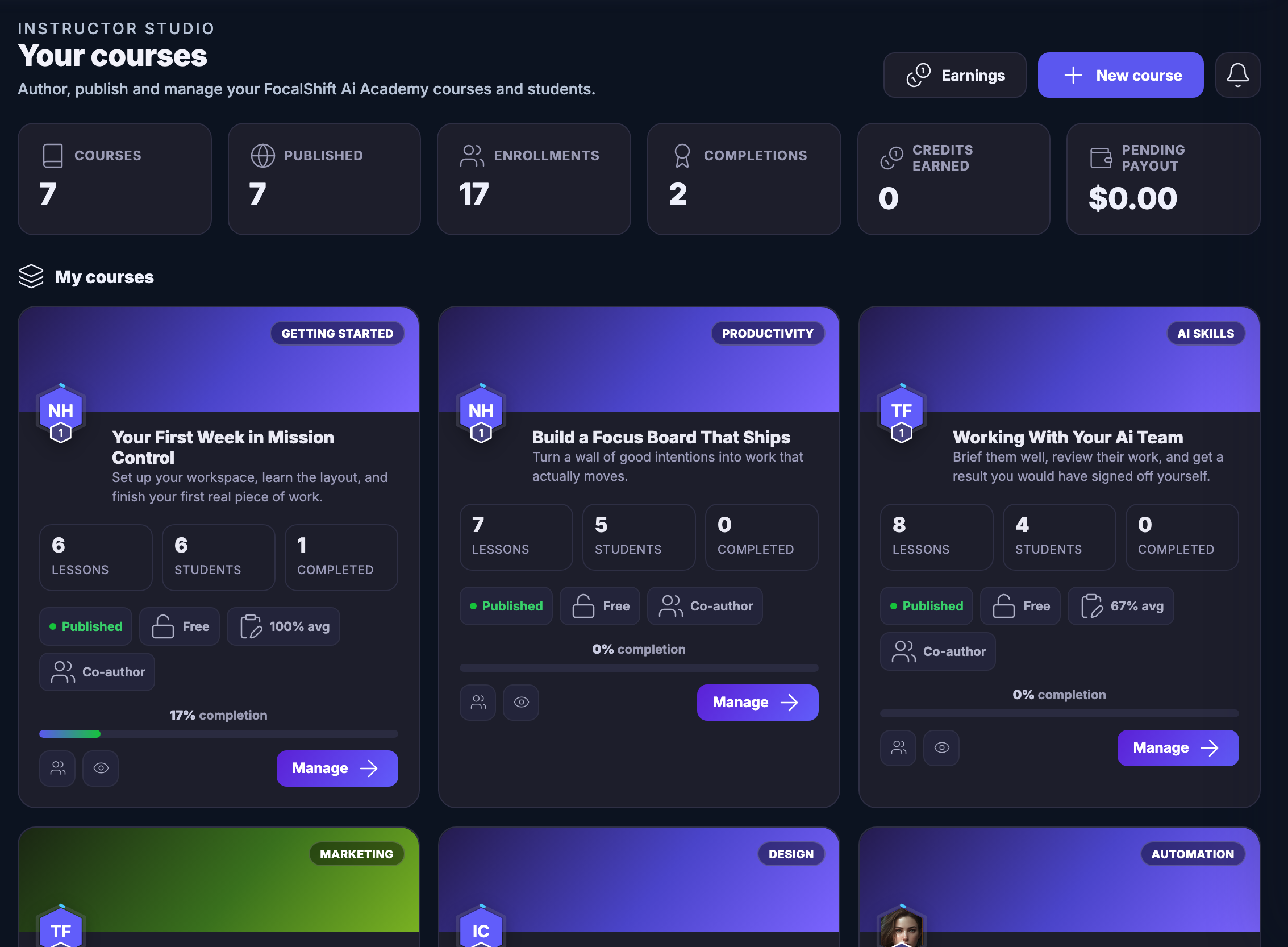
Instructor Studio: a header reading Your courses over the line about authoring, publishing and managing your FocalShift Academy courses and students, with controls beside it that open Earnings or begin a new course. Under it a summary strip labelled for the courses you teach, how many are published, the enrolments across them, the completions, the credits earned and the payout pending. Below that, My courses — every course you teach as a card carrying its subject badge, a colour-blocked cover, its title, the line describing what it is for, then its lesson count, its student count and its completions, a published marker, its price state, its average result where it has one, a co-author marker on the ones you did not create yourself, a completion bar and a control that opens it to manage.Instructor Studio: a header reading Your courses over the line about authoring, publishing and managing your FocalShift Academy courses and students, with controls beside it that open Earnings or begin a new course. Under it a summary strip labelled for the courses you teach, how many are published, the enrolments across them, the completions, the credits earned and the payout pending. Below that, My courses — every course you teach as a card carrying its subject badge, a colour-blocked cover, its title, the line describing what it is for, then its lesson count, its student count and its completions, a published marker, its price state, its average result where it has one, a co-author marker on the ones you did not create yourself, a completion bar and a control that opens it to manage.
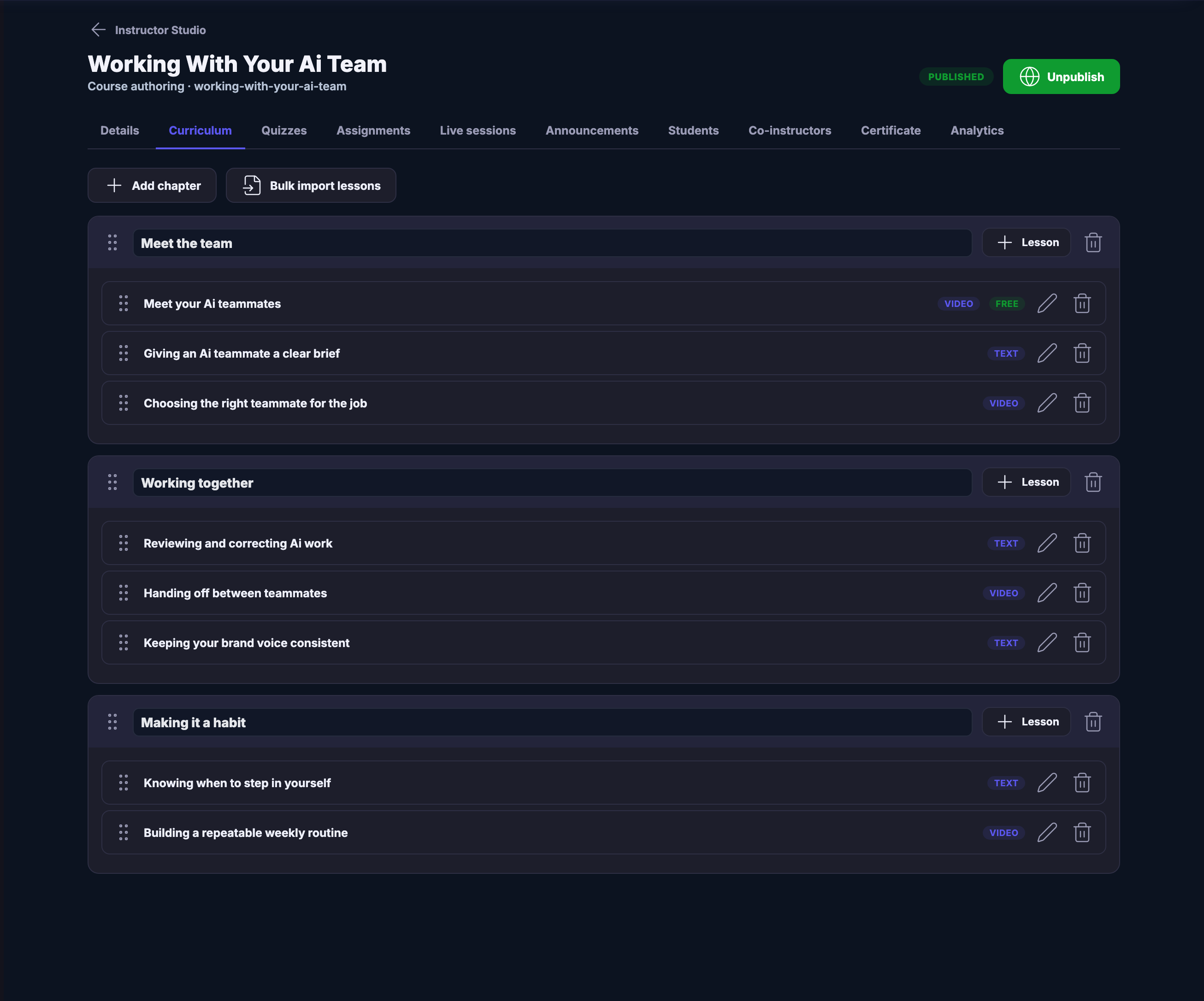
A published course open on its Curriculum tab, the whole instructor tab strip above it — details, curriculum, quizzes, assignments, live sessions, announcements, students, co-instructors, certificate and analytics — with the published marker and the control that would take it back down. Below, the outline itself: three chapters named for what they teach, each a block with its own control to add a lesson, and inside each the lessons in the order a student takes them, every one carrying a drag handle, a marker saying whether it is watched or read, and a pencil and a bin. The first lesson of the first chapter is marked free to anyone.A published course open on its Curriculum tab, the whole instructor tab strip above it — details, curriculum, quizzes, assignments, live sessions, announcements, students, co-instructors, certificate and analytics — with the published marker and the control that would take it back down. Below, the outline itself: three chapters named for what they teach, each a block with its own control to add a lesson, and inside each the lessons in the order a student takes them, every one carrying a drag handle, a marker saying whether it is watched or read, and a pencil and a bin. The first lesson of the first chapter is marked free to anyone.
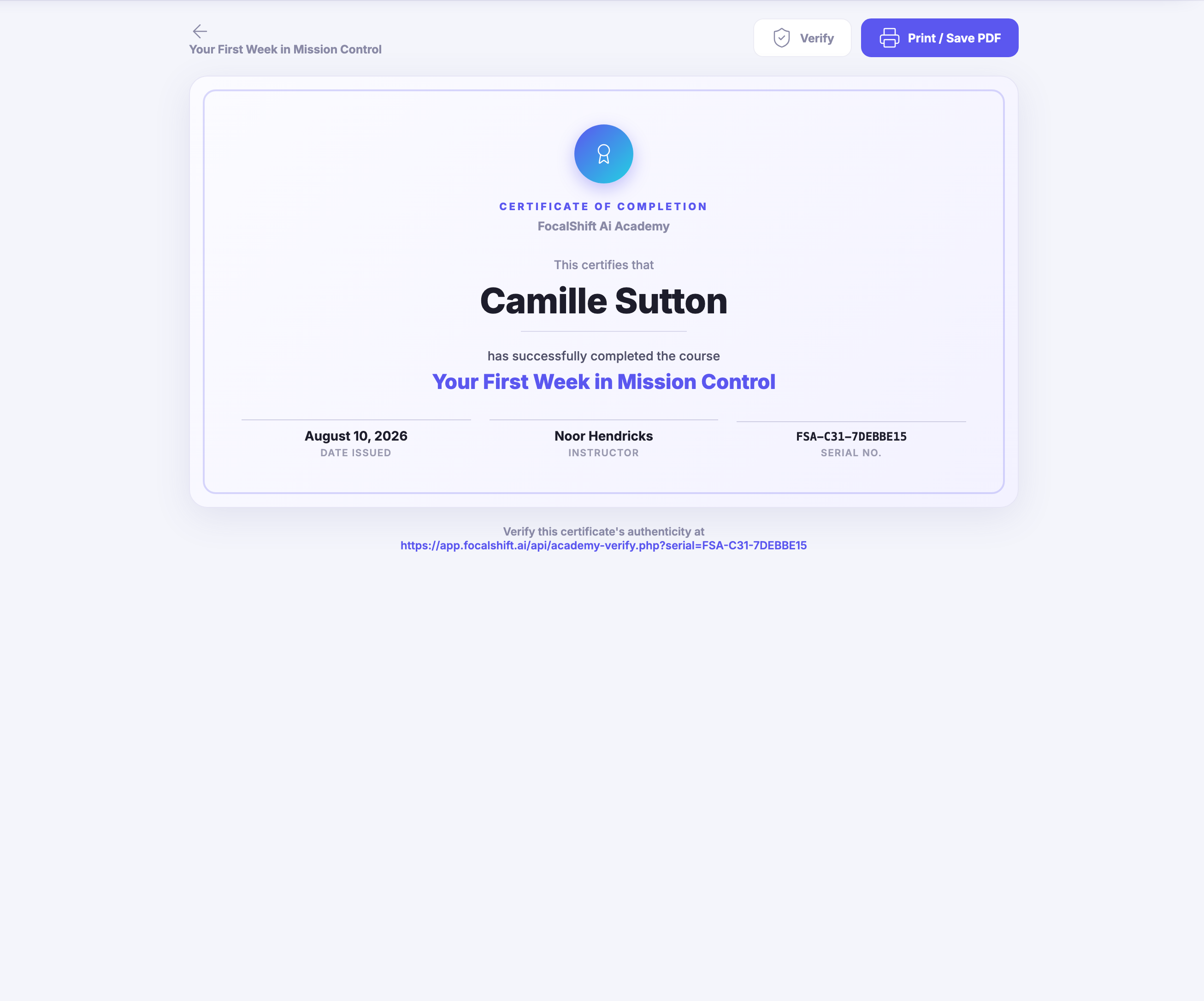
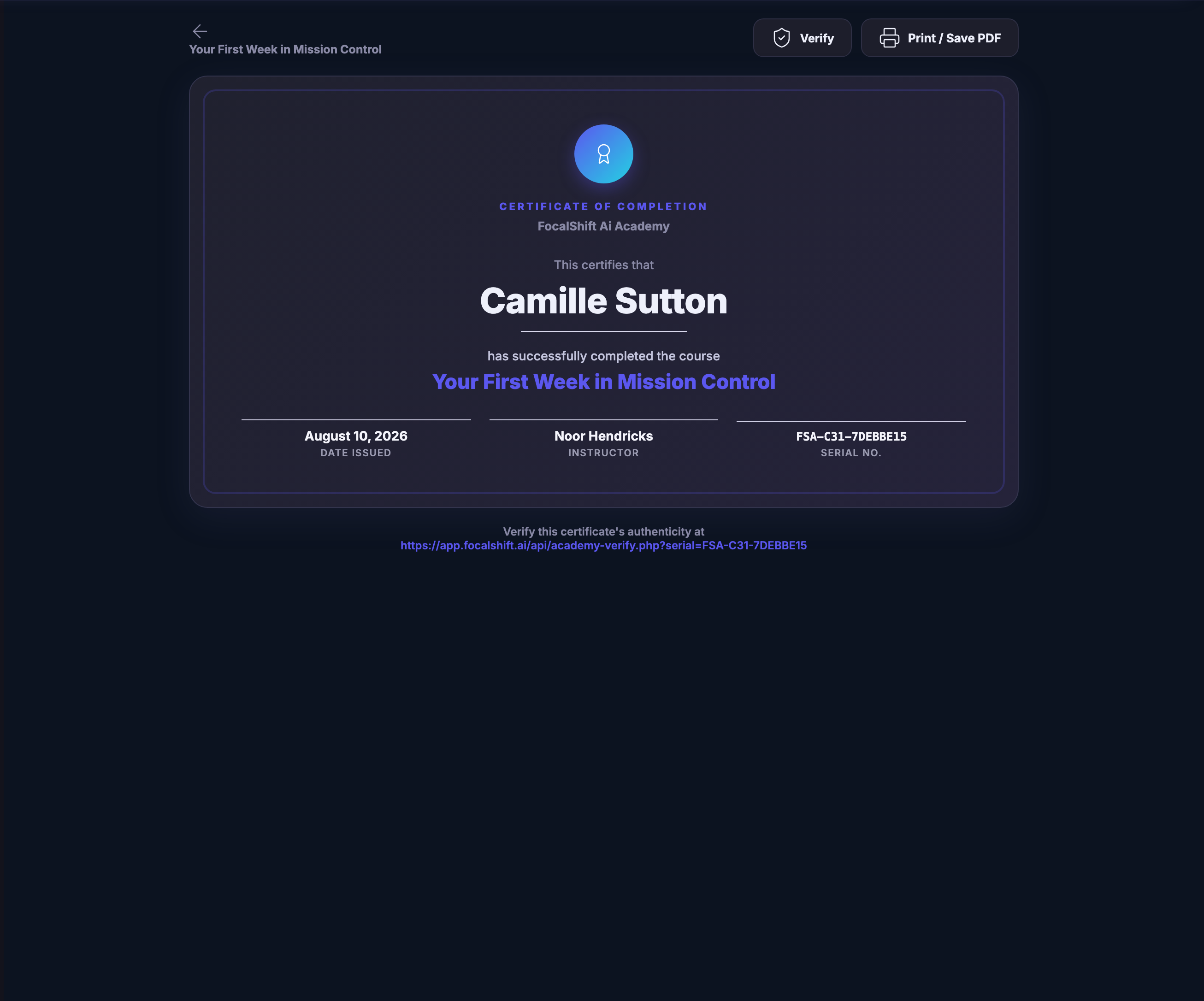
The certificate a finishing student is issued, opened as the document itself: a bordered panel headed certificate of completion under the FocalShift Academy line, naming who completed it and the course they completed, and footed by the day it was issued, the instructor who taught it and the serial it was issued under — with controls above to verify it or print it, and a line beneath giving the address at which anyone can check that it is real.The certificate a finishing student is issued, opened as the document itself: a bordered panel headed certificate of completion under the FocalShift Academy line, naming who completed it and the course they completed, and footed by the day it was issued, the instructor who taught it and the serial it was issued under — with controls above to verify it or print it, and a line beneath giving the address at which anyone can check that it is real.

Instructor Studio

Close
Instructor Studio: a header reading Your courses over the line about authoring, publishing and managing your FocalShift Academy courses and students, with controls beside it that open Earnings or begin a new course. Under it a summary strip labelled for the courses you teach, how many are published, the enrolments across them, the completions, the credits earned and the payout pending. Below that, My courses — every course you teach as a card carrying its subject badge, a colour-blocked cover, its title, the line describing what it is for, then its lesson count, its student count and its completions, a published marker, its price state, its average result where it has one, a co-author marker on the ones you did not create yourself, a completion bar and a control that opens it to manage.Instructor Studio: a header reading Your courses over the line about authoring, publishing and managing your FocalShift Academy courses and students, with controls beside it that open Earnings or begin a new course. Under it a summary strip labelled for the courses you teach, how many are published, the enrolments across them, the completions, the credits earned and the payout pending. Below that, My courses — every course you teach as a card carrying its subject badge, a colour-blocked cover, its title, the line describing what it is for, then its lesson count, its student count and its completions, a published marker, its price state, its average result where it has one, a co-author marker on the ones you did not create yourself, a completion bar and a control that opens it to manage.

Instructor Studio

Close
A published course open on its Curriculum tab, the whole instructor tab strip above it — details, curriculum, quizzes, assignments, live sessions, announcements, students, co-instructors, certificate and analytics — with the published marker and the control that would take it back down. Below, the outline itself: three chapters named for what they teach, each a block with its own control to add a lesson, and inside each the lessons in the order a student takes them, every one carrying a drag handle, a marker saying whether it is watched or read, and a pencil and a bin. The first lesson of the first chapter is marked free to anyone.A published course open on its Curriculum tab, the whole instructor tab strip above it — details, curriculum, quizzes, assignments, live sessions, announcements, students, co-instructors, certificate and analytics — with the published marker and the control that would take it back down. Below, the outline itself: three chapters named for what they teach, each a block with its own control to add a lesson, and inside each the lessons in the order a student takes them, every one carrying a drag handle, a marker saying whether it is watched or read, and a pencil and a bin. The first lesson of the first chapter is marked free to anyone.

Instructor Studio

Close
The certificate a finishing student is issued, opened as the document itself: a bordered panel headed certificate of completion under the FocalShift Academy line, naming who completed it and the course they completed, and footed by the day it was issued, the instructor who taught it and the serial it was issued under — with controls above to verify it or print it, and a line beneath giving the address at which anyone can check that it is real.The certificate a finishing student is issued, opened as the document itself: a bordered panel headed certificate of completion under the FocalShift Academy line, naming who completed it and the course they completed, and footed by the day it was issued, the instructor who taught it and the serial it was issued under — with controls above to verify it or print it, and a line beneath giving the address at which anyone can check that it is real.

A look inside Instructor Studio

Stills from the product, one after the next.

Instructor Studio: a header reading Your courses over the line about authoring, publishing and managing your FocalShift Academy courses and students, with controls beside it that open Earnings or begin a new course. Under it a summary strip labelled for the courses you teach, how many are published, the enrolments across them, the completions, the credits earned and the payout pending. Below that, My courses — every course you teach as a card carrying its subject badge, a colour-blocked cover, its title, the line describing what it is for, then its lesson count, its student count and its completions, a published marker, its price state, its average result where it has one, a co-author marker on the ones you did not create yourself, a completion bar and a control that opens it to manage.Instructor Studio: a header reading Your courses over the line about authoring, publishing and managing your FocalShift Academy courses and students, with controls beside it that open Earnings or begin a new course. Under it a summary strip labelled for the courses you teach, how many are published, the enrolments across them, the completions, the credits earned and the payout pending. Below that, My courses — every course you teach as a card carrying its subject badge, a colour-blocked cover, its title, the line describing what it is for, then its lesson count, its student count and its completions, a published marker, its price state, its average result where it has one, a co-author marker on the ones you did not create yourself, a completion bar and a control that opens it to manage.
A published course open on its Curriculum tab, the whole instructor tab strip above it — details, curriculum, quizzes, assignments, live sessions, announcements, students, co-instructors, certificate and analytics — with the published marker and the control that would take it back down. Below, the outline itself: three chapters named for what they teach, each a block with its own control to add a lesson, and inside each the lessons in the order a student takes them, every one carrying a drag handle, a marker saying whether it is watched or read, and a pencil and a bin. The first lesson of the first chapter is marked free to anyone.A published course open on its Curriculum tab, the whole instructor tab strip above it — details, curriculum, quizzes, assignments, live sessions, announcements, students, co-instructors, certificate and analytics — with the published marker and the control that would take it back down. Below, the outline itself: three chapters named for what they teach, each a block with its own control to add a lesson, and inside each the lessons in the order a student takes them, every one carrying a drag handle, a marker saying whether it is watched or read, and a pencil and a bin. The first lesson of the first chapter is marked free to anyone.
The certificate a finishing student is issued, opened as the document itself: a bordered panel headed certificate of completion under the FocalShift Academy line, naming who completed it and the course they completed, and footed by the day it was issued, the instructor who taught it and the serial it was issued under — with controls above to verify it or print it, and a line beneath giving the address at which anyone can check that it is real.The certificate a finishing student is issued, opened as the document itself: a bordered panel headed certificate of completion under the FocalShift Academy line, naming who completed it and the course they completed, and footed by the day it was issued, the instructor who taught it and the serial it was issued under — with controls above to verify it or print it, and a line beneath giving the address at which anyone can check that it is real.

Teaching becomes another visible income stream.

Earn as an instructor.

Your courses, your price, your students — instructor earnings tracked transparently and paid into your wallet.

Next Up: Courses & credentials

Teach, learn and certify inside the same connected platform.

Ask Maven