메시지

This is the product's own frame. Your conversations appear here once you have an account.

Get started now
알림

This is the product's own frame. Alerts about your business appear here once you have an account.

한국어
The catalog cleaned itself up

Your products, properly kept.

Every product with images, pricing, variants and stock — one catalog serving your store, your site and your invoices.

Why it matters

One catalogue — things you ship, things you send, hours you sell.

One catalog everywhereUpdate once; the store, site and receipts all agree.
Variants without chaosSizes, colors and bundles, sanely managed.
Studio-made imageryProduct shots from Ai Studio, styled on brand.
Part of one platform — works hand-in-hand with리테일·Ai 스튜디오

Maven adds this one: the register, the shelf and your site are all reading from one list — and this is the list.

상품

Everything you sell in one list — shipped, sent or booked — priced once.
One catalogue for three kinds of thingSomething you post, something you send as a file and an hour of your time are all rows in the same list. You are not running three systems and reconciling them at the end of the month.
The product carries its own detailImages, variants, the price and the buy link live on the product. Change it there and the register, your site and the next invoice all read the change — because none of them is keeping a second copy.
A digital shelf beside the in-store oneDownloads, files and templates sit next to the things on the shelf, each with its own live-or-draft state and its own link you can share anywhere.
Read more about Products

Things you ship, things you send and hours you sell all sit in the same catalogue, so a price change happens once.

A catalogue that only knows about parcels makes you keep a second one for downloads and a third for your time. This one holds all three as the same kind of row, with the same fields, in the same place — which is why a price only ever has to be set once.

Everything a product needs travels with it: the images, the variants, the price, the state it is in, and the link that lets somebody buy it. Nothing about a product lives in a note somewhere else, so nothing about it goes stale somewhere else.

The digital shelf and the in-store catalogue sit side by side under the same door. A file you sell and a thing you box are both listed, both counted and both reported on, and a buyer of either becomes the same kind of record in your book.

Because the catalogue is the source, everything downstream stays in step. The register opens on it, the count on the shelf belongs to it, and the money a sale brings in lands in the same month as everything else you earn. One list, and the rest of the business reads from it.

What it actually does

  • One catalogue for physical, digital and time
  • Images, variants, prices and a shareable buy link on the product itself
  • A digital shelf and an in-store catalogue under the same door

What that changes for you

  • A price only ever has to be changed once
  • The store, the site and the receipt stop disagreeing
  • Adding what you sell takes a row, not a project

You come away with one list of everything you sell, priced once.
A look inside Products

Products — platform screenshots

Real screens from the product. Open any one full size, or switch the set to light or dark.

닫기
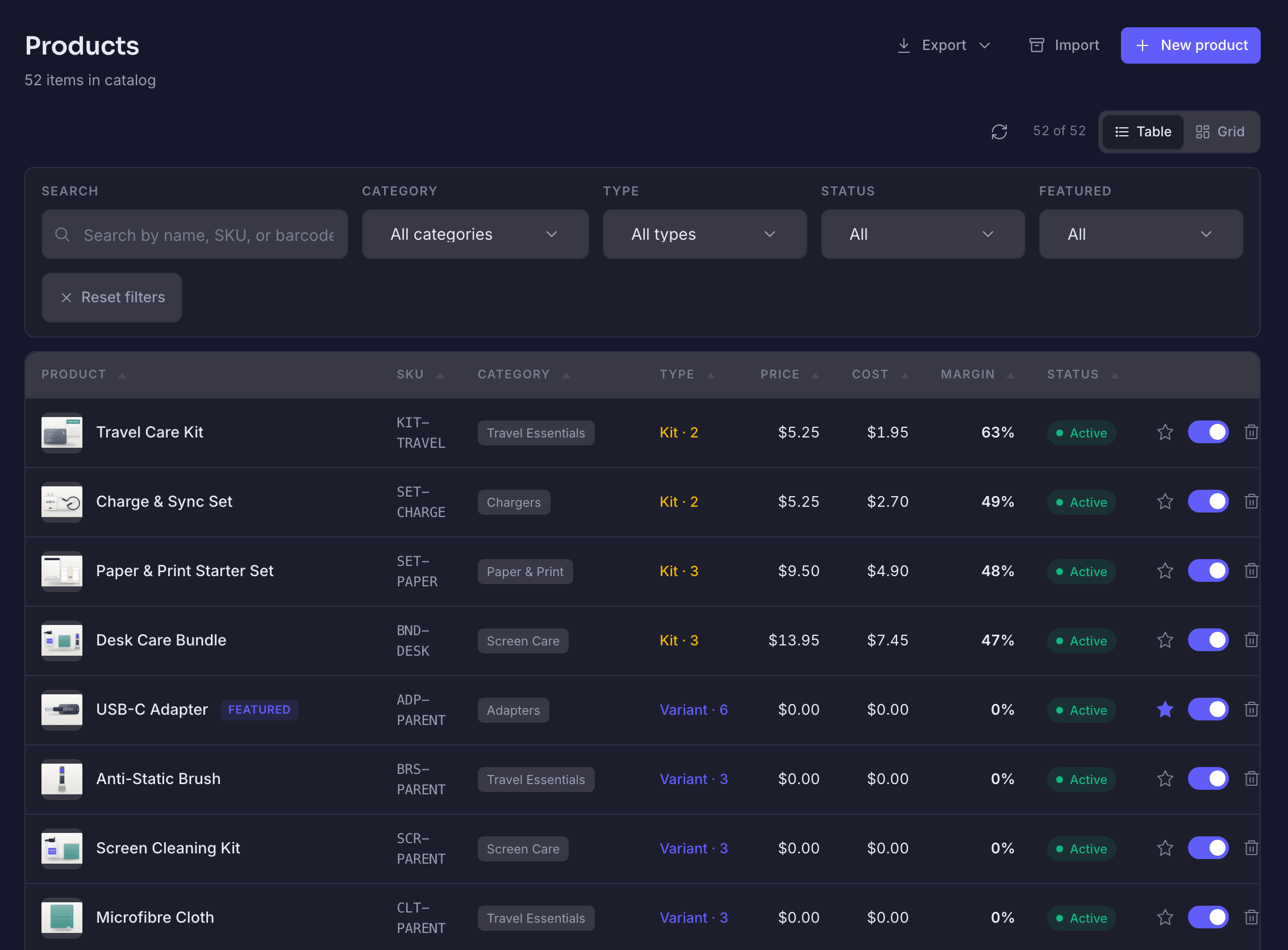
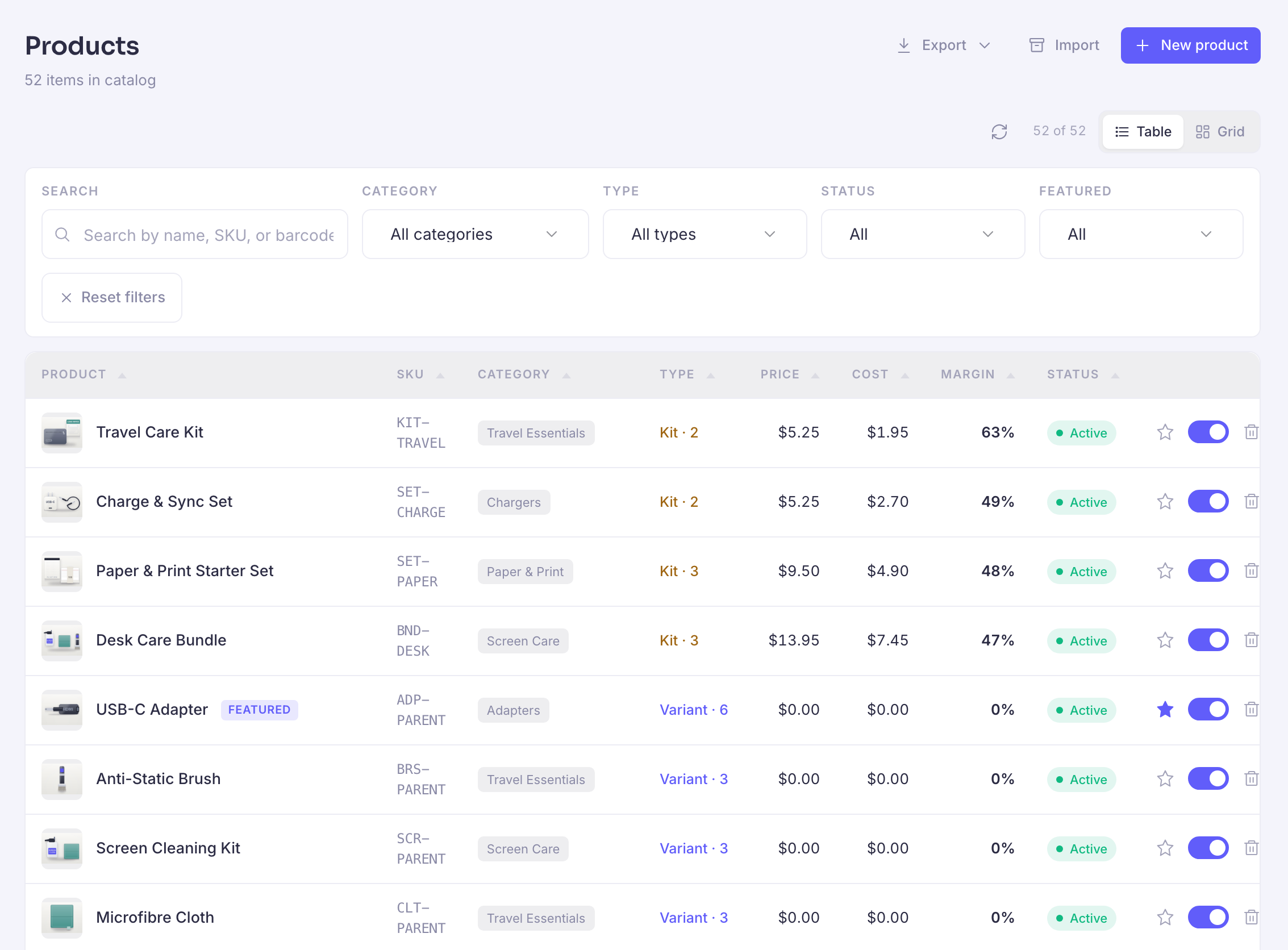
The Products screen in the store back office. A heading reading Products sits over a line counting the items in the catalogue, with controls to export, to import and to add a new product, and a switch between the table and grid ways of looking at it. Under that a filter card: a box for searching by name, SKU or barcode, and selectors for category, type, status and whether a product is featured, with a control that resets them. Then the table itself, a row per product — a travel care kit, a charge and sync set, a paper and print starter set, a desk care bundle, a USB-C adapter, an anti-static brush, a screen cleaning kit and a microfibre cloth. Each row opens with a small photograph of the product, then its name, its SKU in monospace, a category chip, what kind of thing it is — a kit, with how many parts are in it, or a parent product, with how many variants sit under it — a price and a cost, both written as money, a margin given as a percentage, a green Active status pill, an outline star that marks a product as featured rather than rating it, a switch that turns the product on and off in the shop, and a control to remove it. One row wears a Featured badge beside its name and its star is filled in. The list runs on past the foot of the frame.The Products screen in the store back office. A heading reading Products sits over a line counting the items in the catalogue, with controls to export, to import and to add a new product, and a switch between the table and grid ways of looking at it. Under that a filter card: a box for searching by name, SKU or barcode, and selectors for category, type, status and whether a product is featured, with a control that resets them. Then the table itself, a row per product — a travel care kit, a charge and sync set, a paper and print starter set, a desk care bundle, a USB-C adapter, an anti-static brush, a screen cleaning kit and a microfibre cloth. Each row opens with a small photograph of the product, then its name, its SKU in monospace, a category chip, what kind of thing it is — a kit, with how many parts are in it, or a parent product, with how many variants sit under it — a price and a cost, both written as money, a margin given as a percentage, a green Active status pill, an outline star that marks a product as featured rather than rating it, a switch that turns the product on and off in the shop, and a control to remove it. One row wears a Featured badge beside its name and its star is filled in. The list runs on past the foot of the frame.
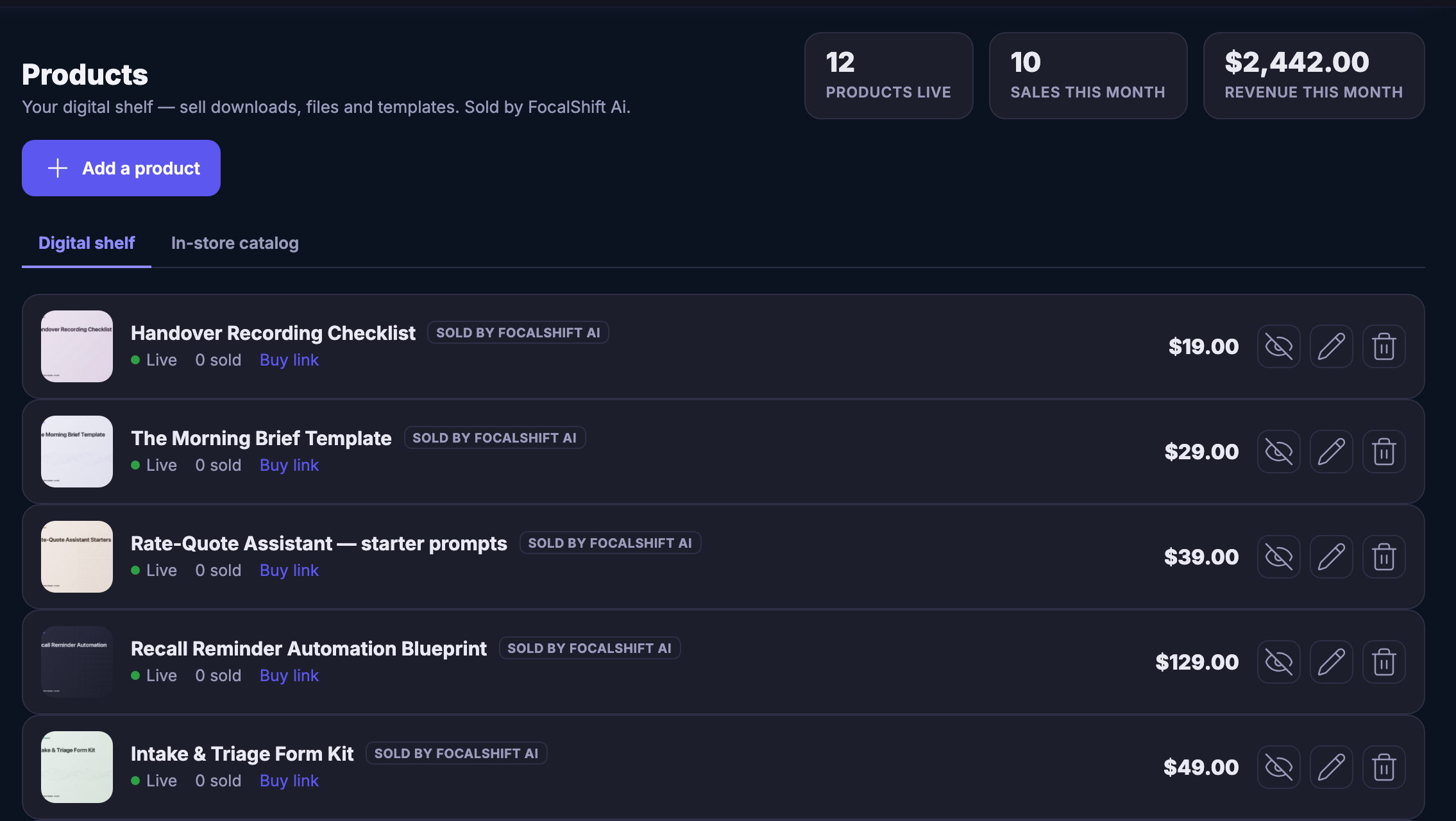
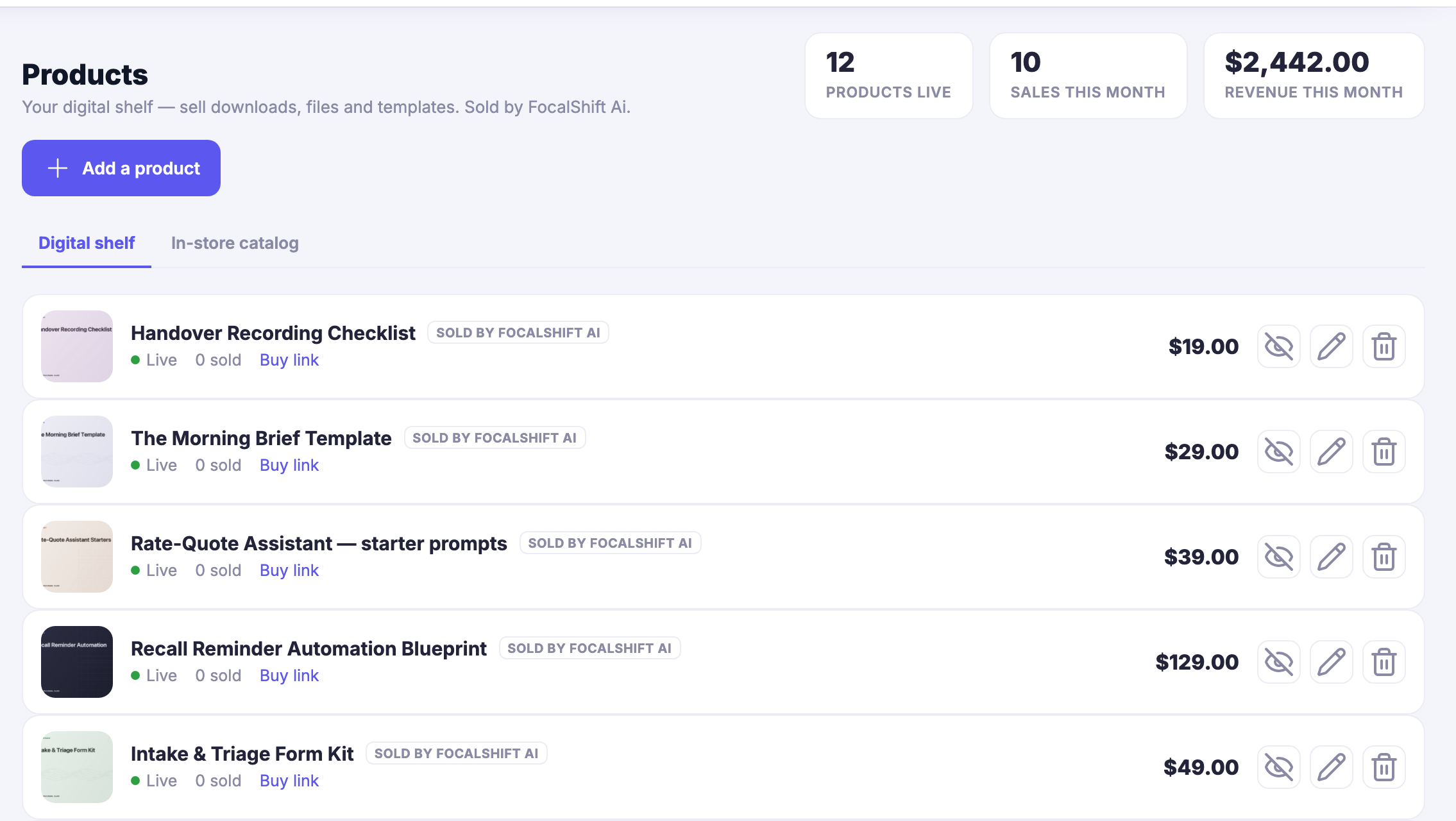
The Products screen in Mission Control. A heading reading Products sits over a line calling it your digital shelf — sell downloads, files and templates — and naming who they are sold by. Beside it three tiles counting the products that are live, the sales this month, and the revenue this month, that last one written as money. Under them a control to add a product, and a pair of tabs: the digital shelf, which is the one showing, and the in-store catalogue beside it. Then the shelf itself, a row per product — a handover recording checklist, a morning brief template, a set of starter prompts for quoting, an automation blueprint for recall reminders and an intake and triage form kit. Each row carries its own cover picture, its name, a chip saying it is sold by the platform, a live marker, how many have sold, a buy link, its price written as money, and three controls — one that hides it from the shelf, then edit and remove. The list runs on past the foot of the frame.The Products screen in Mission Control. A heading reading Products sits over a line calling it your digital shelf — sell downloads, files and templates — and naming who they are sold by. Beside it three tiles counting the products that are live, the sales this month, and the revenue this month, that last one written as money. Under them a control to add a product, and a pair of tabs: the digital shelf, which is the one showing, and the in-store catalogue beside it. Then the shelf itself, a row per product — a handover recording checklist, a morning brief template, a set of starter prompts for quoting, an automation blueprint for recall reminders and an intake and triage form kit. Each row carries its own cover picture, its name, a chip saying it is sold by the platform, a live marker, how many have sold, a buy link, its price written as money, and three controls — one that hides it from the shelf, then edit and remove. The list runs on past the foot of the frame.

상품

닫기
The Products screen in the store back office. A heading reading Products sits over a line counting the items in the catalogue, with controls to export, to import and to add a new product, and a switch between the table and grid ways of looking at it. Under that a filter card: a box for searching by name, SKU or barcode, and selectors for category, type, status and whether a product is featured, with a control that resets them. Then the table itself, a row per product — a travel care kit, a charge and sync set, a paper and print starter set, a desk care bundle, a USB-C adapter, an anti-static brush, a screen cleaning kit and a microfibre cloth. Each row opens with a small photograph of the product, then its name, its SKU in monospace, a category chip, what kind of thing it is — a kit, with how many parts are in it, or a parent product, with how many variants sit under it — a price and a cost, both written as money, a margin given as a percentage, a green Active status pill, an outline star that marks a product as featured rather than rating it, a switch that turns the product on and off in the shop, and a control to remove it. One row wears a Featured badge beside its name and its star is filled in. The list runs on past the foot of the frame.The Products screen in the store back office. A heading reading Products sits over a line counting the items in the catalogue, with controls to export, to import and to add a new product, and a switch between the table and grid ways of looking at it. Under that a filter card: a box for searching by name, SKU or barcode, and selectors for category, type, status and whether a product is featured, with a control that resets them. Then the table itself, a row per product — a travel care kit, a charge and sync set, a paper and print starter set, a desk care bundle, a USB-C adapter, an anti-static brush, a screen cleaning kit and a microfibre cloth. Each row opens with a small photograph of the product, then its name, its SKU in monospace, a category chip, what kind of thing it is — a kit, with how many parts are in it, or a parent product, with how many variants sit under it — a price and a cost, both written as money, a margin given as a percentage, a green Active status pill, an outline star that marks a product as featured rather than rating it, a switch that turns the product on and off in the shop, and a control to remove it. One row wears a Featured badge beside its name and its star is filled in. The list runs on past the foot of the frame.

상품

닫기
The Products screen in Mission Control. A heading reading Products sits over a line calling it your digital shelf — sell downloads, files and templates — and naming who they are sold by. Beside it three tiles counting the products that are live, the sales this month, and the revenue this month, that last one written as money. Under them a control to add a product, and a pair of tabs: the digital shelf, which is the one showing, and the in-store catalogue beside it. Then the shelf itself, a row per product — a handover recording checklist, a morning brief template, a set of starter prompts for quoting, an automation blueprint for recall reminders and an intake and triage form kit. Each row carries its own cover picture, its name, a chip saying it is sold by the platform, a live marker, how many have sold, a buy link, its price written as money, and three controls — one that hides it from the shelf, then edit and remove. The list runs on past the foot of the frame.The Products screen in Mission Control. A heading reading Products sits over a line calling it your digital shelf — sell downloads, files and templates — and naming who they are sold by. Beside it three tiles counting the products that are live, the sales this month, and the revenue this month, that last one written as money. Under them a control to add a product, and a pair of tabs: the digital shelf, which is the one showing, and the in-store catalogue beside it. Then the shelf itself, a row per product — a handover recording checklist, a morning brief template, a set of starter prompts for quoting, an automation blueprint for recall reminders and an intake and triage form kit. Each row carries its own cover picture, its name, a chip saying it is sold by the platform, a live marker, how many have sold, a buy link, its price written as money, and three controls — one that hides it from the shelf, then edit and remove. The list runs on past the foot of the frame.

A look inside Products

Stills from the product, one after the next.

The Products screen in the store back office. A heading reading Products sits over a line counting the items in the catalogue, with controls to export, to import and to add a new product, and a switch between the table and grid ways of looking at it. Under that a filter card: a box for searching by name, SKU or barcode, and selectors for category, type, status and whether a product is featured, with a control that resets them. Then the table itself, a row per product — a travel care kit, a charge and sync set, a paper and print starter set, a desk care bundle, a USB-C adapter, an anti-static brush, a screen cleaning kit and a microfibre cloth. Each row opens with a small photograph of the product, then its name, its SKU in monospace, a category chip, what kind of thing it is — a kit, with how many parts are in it, or a parent product, with how many variants sit under it — a price and a cost, both written as money, a margin given as a percentage, a green Active status pill, an outline star that marks a product as featured rather than rating it, a switch that turns the product on and off in the shop, and a control to remove it. One row wears a Featured badge beside its name and its star is filled in. The list runs on past the foot of the frame.The Products screen in the store back office. A heading reading Products sits over a line counting the items in the catalogue, with controls to export, to import and to add a new product, and a switch between the table and grid ways of looking at it. Under that a filter card: a box for searching by name, SKU or barcode, and selectors for category, type, status and whether a product is featured, with a control that resets them. Then the table itself, a row per product — a travel care kit, a charge and sync set, a paper and print starter set, a desk care bundle, a USB-C adapter, an anti-static brush, a screen cleaning kit and a microfibre cloth. Each row opens with a small photograph of the product, then its name, its SKU in monospace, a category chip, what kind of thing it is — a kit, with how many parts are in it, or a parent product, with how many variants sit under it — a price and a cost, both written as money, a margin given as a percentage, a green Active status pill, an outline star that marks a product as featured rather than rating it, a switch that turns the product on and off in the shop, and a control to remove it. One row wears a Featured badge beside its name and its star is filled in. The list runs on past the foot of the frame.
The Products screen in Mission Control. A heading reading Products sits over a line calling it your digital shelf — sell downloads, files and templates — and naming who they are sold by. Beside it three tiles counting the products that are live, the sales this month, and the revenue this month, that last one written as money. Under them a control to add a product, and a pair of tabs: the digital shelf, which is the one showing, and the in-store catalogue beside it. Then the shelf itself, a row per product — a handover recording checklist, a morning brief template, a set of starter prompts for quoting, an automation blueprint for recall reminders and an intake and triage form kit. Each row carries its own cover picture, its name, a chip saying it is sold by the platform, a live marker, how many have sold, a buy link, its price written as money, and three controls — one that hides it from the shelf, then edit and remove. The list runs on past the foot of the frame.The Products screen in Mission Control. A heading reading Products sits over a line calling it your digital shelf — sell downloads, files and templates — and naming who they are sold by. Beside it three tiles counting the products that are live, the sales this month, and the revenue this month, that last one written as money. Under them a control to add a product, and a pair of tabs: the digital shelf, which is the one showing, and the in-store catalogue beside it. Then the shelf itself, a row per product — a handover recording checklist, a morning brief template, a set of starter prompts for quoting, an automation blueprint for recall reminders and an intake and triage form kit. Each row carries its own cover picture, its name, a chip saying it is sold by the platform, a live marker, how many have sold, a buy link, its price written as money, and three controls — one that hides it from the shelf, then edit and remove. The list runs on past the foot of the frame.

See it in your own business.

Everything on this page comes with the platform — start free and try it on your real work.

Get started now

Next Up: Inventory

Know what is on the shelf before a customer finds out for you.

Maven에게 질문