Nachrichten

This is the product's own frame. Your conversations appear here once you have an account.

Get started now
Benachrichtigungen

This is the product's own frame. Alerts about your business appear here once you have an account.

Deutsch
Tuesday needed foot traffic. A coupon fixed it.

Offers with an off switch.

Create a coupon in a minute, cap it, expire it, and see exactly what it brought in — promotion without the printer or the regret.

Why it matters

What this does for your business.

Fast to launchSlow afternoon? An offer can be live before the hour ends.
Controls built inLimits, expirations and rules mean no coupon ever runs away from you.
Honest mathEach offer reports redemptions and revenue. Keep the winners.
Part of one platform — works hand-in-hand withLocal Customers·Ai Mail

The offer, and the date it stops

An offer you can put out today and switch off tomorrow.

A quiet week is a thing you can act on the same afternoon — as long as what you put out has an ending built into it.

Live before the hour is out.An offer is a name, a type and a date. There is no print run, no proof to approve and nobody else to wait for, so the thing you thought of over a quiet lunch can be live and shareable before the afternoon is gone.

Every offer wears the date it stops on.The end date sits on the face of the offer, beside its state, so a promotion you meant for one week is not still running in three. Taking one down is one control, and the offer stops being live the moment you use it.

You can see which one people actually took.Each offer carries how many times it has been redeemed, and every redemption is listed underneath with who took it and when. Choosing which offer to run again is reading two numbers rather than remembering a feeling about a fortnight.

Maven adds this one: an offer is easy to put out and hard to take back, so the useful part is the off switch.

Coupons & Offers

An offer with an ending built into it — live this afternoon, and stopped the moment you want it stopped.
Live before the hour is outA name, a type and a date is the whole of it. Nothing is printed, nobody else has to approve it, and the offer you thought of at lunch can be out in the world before the afternoon is gone.
The date it stops on is on its faceEvery offer wears its end date beside its state, so the promotion you meant for one week is not quietly still running in three. Taking one down is a single control.
You can see which one people tookEach offer carries how many times it has been redeemed, and every redemption is listed underneath it — who took it, and when. Running the right one again is reading, not remembering.
Read more about Coupons & Offers

Offers with an off switch.

Create a coupon in a minute, cap it, expire it, and see exactly how many times it was taken up — promotion without the printer or the regret.

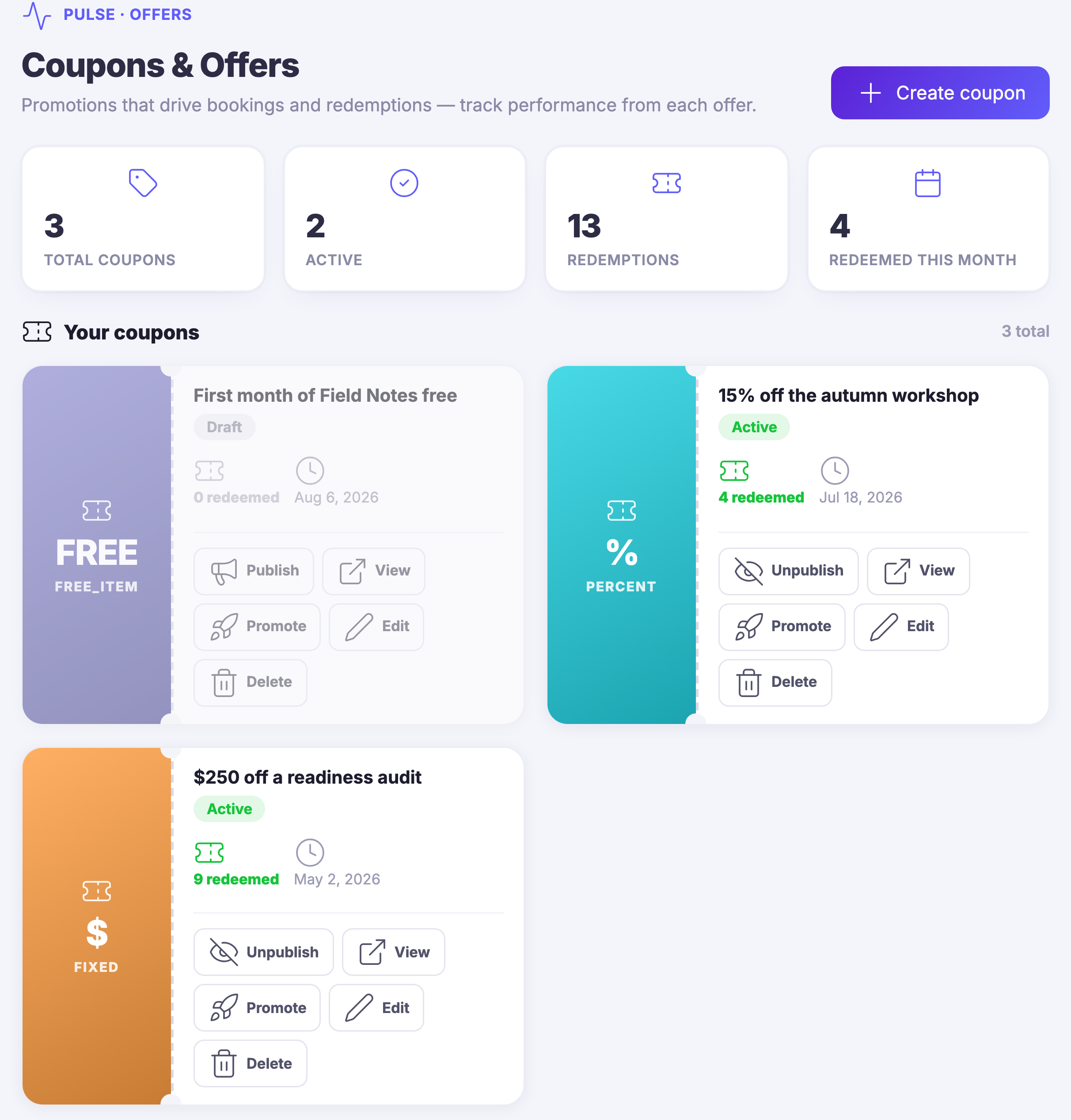
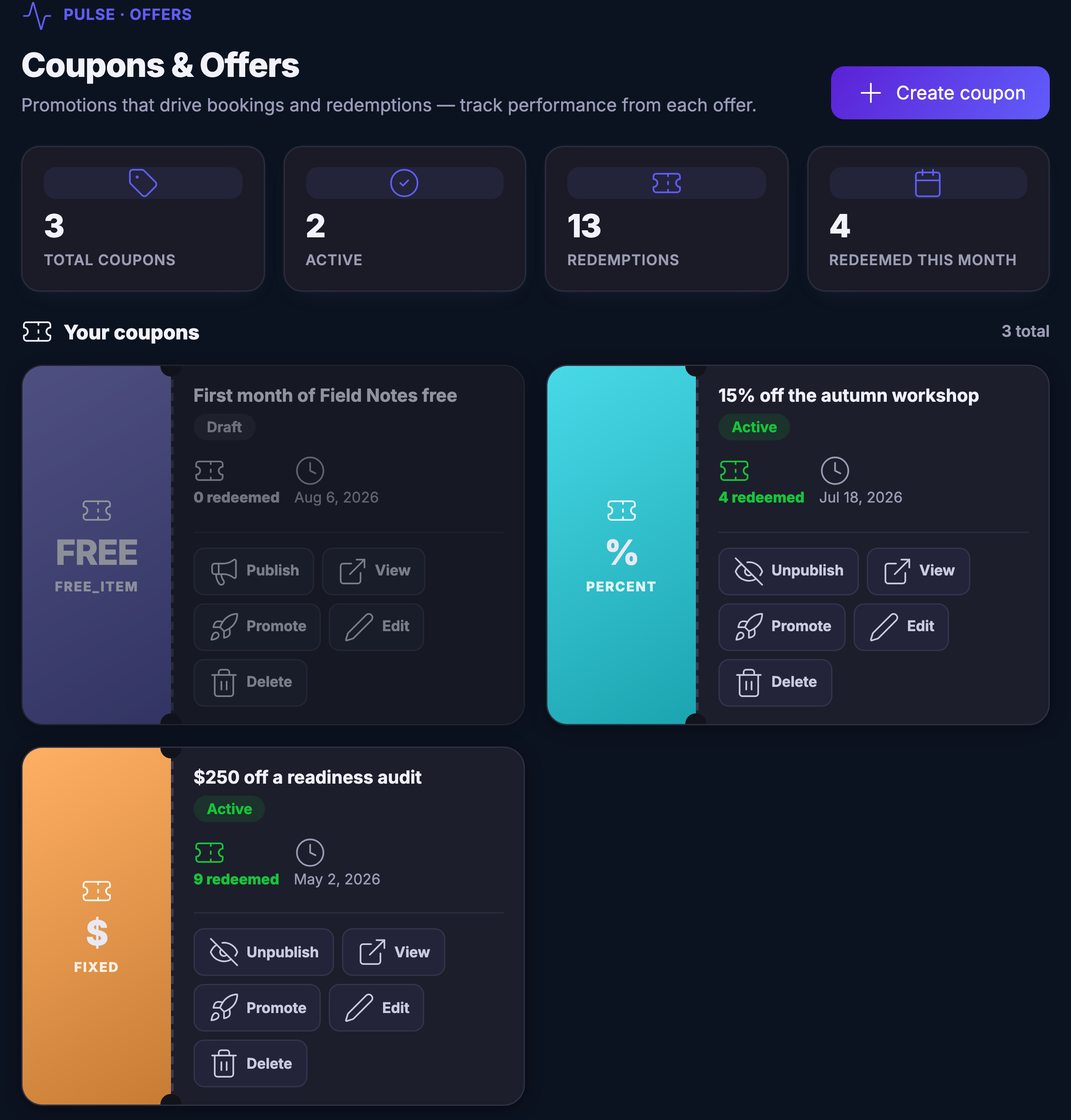
The console is the whole program on one screen: how many offers you have, how many are live, and every one of them laid out with its type, its state and the date it stops. A draft sits beside a live offer rather than in a different place, so the thing you have not published yet is not the thing you forget.

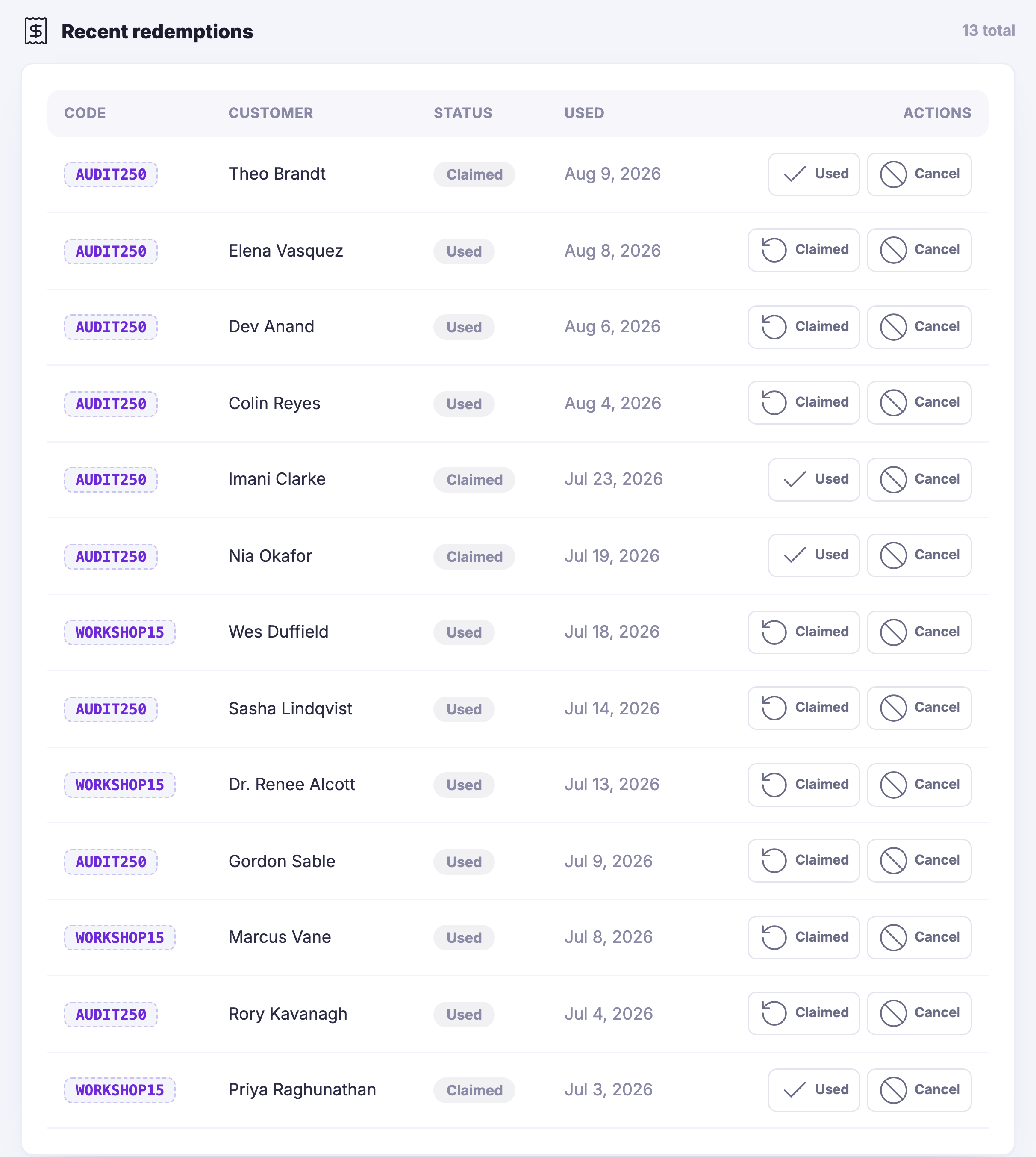
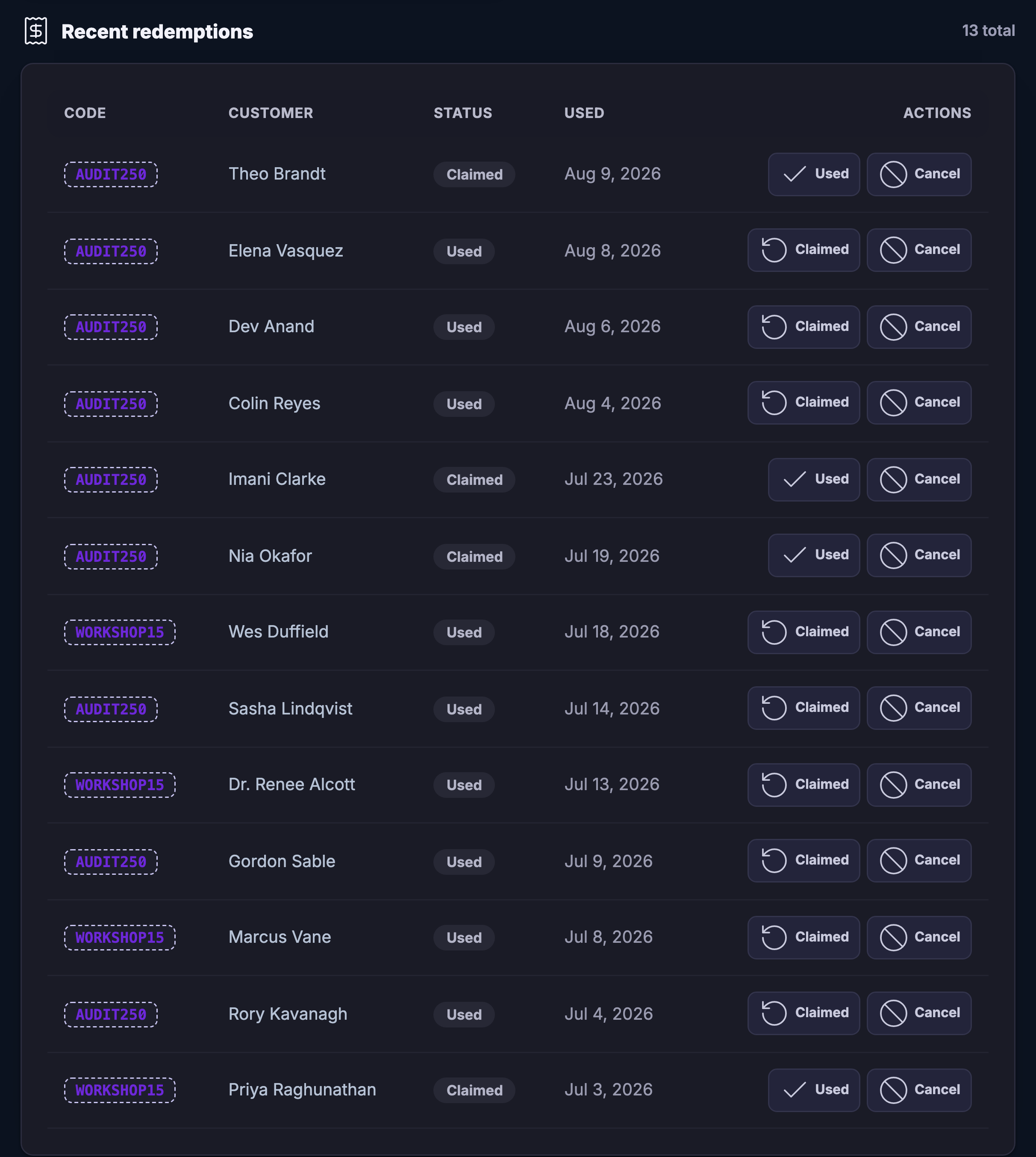
What came back is underneath, as a list rather than a figure. Every redemption names the code that was used and the person who used it, and says whether their claim is still open or has already been taken — so an offer that is being claimed and never used looks different from one that is working.

It is one of four ways back in, and it is the fastest. A review asks somebody who already came, a stamp card rewards them for coming again, a referral asks them to bring somebody — an offer is the one you can put out on a quiet Tuesday and stop again on Thursday.

What it actually does

  • An offer live in a minute, with no print run
  • An end date on the face of every offer
  • Redemptions counted per offer, and listed one by one

What that changes for you

  • A quiet week is something you can act on the same day
  • No offer runs on after you stopped meaning it
  • You run the one that worked again, and drop the one that did not

You come away with an offer you can put out this afternoon and switch off tomorrow.

A look inside Coupons & Offers

Coupons & Offers — platform screenshots

Real screens from the product. Open any one full size, or switch the set to light or dark.

Schließen
The Coupons and Offers console. Across the top, four counts: how many offers exist, how many are live, how many redemptions there have been altogether and how many landed this month. Under a heading reading your coupons, three real offers side by side, each one a coloured stub naming its type — a free item, a percentage and a fixed amount — against a card carrying the offer’s own name, whether it is a draft or live, how many times it has been redeemed so far, the date it runs to, and its controls: publish or unpublish, view, promote, edit and delete. Two of the three carry a percentage and a money amount inside their names, as the owner wrote them.The Coupons and Offers console. Across the top, four counts: how many offers exist, how many are live, how many redemptions there have been altogether and how many landed this month. Under a heading reading your coupons, three real offers side by side, each one a coloured stub naming its type — a free item, a percentage and a fixed amount — against a card carrying the offer’s own name, whether it is a draft or live, how many times it has been redeemed so far, the date it runs to, and its controls: publish or unpublish, view, promote, edit and delete. Two of the three carry a percentage and a money amount inside their names, as the owner wrote them.
The same column below the offers: a heading reading recent redemptions with the running total beside it, and the whole table under it — a column for the code that was used, the customer who used it, whether their claim is still open or has been taken, the date it happened, and two controls on every row for marking it used or cancelling it. Thirteen rows, two different codes running through them, most already taken and a few still open.The same column below the offers: a heading reading recent redemptions with the running total beside it, and the whole table under it — a column for the code that was used, the customer who used it, whether their claim is still open or has been taken, the date it happened, and two controls on every row for marking it used or cancelling it. Thirteen rows, two different codes running through them, most already taken and a few still open.

Coupons & Offers

Schließen
The Coupons and Offers console. Across the top, four counts: how many offers exist, how many are live, how many redemptions there have been altogether and how many landed this month. Under a heading reading your coupons, three real offers side by side, each one a coloured stub naming its type — a free item, a percentage and a fixed amount — against a card carrying the offer’s own name, whether it is a draft or live, how many times it has been redeemed so far, the date it runs to, and its controls: publish or unpublish, view, promote, edit and delete. Two of the three carry a percentage and a money amount inside their names, as the owner wrote them.The Coupons and Offers console. Across the top, four counts: how many offers exist, how many are live, how many redemptions there have been altogether and how many landed this month. Under a heading reading your coupons, three real offers side by side, each one a coloured stub naming its type — a free item, a percentage and a fixed amount — against a card carrying the offer’s own name, whether it is a draft or live, how many times it has been redeemed so far, the date it runs to, and its controls: publish or unpublish, view, promote, edit and delete. Two of the three carry a percentage and a money amount inside their names, as the owner wrote them.

Coupons & Offers

Schließen
The same column below the offers: a heading reading recent redemptions with the running total beside it, and the whole table under it — a column for the code that was used, the customer who used it, whether their claim is still open or has been taken, the date it happened, and two controls on every row for marking it used or cancelling it. Thirteen rows, two different codes running through them, most already taken and a few still open.The same column below the offers: a heading reading recent redemptions with the running total beside it, and the whole table under it — a column for the code that was used, the customer who used it, whether their claim is still open or has been taken, the date it happened, and two controls on every row for marking it used or cancelling it. Thirteen rows, two different codes running through them, most already taken and a few still open.

A look inside Coupons & Offers

Stills from the product, one after the next.

The Coupons and Offers console. Across the top, four counts: how many offers exist, how many are live, how many redemptions there have been altogether and how many landed this month. Under a heading reading your coupons, three real offers side by side, each one a coloured stub naming its type — a free item, a percentage and a fixed amount — against a card carrying the offer’s own name, whether it is a draft or live, how many times it has been redeemed so far, the date it runs to, and its controls: publish or unpublish, view, promote, edit and delete. Two of the three carry a percentage and a money amount inside their names, as the owner wrote them.The Coupons and Offers console. Across the top, four counts: how many offers exist, how many are live, how many redemptions there have been altogether and how many landed this month. Under a heading reading your coupons, three real offers side by side, each one a coloured stub naming its type — a free item, a percentage and a fixed amount — against a card carrying the offer’s own name, whether it is a draft or live, how many times it has been redeemed so far, the date it runs to, and its controls: publish or unpublish, view, promote, edit and delete. Two of the three carry a percentage and a money amount inside their names, as the owner wrote them.
The same column below the offers: a heading reading recent redemptions with the running total beside it, and the whole table under it — a column for the code that was used, the customer who used it, whether their claim is still open or has been taken, the date it happened, and two controls on every row for marking it used or cancelling it. Thirteen rows, two different codes running through them, most already taken and a few still open.The same column below the offers: a heading reading recent redemptions with the running total beside it, and the whole table under it — a column for the code that was used, the customer who used it, whether their claim is still open or has been taken, the date it happened, and two controls on every row for marking it used or cancelling it. Thirteen rows, two different codes running through them, most already taken and a few still open.

See it in your own business.

Everything on this page comes with the platform — start free and try it on your real work.

Get started now

Next Up: Referrals

The customers who bring you customers, credited properly.

Maven fragen