Сообщения

This is the product's own frame. Your conversations appear here once you have an account.

Get started now
Уведомления

This is the product's own frame. Alerts about your business appear here once you have an account.

Русский
A pin where your business stands

On The Map.

The living map of the network — businesses, members and activity, plotted where they actually are.

Why it matters

Who is working near you — and what they have left open.

Be findable locallyCustomers and collaborators search where they live.
See your sceneWho's building near you — allies you didn't know you had.
Presence, kept freshYour pin carries live info, not a stale listing.
Part of one platform — works hand-in-hand withLocal Pulse·The Network

Maven adds this one: every other screen here shows you your own desk — this is the one that looks up and shows you the street.

На карте

Where the other businesses are, what is open to you right now, and how your own work actually joins up.
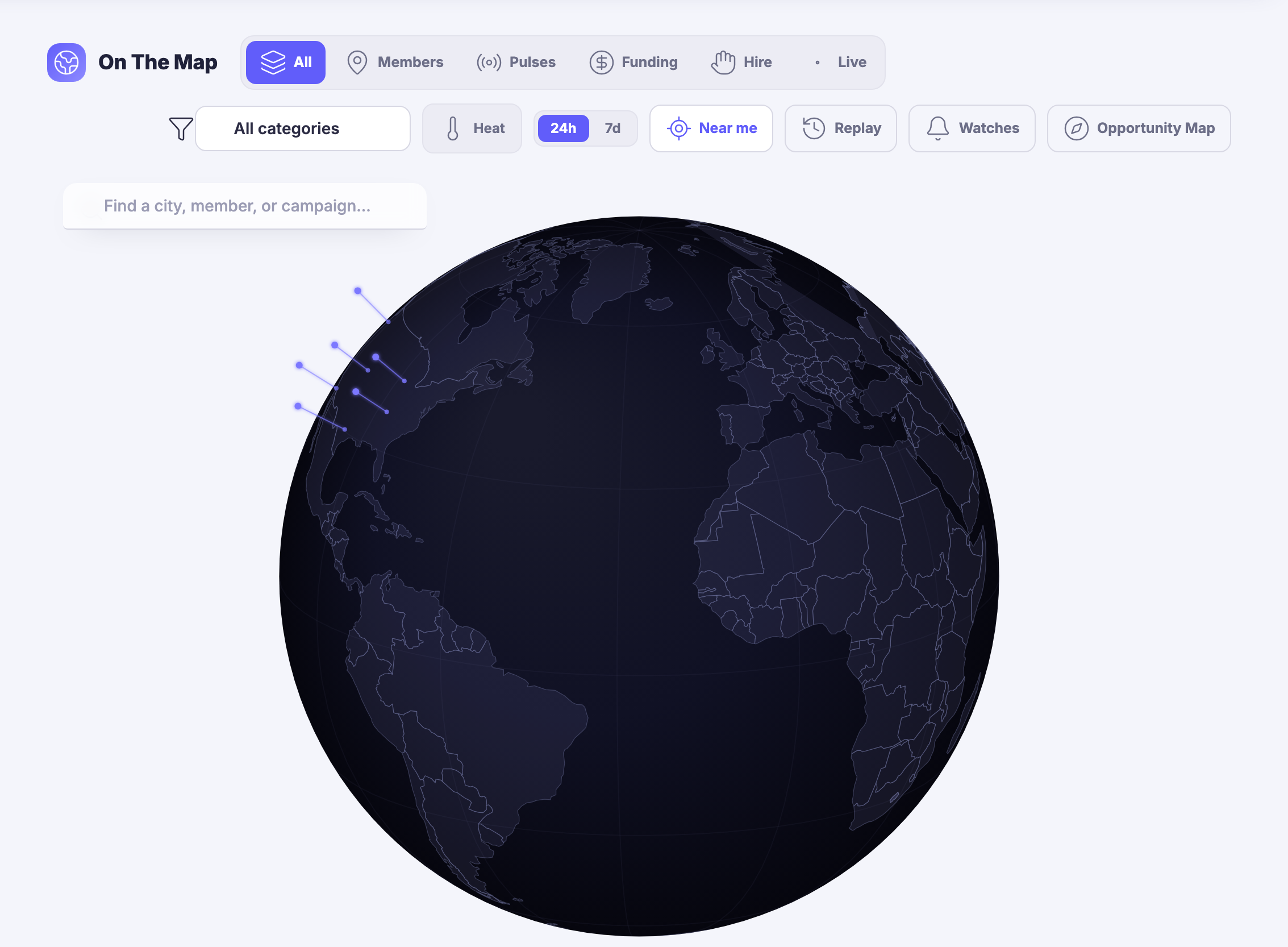
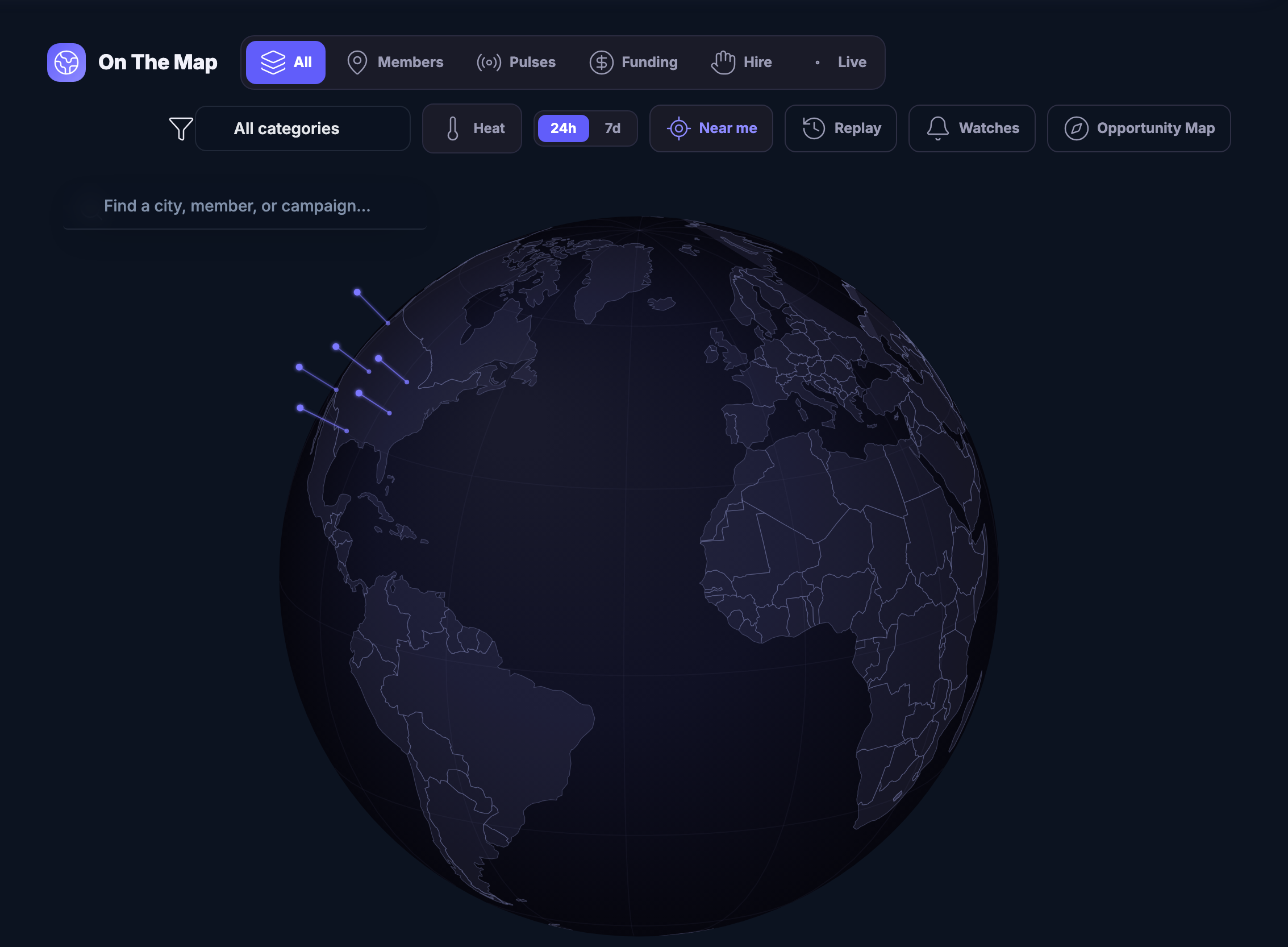
The world, and who is on itA globe you can spin, with the places members are working lit up on it. Filter it by what you came for — people, live activity, funding, hiring — or search a city, a member or a campaign by name.
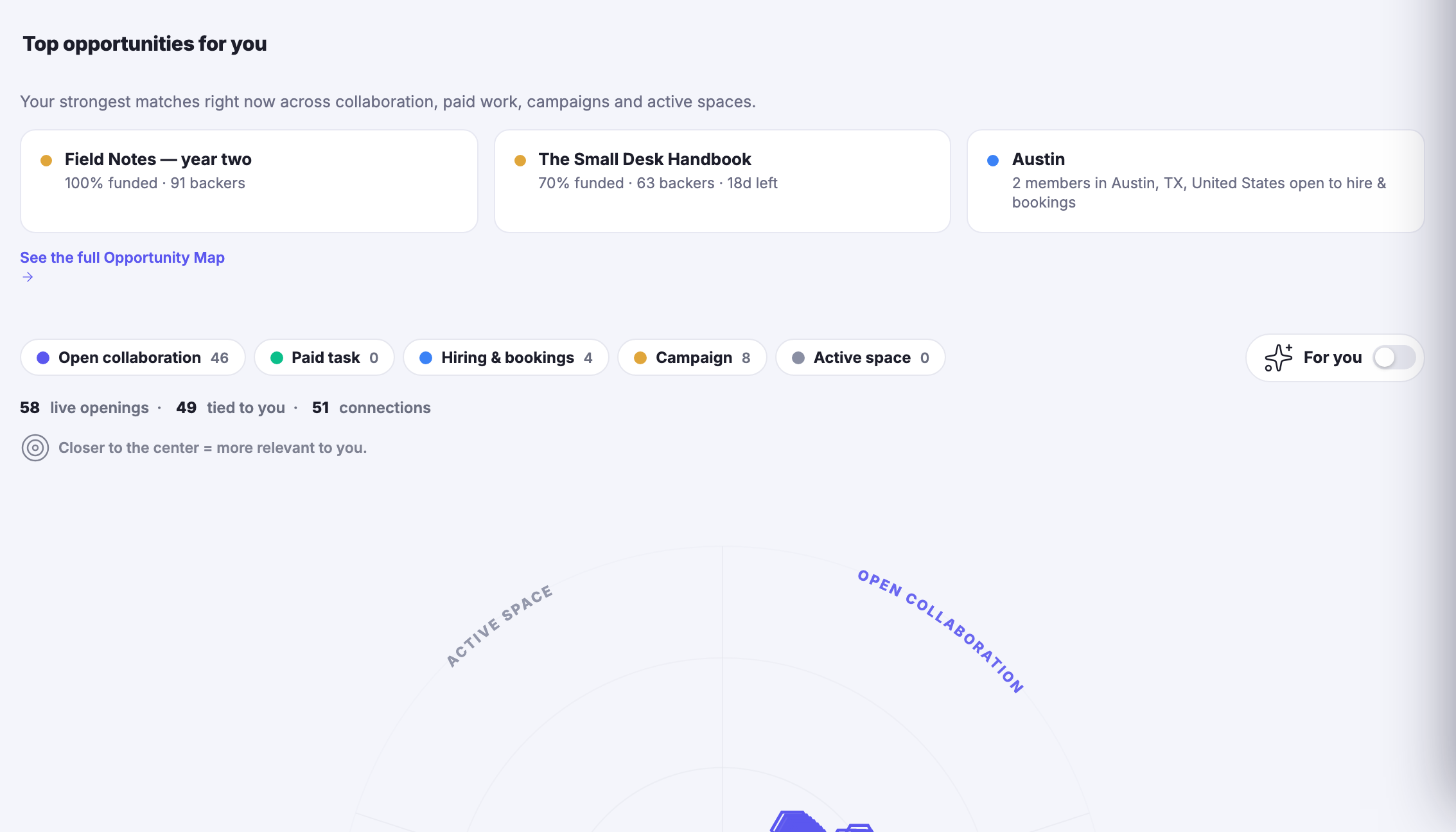
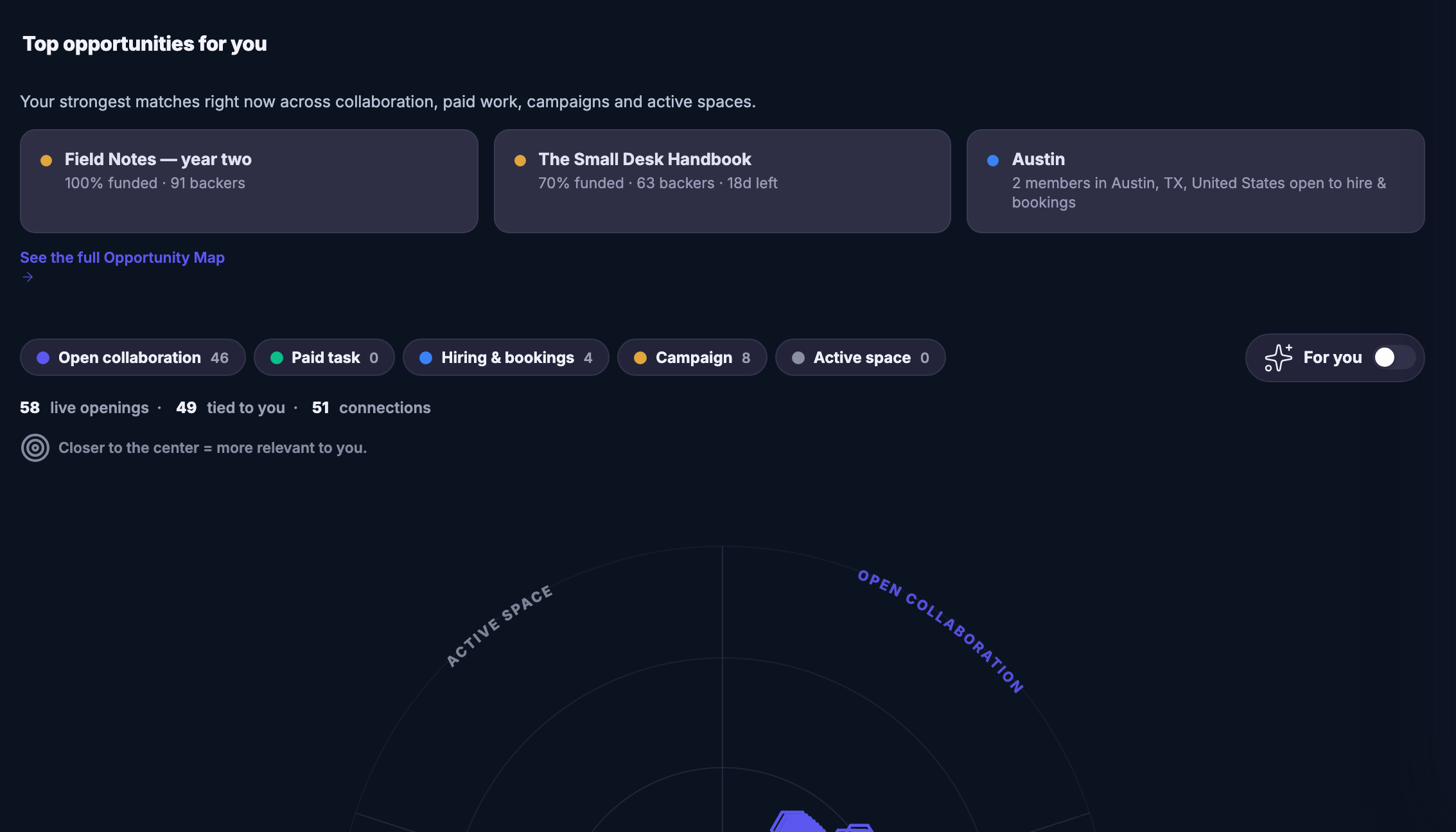
What is open to you this weekEvery live opening across your boards and the network, arranged by how well it fits you: the closer to the centre, the better the match. Open collaborations, paid work, hiring, campaigns and active spaces, each its own sector.
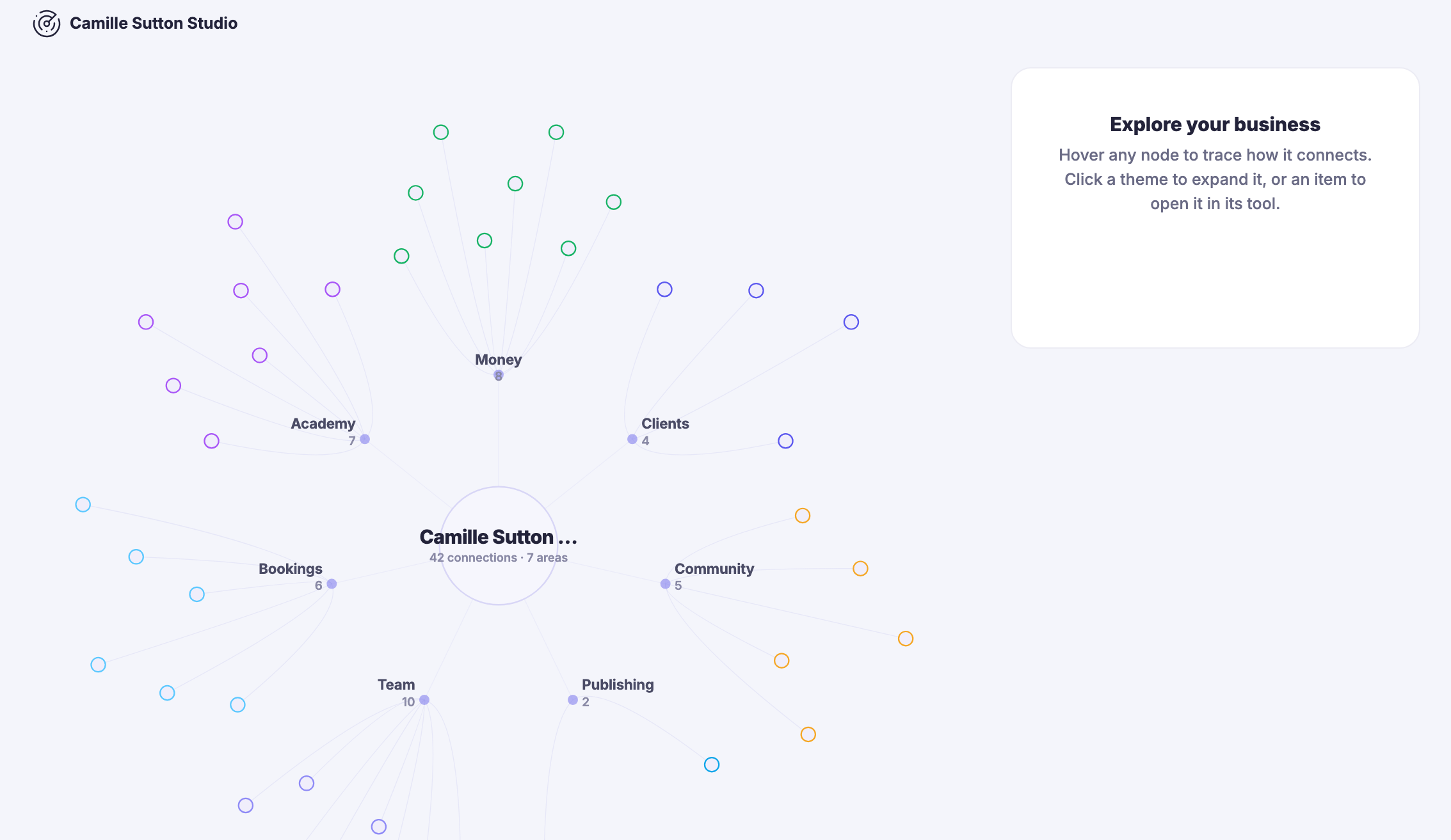
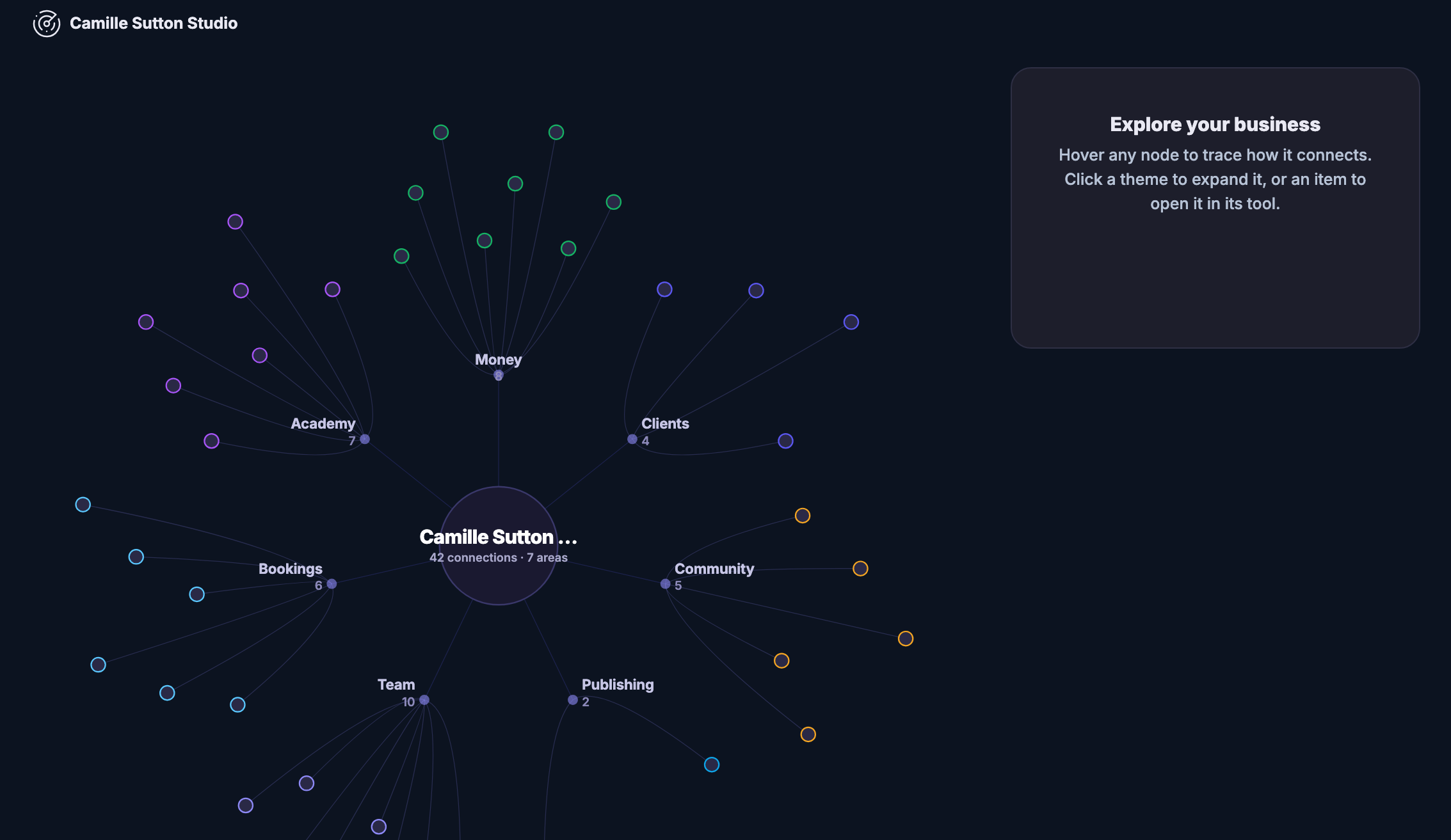
Your own business, drawn outThe other map is inward. Your money, clients, projects, channels, campaigns, team, bookings and courses as one connected picture — hover a node to trace how it joins up, click a theme to open it in the tool that owns it.
Read more about On The Map

Maps that point outward, and one that points back at you.

On The Map is the platform’s discovery surface, and it holds several views of the same idea: that a business is easier to run when you can see the ones around it. The World Map is the one it opens on — a globe with the cities members are working in lit up, spinnable, zoomable, and filterable by what you actually came looking for: people, live activity, funding, who is hiring. Click a city and you drop into what is happening there.

The Opportunity Map is the one that pays for itself. It gathers every live opening across your own boards and across the network and arranges them by fit rather than by date — the closer to the centre, the better the match — in sectors for open collaboration, paid work, hiring and bookings, campaigns and active spaces. Above the radar it names your strongest matches outright, so the week’s question is answered before you have finished reading the screen.

The Business Map turns the same drawing inward. Your money, your clients, your projects, your channels, your campaigns, your team, your bookings and your courses become one connected picture of the thing you are actually running — hover a node and it traces what it touches, click a theme and it opens in the tool that owns it. It is the only screen here that shows you the shape of your own business rather than a list of its parts, and it exports.

They sit together under one heading in the rail, with the local feed below them, because they answer one question between them: who else is out there, what will they let me in on, and how does my own work hang together. Nothing here asks you to publish anything — being on the map is a consequence of using the platform, not another thing to maintain.

What it actually does

  • A spinnable globe of where members are working
  • Live openings ranked by how well they fit you
  • Your whole business drawn as one connected map

What that changes for you

  • You can see the market you are actually in
  • The week’s best opening finds you, not the other way round
  • You stop holding the shape of your business in your head

You come away with a view of the street your business is on, and the openings on it this week.

A look inside On The Map

On The Map — platform screenshots

Real screens from the product. Open any one full size, or switch the set to light or dark.

Закрыть
The On The Map area open on World Map: a header row that filters the globe by members, live pulses, funding, hiring or live activity, a category selector, controls for heat and recent windows, replay and watches, a shortcut across to the Opportunity Map, and a search field inviting a city, a member or a campaign by name. Filling the rest of the frame, a dark globe turned to the Atlantic with a small scatter of glowing spikes rising from a cluster of cities in eastern North America, with Europe in plain view and nothing lit there or anywhere else — the network is small and the picture says so.The On The Map area open on World Map: a header row that filters the globe by members, live pulses, funding, hiring or live activity, a category selector, controls for heat and recent windows, replay and watches, a shortcut across to the Opportunity Map, and a search field inviting a city, a member or a campaign by name. Filling the rest of the frame, a dark globe turned to the Atlantic with a small scatter of glowing spikes rising from a cluster of cities in eastern North America, with Europe in plain view and nothing lit there or anywhere else — the network is small and the picture says so.
The Business Map. Below it the map itself: the member’s own business as a labelled node at the centre, reading as connections across several areas, with a branch out to each area the business runs in, among them community, academy, publishing, bookings and team, each carrying its own count, and pale satellite dots scattered around them where individual items hang off each branch. To the right, a panel headed Explore your business inviting the reader to hover any node to trace how it connects, or click a theme to expand it and an item to open it in its own tool.The Business Map. Below it the map itself: the member’s own business as a labelled node at the centre, reading as connections across several areas, with a branch out to each area the business runs in, among them community, academy, publishing, bookings and team, each carrying its own count, and pale satellite dots scattered around them where individual items hang off each branch. To the right, a panel headed Explore your business inviting the reader to hover any node to trace how it connects, or click a theme to expand it and an item to open it in its own tool.
The Opportunity Map. What remains is headed Top opportunities for you, described as the strongest matches right now across collaboration, paid work, campaigns and active spaces, and under it a row of matches side by side, each keyed by a small coloured dot to the sector it came from and carrying its own line of particulars — campaigns to back, and a city where members are open to hiring and bookings. A link out to the full Opportunity Map, then the sector filters — open collaboration, paid task, hiring and bookings, campaign, active space — each carrying its own count, a summary of live openings, how many are tied to the reader and how many connections they run through, and a note that closer to the centre means more relevant. Below, the radar itself begins, its sectors labelled around the rim for active space and open collaboration.The Opportunity Map. What remains is headed Top opportunities for you, described as the strongest matches right now across collaboration, paid work, campaigns and active spaces, and under it a row of matches side by side, each keyed by a small coloured dot to the sector it came from and carrying its own line of particulars — campaigns to back, and a city where members are open to hiring and bookings. A link out to the full Opportunity Map, then the sector filters — open collaboration, paid task, hiring and bookings, campaign, active space — each carrying its own count, a summary of live openings, how many are tied to the reader and how many connections they run through, and a note that closer to the centre means more relevant. Below, the radar itself begins, its sectors labelled around the rim for active space and open collaboration.

На карте

Закрыть
The On The Map area open on World Map: a header row that filters the globe by members, live pulses, funding, hiring or live activity, a category selector, controls for heat and recent windows, replay and watches, a shortcut across to the Opportunity Map, and a search field inviting a city, a member or a campaign by name. Filling the rest of the frame, a dark globe turned to the Atlantic with a small scatter of glowing spikes rising from a cluster of cities in eastern North America, with Europe in plain view and nothing lit there or anywhere else — the network is small and the picture says so.The On The Map area open on World Map: a header row that filters the globe by members, live pulses, funding, hiring or live activity, a category selector, controls for heat and recent windows, replay and watches, a shortcut across to the Opportunity Map, and a search field inviting a city, a member or a campaign by name. Filling the rest of the frame, a dark globe turned to the Atlantic with a small scatter of glowing spikes rising from a cluster of cities in eastern North America, with Europe in plain view and nothing lit there or anywhere else — the network is small and the picture says so.

На карте

Закрыть
The Business Map. Below it the map itself: the member’s own business as a labelled node at the centre, reading as connections across several areas, with a branch out to each area the business runs in, among them community, academy, publishing, bookings and team, each carrying its own count, and pale satellite dots scattered around them where individual items hang off each branch. To the right, a panel headed Explore your business inviting the reader to hover any node to trace how it connects, or click a theme to expand it and an item to open it in its own tool.The Business Map. Below it the map itself: the member’s own business as a labelled node at the centre, reading as connections across several areas, with a branch out to each area the business runs in, among them community, academy, publishing, bookings and team, each carrying its own count, and pale satellite dots scattered around them where individual items hang off each branch. To the right, a panel headed Explore your business inviting the reader to hover any node to trace how it connects, or click a theme to expand it and an item to open it in its own tool.

На карте

Закрыть
The Opportunity Map. What remains is headed Top opportunities for you, described as the strongest matches right now across collaboration, paid work, campaigns and active spaces, and under it a row of matches side by side, each keyed by a small coloured dot to the sector it came from and carrying its own line of particulars — campaigns to back, and a city where members are open to hiring and bookings. A link out to the full Opportunity Map, then the sector filters — open collaboration, paid task, hiring and bookings, campaign, active space — each carrying its own count, a summary of live openings, how many are tied to the reader and how many connections they run through, and a note that closer to the centre means more relevant. Below, the radar itself begins, its sectors labelled around the rim for active space and open collaboration.The Opportunity Map. What remains is headed Top opportunities for you, described as the strongest matches right now across collaboration, paid work, campaigns and active spaces, and under it a row of matches side by side, each keyed by a small coloured dot to the sector it came from and carrying its own line of particulars — campaigns to back, and a city where members are open to hiring and bookings. A link out to the full Opportunity Map, then the sector filters — open collaboration, paid task, hiring and bookings, campaign, active space — each carrying its own count, a summary of live openings, how many are tied to the reader and how many connections they run through, and a note that closer to the centre means more relevant. Below, the radar itself begins, its sectors labelled around the rim for active space and open collaboration.

A look inside On The Map

Stills from the product, one after the next.

The On The Map area open on World Map: a header row that filters the globe by members, live pulses, funding, hiring or live activity, a category selector, controls for heat and recent windows, replay and watches, a shortcut across to the Opportunity Map, and a search field inviting a city, a member or a campaign by name. Filling the rest of the frame, a dark globe turned to the Atlantic with a small scatter of glowing spikes rising from a cluster of cities in eastern North America, with Europe in plain view and nothing lit there or anywhere else — the network is small and the picture says so.The On The Map area open on World Map: a header row that filters the globe by members, live pulses, funding, hiring or live activity, a category selector, controls for heat and recent windows, replay and watches, a shortcut across to the Opportunity Map, and a search field inviting a city, a member or a campaign by name. Filling the rest of the frame, a dark globe turned to the Atlantic with a small scatter of glowing spikes rising from a cluster of cities in eastern North America, with Europe in plain view and nothing lit there or anywhere else — the network is small and the picture says so.
The Business Map. Below it the map itself: the member’s own business as a labelled node at the centre, reading as connections across several areas, with a branch out to each area the business runs in, among them community, academy, publishing, bookings and team, each carrying its own count, and pale satellite dots scattered around them where individual items hang off each branch. To the right, a panel headed Explore your business inviting the reader to hover any node to trace how it connects, or click a theme to expand it and an item to open it in its own tool.The Business Map. Below it the map itself: the member’s own business as a labelled node at the centre, reading as connections across several areas, with a branch out to each area the business runs in, among them community, academy, publishing, bookings and team, each carrying its own count, and pale satellite dots scattered around them where individual items hang off each branch. To the right, a panel headed Explore your business inviting the reader to hover any node to trace how it connects, or click a theme to expand it and an item to open it in its own tool.
The Opportunity Map. What remains is headed Top opportunities for you, described as the strongest matches right now across collaboration, paid work, campaigns and active spaces, and under it a row of matches side by side, each keyed by a small coloured dot to the sector it came from and carrying its own line of particulars — campaigns to back, and a city where members are open to hiring and bookings. A link out to the full Opportunity Map, then the sector filters — open collaboration, paid task, hiring and bookings, campaign, active space — each carrying its own count, a summary of live openings, how many are tied to the reader and how many connections they run through, and a note that closer to the centre means more relevant. Below, the radar itself begins, its sectors labelled around the rim for active space and open collaboration.The Opportunity Map. What remains is headed Top opportunities for you, described as the strongest matches right now across collaboration, paid work, campaigns and active spaces, and under it a row of matches side by side, each keyed by a small coloured dot to the sector it came from and carrying its own line of particulars — campaigns to back, and a city where members are open to hiring and bookings. A link out to the full Opportunity Map, then the sector filters — open collaboration, paid task, hiring and bookings, campaign, active space — each carrying its own count, a summary of live openings, how many are tied to the reader and how many connections they run through, and a note that closer to the centre means more relevant. Below, the radar itself begins, its sectors labelled around the rim for active space and open collaboration.

See it in your own business.

Everything on this page comes with the platform — start free and try it on your real work.

Get started now
One connected destination

Go deeper without losing the thread.

Each title beginning with a hashtag is a direct destination. The navigation can bring you to the exact part of the story without creating another disconnected page.

See the businesses already around you.

The business map.

Explore businesses across the network by place and category — a map view of who does what, where.

See where the next opportunity is forming.

The opportunity map.

See where demand clusters and coverage thins — geographic whitespace, visible to members deciding where to aim next.

Next Up: Network

Build relationships, share opportunities and grow in the FocalShift Network.

Спросить Maven