संदेश

This is the product's own frame. Your conversations appear here once you have an account.

Get started now
सूचनाएं

This is the product's own frame. Alerts about your business appear here once you have an account.

हिन्दी
लीड कैप्चर

Turn attention into a name—and a next step.

Someone is leaning toward your business right now. Give them one easy way in, learn what matters, and let FocalShift carry the relationship forward before the moment cools.

The idea, drawn

Attention is not a lead until somebody keeps it.

Someone is leaning toward your business right now. The whole job is to give them one easy way in, learn the thing that matters, and make sure the next step happens while they still care.

Attention becoming a name, and a name becoming a next step

Drawn: attention arriving from several places, becoming a name, and becoming a next step with a time on it.

One easy way in

A form, a survey or a page that asks for what you actually need and nothing else.

What they said is kept

The answers travel with the person, so the first reply can refer to them instead of starting over.

The next step is scheduled

A follow–up that exists as a real, dated thing rather than as an intention.

A better first hello

Ask less. Learn more.

Long forms feel like paperwork. FocalShift lets the next question respond to the last answer, so each visitor gets a short path that feels relevant—and you still receive the context needed to help.

1
Start with the easy answerOne clear question gets the conversation moving.
2
Branch with purposeShow only the questions that matter to that person.
3
End with a useful next stepRoute them to the right offer, person, booking, or sequence.
Visitor path
2 of 3
What are you hoping to launch?
A website
A campaign
A membership
Next question: When should the campaign go live?
Context comes with them

No more mystery leads.

The doorway, the offer, and every useful answer travel together. Your team opens the lead already knowing why the person raised their hand.

Instagram bioSpring campaign
Website formServices page
QR कोडPop-up event
Referral linkPartner: Aster Studio
Kai Morganयोग्य
स्रोतInstagram bio
ऑफ़रSpring launch
समयरेखा30 दिनों के भीतर
पाइपलाइनBrand services
While intent is warm

The handoff happens before you check your phone.

A submission can acknowledge the visitor, notify the right person, create the pipeline card, and start the appropriate follow-up—without a copied email or a manual relay.

00:00
Form submitted

The complete answer set lands once.

00:01
लीड बनाई गई

Source and context arrive attached.

00:02
Owner notified

The right person knows what changed.

00:03
Welcome sent

The visitor gets the promised next step.

Maven adds this one: an enquiry that arrives while you are asleep is only worth having if something answers it before you wake up.

फ़ॉर्म और ईमेल

A form short enough to finish — and the reply that goes back before you have read it.
Short forms you can paste anywhereTwo questions get answered; nine do not. Drop one on a page, inside a post, behind a code somebody scans, or on a link you hand out — it works where you put it.
Every answer becomes a personWhat arrives is a real record from the first second: the name, the answers, and the door they came through, filed together rather than sitting in a spreadsheet of rows.
The first reply goes out without youWritten once, sent the moment the form lands. Nobody waits a day to hear back, and the right person knows what changed before you have looked at your phone.
Read more about Forms & Emails

The short form that takes a name, and the note that goes back without you.

A form that asks two questions gets answered; one that asks nine does not. What comes in is a real record from the first second, and the reply that follows is already written and already scheduled.

The same form travels. Paste it on a page you built, put it behind a code on a card, sit it at the end of a post or hand it out as a link — and every route in is named, so you can tell which door made the sale rather than guessing at it.

What comes back can choose its own path. Send the guide they actually asked for, wait the right amount of time, offer a time in the diary only after real interest, and hand the thread to a person the moment somebody writes back. You decide the shape of it once.

Surveys and quizzes sit on the same shelf. Ask a proper question while the attention is still warm, and the answers file themselves against the person — where the next note, the next call and the next offer will all find them.

What it actually does

  • Short forms that live anywhere you can paste a line
  • Every answer becomes a customer record, not a row
  • The first reply goes out whether you are there or not

What that changes for you

  • You stop losing people at question four
  • Nobody waits a day for an acknowledgement
  • The enquiry is already filed before you read it

You come away with a name and an email address.

A look inside Forms & Emails

Forms & Emails — platform screenshots

Real screens from the product. Open any one full size, or switch the set to light or dark.

बंद करें
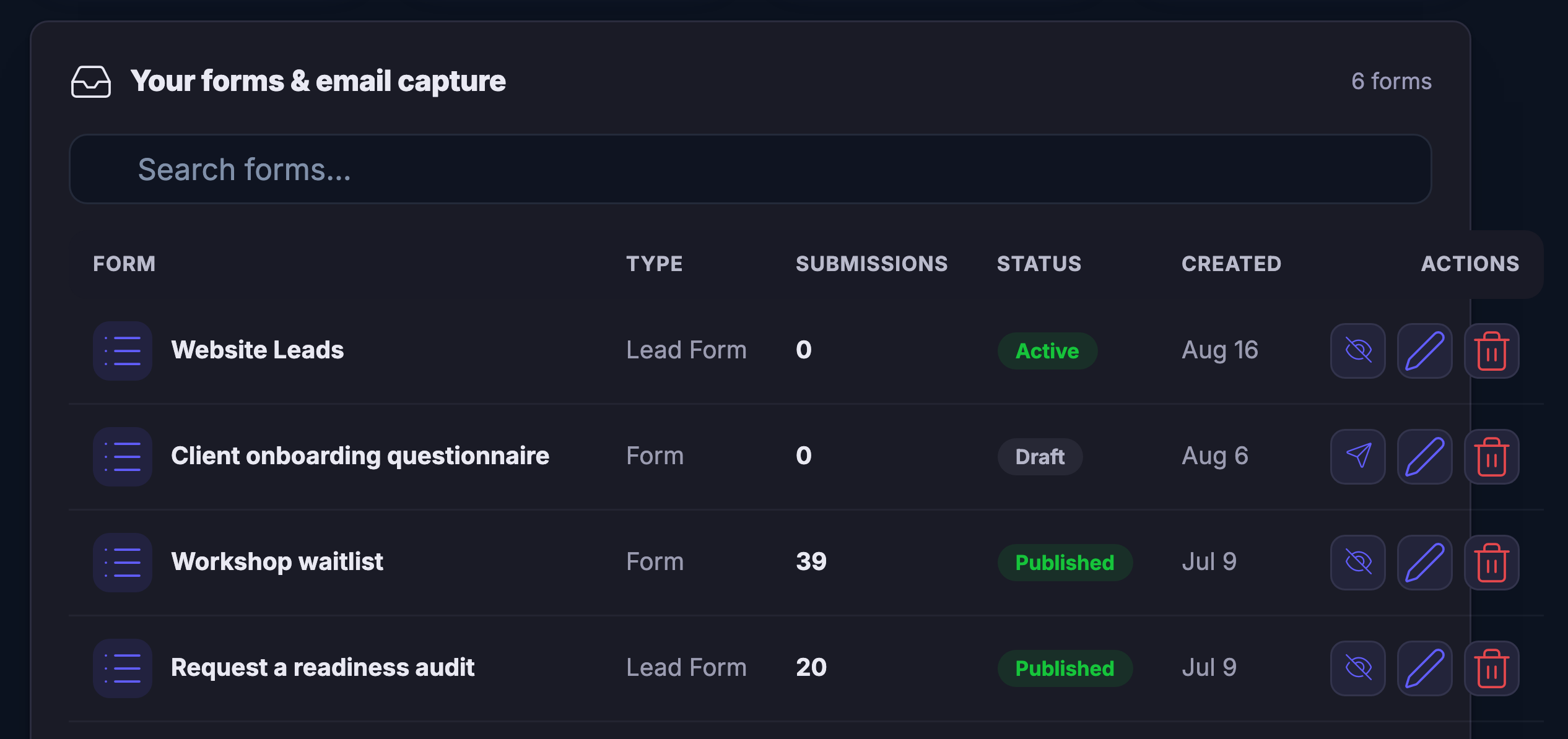
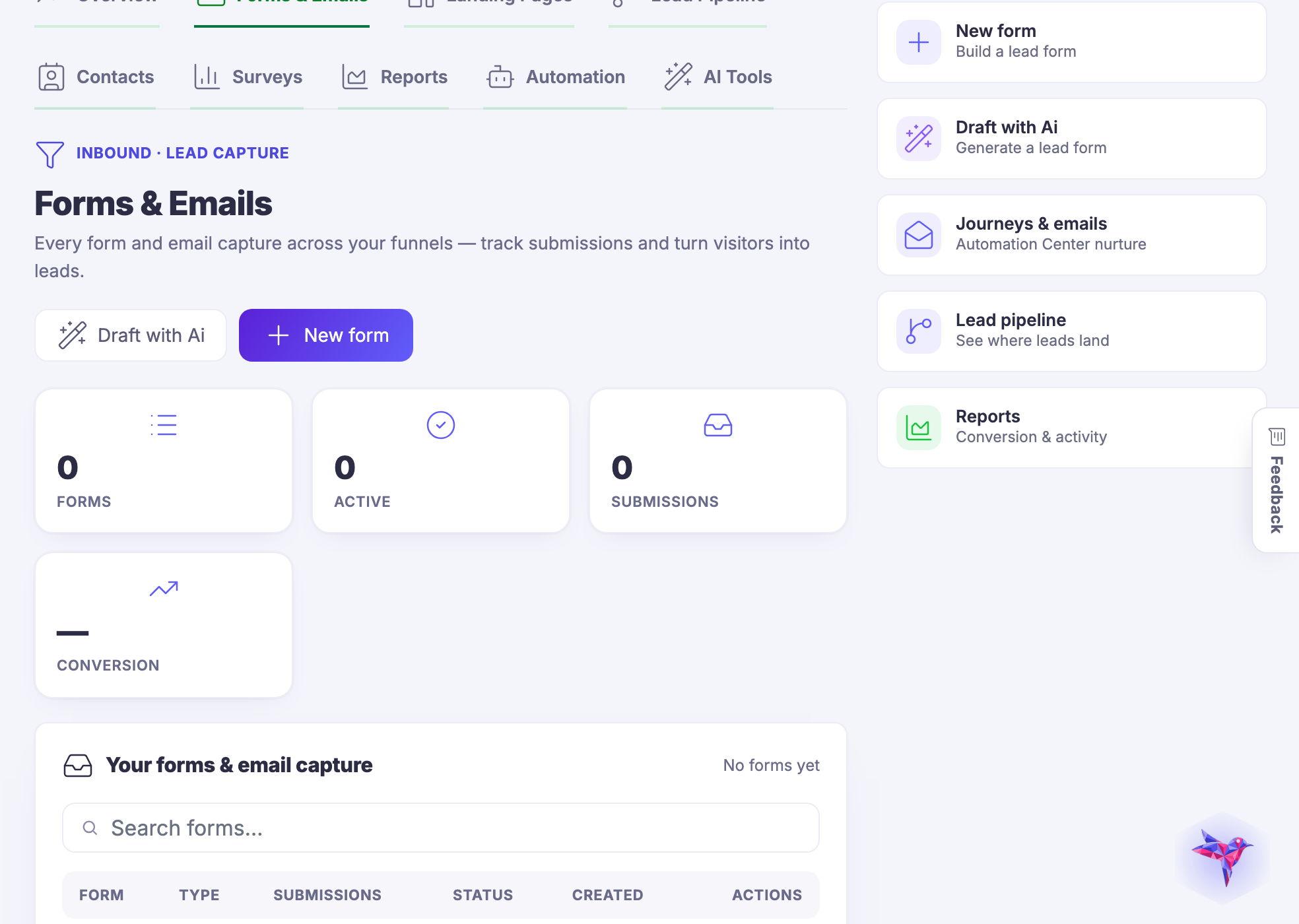
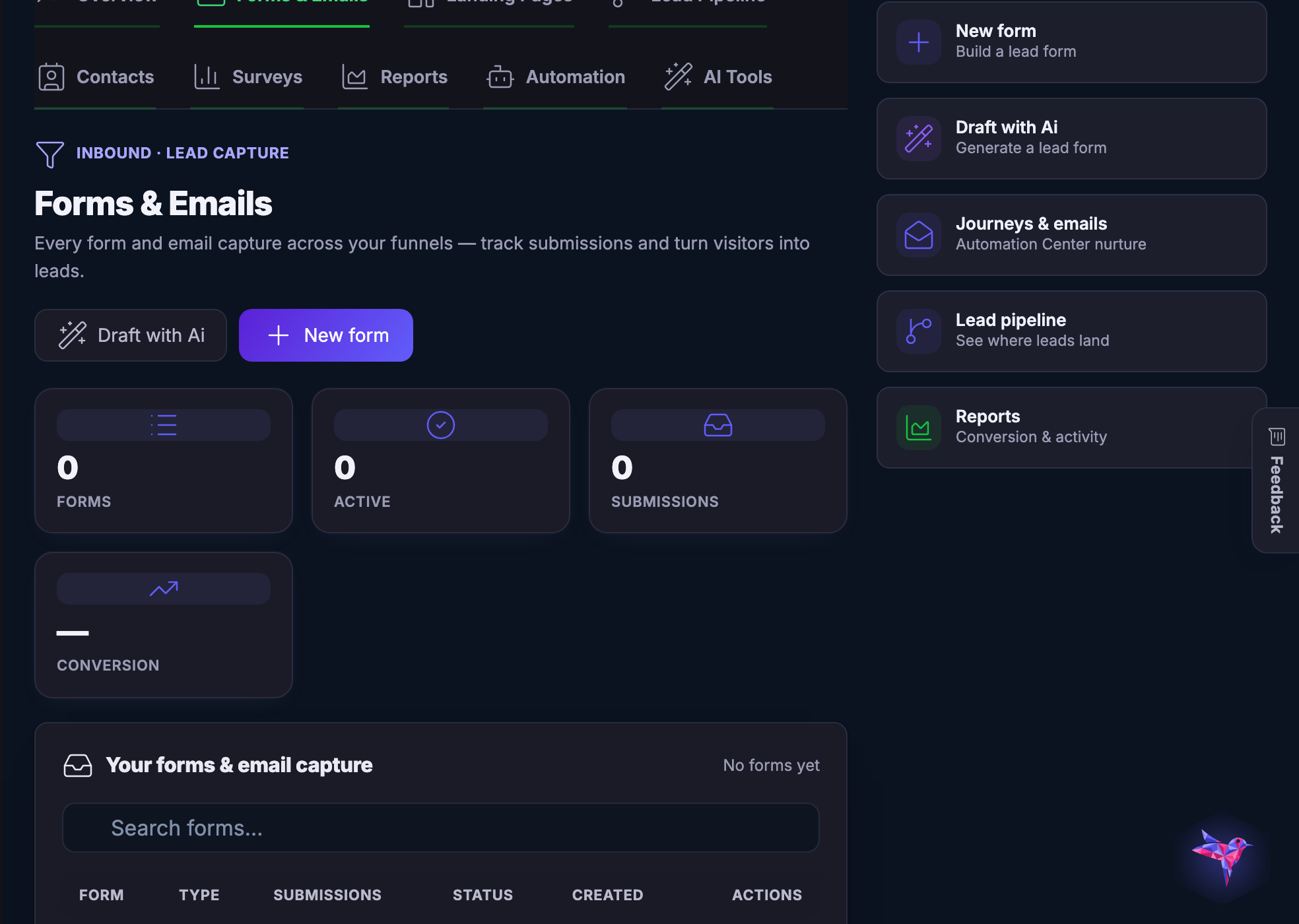
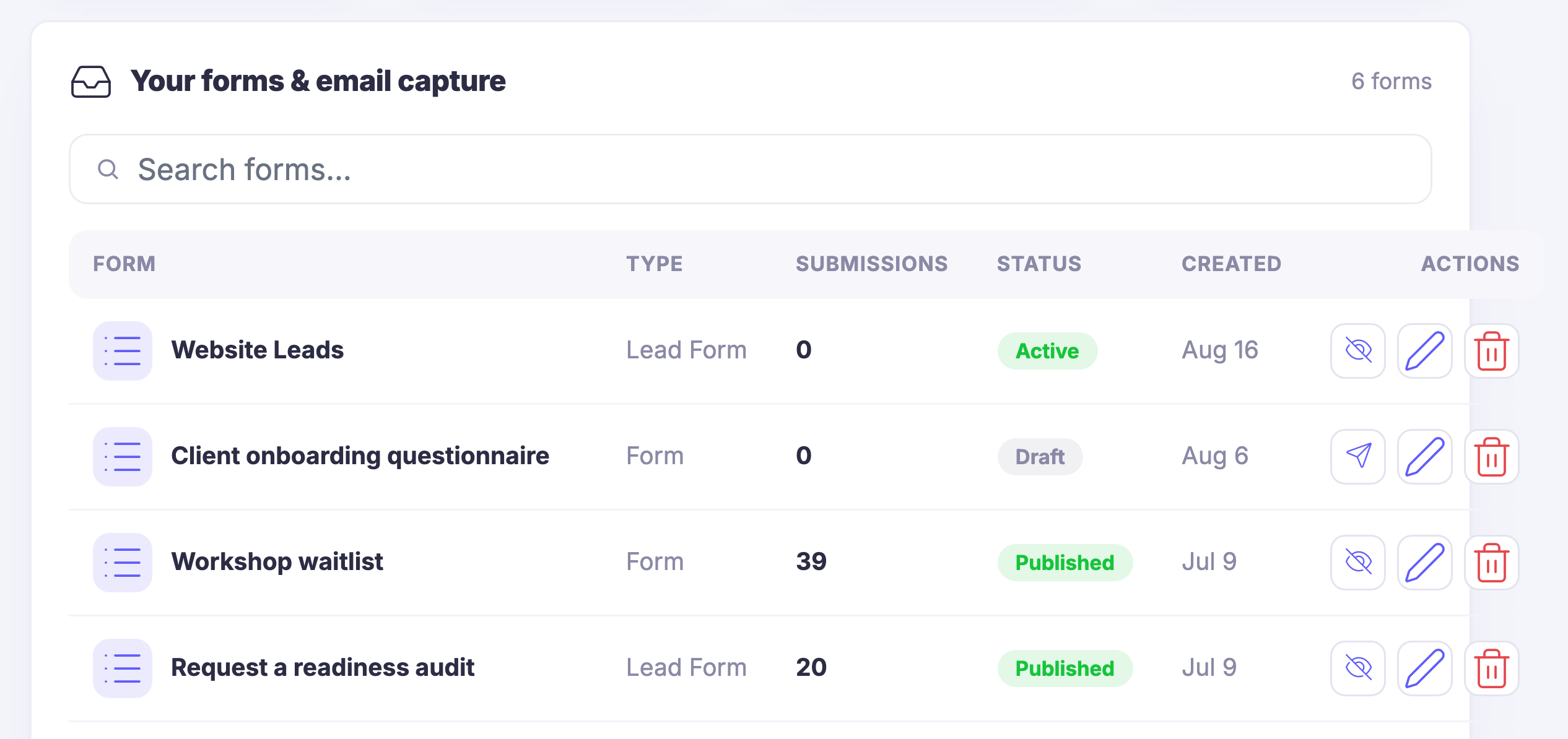
Your forms and email capture, the list itself: every form and email capture across your funnels in one place — a website lead form, a client onboarding questionnaire, a workshop waitlist, a readiness-audit lead form — each row giving its type, the submissions it has taken, whether it is active, published or still a draft, and the day it was created, with the controls that take it down, edit it or remove it sitting on the row itself. Above the rows, a search that narrows the list. The list runs on past the foot of the frame, and the email automations that fire from these forms sit below it.Your forms and email capture, the list itself: every form and email capture across your funnels in one place — a website lead form, a client onboarding questionnaire, a workshop waitlist, a readiness-audit lead form — each row giving its type, the submissions it has taken, whether it is active, published or still a draft, and the day it was created, with the controls that take it down, edit it or remove it sitting on the row itself. Above the rows, a search that narrows the list. The list runs on past the foot of the frame, and the email automations that fire from these forms sit below it.
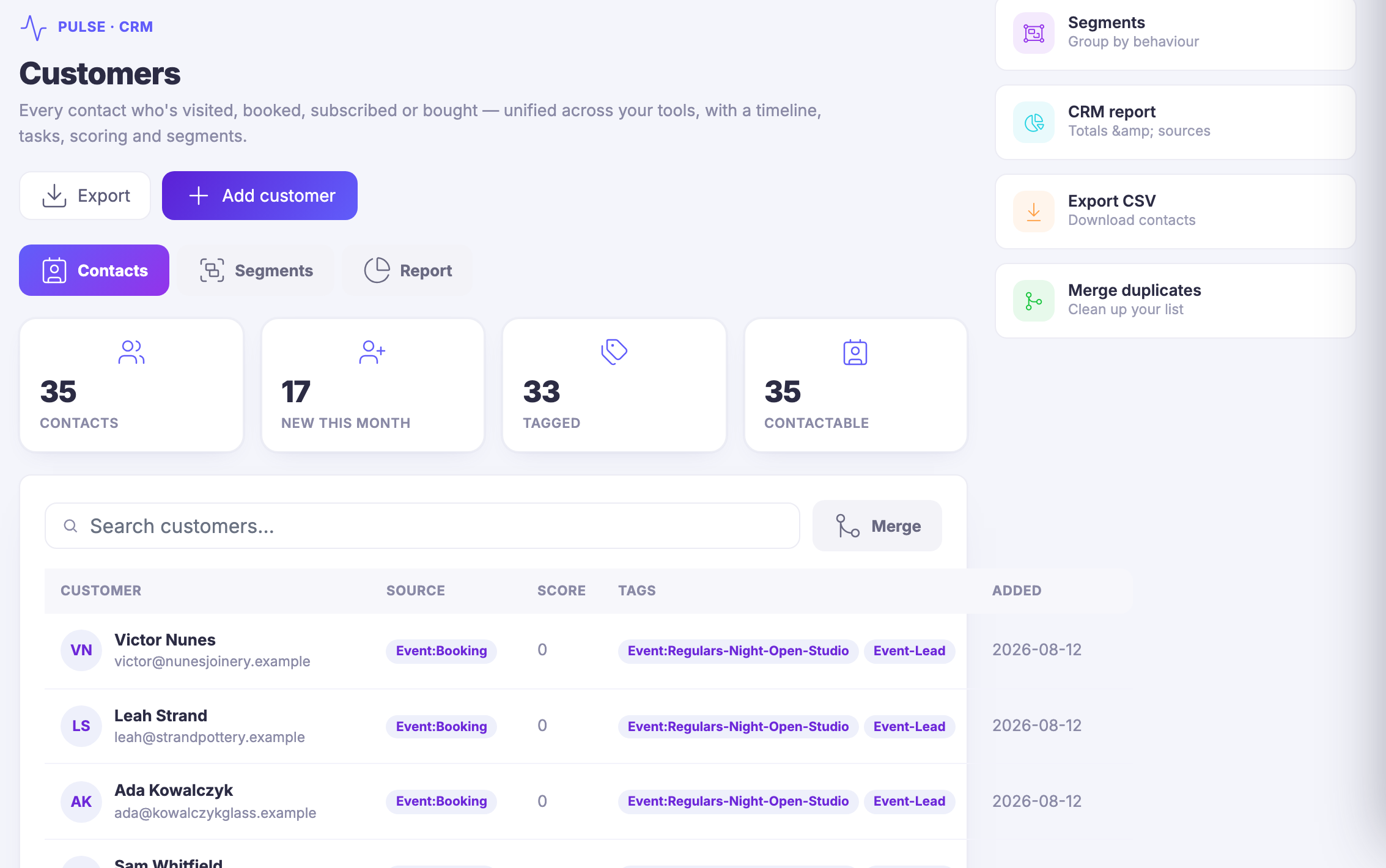
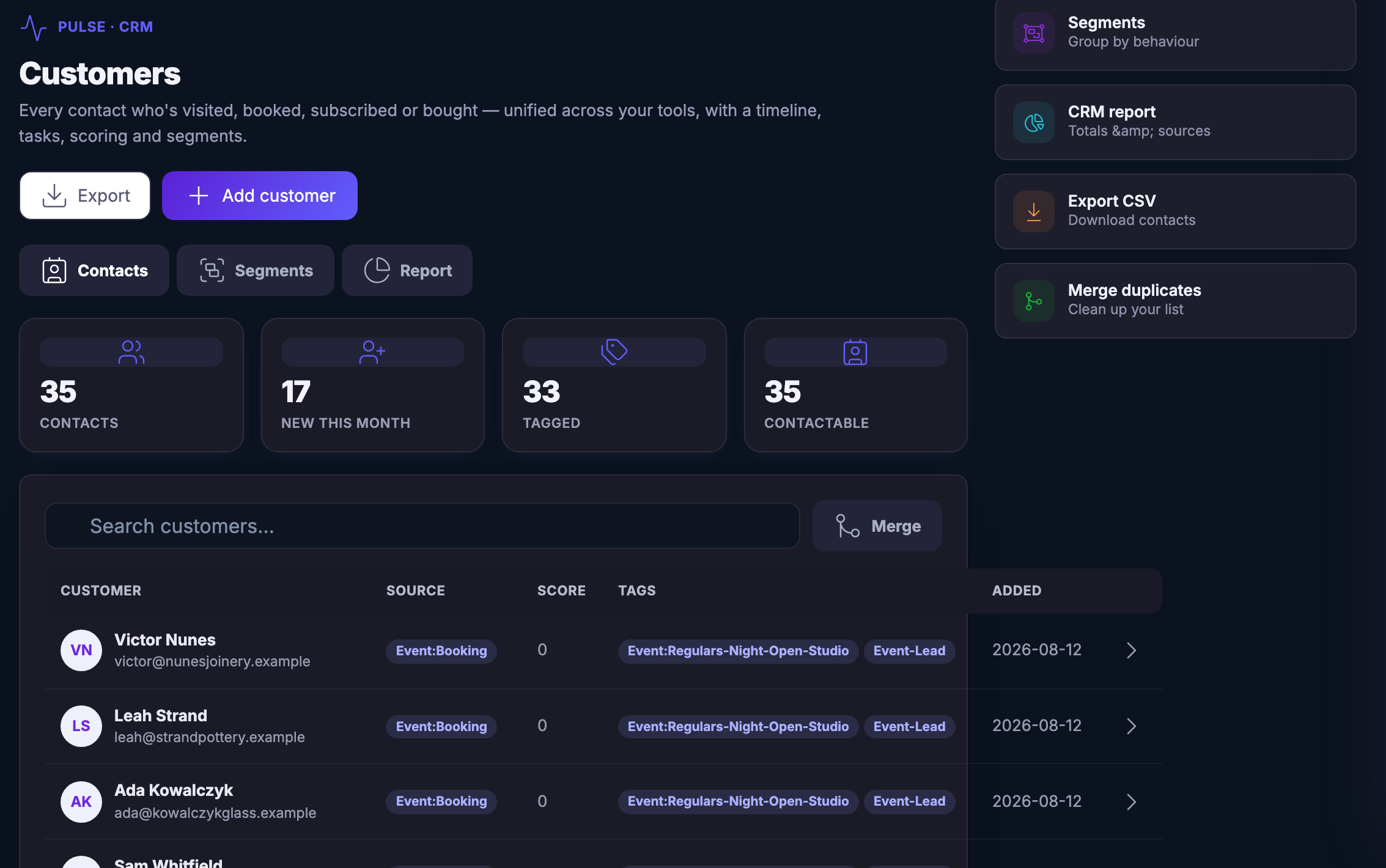
The Customers book: everyone who has visited, booked, subscribed or bought, unified across your tools into one record each, with the door they came through named on every row and the tags that grouped them.The Customers book: everyone who has visited, booked, subscribed or bought, unified across your tools into one record each, with the door they came through named on every row and the tags that grouped them.
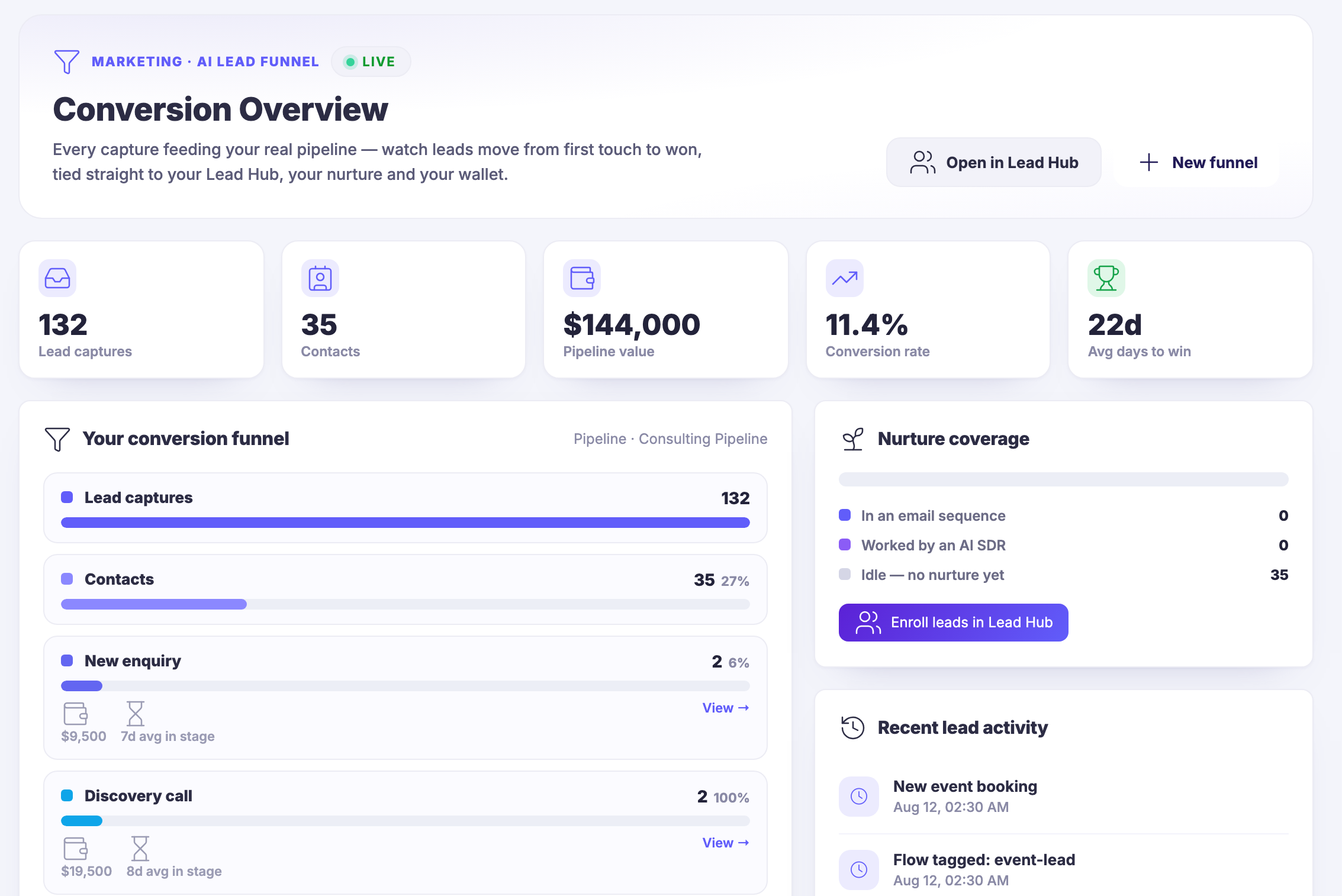
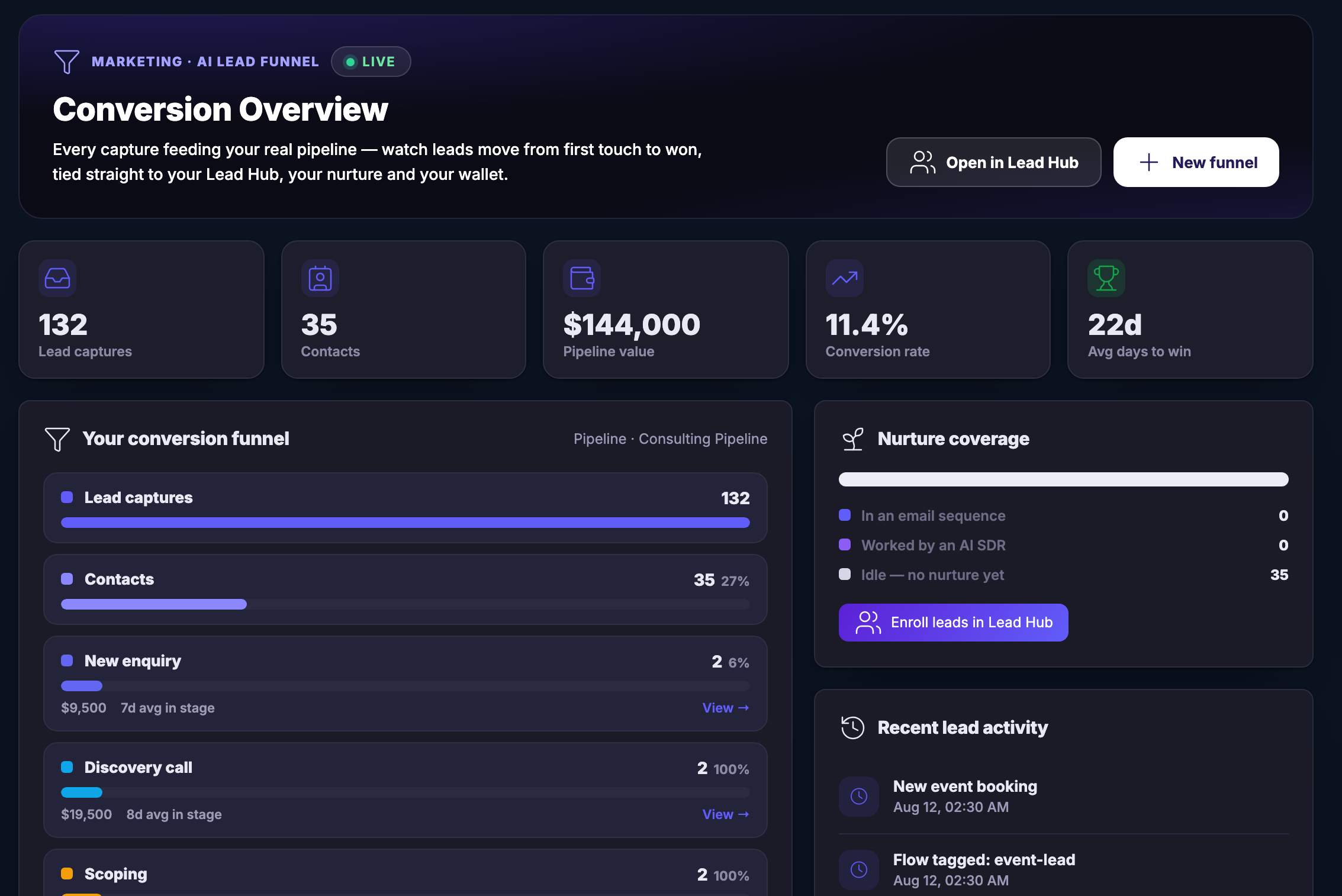
Conversion Overview: the path from a lead capture to a won deal, laid out stage by stage with the pipeline it belongs to, the nurture coverage beside it, and the most recent lead activity underneath.Conversion Overview: the path from a lead capture to a won deal, laid out stage by stage with the pipeline it belongs to, the nurture coverage beside it, and the most recent lead activity underneath.
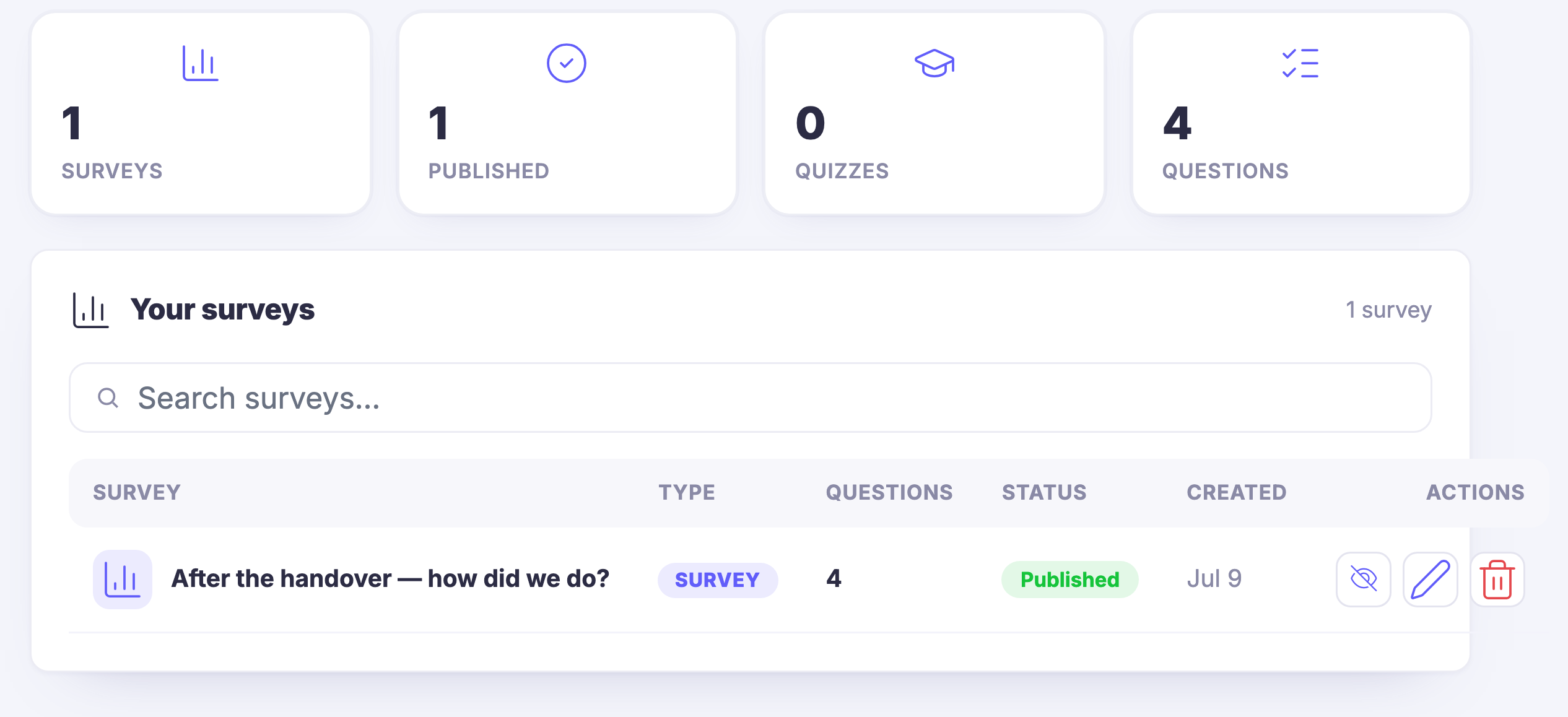
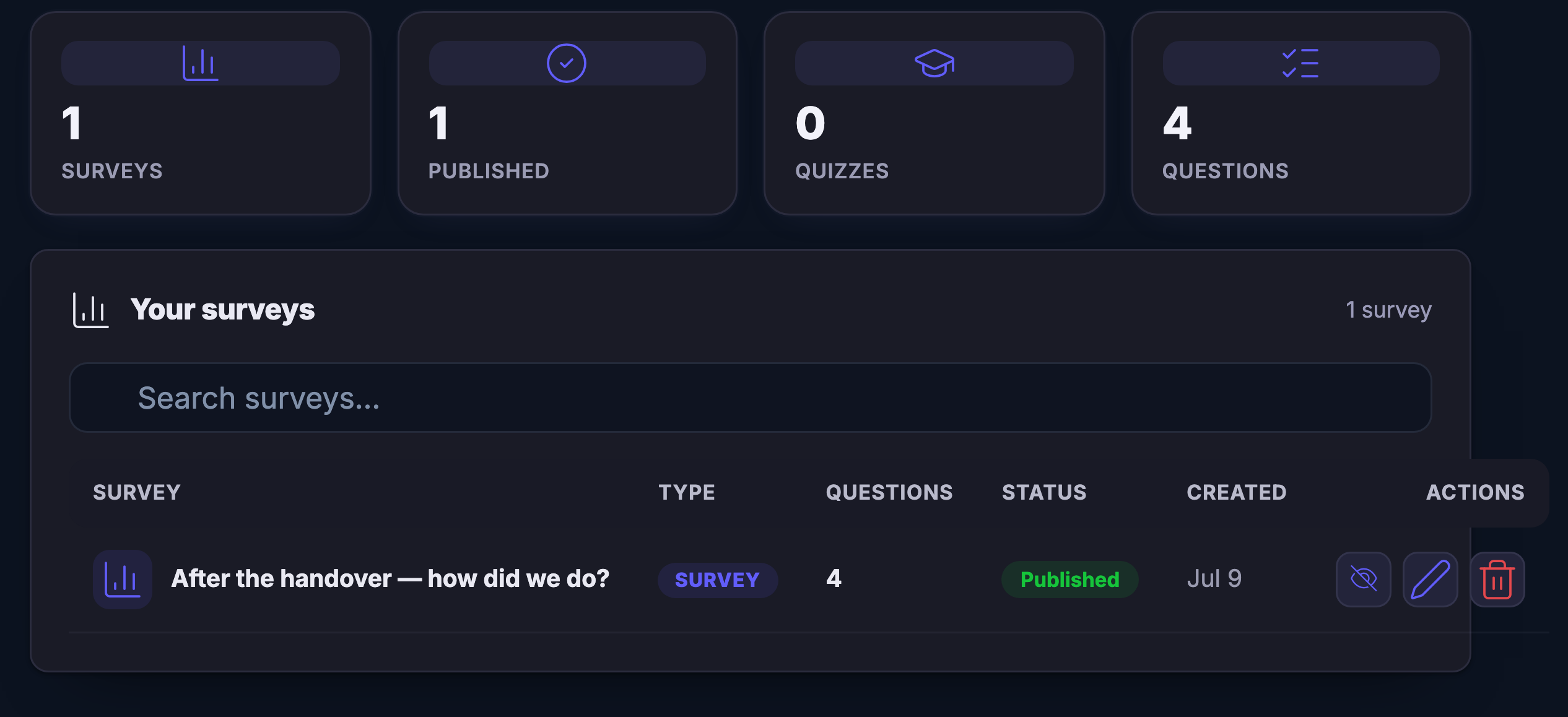
Surveys and quizzes on the same shelf as your forms: a published survey with its questions, ready to collect feedback, qualify a lead or ask a quick question while the attention is still warm.Surveys and quizzes on the same shelf as your forms: a published survey with its questions, ready to collect feedback, qualify a lead or ask a quick question while the attention is still warm.
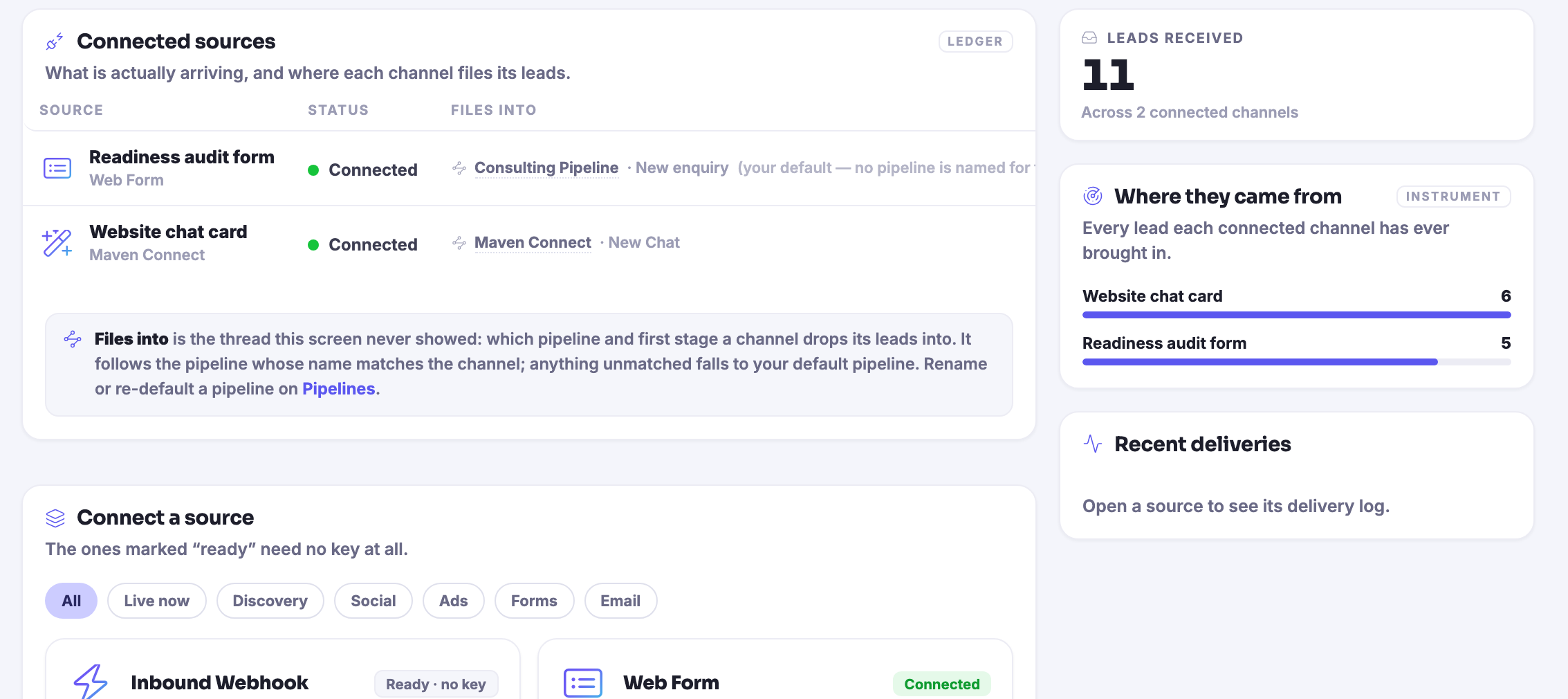
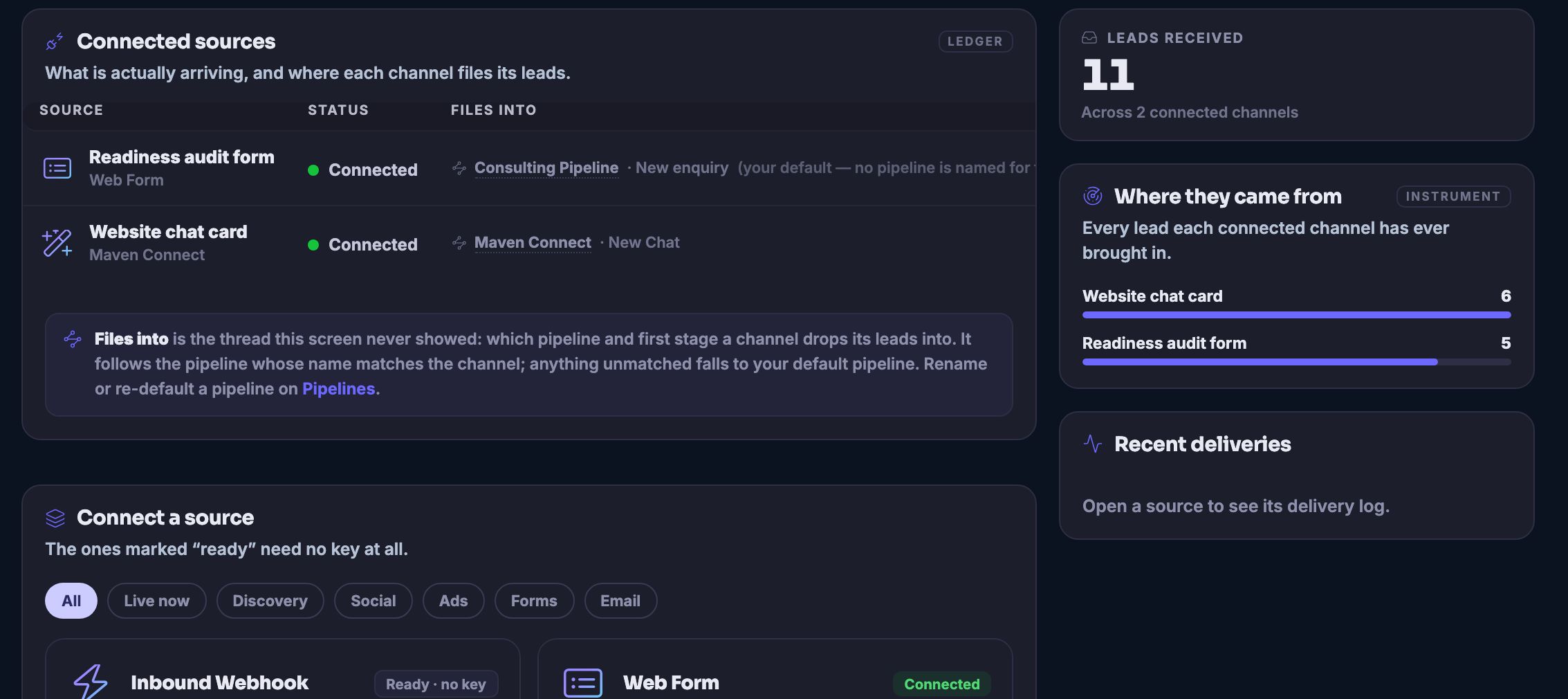
The Sources ledger: what is actually arriving and where each channel files its leads, with the pipeline and first stage each one drops into named beside it.The Sources ledger: what is actually arriving and where each channel files its leads, with the pipeline and first stage each one drops into named beside it.

फ़ॉर्म और ईमेल

बंद करें
Your forms and email capture, the list itself: every form and email capture across your funnels in one place — a website lead form, a client onboarding questionnaire, a workshop waitlist, a readiness-audit lead form — each row giving its type, the submissions it has taken, whether it is active, published or still a draft, and the day it was created, with the controls that take it down, edit it or remove it sitting on the row itself. Above the rows, a search that narrows the list. The list runs on past the foot of the frame, and the email automations that fire from these forms sit below it.Your forms and email capture, the list itself: every form and email capture across your funnels in one place — a website lead form, a client onboarding questionnaire, a workshop waitlist, a readiness-audit lead form — each row giving its type, the submissions it has taken, whether it is active, published or still a draft, and the day it was created, with the controls that take it down, edit it or remove it sitting on the row itself. Above the rows, a search that narrows the list. The list runs on past the foot of the frame, and the email automations that fire from these forms sit below it.

फ़ॉर्म और ईमेल

बंद करें
The Customers book: everyone who has visited, booked, subscribed or bought, unified across your tools into one record each, with the door they came through named on every row and the tags that grouped them.The Customers book: everyone who has visited, booked, subscribed or bought, unified across your tools into one record each, with the door they came through named on every row and the tags that grouped them.

फ़ॉर्म और ईमेल

बंद करें
Conversion Overview: the path from a lead capture to a won deal, laid out stage by stage with the pipeline it belongs to, the nurture coverage beside it, and the most recent lead activity underneath.Conversion Overview: the path from a lead capture to a won deal, laid out stage by stage with the pipeline it belongs to, the nurture coverage beside it, and the most recent lead activity underneath.

फ़ॉर्म और ईमेल

बंद करें
Surveys and quizzes on the same shelf as your forms: a published survey with its questions, ready to collect feedback, qualify a lead or ask a quick question while the attention is still warm.Surveys and quizzes on the same shelf as your forms: a published survey with its questions, ready to collect feedback, qualify a lead or ask a quick question while the attention is still warm.

फ़ॉर्म और ईमेल

बंद करें
The Sources ledger: what is actually arriving and where each channel files its leads, with the pipeline and first stage each one drops into named beside it.The Sources ledger: what is actually arriving and where each channel files its leads, with the pipeline and first stage each one drops into named beside it.

A look inside Forms & Emails

Stills from the product, one after the next.

Your forms and email capture, the list itself: every form and email capture across your funnels in one place — a website lead form, a client onboarding questionnaire, a workshop waitlist, a readiness-audit lead form — each row giving its type, the submissions it has taken, whether it is active, published or still a draft, and the day it was created, with the controls that take it down, edit it or remove it sitting on the row itself. Above the rows, a search that narrows the list. The list runs on past the foot of the frame, and the email automations that fire from these forms sit below it.Your forms and email capture, the list itself: every form and email capture across your funnels in one place — a website lead form, a client onboarding questionnaire, a workshop waitlist, a readiness-audit lead form — each row giving its type, the submissions it has taken, whether it is active, published or still a draft, and the day it was created, with the controls that take it down, edit it or remove it sitting on the row itself. Above the rows, a search that narrows the list. The list runs on past the foot of the frame, and the email automations that fire from these forms sit below it.
The Customers book: everyone who has visited, booked, subscribed or bought, unified across your tools into one record each, with the door they came through named on every row and the tags that grouped them.The Customers book: everyone who has visited, booked, subscribed or bought, unified across your tools into one record each, with the door they came through named on every row and the tags that grouped them.
Conversion Overview: the path from a lead capture to a won deal, laid out stage by stage with the pipeline it belongs to, the nurture coverage beside it, and the most recent lead activity underneath.Conversion Overview: the path from a lead capture to a won deal, laid out stage by stage with the pipeline it belongs to, the nurture coverage beside it, and the most recent lead activity underneath.
Surveys and quizzes on the same shelf as your forms: a published survey with its questions, ready to collect feedback, qualify a lead or ask a quick question while the attention is still warm.Surveys and quizzes on the same shelf as your forms: a published survey with its questions, ready to collect feedback, qualify a lead or ask a quick question while the attention is still warm.
The Sources ledger: what is actually arriving and where each channel files its leads, with the pipeline and first stage each one drops into named beside it.The Sources ledger: what is actually arriving and where each channel files its leads, with the pipeline and first stage each one drops into named beside it.

Conversion Overview — platform screenshots

Real screens from the product. Open any one full size, or switch the set to light or dark.

बंद करें
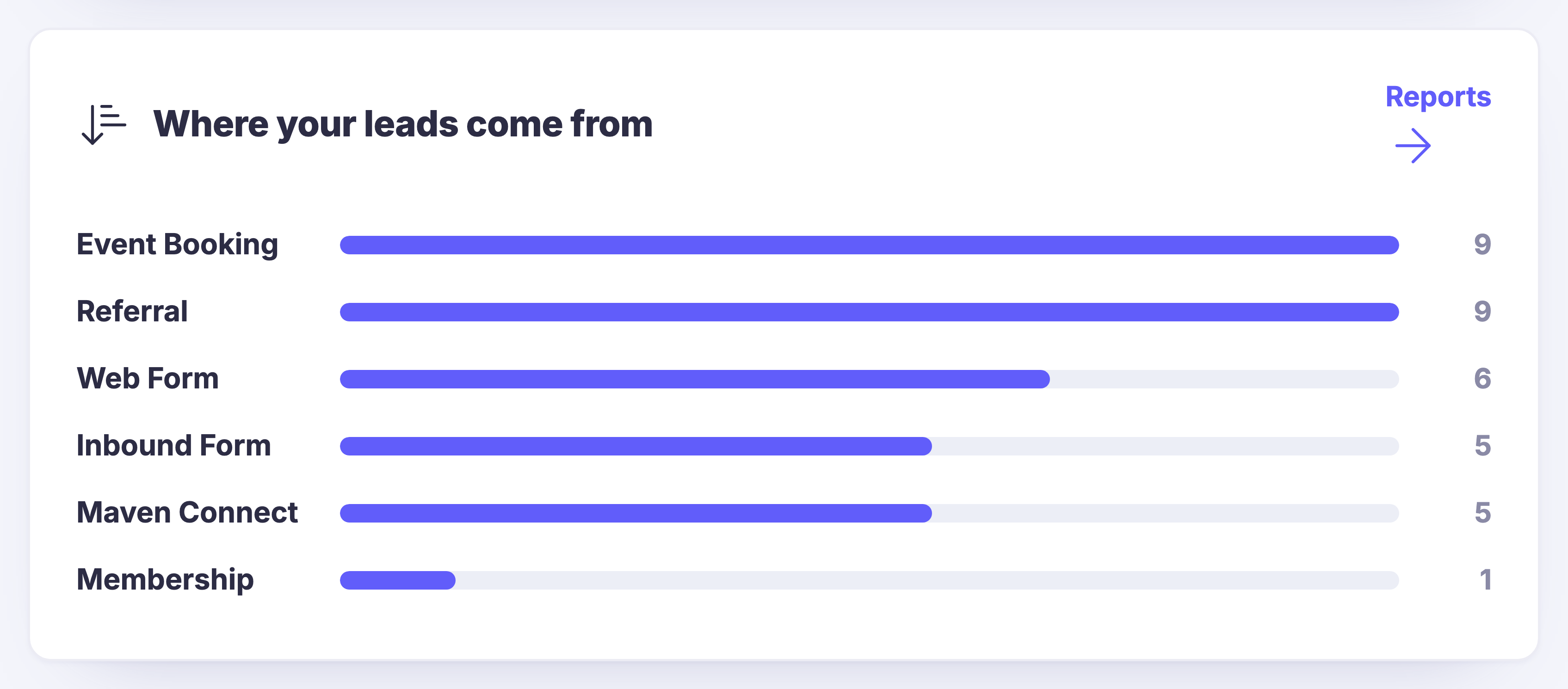
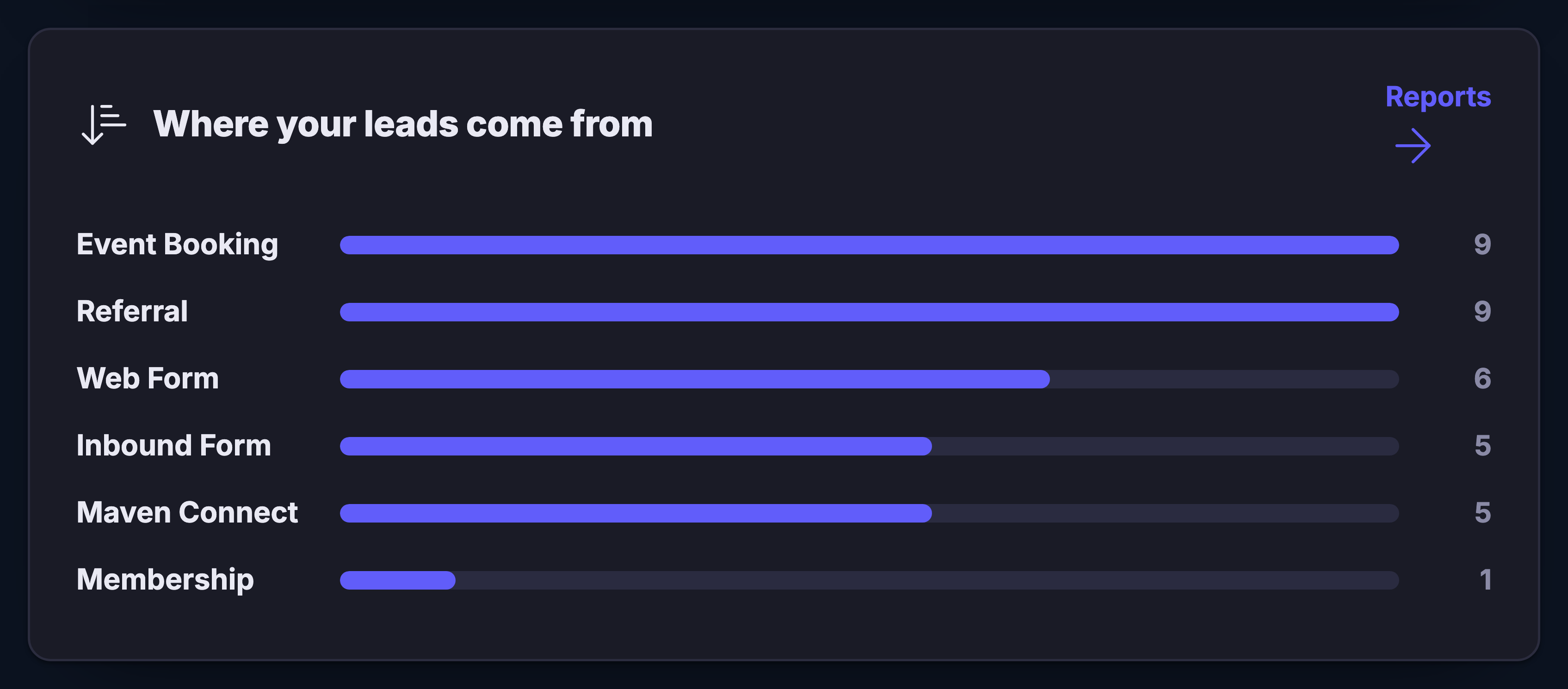
The Where your leads come from card on the Conversion Overview screen: the named ways in — an event booking, a referral, a web form, an inbound form, the platform’s own Maven Connect and a membership — each with its own bar and its own count, event bookings and referrals running longest and memberships shortest, and a control through to Reports in the corner. This is the panel that ties every captured lead back to the door it came in through.The Where your leads come from card on the Conversion Overview screen: the named ways in — an event booking, a referral, a web form, an inbound form, the platform’s own Maven Connect and a membership — each with its own bar and its own count, event bookings and referrals running longest and memberships shortest, and a control through to Reports in the corner. This is the panel that ties every captured lead back to the door it came in through.
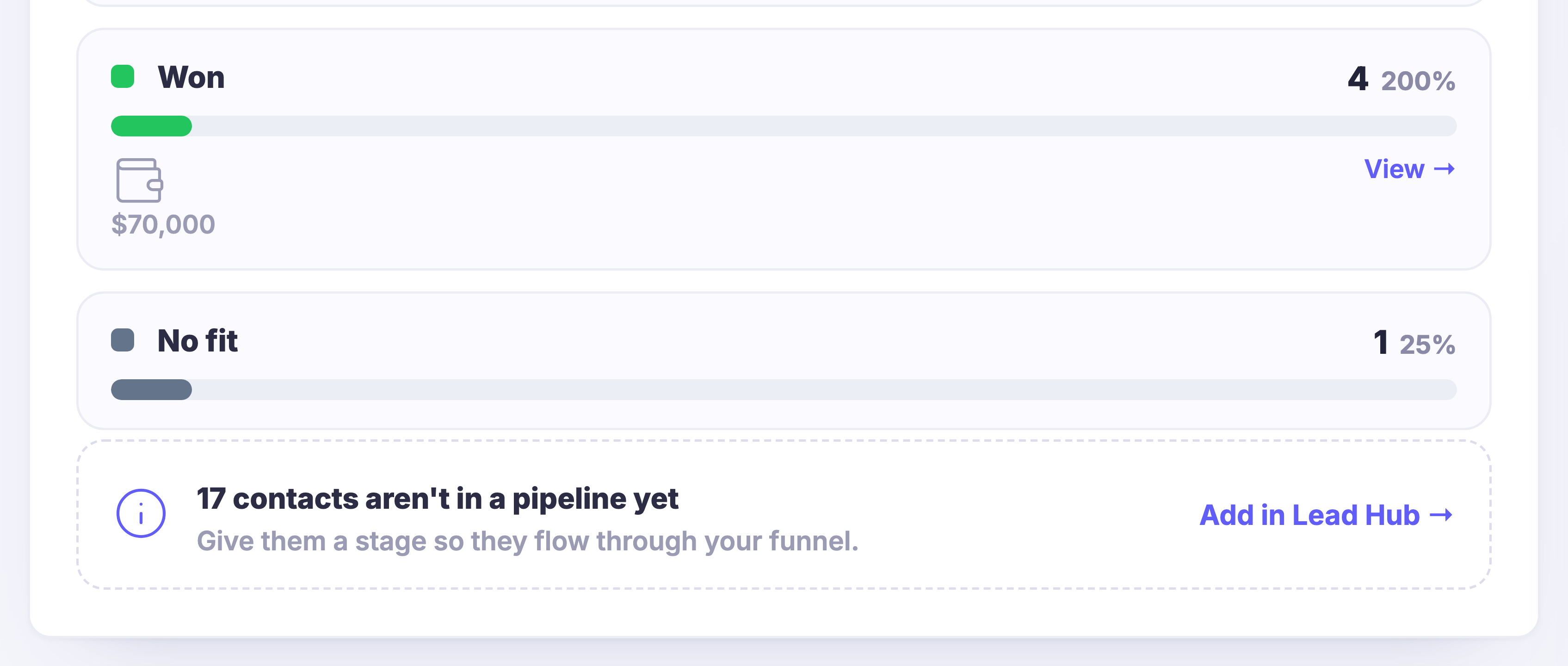
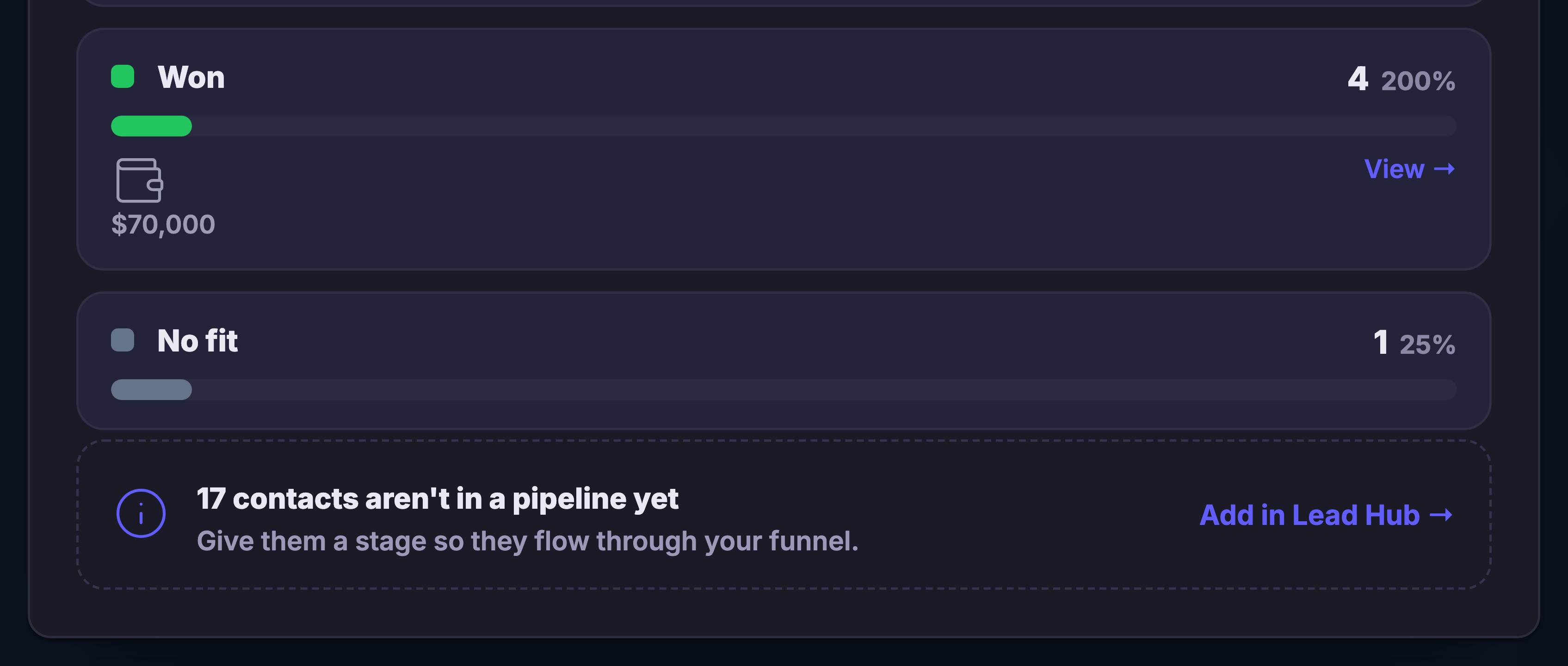
The closing stages of the conversion funnel, seen close up at the end of the stage list: the Won stage with its green bar, its total value and a View control, the No fit stage under it with its own count, and beneath both a dashed note that some contacts are not in a pipeline yet, with the control that adds them in Lead Hub so they flow through the funnel.The closing stages of the conversion funnel, seen close up at the end of the stage list: the Won stage with its green bar, its total value and a View control, the No fit stage under it with its own count, and beneath both a dashed note that some contacts are not in a pipeline yet, with the control that adds them in Lead Hub so they flow through the funnel.
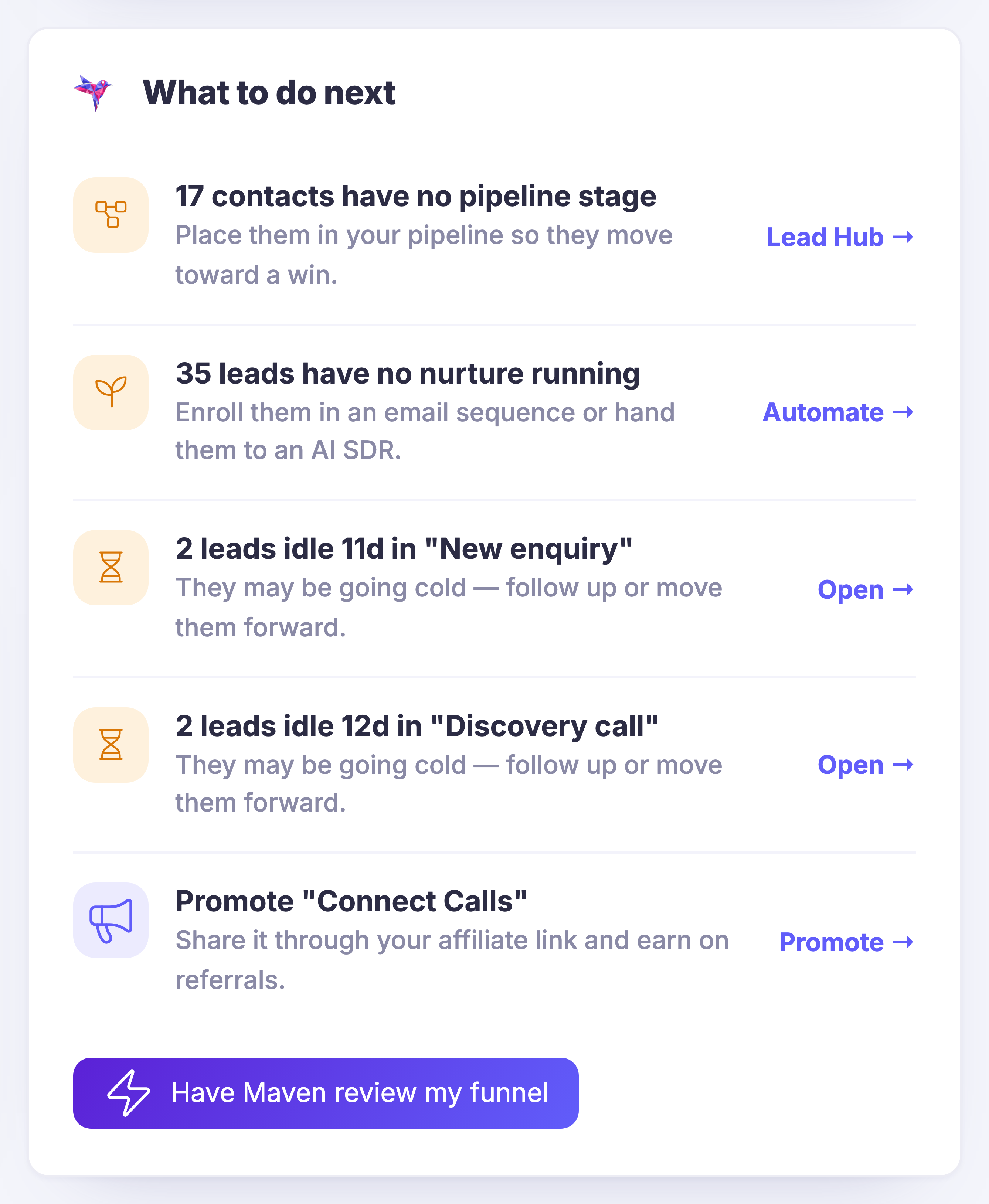
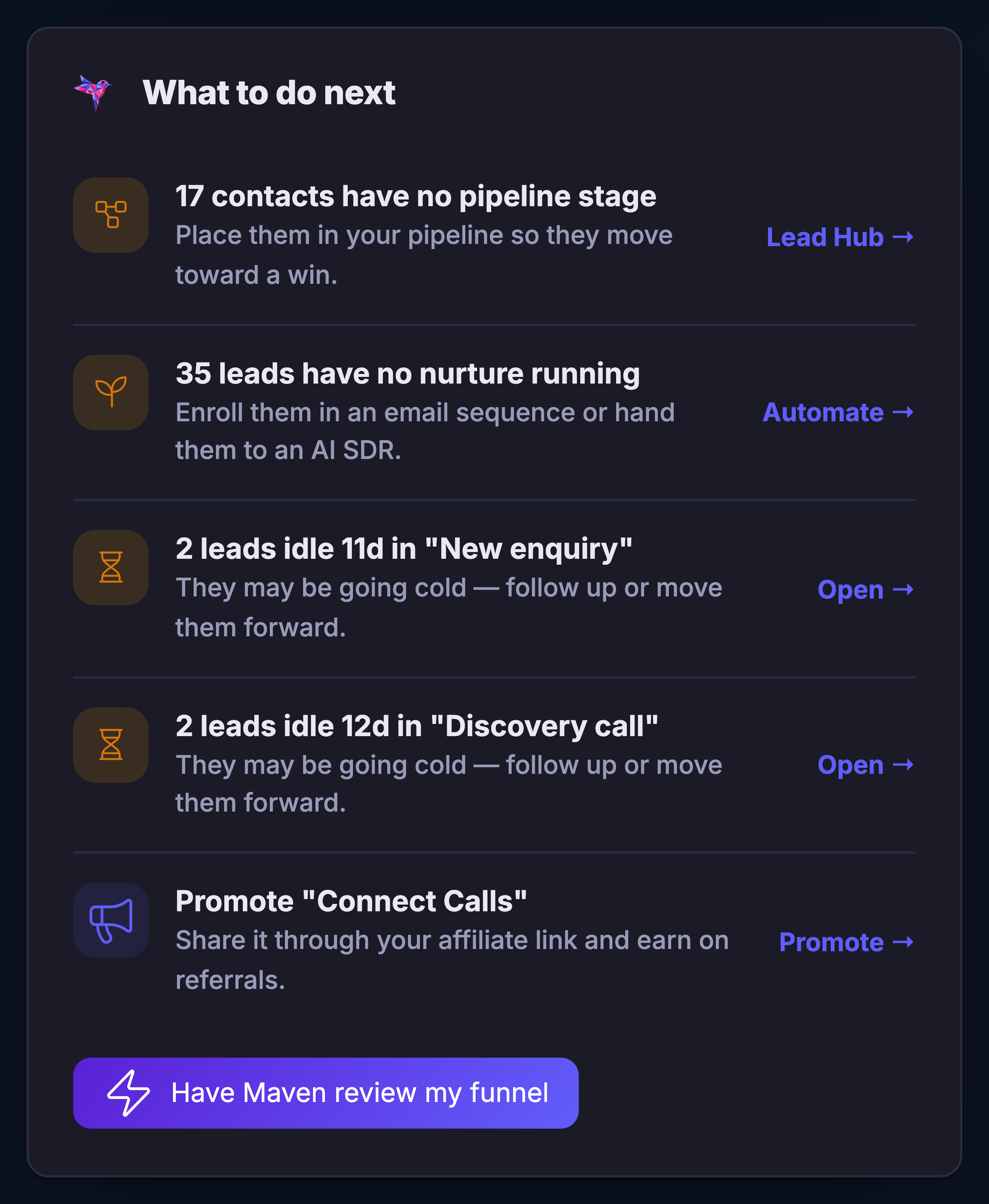
The What to do next panel from the screen’s right column: Maven’s hummingbird over the moves the screen is proposing off the funnel as it currently stands — each one written as a plain next step, and each carrying its own control through to the place that work actually happens, so the suggestion and the door to it arrive together. The Have Maven review my funnel control closes the panel.The What to do next panel from the screen’s right column: Maven’s hummingbird over the moves the screen is proposing off the funnel as it currently stands — each one written as a plain next step, and each carrying its own control through to the place that work actually happens, so the suggestion and the door to it arrive together. The Have Maven review my funnel control closes the panel.

रूपांतरण अवलोकन

बंद करें
The Where your leads come from card on the Conversion Overview screen: the named ways in — an event booking, a referral, a web form, an inbound form, the platform’s own Maven Connect and a membership — each with its own bar and its own count, event bookings and referrals running longest and memberships shortest, and a control through to Reports in the corner. This is the panel that ties every captured lead back to the door it came in through.The Where your leads come from card on the Conversion Overview screen: the named ways in — an event booking, a referral, a web form, an inbound form, the platform’s own Maven Connect and a membership — each with its own bar and its own count, event bookings and referrals running longest and memberships shortest, and a control through to Reports in the corner. This is the panel that ties every captured lead back to the door it came in through.

रूपांतरण अवलोकन

बंद करें
The closing stages of the conversion funnel, seen close up at the end of the stage list: the Won stage with its green bar, its total value and a View control, the No fit stage under it with its own count, and beneath both a dashed note that some contacts are not in a pipeline yet, with the control that adds them in Lead Hub so they flow through the funnel.The closing stages of the conversion funnel, seen close up at the end of the stage list: the Won stage with its green bar, its total value and a View control, the No fit stage under it with its own count, and beneath both a dashed note that some contacts are not in a pipeline yet, with the control that adds them in Lead Hub so they flow through the funnel.

रूपांतरण अवलोकन

बंद करें
The What to do next panel from the screen’s right column: Maven’s hummingbird over the moves the screen is proposing off the funnel as it currently stands — each one written as a plain next step, and each carrying its own control through to the place that work actually happens, so the suggestion and the door to it arrive together. The Have Maven review my funnel control closes the panel.The What to do next panel from the screen’s right column: Maven’s hummingbird over the moves the screen is proposing off the funnel as it currently stands — each one written as a plain next step, and each carrying its own control through to the place that work actually happens, so the suggestion and the door to it arrive together. The Have Maven review my funnel control closes the panel.

A look inside Conversion Overview

Stills from the product, one after the next.

The Where your leads come from card on the Conversion Overview screen: the named ways in — an event booking, a referral, a web form, an inbound form, the platform’s own Maven Connect and a membership — each with its own bar and its own count, event bookings and referrals running longest and memberships shortest, and a control through to Reports in the corner. This is the panel that ties every captured lead back to the door it came in through.The Where your leads come from card on the Conversion Overview screen: the named ways in — an event booking, a referral, a web form, an inbound form, the platform’s own Maven Connect and a membership — each with its own bar and its own count, event bookings and referrals running longest and memberships shortest, and a control through to Reports in the corner. This is the panel that ties every captured lead back to the door it came in through.
The closing stages of the conversion funnel, seen close up at the end of the stage list: the Won stage with its green bar, its total value and a View control, the No fit stage under it with its own count, and beneath both a dashed note that some contacts are not in a pipeline yet, with the control that adds them in Lead Hub so they flow through the funnel.The closing stages of the conversion funnel, seen close up at the end of the stage list: the Won stage with its green bar, its total value and a View control, the No fit stage under it with its own count, and beneath both a dashed note that some contacts are not in a pipeline yet, with the control that adds them in Lead Hub so they flow through the funnel.
The What to do next panel from the screen’s right column: Maven’s hummingbird over the moves the screen is proposing off the funnel as it currently stands — each one written as a plain next step, and each carrying its own control through to the place that work actually happens, so the suggestion and the door to it arrive together. The Have Maven review my funnel control closes the panel.The What to do next panel from the screen’s right column: Maven’s hummingbird over the moves the screen is proposing off the funnel as it currently stands — each one written as a plain next step, and each carrying its own control through to the place that work actually happens, so the suggestion and the door to it arrive together. The Have Maven review my funnel control closes the panel.
Ai Mail & Automations

Write the follow-up once. Let the answers choose the path.

A captured lead can enter an email automation built around what they actually asked for. Send the right guide, offer the right booking link, wait the right amount of time, and stop the sequence the moment a human conversation begins.

1
Personal from the first sendUse their name, source, interest, and answers without copying a thing.
2
Branch on real behaviorClicks, replies, bookings, and silence can each lead somewhere different.
3
Automation knows when to leaveA reply pauses the sequence so the relationship becomes human at the right moment.
Trigger · immediatelyCampaign-interest form submitted

Kai enters with the answers and Instagram source attached.

Send · nowDeliver the launch-planning guide

The promised resource arrives while the visit is still fresh.

Branch · if clickedOffer a strategy call

The booking link appears only after meaningful interest.

Exit · on replyHand the conversation to a person

The sequence stops; the complete context stays on the lead.

Measured to money

Know which door made the sale.

Lead capture does not end at a submission count. Because the source stays connected as the relationship moves through your pipeline, you can see which page, post, event, or partner created customers—not merely clicks.

Compare offers by qualified leads, not raw traffic.
See where strong customers actually entered.
Put the next marketing hour behind what earns.

Maven adds this one: every tool on this deck opens a door for somebody to walk through — this is the screen that says which doors they actually came through, and where they went next.

रूपांतरण अवलोकन

One screen for the whole path from first touch to won — every way in feeding your real pipeline, and the places it thins in plain view.

Captures become customers, on one screenThe funnel is drawn from your live pipeline and closes the story properly — through won, and honestly past it to no fit — so you compare offers by qualified people rather than by clicks.
Every lead remembers its doorThe referral, the web form, the inbound form, the chat — the source stays on the lead all the way to the sale, and this screen ranks the doors by what actually came through them.
The leak has a name and a next stepContacts that never entered a stage and leads with no follow-up running are pointed out on the screen itself, each with the control that hands them to the pipeline, a sequence, or Maven.
Read more about Conversion Overview

Traffic is a number that flatters you; this screen keeps the part that became people.

The funnel here is not a diagram you drew in a planning meeting — it is drawn from your pipeline as it stands. Each stage is one of yours, each bar is the people standing in it now, and the story runs all the way to the end: won, and the honest column past it for the ones that were never a fit.

Every lead carries the door it came in through — the page, the post, the event, the partner — and keeps carrying it as the relationship moves. So the question this screen answers is not which door got clicked; it is which door made customers, and the doors are ranked by exactly that.

Leaks do not announce themselves; they just sit still. This screen points at them: the contacts that never entered a stage, the leads with no follow-up running, the capture that deserves more traffic than it gets — each with the control that moves it on, into the pipeline or into a sequence, without leaving the page. You can even hand the whole funnel to Maven for a review.

And it is wired in, not bolted on. The funnel opens in Lead Hub, the idle leads hand straight to your nurture, and a won deal is real revenue — every capture feeding your real pipeline, tied to your Lead Hub, your nurture and your wallet, as the screen itself puts it.

What it actually does

  • The funnel from first capture through won, drawn from your live pipeline
  • Source kept on every lead from the door to the sale, and the doors ranked
  • The unstaged and the un-nurtured surfaced with their next step attached

What that changes for you

  • You put the next marketing hour behind the door that earns
  • You compare offers by qualified leads, not raw traffic
  • Nothing drifts out of the funnel unseen

You come away with the shape of the path from stranger to customer — and the exact places it thins.

A look inside Conversion Overview

Catch the next person who leans in.

Build the path once. Let every new lead arrive with context, a destination, and a next step.

Create your first capture path

The real screens

Lead capture, signed in.

Two screens from a real account: the forms and emails that bring people in, and the activity view that shows whether it worked.

Forms and emails — The doors you put in front of people, and the messages that go out when somebody walks through one.
Forms and emails

The doors you put in front of people, and the messages that go out when somebody walks through one.

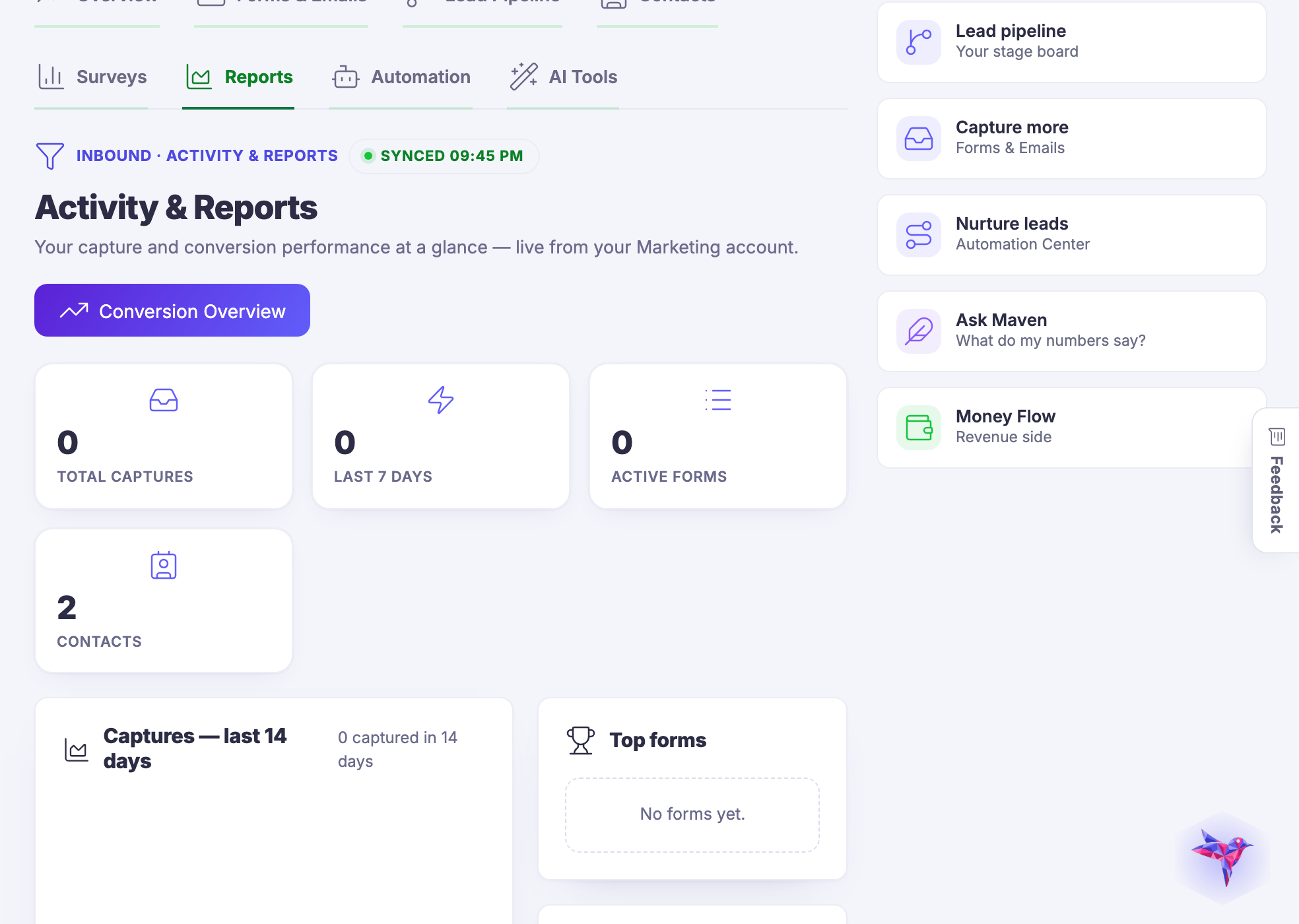
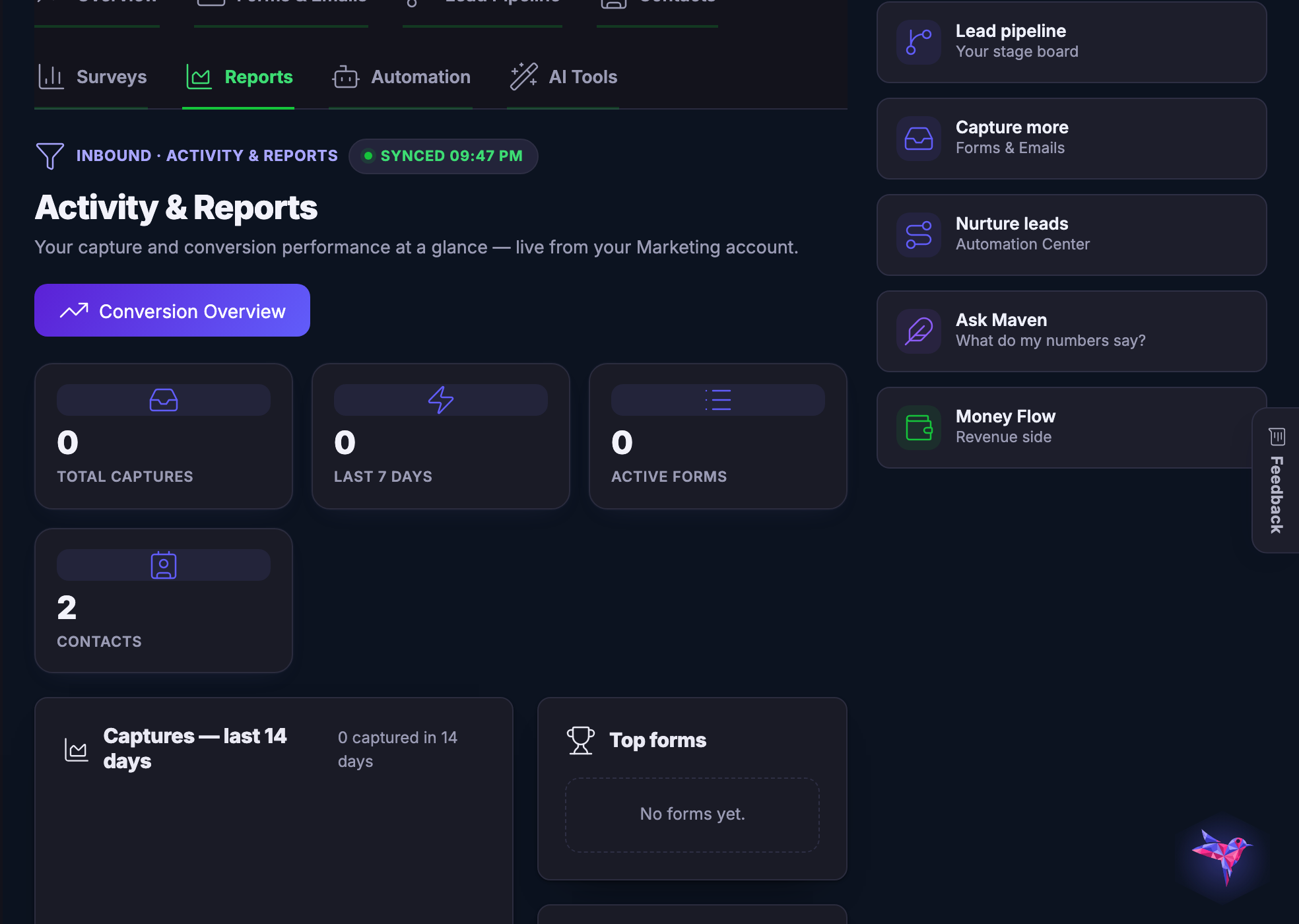
Activity and reports — What actually came in, from where, and what happened next.
Activity and reports

What actually came in, from where, and what happened next.

Captured from a demo business on a live account. The numbers on these screens are that account’s own, and a new account’s are small.

Catch the moment while the moment is still warm.

Join the beta program
One connected destination

Go deeper without losing the thread.

Each title beginning with a hashtag is a direct destination. The navigation can bring you to the exact part of the story without creating another disconnected page.

Ask the question while attention is still warm.

Ask your audience directly.

Surveys that live where your customers already are — answered in a tap, analyzed without a spreadsheet, and remembered on each contact's card.

Next Up: Local growth

Build reviews, loyalty and local visibility from every customer interaction.

Maven से पूछें