消息

This is the product's own frame. Your conversations appear here once you have an account.

Get started now
通知

This is the product's own frame. Alerts about your business appear here once you have an account.

中文
You went live everywhere at once

One camera. Every stage.

GoLive streams you to your channels simultaneously — one setup, one show, every audience you've built.

The idea, drawn

One camera. Every stage. One recording afterward.

Going live in more than one place used to mean choosing. GoLive takes one setup and one show and sends it to every channel you have built an audience on — and then hands you back the recording to use again.

One camera reaching every stage, and the recording coming back

Drawn: one source reaching every stage at once, and the recording travelling back to be reused.

Set up once

The camera, the sound, the overlay and the title are arranged before you start, not while everyone is watching.

Everywhere at the same time

Every destination you have connected gets the same show, so you are not asking an audience to move.

The replay is an asset

What you said live becomes something you can cut, publish and point people at for months.

Why it matters

One setup — the green room, every stage, and the hour afterwards.

Multistream by defaultStop choosing which audience deserves the live.
Rooms with structureGuests, screens, scenes — produced, not chaotic.
Lives become contentEvery stream is tomorrow's clips library.
Part of one platform — works hand-in-hand with直播工作室·回放

Maven adds this one: going live is the one thing on this deck you cannot do twice, so everything has to be settled before the light comes on.

Go Live Studio

One sitting, every stage you have built an audience on — with a private room to settle everybody into first, and a replay that keeps working long after.
A green room before the light goes onGuests, files, the running order and the mic check happen somewhere private first, and everyone keeps that room open beside the broadcast. What your audience sees starts already settled rather than being sorted out in front of them.
One broadcast, every stage at onceThe places your audience already watches are connected once and then forgotten about. A show goes to all of them or to the ones you choose — you are never picking which audience deserves the live.
The hour keeps working afterwardsWhat you streamed comes back as a replay you can point people at, cut into shorter pieces, put behind a tier, or turn into the letter that follows it up. The recording finally gets used.
Read more about Go Live Studio

One camera. Every stage.

The broadcast runs out of a studio that lives on your own computer, set up once and then left alone. What lives here is everything around it: the shows you have planned, the room you settle people into, the stages the picture goes out to, and what the hour turns into afterwards.

Guests do not arrive on stage. They arrive in a private room first, where readiness is checked, the running order is to hand, files are passed round and the conversation happens before anybody is watching — and that room stays open beside the broadcast rather than being closed the moment it starts.

Destinations are connected once and then forgotten about. Every place your audience already watches can be on the list, and each show goes to all of them or to the ones you point it at, so the question stops being which audience gets the live one.

And the hour keeps earning. The replay is there to point people at, the highlights come out of it as shorter pieces, the whole session can sit behind a tier for the people who pay to be closer, and the same sitting is also an episode — recorded in a browser tab, with its guests bookedits episodes published to a feed of their own.

What it actually does

  • A private green room before anybody is watching
  • One broadcast sent to every stage you have connected
  • Replays, clips and follow-ups cut from the hour you already did

What that changes for you

  • The show starts settled instead of being sorted out on air
  • You stop choosing which audience deserves the live
  • The recording finally gets used

You come away with an hour of live that is still working next week.
A look inside Go Live Studio

Go Live Studio — platform screenshots

Real screens from the product. Open any one full size, or switch the set to light or dark.

关闭
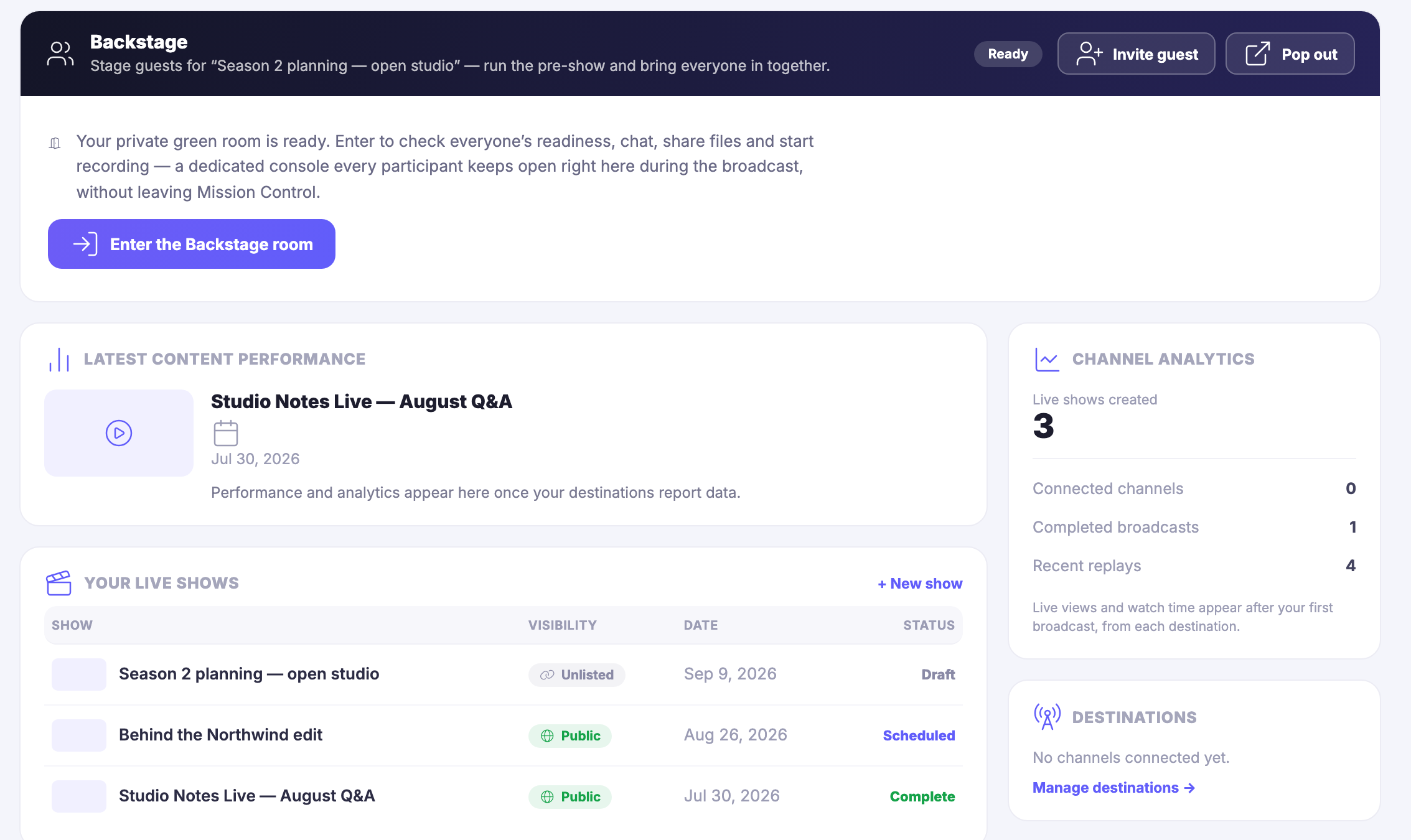
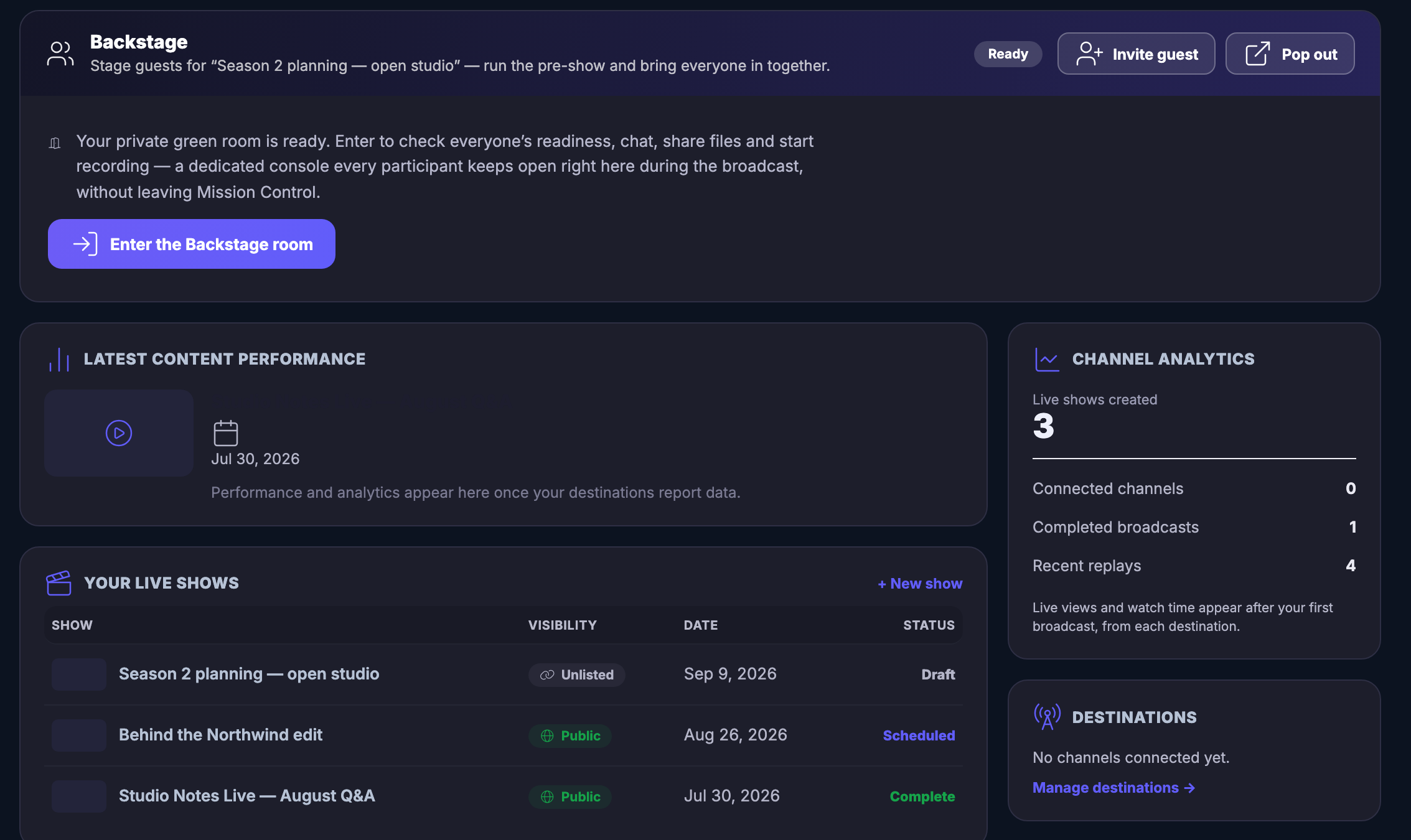
The broadcast desk with the green room open across the top of it: a Backstage panel naming the show it is staging guests for, marked ready, beside controls to invite somebody, to pop the room out into a window of its own, and to step into it. Under that the room explains itself — a private place to check everyone is ready, to talk, to share files and to start recording, held open by every participant through the broadcast without leaving Mission Control. Below it a latest-content panel carrying the show that has already gone out, its date, and the note that performance appears once the destinations report back. Beside that your live shows, one under another, each with whether it is unlisted or public, its date, and where it has got to — still a draft, scheduled, or already complete — above a control to start another. Down the right a channel analytics panel giving a count of the shows made, the channels connected, the broadcasts completed and the replays waiting, and beneath it a destinations panel saying no channel is connected on this workspace yet, with a way through to connect one.The broadcast desk with the green room open across the top of it: a Backstage panel naming the show it is staging guests for, marked ready, beside controls to invite somebody, to pop the room out into a window of its own, and to step into it. Under that the room explains itself — a private place to check everyone is ready, to talk, to share files and to start recording, held open by every participant through the broadcast without leaving Mission Control. Below it a latest-content panel carrying the show that has already gone out, its date, and the note that performance appears once the destinations report back. Beside that your live shows, one under another, each with whether it is unlisted or public, its date, and where it has got to — still a draft, scheduled, or already complete — above a control to start another. Down the right a channel analytics panel giving a count of the shows made, the channels connected, the broadcasts completed and the replays waiting, and beneath it a destinations panel saying no channel is connected on this workspace yet, with a way through to connect one.
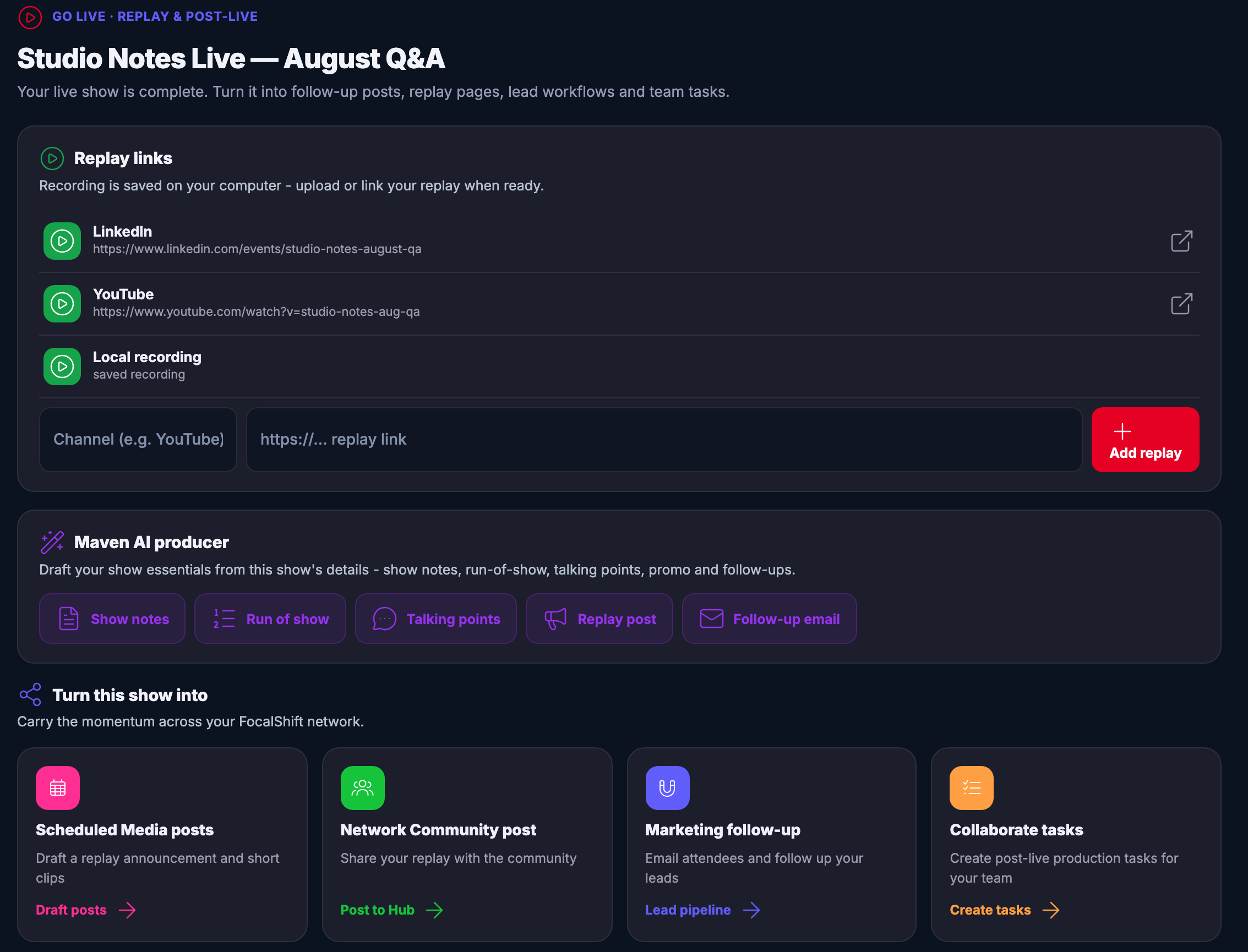
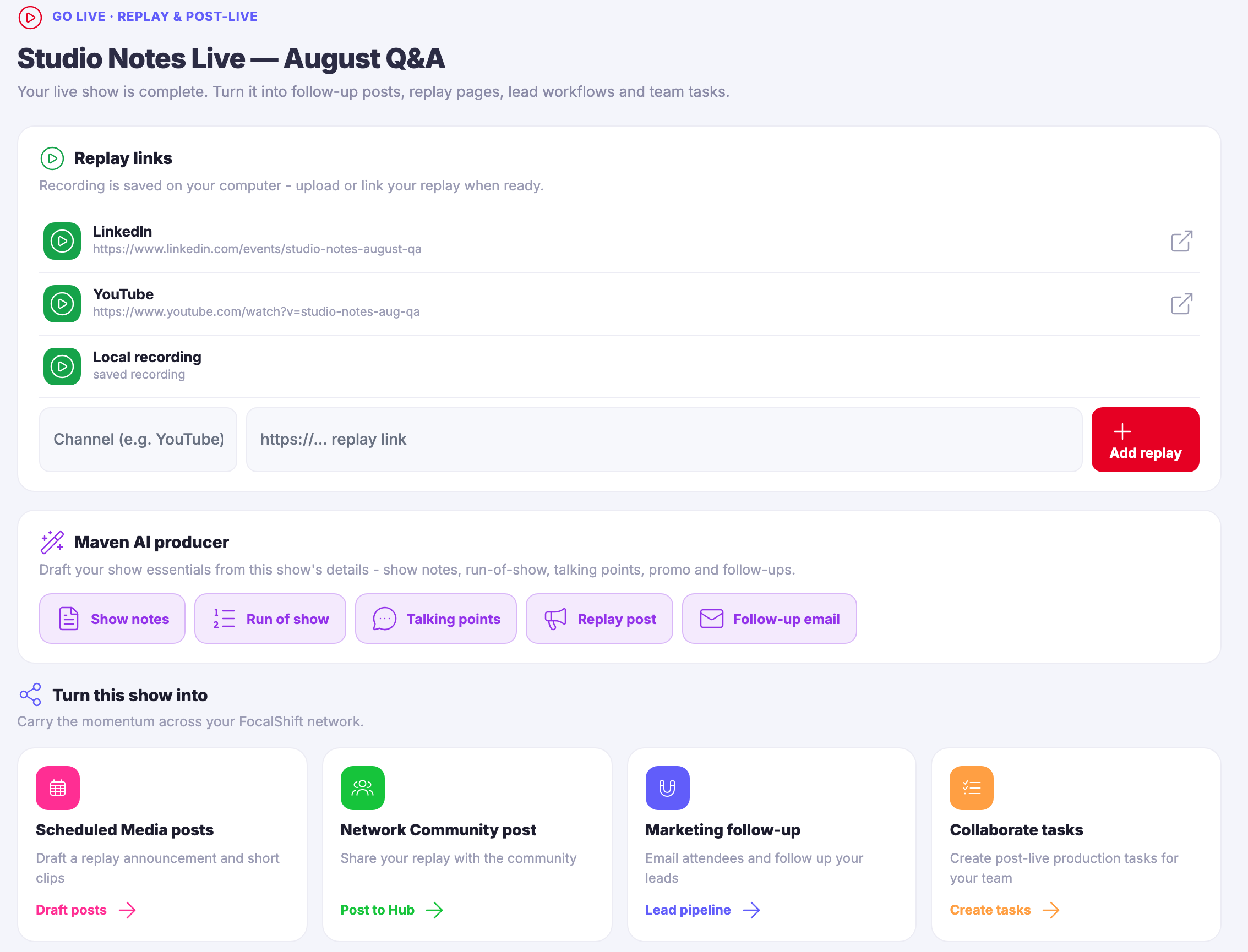
The post-live page of a show that has already gone out, under the module’s own replay-and-post-live kicker: the show named, over the line that it is complete and can be turned into follow-up posts, replay pages, lead workflows and team tasks. Beneath it a replay-links panel, noting that the recording is saved on your own computer, listing the replay as published on a professional network and on a video platform with their web addresses beside them, and the local recording under those, above a row offering to add another link. Then a producer panel offering to draft the show notes, the run of show, the talking points, a replay post and a follow-up letter from this show’s own details. And along the foot, the ways to carry the show on: scheduled posts and short clips, a post to the community, a marketing follow-up to the people who came, and production tasks for the team.The post-live page of a show that has already gone out, under the module’s own replay-and-post-live kicker: the show named, over the line that it is complete and can be turned into follow-up posts, replay pages, lead workflows and team tasks. Beneath it a replay-links panel, noting that the recording is saved on your own computer, listing the replay as published on a professional network and on a video platform with their web addresses beside them, and the local recording under those, above a row offering to add another link. Then a producer panel offering to draft the show notes, the run of show, the talking points, a replay post and a follow-up letter from this show’s own details. And along the foot, the ways to carry the show on: scheduled posts and short clips, a post to the community, a marketing follow-up to the people who came, and production tasks for the team.

Go Live Studio

关闭
The broadcast desk with the green room open across the top of it: a Backstage panel naming the show it is staging guests for, marked ready, beside controls to invite somebody, to pop the room out into a window of its own, and to step into it. Under that the room explains itself — a private place to check everyone is ready, to talk, to share files and to start recording, held open by every participant through the broadcast without leaving Mission Control. Below it a latest-content panel carrying the show that has already gone out, its date, and the note that performance appears once the destinations report back. Beside that your live shows, one under another, each with whether it is unlisted or public, its date, and where it has got to — still a draft, scheduled, or already complete — above a control to start another. Down the right a channel analytics panel giving a count of the shows made, the channels connected, the broadcasts completed and the replays waiting, and beneath it a destinations panel saying no channel is connected on this workspace yet, with a way through to connect one.The broadcast desk with the green room open across the top of it: a Backstage panel naming the show it is staging guests for, marked ready, beside controls to invite somebody, to pop the room out into a window of its own, and to step into it. Under that the room explains itself — a private place to check everyone is ready, to talk, to share files and to start recording, held open by every participant through the broadcast without leaving Mission Control. Below it a latest-content panel carrying the show that has already gone out, its date, and the note that performance appears once the destinations report back. Beside that your live shows, one under another, each with whether it is unlisted or public, its date, and where it has got to — still a draft, scheduled, or already complete — above a control to start another. Down the right a channel analytics panel giving a count of the shows made, the channels connected, the broadcasts completed and the replays waiting, and beneath it a destinations panel saying no channel is connected on this workspace yet, with a way through to connect one.

Go Live Studio

关闭
The post-live page of a show that has already gone out, under the module’s own replay-and-post-live kicker: the show named, over the line that it is complete and can be turned into follow-up posts, replay pages, lead workflows and team tasks. Beneath it a replay-links panel, noting that the recording is saved on your own computer, listing the replay as published on a professional network and on a video platform with their web addresses beside them, and the local recording under those, above a row offering to add another link. Then a producer panel offering to draft the show notes, the run of show, the talking points, a replay post and a follow-up letter from this show’s own details. And along the foot, the ways to carry the show on: scheduled posts and short clips, a post to the community, a marketing follow-up to the people who came, and production tasks for the team.The post-live page of a show that has already gone out, under the module’s own replay-and-post-live kicker: the show named, over the line that it is complete and can be turned into follow-up posts, replay pages, lead workflows and team tasks. Beneath it a replay-links panel, noting that the recording is saved on your own computer, listing the replay as published on a professional network and on a video platform with their web addresses beside them, and the local recording under those, above a row offering to add another link. Then a producer panel offering to draft the show notes, the run of show, the talking points, a replay post and a follow-up letter from this show’s own details. And along the foot, the ways to carry the show on: scheduled posts and short clips, a post to the community, a marketing follow-up to the people who came, and production tasks for the team.

A look inside Go Live Studio

Stills from the product, one after the next.

The broadcast desk with the green room open across the top of it: a Backstage panel naming the show it is staging guests for, marked ready, beside controls to invite somebody, to pop the room out into a window of its own, and to step into it. Under that the room explains itself — a private place to check everyone is ready, to talk, to share files and to start recording, held open by every participant through the broadcast without leaving Mission Control. Below it a latest-content panel carrying the show that has already gone out, its date, and the note that performance appears once the destinations report back. Beside that your live shows, one under another, each with whether it is unlisted or public, its date, and where it has got to — still a draft, scheduled, or already complete — above a control to start another. Down the right a channel analytics panel giving a count of the shows made, the channels connected, the broadcasts completed and the replays waiting, and beneath it a destinations panel saying no channel is connected on this workspace yet, with a way through to connect one.The broadcast desk with the green room open across the top of it: a Backstage panel naming the show it is staging guests for, marked ready, beside controls to invite somebody, to pop the room out into a window of its own, and to step into it. Under that the room explains itself — a private place to check everyone is ready, to talk, to share files and to start recording, held open by every participant through the broadcast without leaving Mission Control. Below it a latest-content panel carrying the show that has already gone out, its date, and the note that performance appears once the destinations report back. Beside that your live shows, one under another, each with whether it is unlisted or public, its date, and where it has got to — still a draft, scheduled, or already complete — above a control to start another. Down the right a channel analytics panel giving a count of the shows made, the channels connected, the broadcasts completed and the replays waiting, and beneath it a destinations panel saying no channel is connected on this workspace yet, with a way through to connect one.
The post-live page of a show that has already gone out, under the module’s own replay-and-post-live kicker: the show named, over the line that it is complete and can be turned into follow-up posts, replay pages, lead workflows and team tasks. Beneath it a replay-links panel, noting that the recording is saved on your own computer, listing the replay as published on a professional network and on a video platform with their web addresses beside them, and the local recording under those, above a row offering to add another link. Then a producer panel offering to draft the show notes, the run of show, the talking points, a replay post and a follow-up letter from this show’s own details. And along the foot, the ways to carry the show on: scheduled posts and short clips, a post to the community, a marketing follow-up to the people who came, and production tasks for the team.The post-live page of a show that has already gone out, under the module’s own replay-and-post-live kicker: the show named, over the line that it is complete and can be turned into follow-up posts, replay pages, lead workflows and team tasks. Beneath it a replay-links panel, noting that the recording is saved on your own computer, listing the replay as published on a professional network and on a video platform with their web addresses beside them, and the local recording under those, above a row offering to add another link. Then a producer panel offering to draft the show notes, the run of show, the talking points, a replay post and a follow-up letter from this show’s own details. And along the foot, the ways to carry the show on: scheduled posts and short clips, a post to the community, a marketing follow-up to the people who came, and production tasks for the team.

See it in your own business.

Everything on this page comes with the platform — start free and try it on your real work.

Get started now

The real screens

GoLive, signed in.

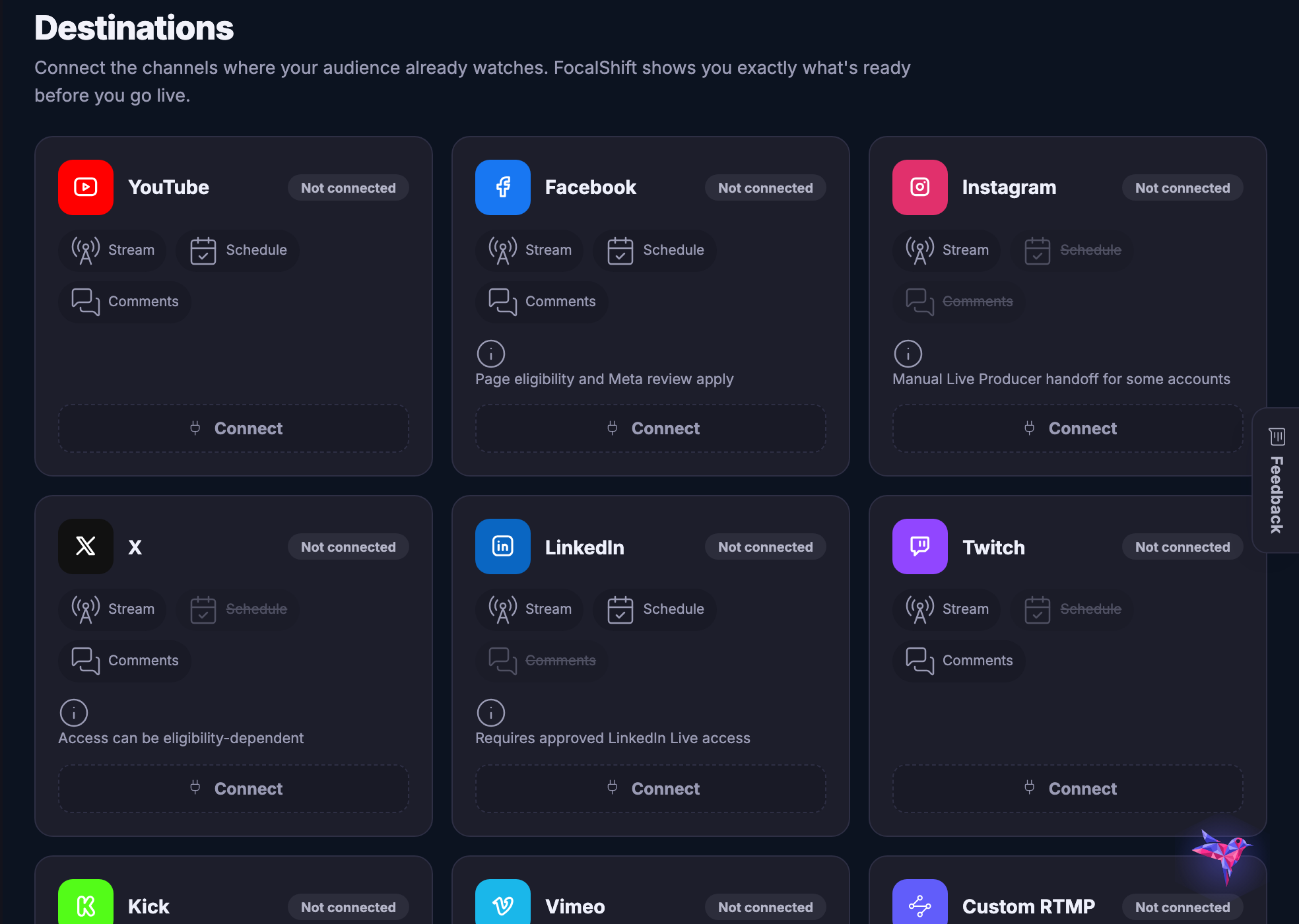
Two screens from a real account: the launch screen you actually go live from, and the destinations it goes out to.

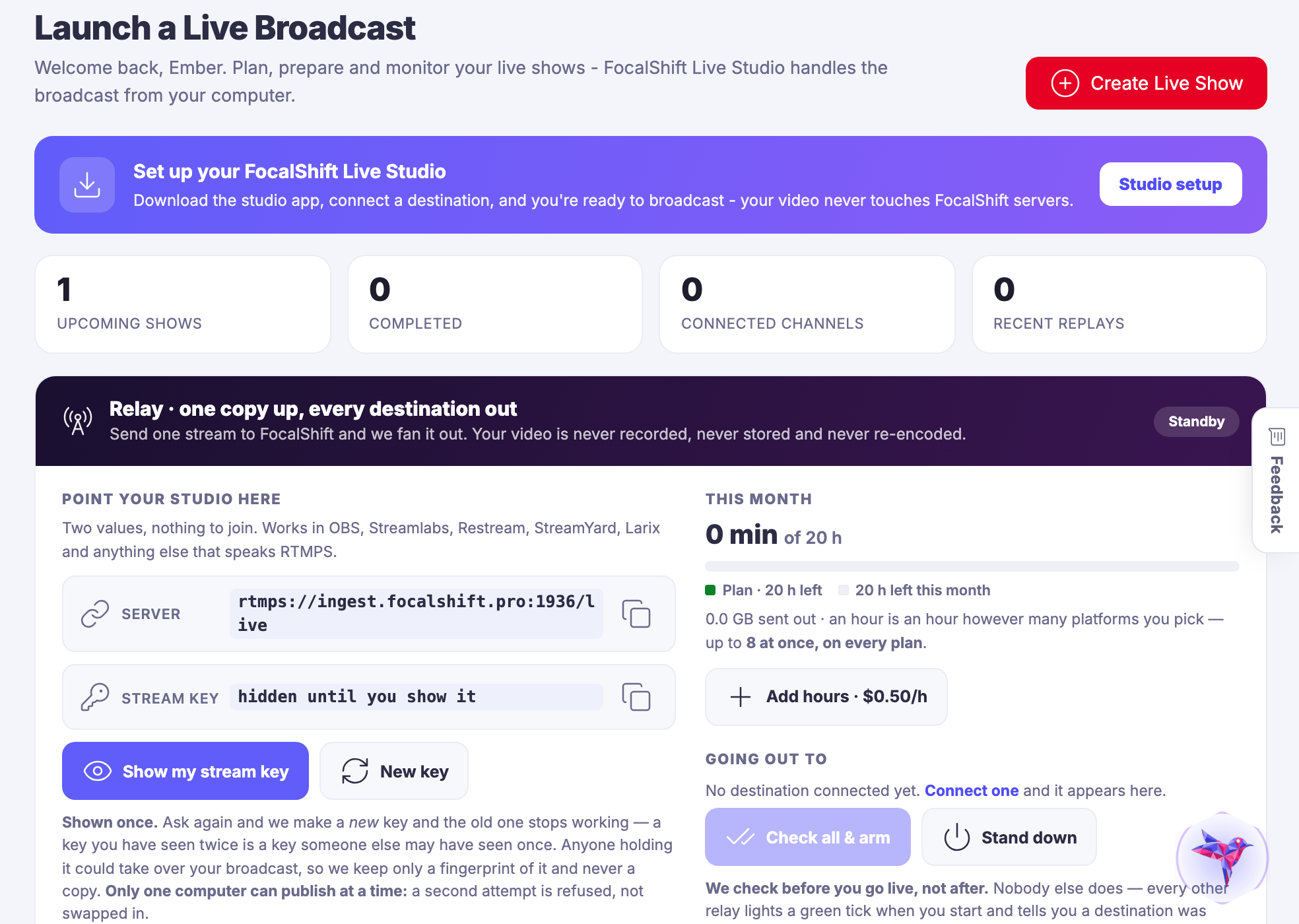
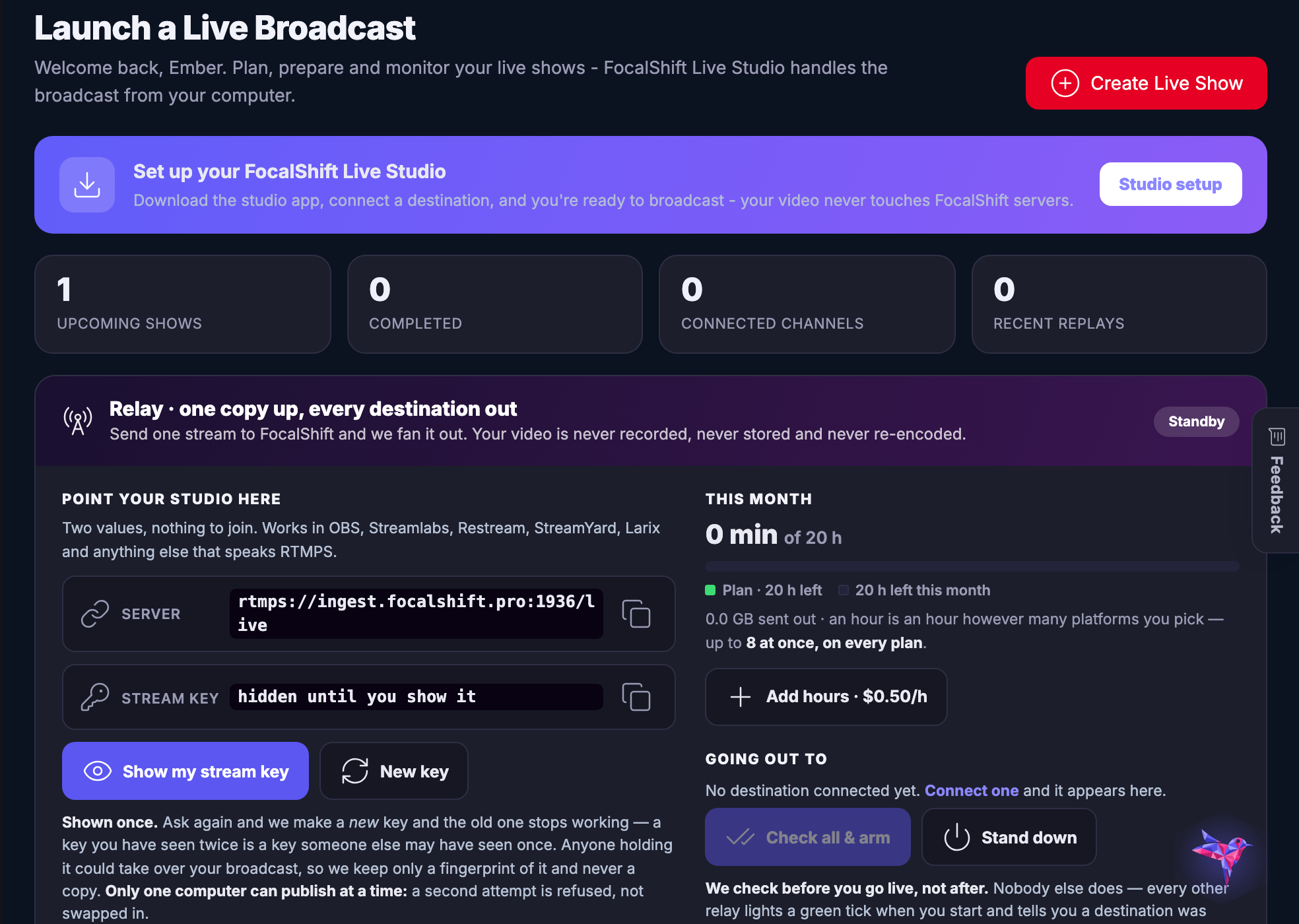
Launch a broadcast — The screen you go live from: what the show is, where it is going, and what is already checked.
Launch a broadcast

The screen you go live from: what the show is, where it is going, and what is already checked.

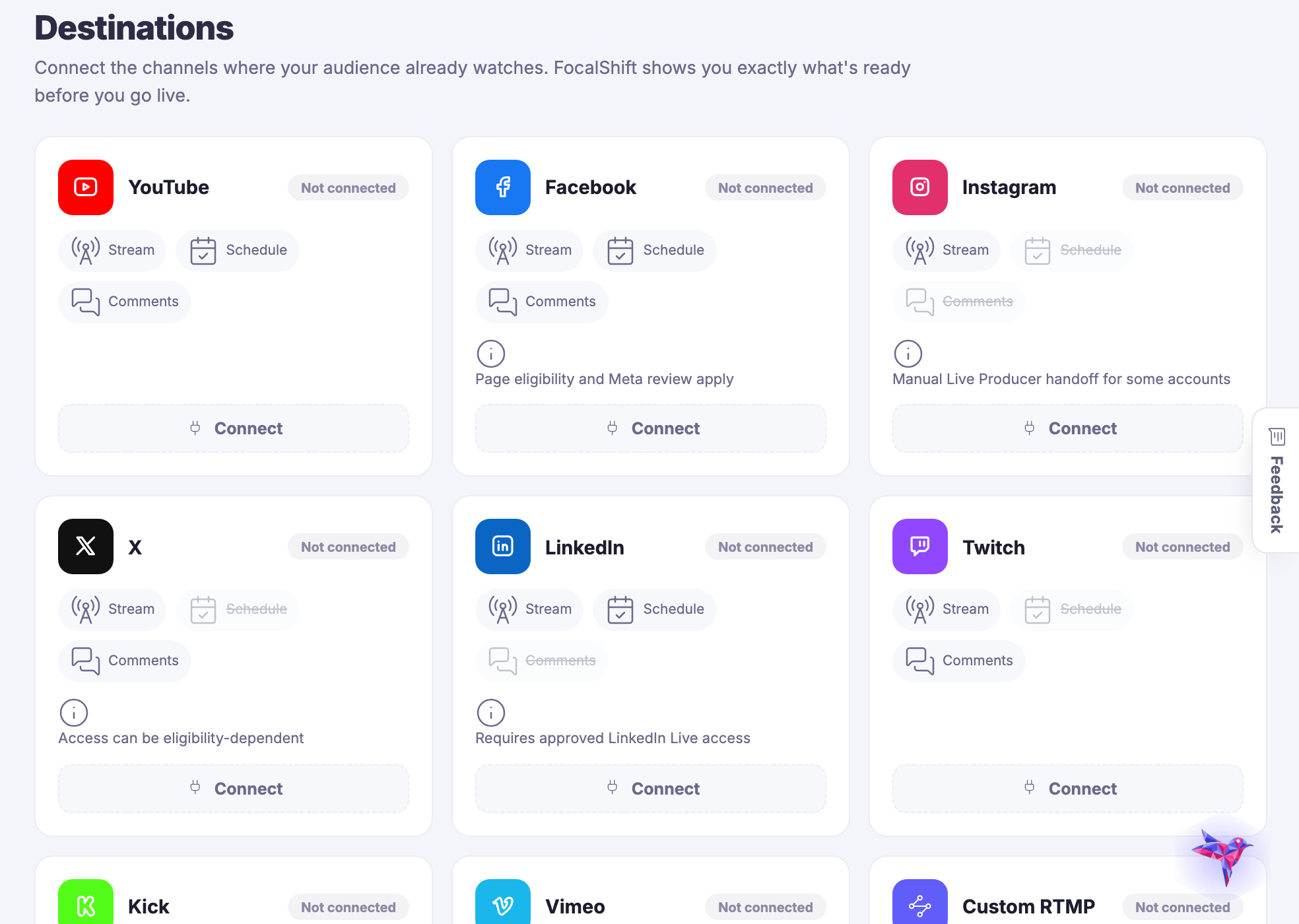
Destinations — Every channel you have connected, and the state each one is in before you start.
目标

Every channel you have connected, and the state each one is in before you start.

Captured from a demo business on a live account, with nothing connected yet — which is what this screen honestly looks like on the day you arrive.

Go live once, and be everywhere you already are.

Join the beta program
One connected destination

Go deeper without losing the thread.

Each title beginning with a hashtag is a direct destination. The navigation can bring you to the exact part of the story without creating another disconnected page.

One broadcast. Every chosen destination.

Choose your stages.

Connect your streaming destinations once — then every show goes wherever you point it, together or separately.

The live moment keeps working afterward.

Replays that keep working.

Every live becomes an on-demand replay — clip the highlights, gate the full session for members, and let the show keep earning.

Next Up: Payments & memberships

Get paid once or every month and keep the revenue connected.

询问 Maven