Pesan

This is the product's own frame. Your conversations appear here once you have an account.

Get started now
Notifikasi

This is the product's own frame. Alerts about your business appear here once you have an account.

Bahasa

Monday · 9:00 · One board per piece of work

The work, the people, and the Ai sitting with them.

Every piece of work gets a FocusBoard: a board for the work itself, not for the department. The card carries the real thing, its file, its thread and the decision that made it, and a card that sits too long ages where you can see it. Around the board sit the people, and one seat for Maven.

Get started now

Free plan. No card. Collaborate is included.

TO DODOINGREVIEWDONE FILETHREADDECIDED THE AI SEAT

Because you said see what is actually stuck.

FocusBoards

One board per piece of work — and the cards on it carry the work itself.
A board per missionNot a board per department. One board holds one piece of work, and everything that work needs sits on it — the brief, the people, the artifacts, the timeline.
A card that carries the real workThe file, the thread, the customer, the decision. Attached to the card rather than described by it, so opening a card is opening the work.
What is blocked shows itselfAnyone can raise a hand on a task that has gone quiet, and the board says so on its face. Nobody calls a meeting to find out what has not moved.
Read more about FocusBoards

What is being done, by whom, and what is genuinely stuck.

A board per mission with cards that carry the real thing — the file, the thread, the customer — instead of a title and a hope. Stuck is visible rather than remembered.

The board is not one view of the work, it is all of them. The same cards read as a Kanban, as a table, as a calendar and as a timeline, and the one you open is the one that answers the question you actually have. Nothing is re-entered to change the view.

Thinking has a home on the board too. Every board carries a Design Canvas and a Mind Map, so the sketch of the launch and the tasks that deliver it sit behind the same door — you drag an idea across and it becomes work.

Work worth paying for can be paid for. A task can be opened to your Team, offered as a paid task, or handed to an agent, and what happened to it stays on the card. Six weeks later the decision is still attached to the thing it decided.

What it actually does

  • Cards that carry the real work, not a label
  • A board per mission, not per department
  • What is blocked is visible without a meeting

What that changes for you

  • The status meeting gets shorter or stops
  • Nothing sits untouched without anyone noticing
  • You can hand a board over and walk away

You come away with a plan that other people can see moving.

A look inside FocusBoards

THE BOARD · MONDAY'S PIECE OF WORK NAMEJOB NAMEJOB · CARRIES THIS WEEK NAMEJOB NAMEJOB DOTTED STRIP · WHAT EACH ONE MAY TOUCH SIDEKICK · A MEMBER'S OWN AISEATED AND SIGNED AS ITSELF

Tuesday · The bench

One agent, one job, and a boundary printed with it.

The bench is named specialists, one job each, briefed on your real records, with the boundary printed on the seat: what they may open, edit and send. The dull half of the week goes to them. A member's own Sidekick can hold a seat too, signed as itself, never as them. Touch a seat to see which part of the board it carries.

FocusBoards — platform screenshots

Real screens from the product. Open any one full size, or switch the set to light or dark.

Tutup
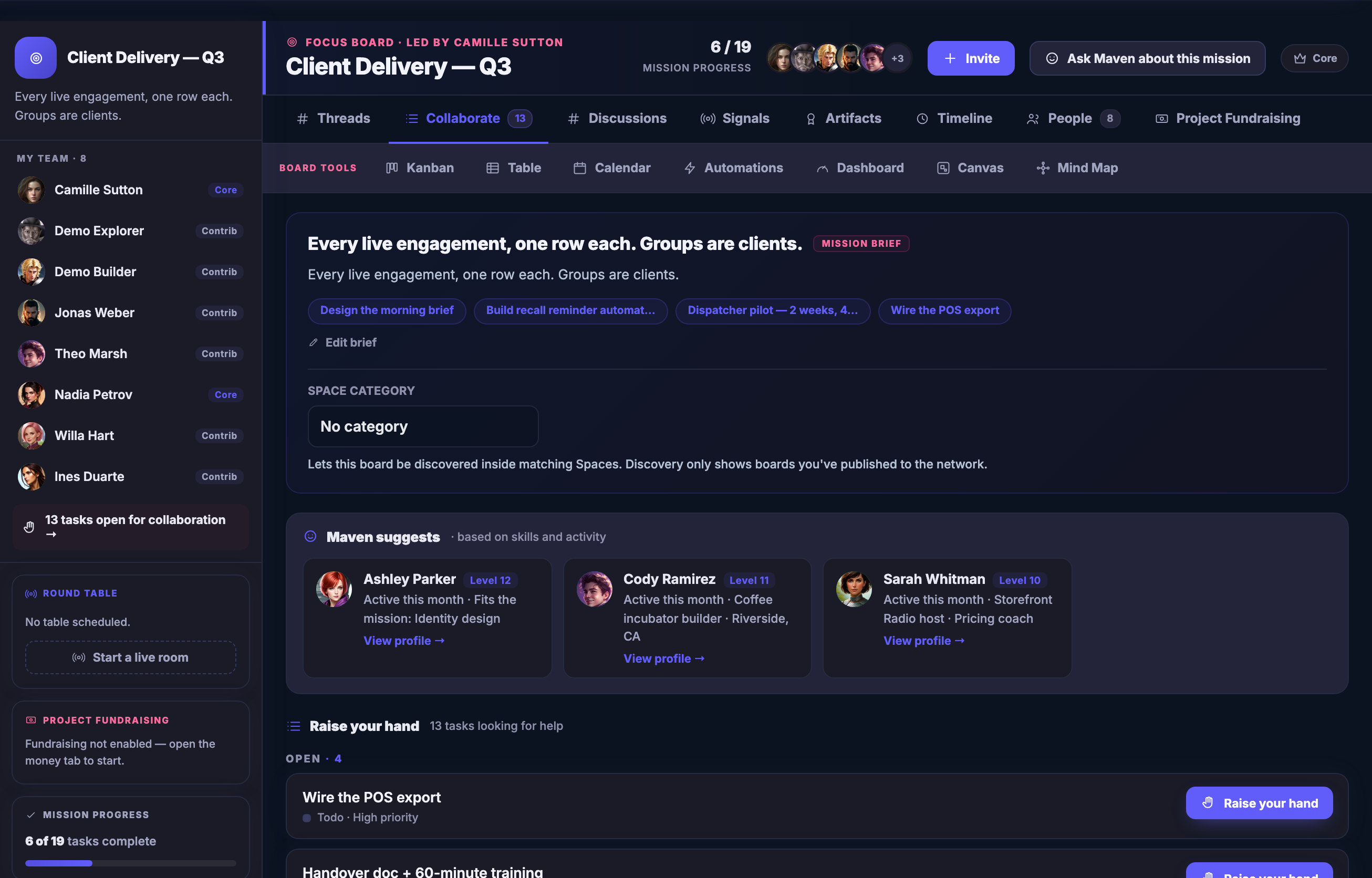
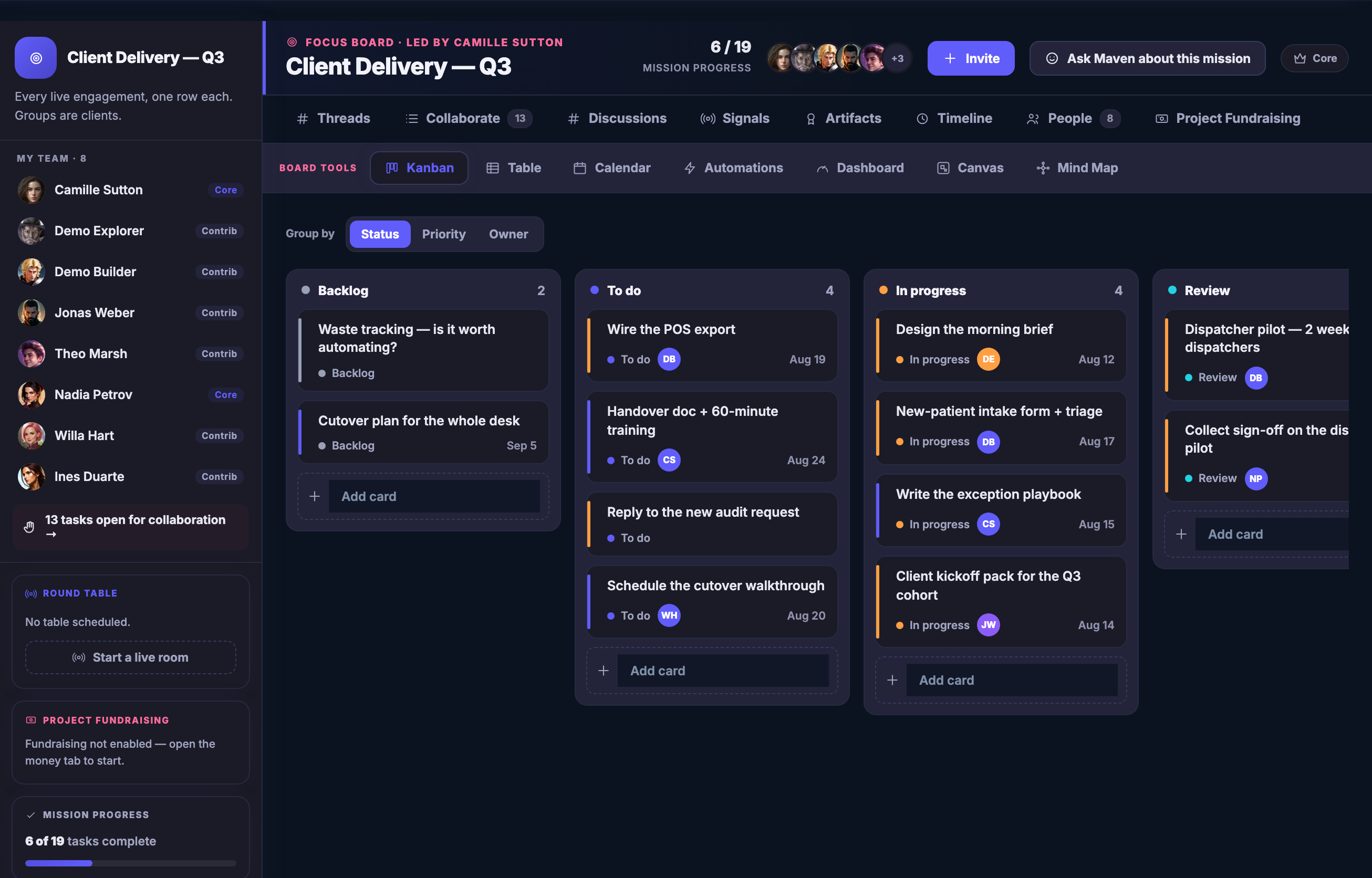
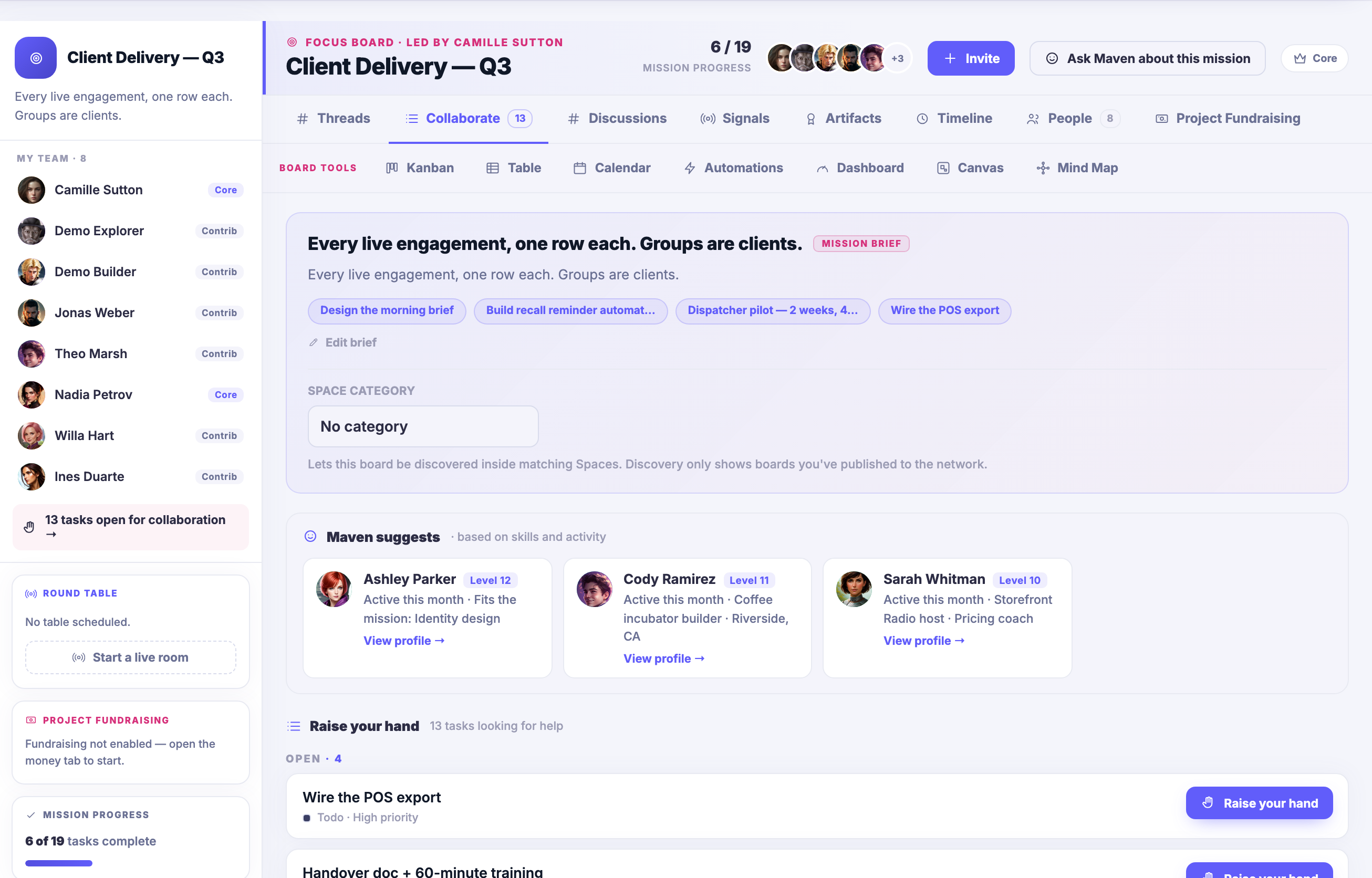
A Focus Board open on the work: the mission brief in plain words at the top, the board tools beside it — Kanban, Table, Calendar, Automations, Dashboard, Design Canvas and Mind Map — your Team down the left, each name badged with the role it holds on this board — Core or Contrib — above a row of tasks open for collaboration; mission progress below that, and beneath it the open tasks looking for help, each one able to be taken up.A Focus Board open on the work: the mission brief in plain words at the top, the board tools beside it — Kanban, Table, Calendar, Automations, Dashboard, Design Canvas and Mind Map — your Team down the left, each name badged with the role it holds on this board — Core or Contrib — above a row of tasks open for collaboration; mission progress below that, and beneath it the open tasks looking for help, each one able to be taken up.
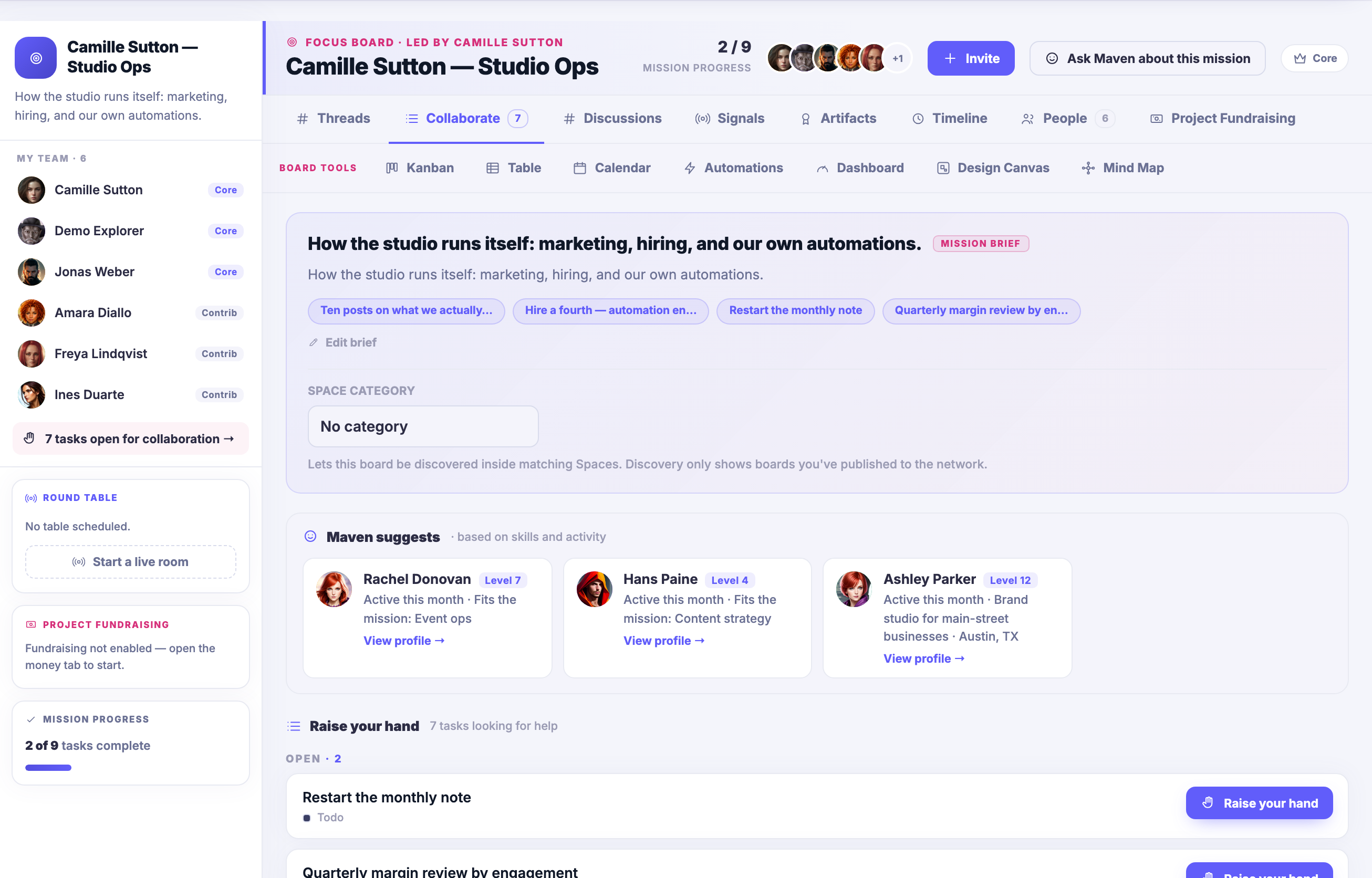
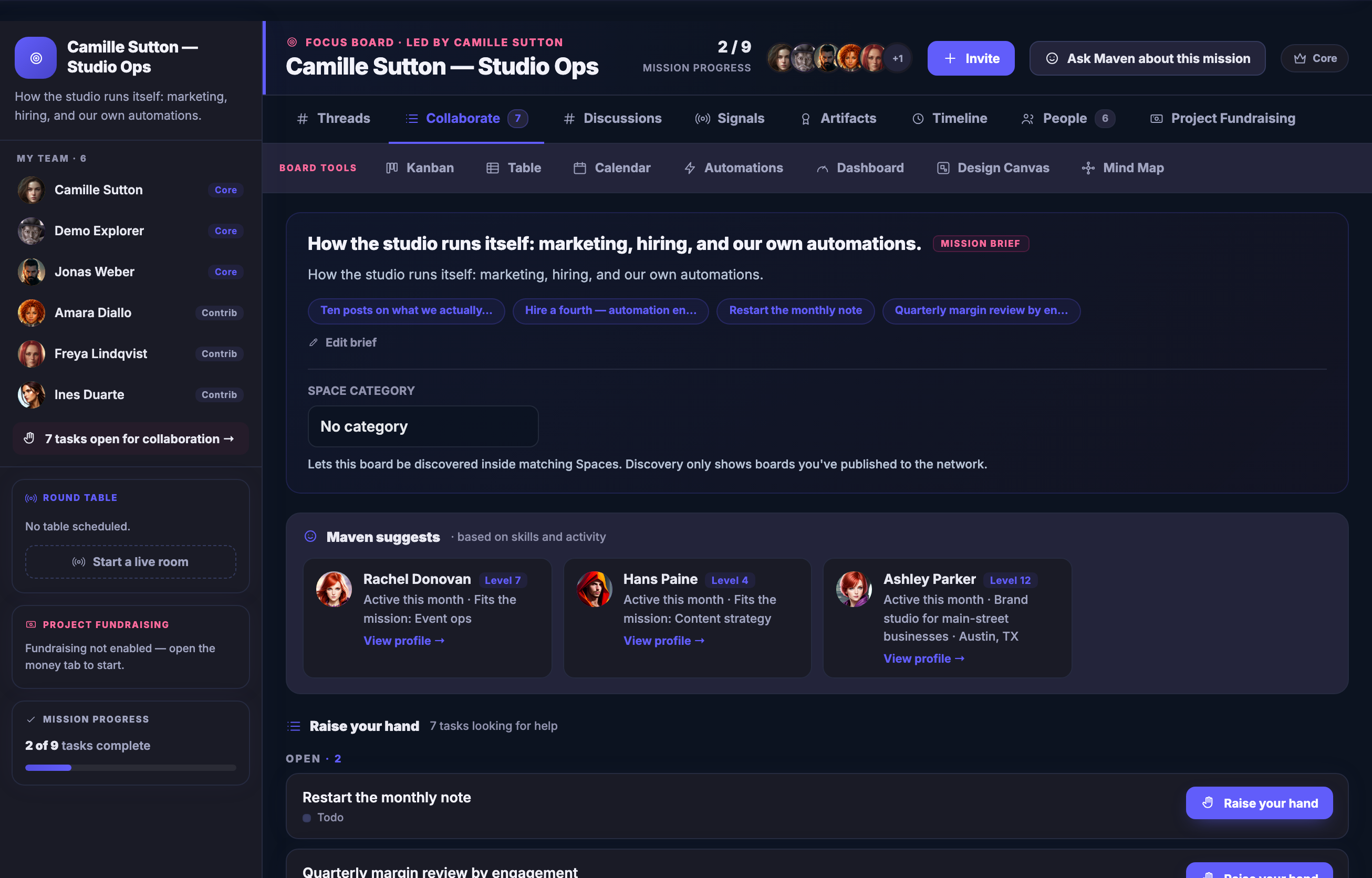
A second Focus Board, carrying a different mission: its own brief, its own Team, its own progress, and its own open tasks — one board per piece of work rather than one board per department.A second Focus Board, carrying a different mission: its own brief, its own Team, its own progress, and its own open tasks — one board per piece of work rather than one board per department.
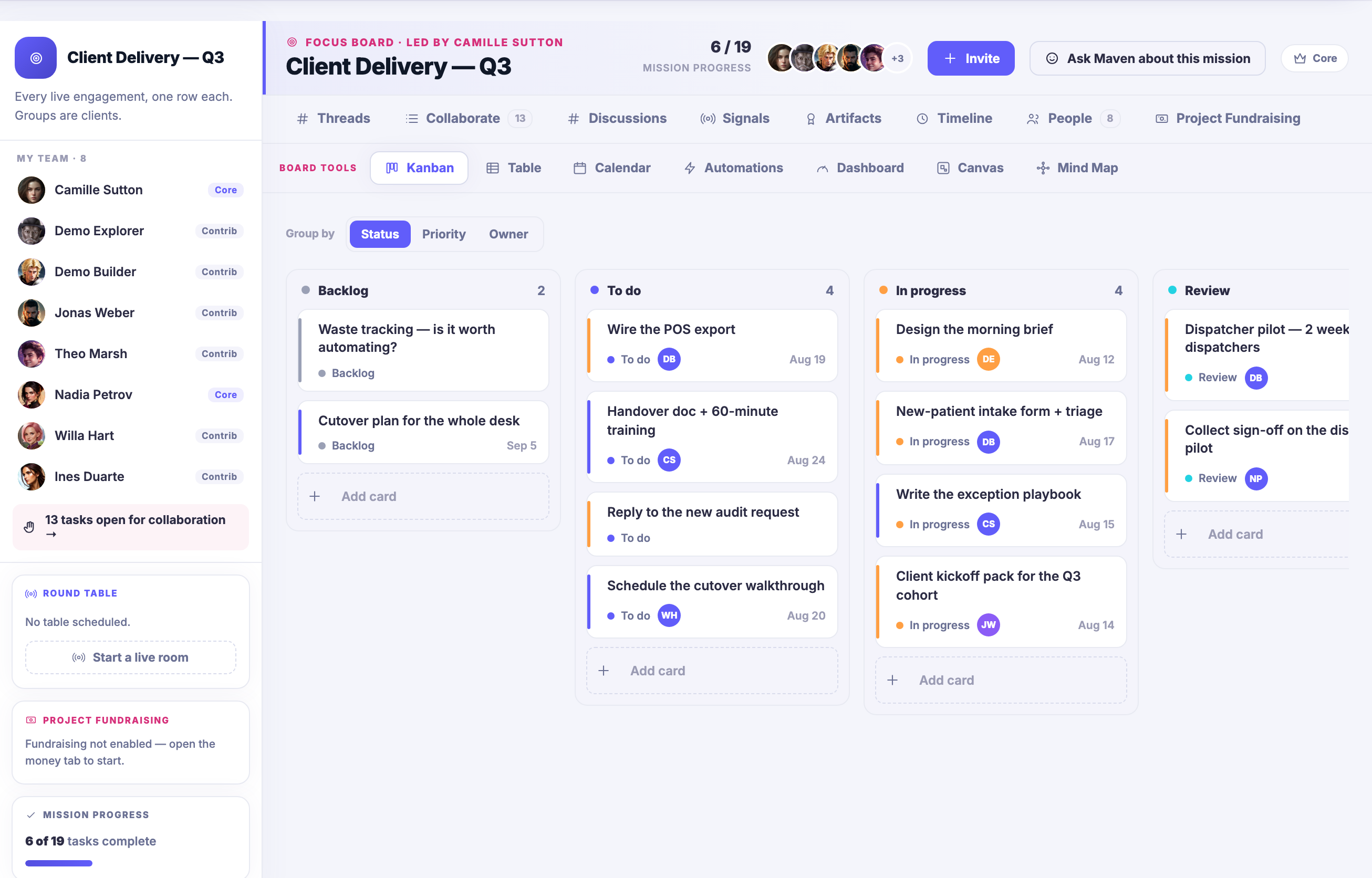
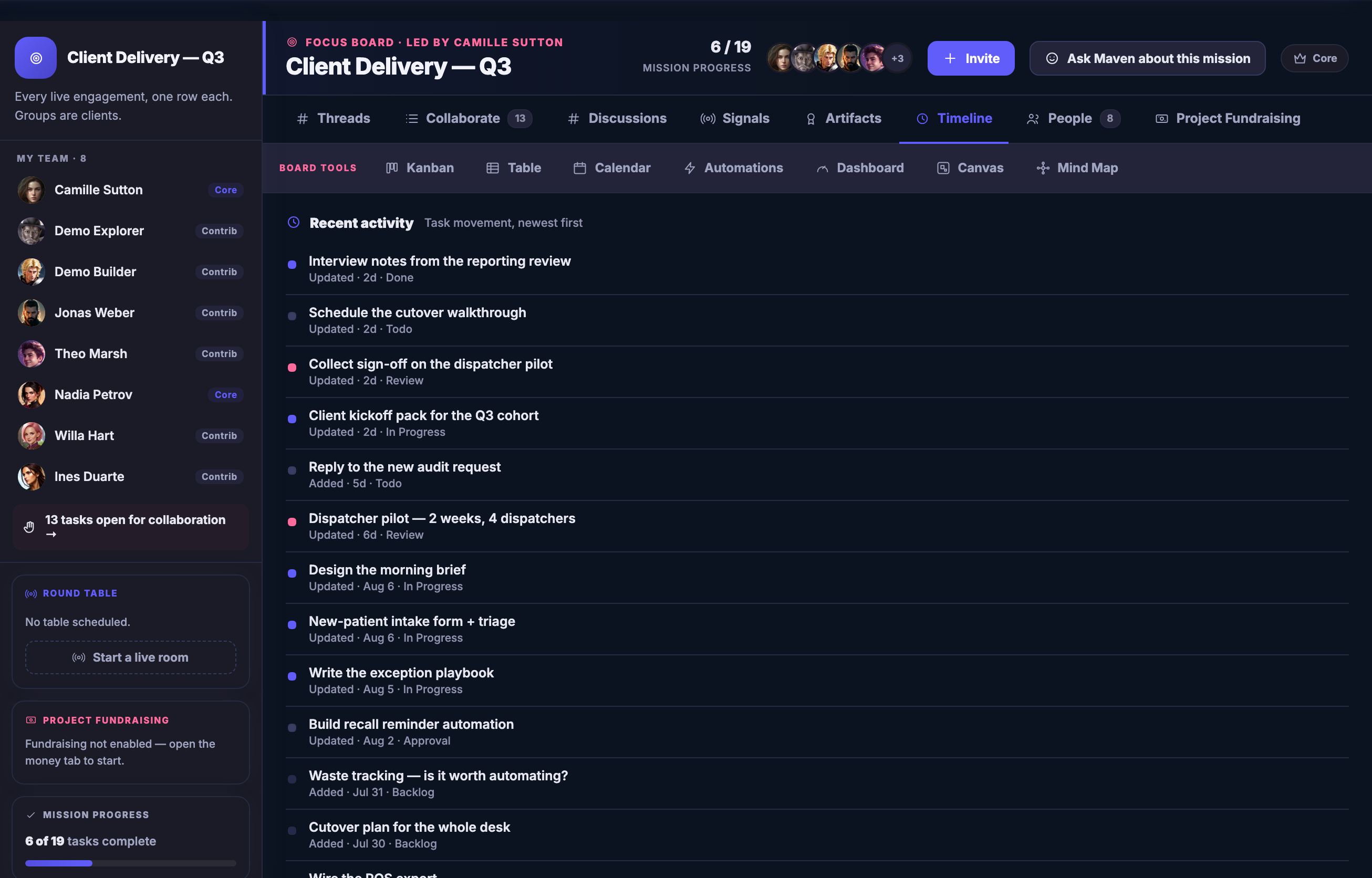
The first board as a Kanban: its tasks in columns by where they have actually got to — backlog, to do, in progress, and a review column running on past the right edge of the frame — each card carrying its status, whose it is and when it is due.The first board as a Kanban: its tasks in columns by where they have actually got to — backlog, to do, in progress, and a review column running on past the right edge of the frame — each card carrying its status, whose it is and when it is due.
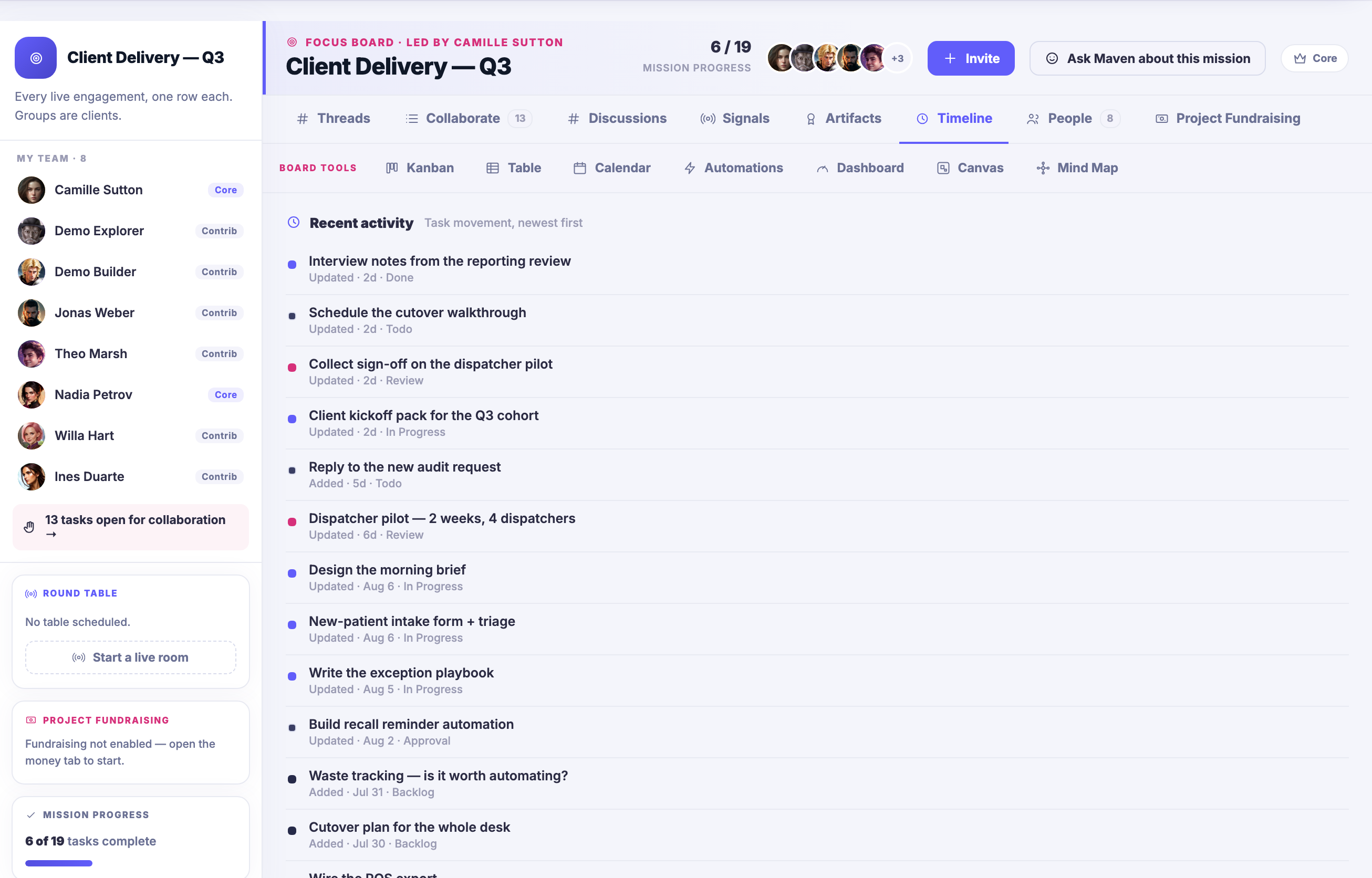
The same board on its Timeline: recent activity newest first, one line per task saying what changed and when, so what has moved and what has not is a list rather than something one person remembers.The same board on its Timeline: recent activity newest first, one line per task saying what changed and when, so what has moved and what has not is a list rather than something one person remembers.
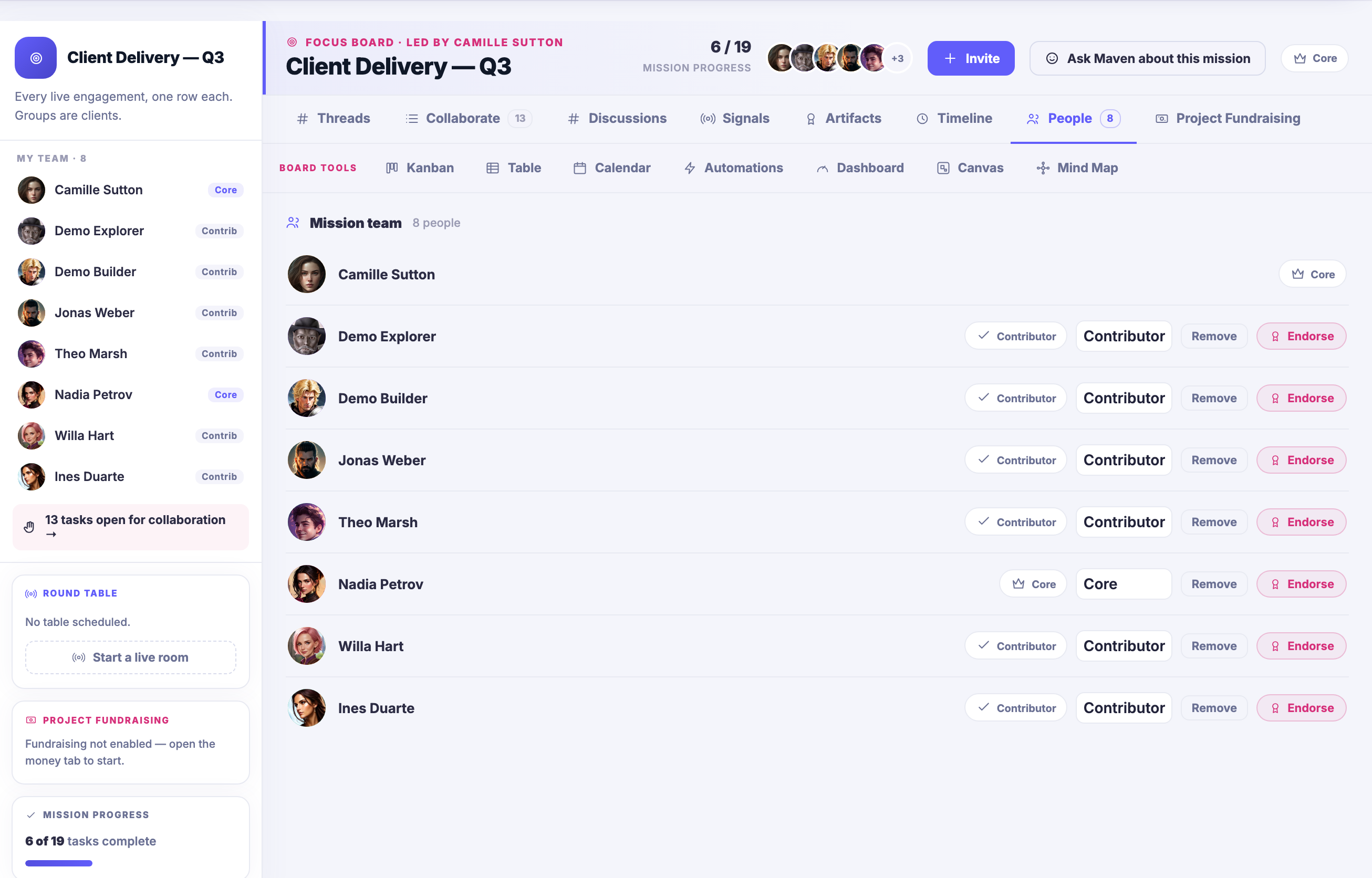
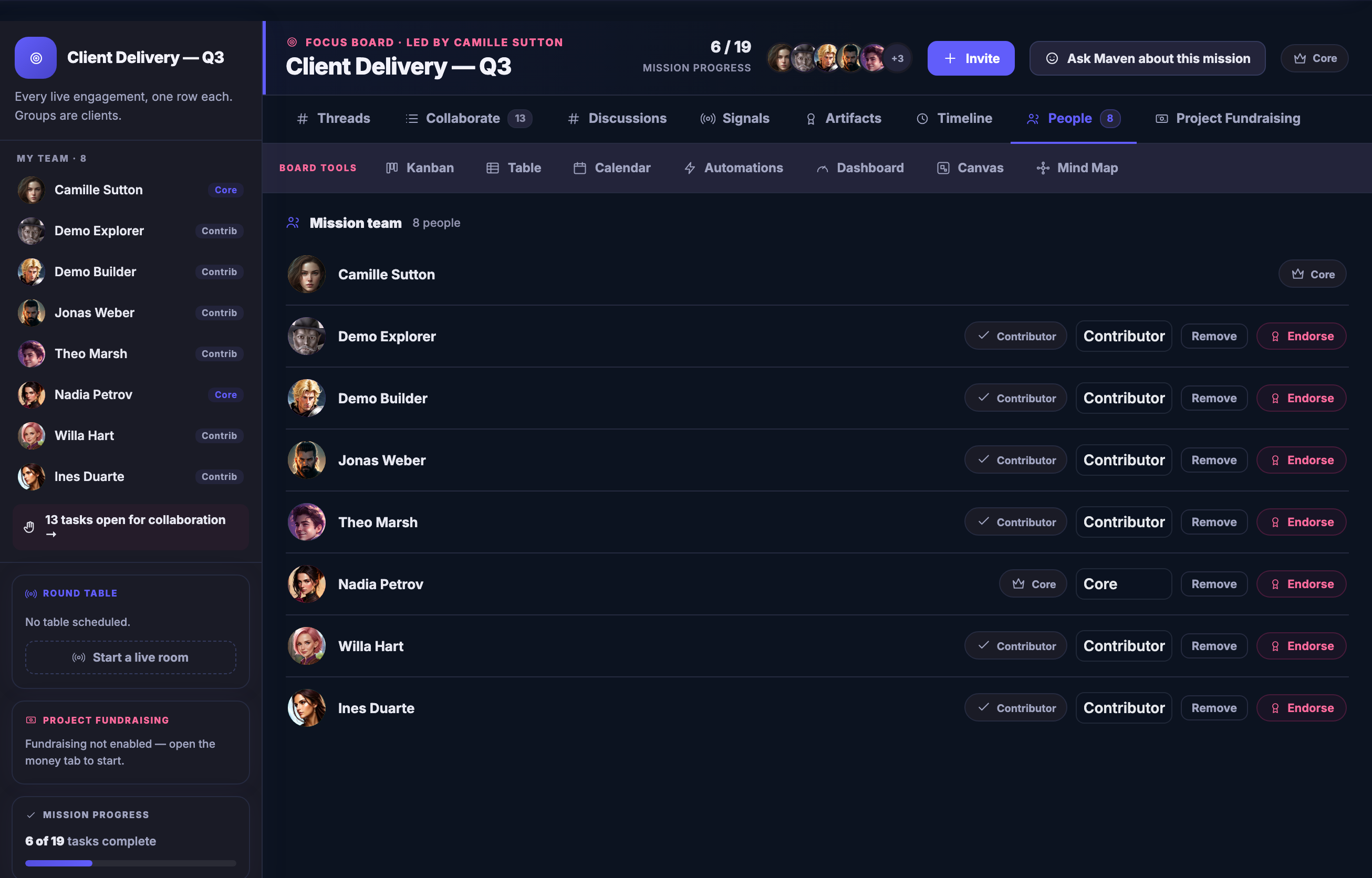
The same board on its People tab: the mission team for this piece of work, each person shown with the role they hold on the board and the controls to endorse them or take them off it.The same board on its People tab: the mission team for this piece of work, each person shown with the role they hold on the board and the controls to endorse them or take them off it.

FocusBoards

Tutup
A Focus Board open on the work: the mission brief in plain words at the top, the board tools beside it — Kanban, Table, Calendar, Automations, Dashboard, Design Canvas and Mind Map — your Team down the left, each name badged with the role it holds on this board — Core or Contrib — above a row of tasks open for collaboration; mission progress below that, and beneath it the open tasks looking for help, each one able to be taken up.A Focus Board open on the work: the mission brief in plain words at the top, the board tools beside it — Kanban, Table, Calendar, Automations, Dashboard, Design Canvas and Mind Map — your Team down the left, each name badged with the role it holds on this board — Core or Contrib — above a row of tasks open for collaboration; mission progress below that, and beneath it the open tasks looking for help, each one able to be taken up.

FocusBoards

Tutup
A second Focus Board, carrying a different mission: its own brief, its own Team, its own progress, and its own open tasks — one board per piece of work rather than one board per department.A second Focus Board, carrying a different mission: its own brief, its own Team, its own progress, and its own open tasks — one board per piece of work rather than one board per department.

FocusBoards

Tutup
The first board as a Kanban: its tasks in columns by where they have actually got to — backlog, to do, in progress, and a review column running on past the right edge of the frame — each card carrying its status, whose it is and when it is due.The first board as a Kanban: its tasks in columns by where they have actually got to — backlog, to do, in progress, and a review column running on past the right edge of the frame — each card carrying its status, whose it is and when it is due.

FocusBoards

Tutup
The same board on its Timeline: recent activity newest first, one line per task saying what changed and when, so what has moved and what has not is a list rather than something one person remembers.The same board on its Timeline: recent activity newest first, one line per task saying what changed and when, so what has moved and what has not is a list rather than something one person remembers.

FocusBoards

Tutup
The same board on its People tab: the mission team for this piece of work, each person shown with the role they hold on the board and the controls to endorse them or take them off it.The same board on its People tab: the mission team for this piece of work, each person shown with the role they hold on the board and the controls to endorse them or take them off it.

A look inside FocusBoards

Stills from the product, one after the next.

A Focus Board open on the work: the mission brief in plain words at the top, the board tools beside it — Kanban, Table, Calendar, Automations, Dashboard, Design Canvas and Mind Map — your Team down the left, each name badged with the role it holds on this board — Core or Contrib — above a row of tasks open for collaboration; mission progress below that, and beneath it the open tasks looking for help, each one able to be taken up.A Focus Board open on the work: the mission brief in plain words at the top, the board tools beside it — Kanban, Table, Calendar, Automations, Dashboard, Design Canvas and Mind Map — your Team down the left, each name badged with the role it holds on this board — Core or Contrib — above a row of tasks open for collaboration; mission progress below that, and beneath it the open tasks looking for help, each one able to be taken up.
A second Focus Board, carrying a different mission: its own brief, its own Team, its own progress, and its own open tasks — one board per piece of work rather than one board per department.A second Focus Board, carrying a different mission: its own brief, its own Team, its own progress, and its own open tasks — one board per piece of work rather than one board per department.
The first board as a Kanban: its tasks in columns by where they have actually got to — backlog, to do, in progress, and a review column running on past the right edge of the frame — each card carrying its status, whose it is and when it is due.The first board as a Kanban: its tasks in columns by where they have actually got to — backlog, to do, in progress, and a review column running on past the right edge of the frame — each card carrying its status, whose it is and when it is due.
The same board on its Timeline: recent activity newest first, one line per task saying what changed and when, so what has moved and what has not is a list rather than something one person remembers.The same board on its Timeline: recent activity newest first, one line per task saying what changed and when, so what has moved and what has not is a list rather than something one person remembers.
The same board on its People tab: the mission team for this piece of work, each person shown with the role they hold on the board and the controls to endorse them or take them off it.The same board on its People tab: the mission team for this piece of work, each person shown with the role they hold on the board and the controls to endorse them or take them off it.

Ai agents — platform screenshots

Real screens from the product. Open any one full size, or switch the set to light or dark.

Tutup
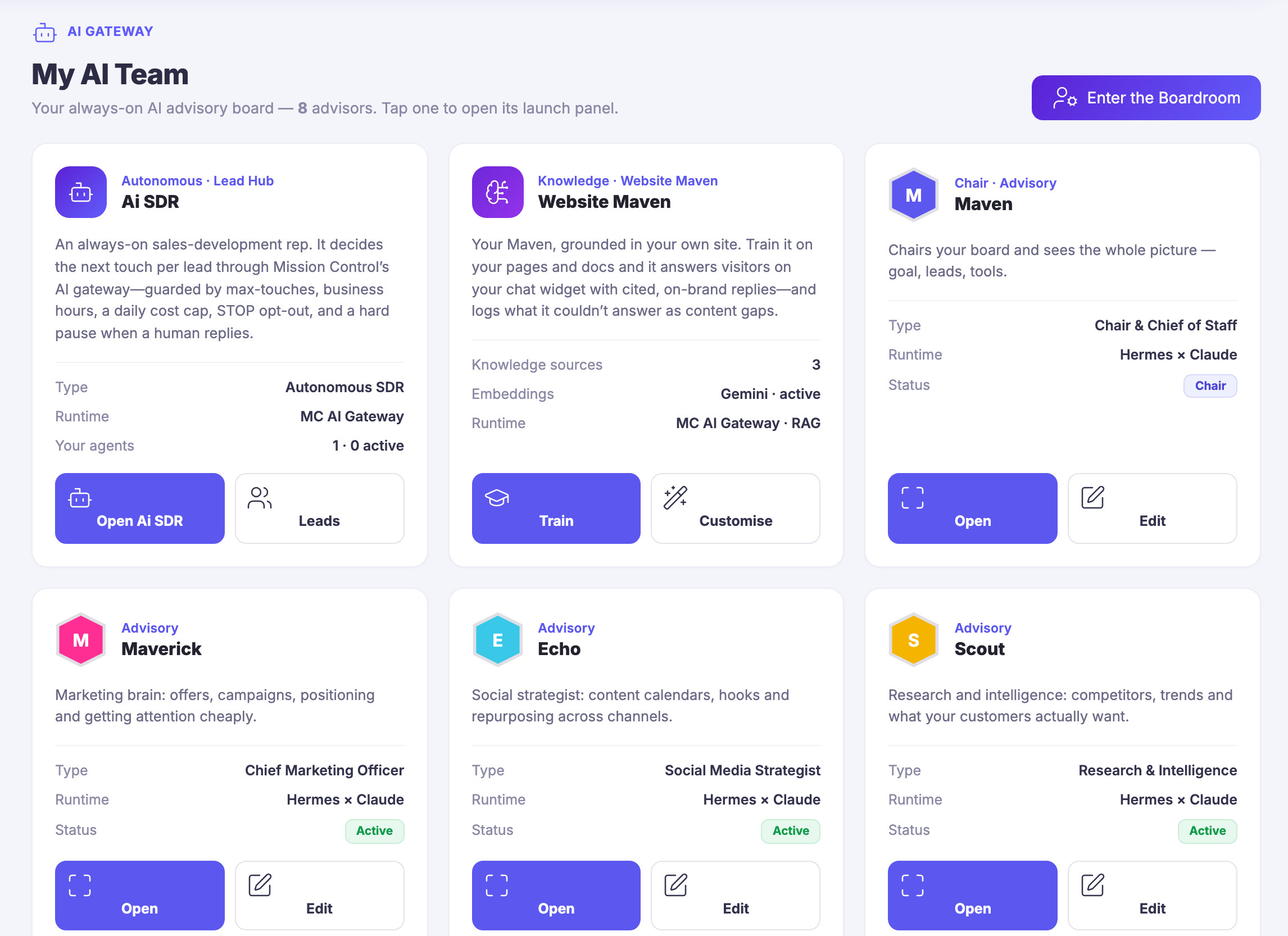
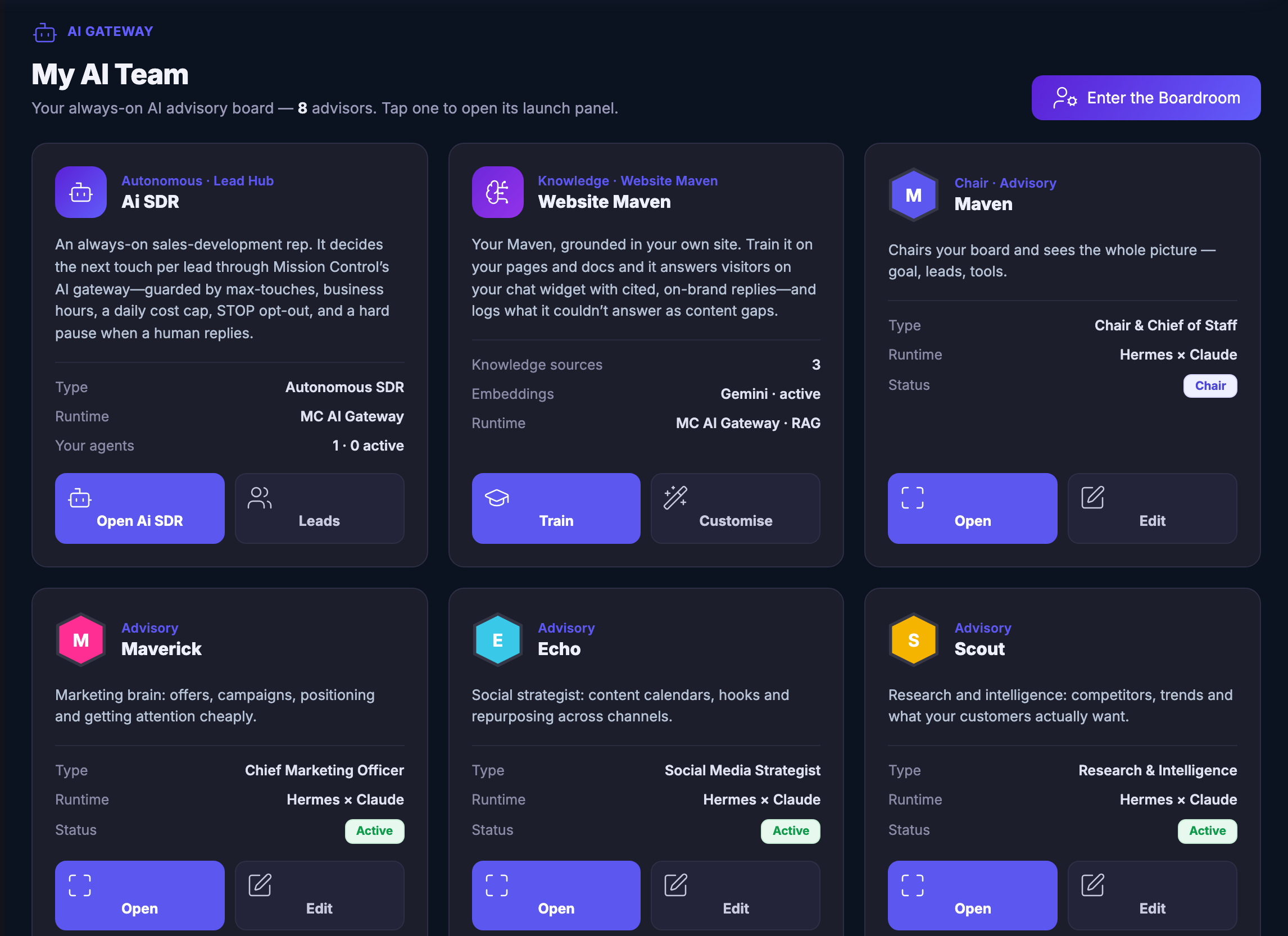
My AI Team — the bench itself, under the platform’s own gateway label: a heading over the line naming how many advisors sit on the board and saying that tapping one opens its launch panel, beside the control that walks into the Boardroom. Below, the bench as tiles. A sales-development agent for the lead hub, whose own description prints the boundary it works inside — a ceiling on how many times it may reach out, business hours, a daily spend cap, a word that opts a person out, and a hard stop the moment a human replies. A website agent grounded in your own pages and documents, which answers visitors with citations and logs what it could not answer as a gap to fill. Maven itself as chair and chief of staff, seeing goal, leads and tools together. Then Maverick as the marketing brain, Echo on social strategy, and Scout on research and intelligence. Each tile prints the same three things — the type of specialist it is, the runtime it answers through, which for the advisors is the platform’s own agent crossed with a named outside model and for the others the platform’s own gateway, and whether it is active — over a pair of controls that open it or edit it. The grid runs on past the lower edge of the frame.My AI Team — the bench itself, under the platform’s own gateway label: a heading over the line naming how many advisors sit on the board and saying that tapping one opens its launch panel, beside the control that walks into the Boardroom. Below, the bench as tiles. A sales-development agent for the lead hub, whose own description prints the boundary it works inside — a ceiling on how many times it may reach out, business hours, a daily spend cap, a word that opts a person out, and a hard stop the moment a human replies. A website agent grounded in your own pages and documents, which answers visitors with citations and logs what it could not answer as a gap to fill. Maven itself as chair and chief of staff, seeing goal, leads and tools together. Then Maverick as the marketing brain, Echo on social strategy, and Scout on research and intelligence. Each tile prints the same three things — the type of specialist it is, the runtime it answers through, which for the advisors is the platform’s own agent crossed with a named outside model and for the others the platform’s own gateway, and whether it is active — over a pair of controls that open it or edit it. The grid runs on past the lower edge of the frame.
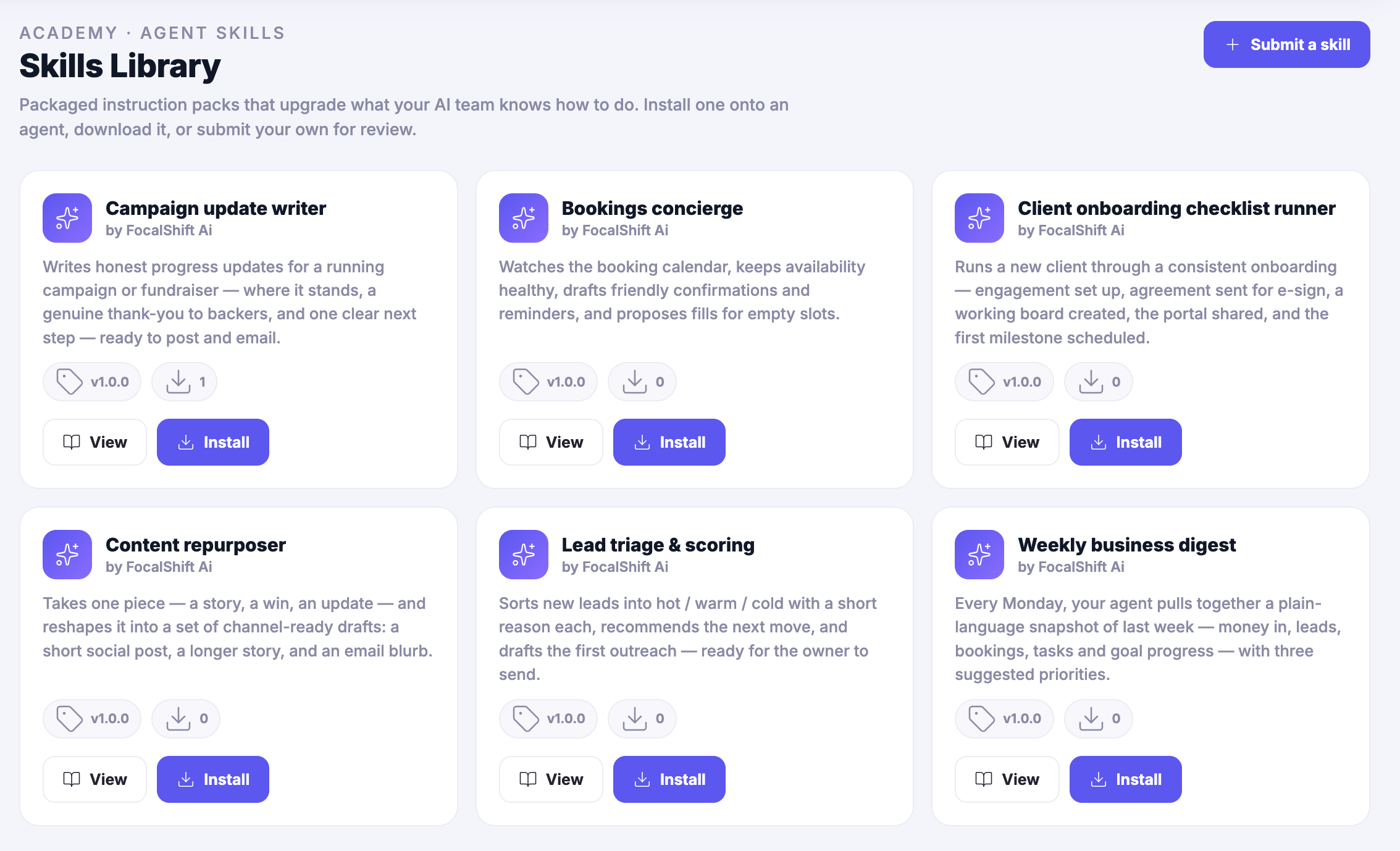
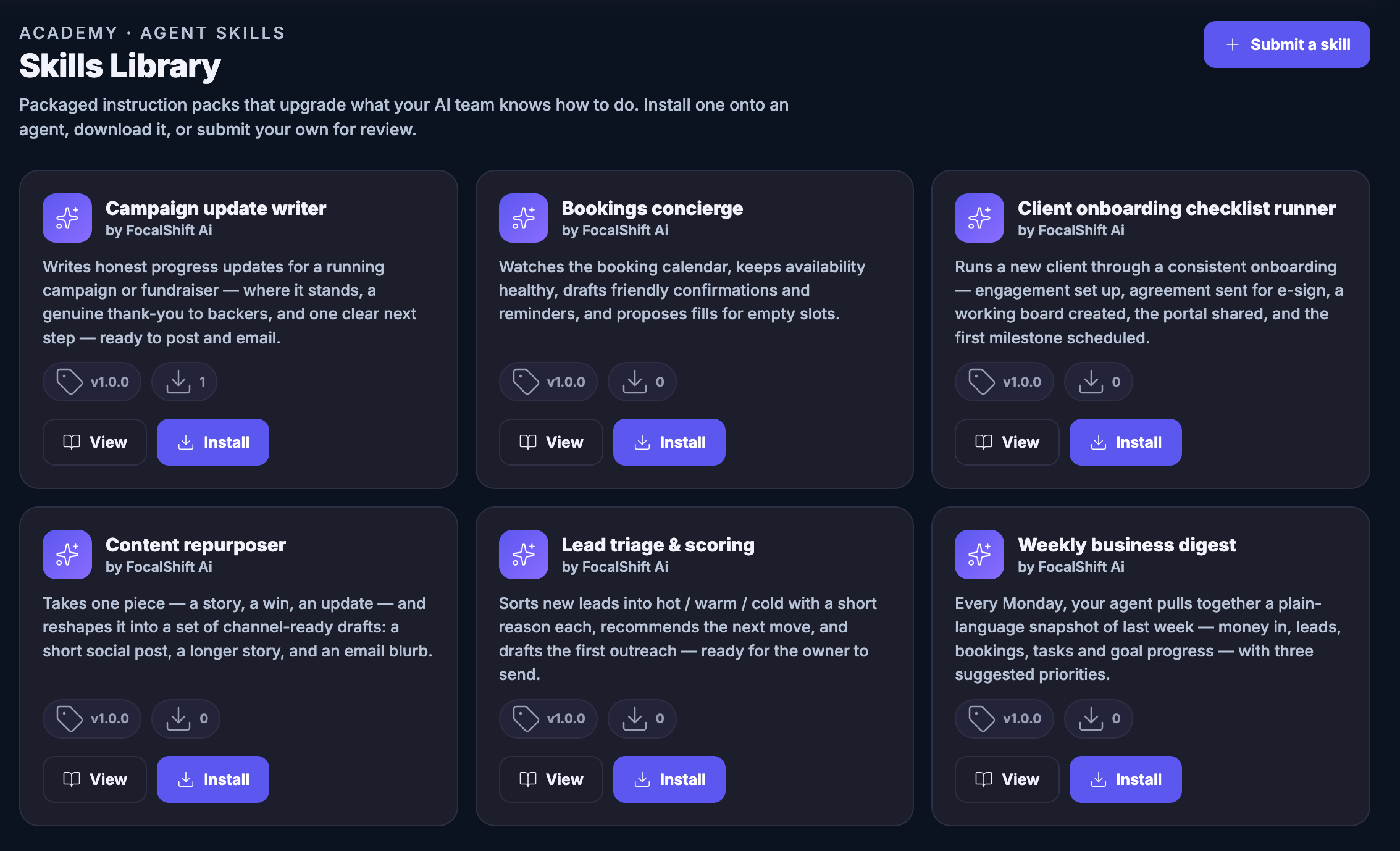
The Skills Library: packaged instruction packs that add to what an agent knows how to do, each one authored by FocalShift, each with a version, a download count and controls to view or install it onto an agent — a campaign update writer that turns a running campaign into an honest progress note ready to post and email; a bookings concierge which the product describes, in its own words, as watching the booking calendar, keeping availability healthy, drafting friendly confirmations and reminders and proposing fills for empty slots; a client onboarding checklist runner that walks a new client through engagement set-up, agreement for signature, a working board, the shared portal and the first milestone; a content repurposer that reshapes one piece into a short social post, a longer story and an email blurb; a lead triage pack that sorts new leads hot, warm and cold with a short reason each and drafts the first outreach for the owner to send; and a weekly business digest that gathers last week into plain language with three suggested priorities.The Skills Library: packaged instruction packs that add to what an agent knows how to do, each one authored by FocalShift, each with a version, a download count and controls to view or install it onto an agent — a campaign update writer that turns a running campaign into an honest progress note ready to post and email; a bookings concierge which the product describes, in its own words, as watching the booking calendar, keeping availability healthy, drafting friendly confirmations and reminders and proposing fills for empty slots; a client onboarding checklist runner that walks a new client through engagement set-up, agreement for signature, a working board, the shared portal and the first milestone; a content repurposer that reshapes one piece into a short social post, a longer story and an email blurb; a lead triage pack that sorts new leads hot, warm and cold with a short reason each and drafts the first outreach for the owner to send; and a weekly business digest that gathers last week into plain language with three suggested priorities.

Ai agents

Tutup
My AI Team — the bench itself, under the platform’s own gateway label: a heading over the line naming how many advisors sit on the board and saying that tapping one opens its launch panel, beside the control that walks into the Boardroom. Below, the bench as tiles. A sales-development agent for the lead hub, whose own description prints the boundary it works inside — a ceiling on how many times it may reach out, business hours, a daily spend cap, a word that opts a person out, and a hard stop the moment a human replies. A website agent grounded in your own pages and documents, which answers visitors with citations and logs what it could not answer as a gap to fill. Maven itself as chair and chief of staff, seeing goal, leads and tools together. Then Maverick as the marketing brain, Echo on social strategy, and Scout on research and intelligence. Each tile prints the same three things — the type of specialist it is, the runtime it answers through, which for the advisors is the platform’s own agent crossed with a named outside model and for the others the platform’s own gateway, and whether it is active — over a pair of controls that open it or edit it. The grid runs on past the lower edge of the frame.My AI Team — the bench itself, under the platform’s own gateway label: a heading over the line naming how many advisors sit on the board and saying that tapping one opens its launch panel, beside the control that walks into the Boardroom. Below, the bench as tiles. A sales-development agent for the lead hub, whose own description prints the boundary it works inside — a ceiling on how many times it may reach out, business hours, a daily spend cap, a word that opts a person out, and a hard stop the moment a human replies. A website agent grounded in your own pages and documents, which answers visitors with citations and logs what it could not answer as a gap to fill. Maven itself as chair and chief of staff, seeing goal, leads and tools together. Then Maverick as the marketing brain, Echo on social strategy, and Scout on research and intelligence. Each tile prints the same three things — the type of specialist it is, the runtime it answers through, which for the advisors is the platform’s own agent crossed with a named outside model and for the others the platform’s own gateway, and whether it is active — over a pair of controls that open it or edit it. The grid runs on past the lower edge of the frame.

Ai agents

Tutup
The Skills Library: packaged instruction packs that add to what an agent knows how to do, each one authored by FocalShift, each with a version, a download count and controls to view or install it onto an agent — a campaign update writer that turns a running campaign into an honest progress note ready to post and email; a bookings concierge which the product describes, in its own words, as watching the booking calendar, keeping availability healthy, drafting friendly confirmations and reminders and proposing fills for empty slots; a client onboarding checklist runner that walks a new client through engagement set-up, agreement for signature, a working board, the shared portal and the first milestone; a content repurposer that reshapes one piece into a short social post, a longer story and an email blurb; a lead triage pack that sorts new leads hot, warm and cold with a short reason each and drafts the first outreach for the owner to send; and a weekly business digest that gathers last week into plain language with three suggested priorities.The Skills Library: packaged instruction packs that add to what an agent knows how to do, each one authored by FocalShift, each with a version, a download count and controls to view or install it onto an agent — a campaign update writer that turns a running campaign into an honest progress note ready to post and email; a bookings concierge which the product describes, in its own words, as watching the booking calendar, keeping availability healthy, drafting friendly confirmations and reminders and proposing fills for empty slots; a client onboarding checklist runner that walks a new client through engagement set-up, agreement for signature, a working board, the shared portal and the first milestone; a content repurposer that reshapes one piece into a short social post, a longer story and an email blurb; a lead triage pack that sorts new leads hot, warm and cold with a short reason each and drafts the first outreach for the owner to send; and a weekly business digest that gathers last week into plain language with three suggested priorities.

A look inside Ai agents

Stills from the product, one after the next.

My AI Team — the bench itself, under the platform’s own gateway label: a heading over the line naming how many advisors sit on the board and saying that tapping one opens its launch panel, beside the control that walks into the Boardroom. Below, the bench as tiles. A sales-development agent for the lead hub, whose own description prints the boundary it works inside — a ceiling on how many times it may reach out, business hours, a daily spend cap, a word that opts a person out, and a hard stop the moment a human replies. A website agent grounded in your own pages and documents, which answers visitors with citations and logs what it could not answer as a gap to fill. Maven itself as chair and chief of staff, seeing goal, leads and tools together. Then Maverick as the marketing brain, Echo on social strategy, and Scout on research and intelligence. Each tile prints the same three things — the type of specialist it is, the runtime it answers through, which for the advisors is the platform’s own agent crossed with a named outside model and for the others the platform’s own gateway, and whether it is active — over a pair of controls that open it or edit it. The grid runs on past the lower edge of the frame.My AI Team — the bench itself, under the platform’s own gateway label: a heading over the line naming how many advisors sit on the board and saying that tapping one opens its launch panel, beside the control that walks into the Boardroom. Below, the bench as tiles. A sales-development agent for the lead hub, whose own description prints the boundary it works inside — a ceiling on how many times it may reach out, business hours, a daily spend cap, a word that opts a person out, and a hard stop the moment a human replies. A website agent grounded in your own pages and documents, which answers visitors with citations and logs what it could not answer as a gap to fill. Maven itself as chair and chief of staff, seeing goal, leads and tools together. Then Maverick as the marketing brain, Echo on social strategy, and Scout on research and intelligence. Each tile prints the same three things — the type of specialist it is, the runtime it answers through, which for the advisors is the platform’s own agent crossed with a named outside model and for the others the platform’s own gateway, and whether it is active — over a pair of controls that open it or edit it. The grid runs on past the lower edge of the frame.
The Skills Library: packaged instruction packs that add to what an agent knows how to do, each one authored by FocalShift, each with a version, a download count and controls to view or install it onto an agent — a campaign update writer that turns a running campaign into an honest progress note ready to post and email; a bookings concierge which the product describes, in its own words, as watching the booking calendar, keeping availability healthy, drafting friendly confirmations and reminders and proposing fills for empty slots; a client onboarding checklist runner that walks a new client through engagement set-up, agreement for signature, a working board, the shared portal and the first milestone; a content repurposer that reshapes one piece into a short social post, a longer story and an email blurb; a lead triage pack that sorts new leads hot, warm and cold with a short reason each and drafts the first outreach for the owner to send; and a weekly business digest that gathers last week into plain language with three suggested priorities.The Skills Library: packaged instruction packs that add to what an agent knows how to do, each one authored by FocalShift, each with a version, a download count and controls to view or install it onto an agent — a campaign update writer that turns a running campaign into an honest progress note ready to post and email; a bookings concierge which the product describes, in its own words, as watching the booking calendar, keeping availability healthy, drafting friendly confirmations and reminders and proposing fills for empty slots; a client onboarding checklist runner that walks a new client through engagement set-up, agreement for signature, a working board, the shared portal and the first milestone; a content repurposer that reshapes one piece into a short social post, a longer story and an email blurb; a lead triage pack that sorts new leads hot, warm and cold with a short reason each and drafts the first outreach for the owner to send; and a weekly business digest that gathers last week into plain language with three suggested priorities.

Teamwork — platform screenshots

Real screens from the product. Open any one full size, or switch the set to light or dark.

Tutup
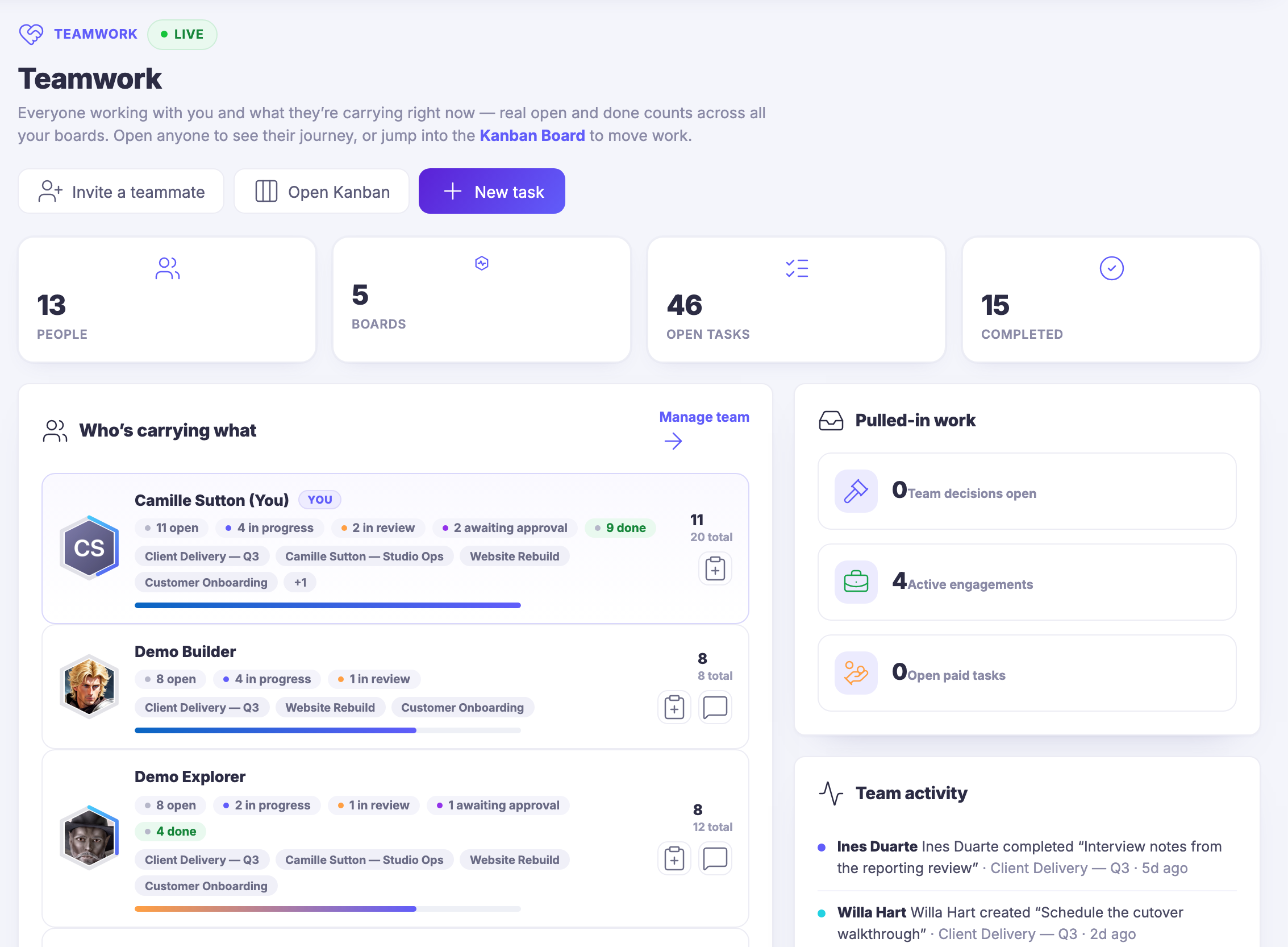
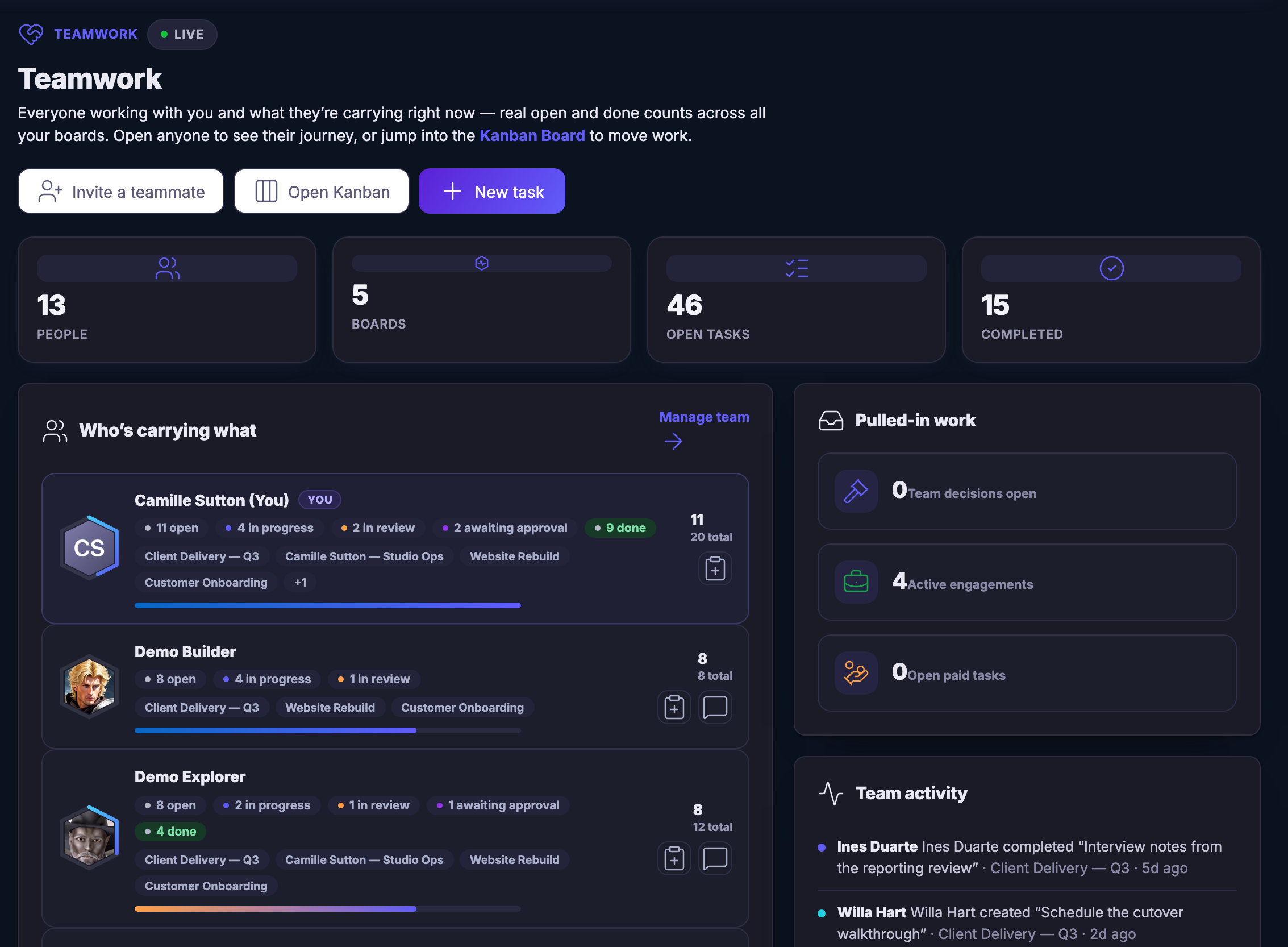
The Teamwork view: everyone working with you and what each person is carrying right now — open, in progress, in review, awaiting approval and done — across every board, with the boards each person is on, the work pulled in from client engagements, and the team’s recent activity and decisions beside it.The Teamwork view: everyone working with you and what each person is carrying right now — open, in progress, in review, awaiting approval and done — across every board, with the boards each person is on, the work pulled in from client engagements, and the team’s recent activity and decisions beside it.
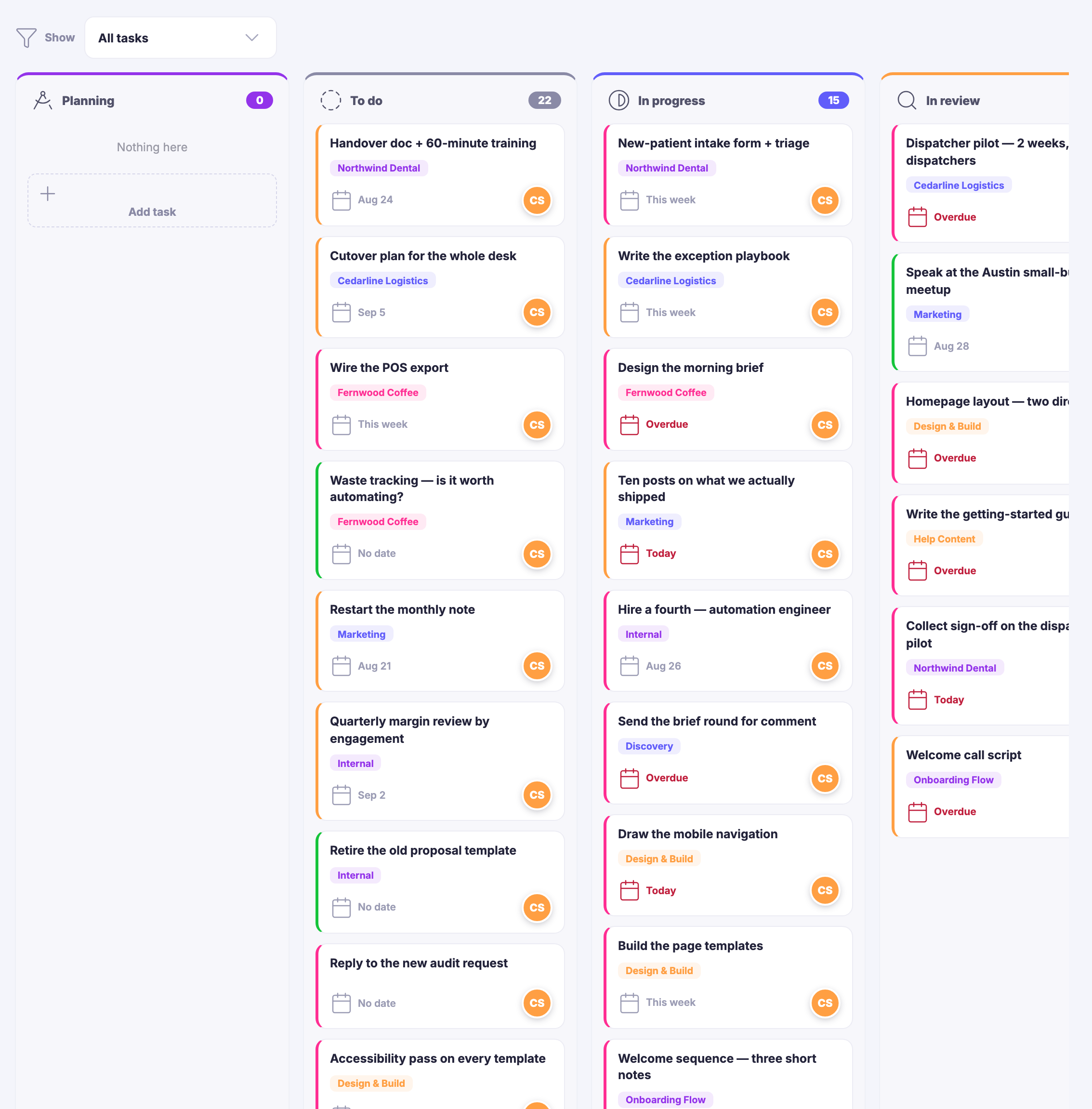
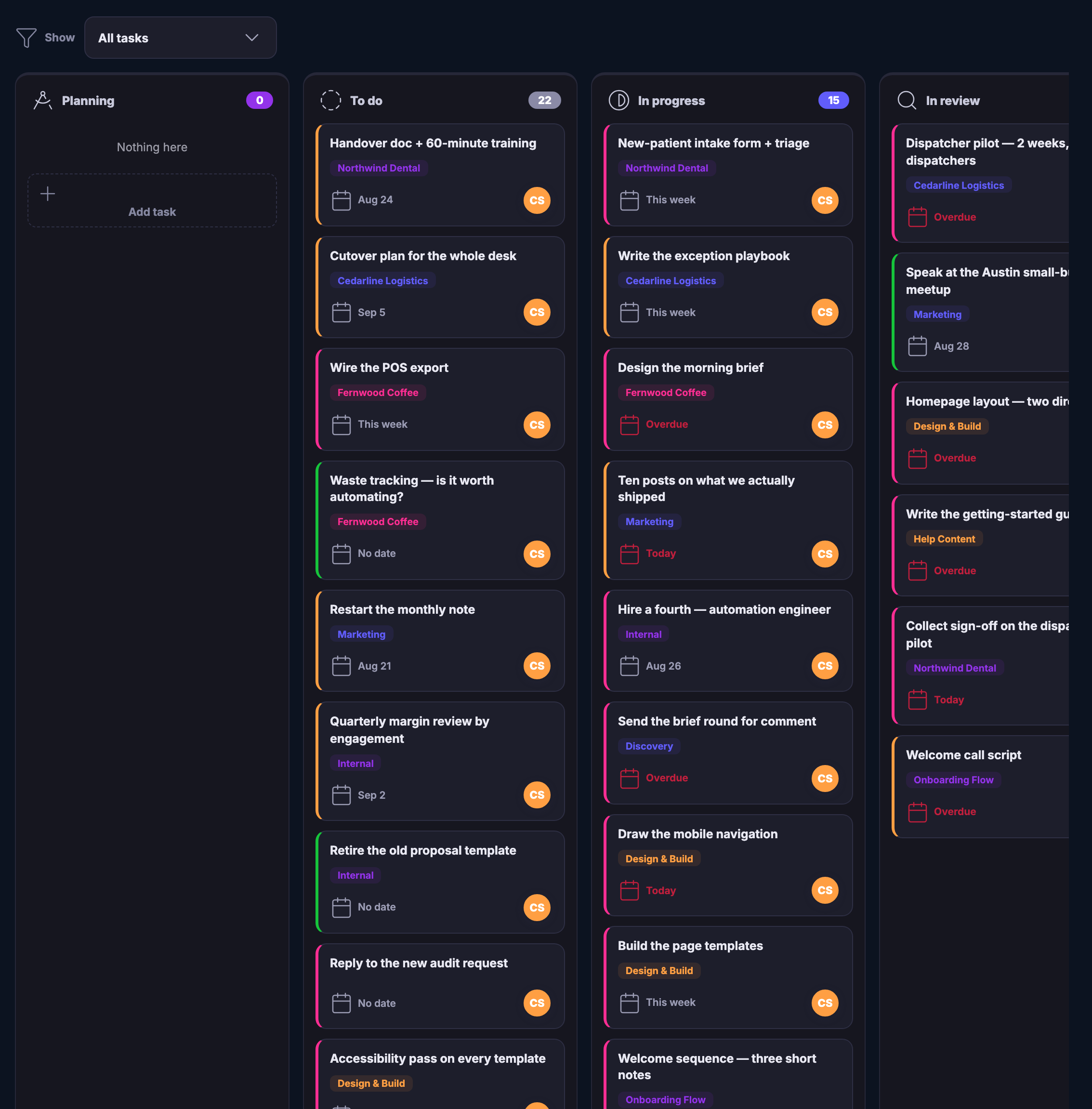
The Kanban board: every task across the whole workspace arranged by status — planning, to do, in progress, in review — most cards carrying the client or the project they belong to, the date each is due where one is set, and who has it.The Kanban board: every task across the whole workspace arranged by status — planning, to do, in progress, in review — most cards carrying the client or the project they belong to, the date each is due where one is set, and who has it.

Kerja sama tim

Tutup
The Teamwork view: everyone working with you and what each person is carrying right now — open, in progress, in review, awaiting approval and done — across every board, with the boards each person is on, the work pulled in from client engagements, and the team’s recent activity and decisions beside it.The Teamwork view: everyone working with you and what each person is carrying right now — open, in progress, in review, awaiting approval and done — across every board, with the boards each person is on, the work pulled in from client engagements, and the team’s recent activity and decisions beside it.

Kerja sama tim

Tutup
The Kanban board: every task across the whole workspace arranged by status — planning, to do, in progress, in review — most cards carrying the client or the project they belong to, the date each is due where one is set, and who has it.The Kanban board: every task across the whole workspace arranged by status — planning, to do, in progress, in review — most cards carrying the client or the project they belong to, the date each is due where one is set, and who has it.

A look inside Teamwork

Stills from the product, one after the next.

The Teamwork view: everyone working with you and what each person is carrying right now — open, in progress, in review, awaiting approval and done — across every board, with the boards each person is on, the work pulled in from client engagements, and the team’s recent activity and decisions beside it.The Teamwork view: everyone working with you and what each person is carrying right now — open, in progress, in review, awaiting approval and done — across every board, with the boards each person is on, the work pulled in from client engagements, and the team’s recent activity and decisions beside it.
The Kanban board: every task across the whole workspace arranged by status — planning, to do, in progress, in review — most cards carrying the client or the project they belong to, the date each is due where one is set, and who has it.The Kanban board: every task across the whole workspace arranged by status — planning, to do, in progress, in review — most cards carrying the client or the project they belong to, the date each is due where one is set, and who has it.

Client Work — platform screenshots

Real screens from the product. Open any one full size, or switch the set to light or dark.

Tutup
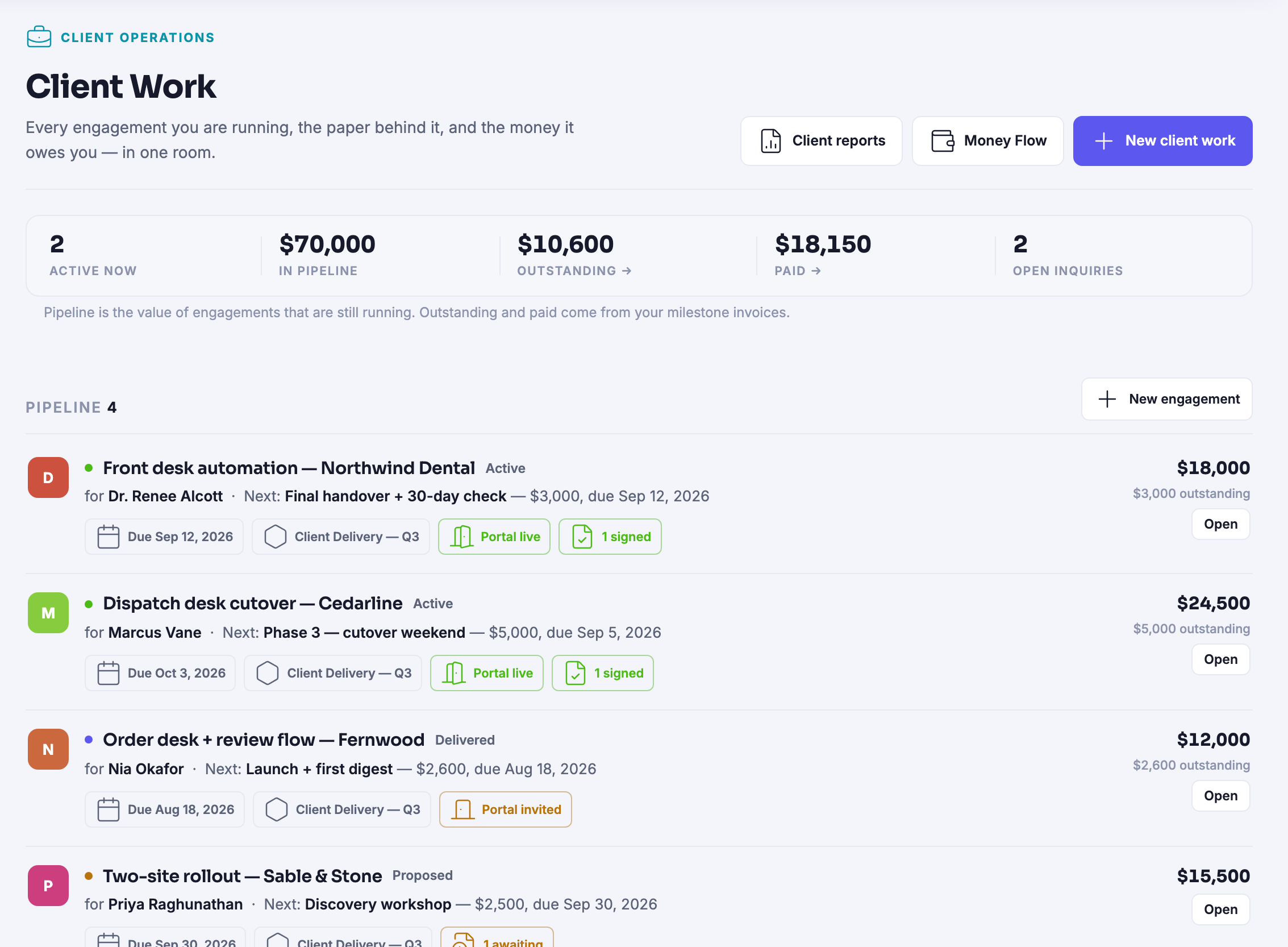
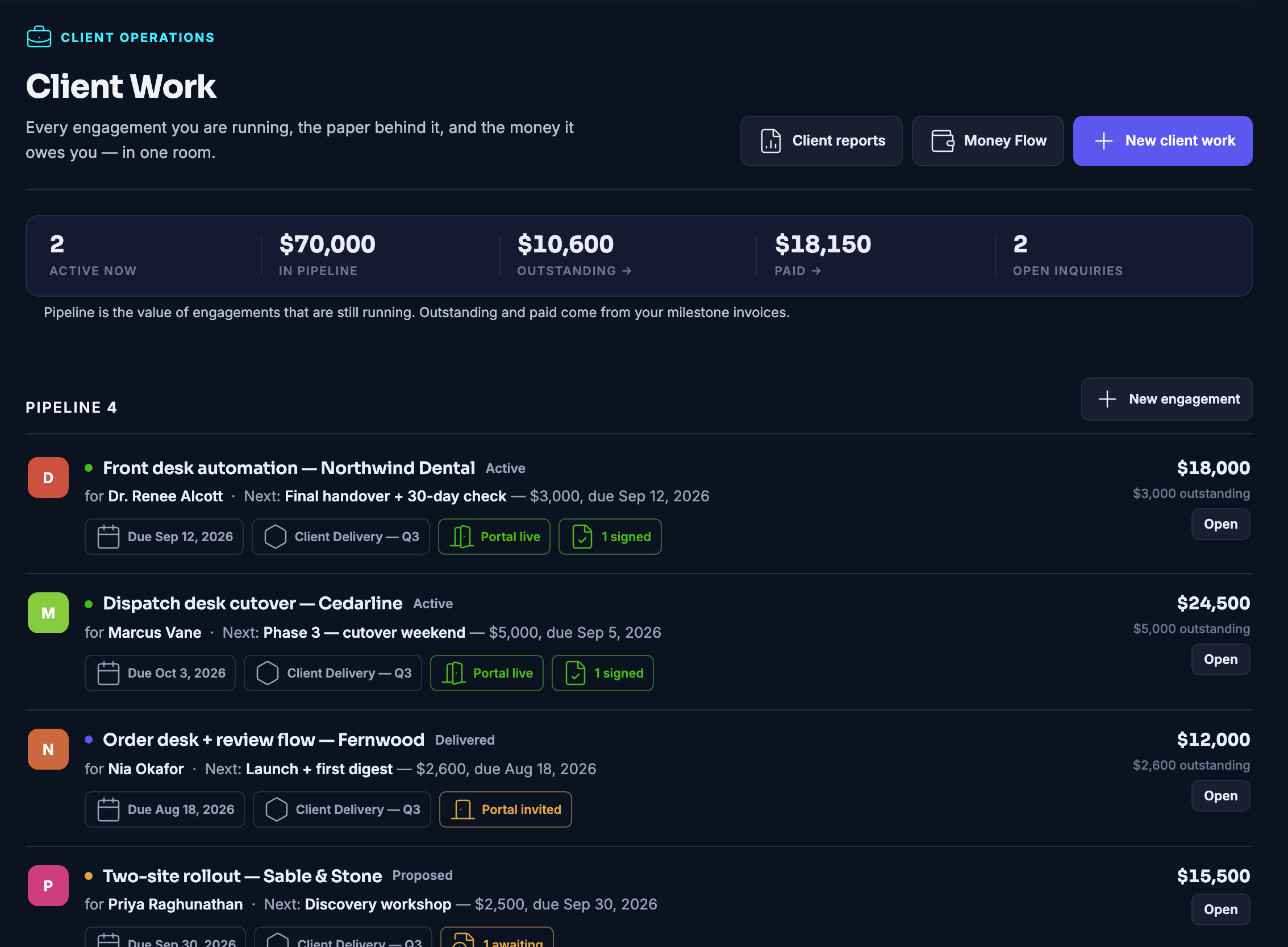
The Client Work home: every engagement you are running in one room — how many are active, what is in the pipeline, what is outstanding, what has been paid and how many enquiries are open — above a live pipeline of engagements, each with its client, its next milestone and its due date, and, where there is one, the state of the client’s portal or of the agreement.The Client Work home: every engagement you are running in one room — how many are active, what is in the pipeline, what is outstanding, what has been paid and how many enquiries are open — above a live pipeline of engagements, each with its client, its next milestone and its due date, and, where there is one, the state of the client’s portal or of the agreement.
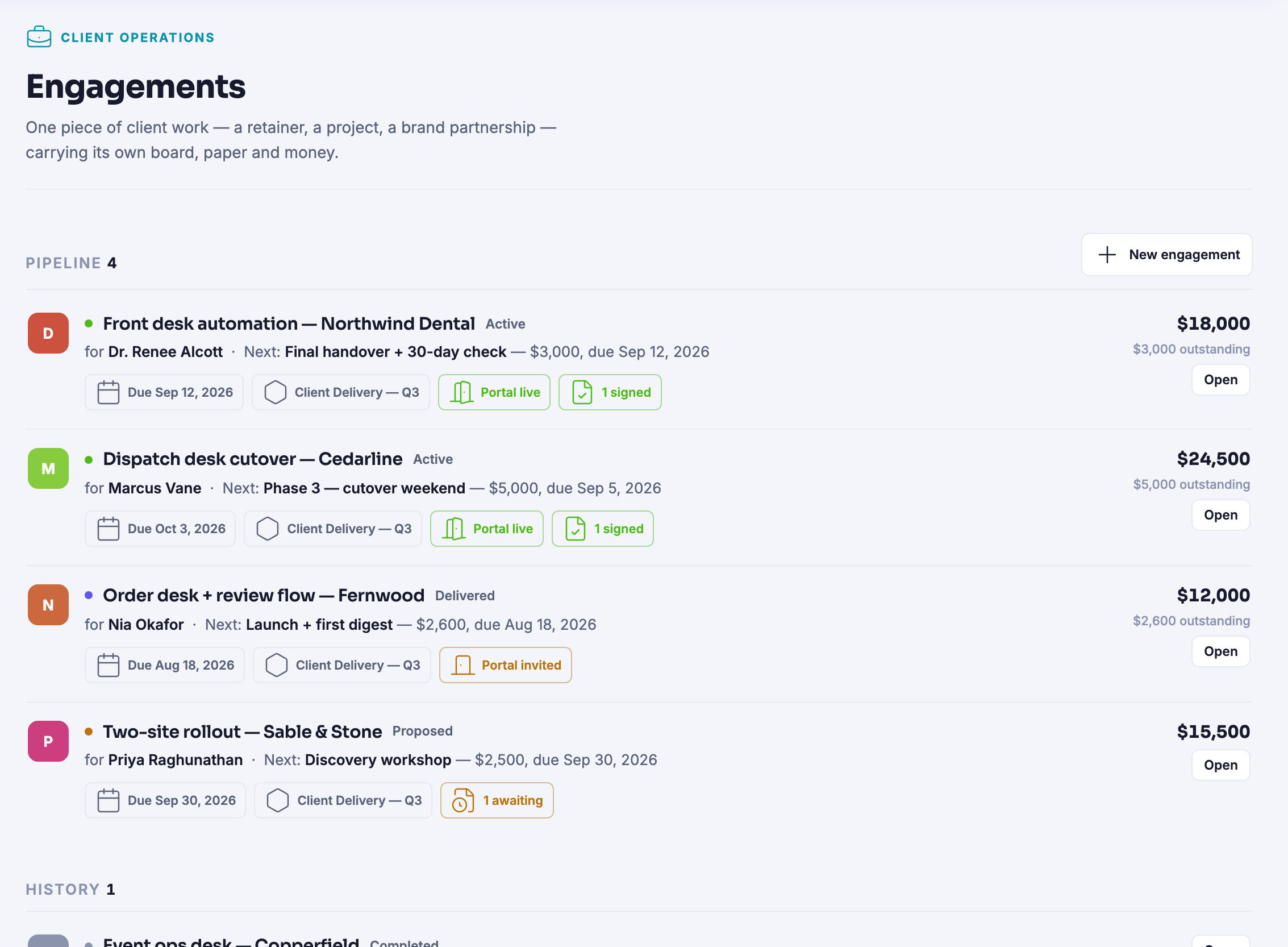
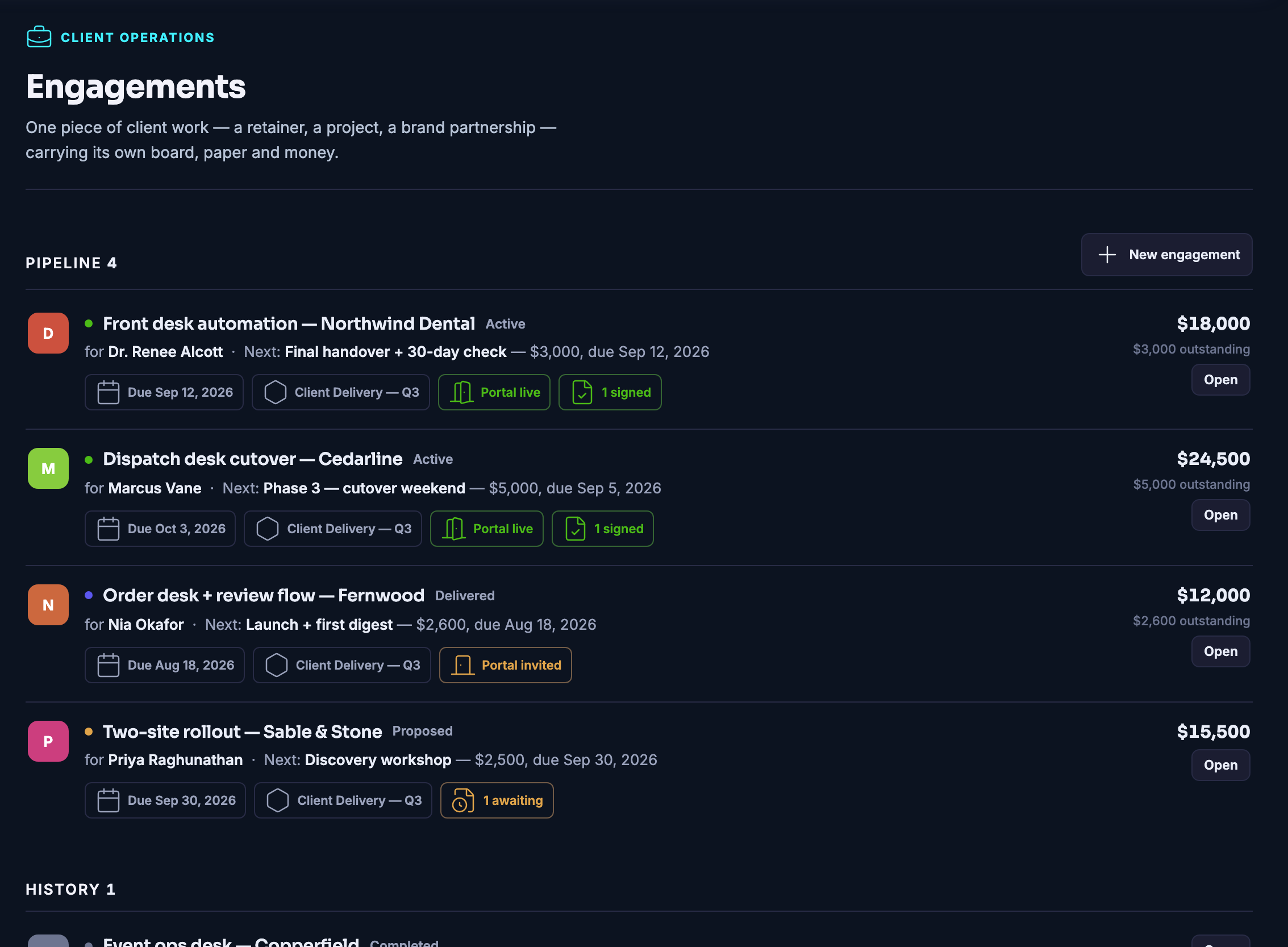
The Engagements pipeline in full — every piece of client work that is genuinely running, with the work that has closed kept underneath in history — each row carrying its client, its next milestone, its due date and, where there is one, the state of its portal or of its agreement.The Engagements pipeline in full — every piece of client work that is genuinely running, with the work that has closed kept underneath in history — each row carrying its client, its next milestone, its due date and, where there is one, the state of its portal or of its agreement.
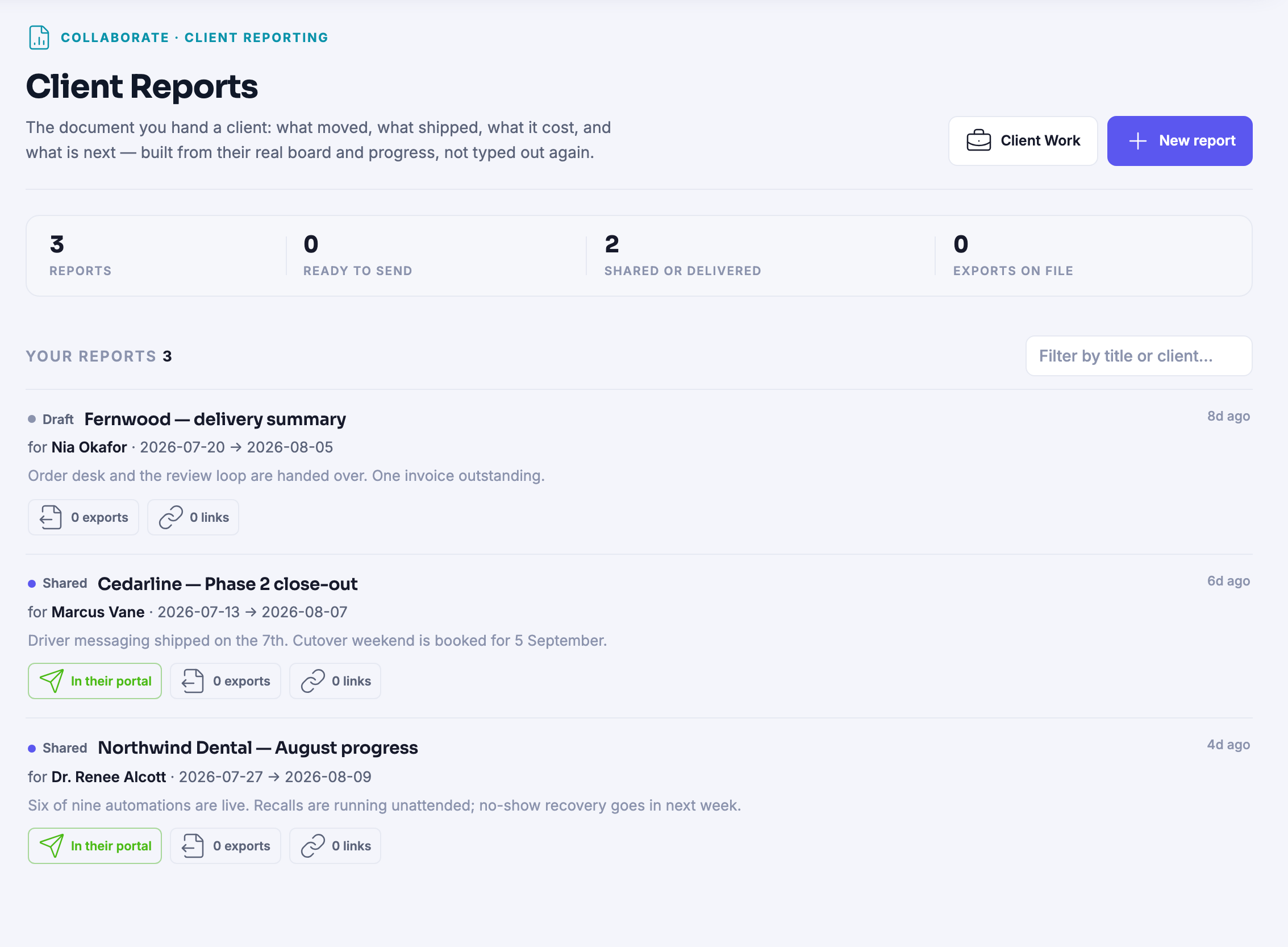
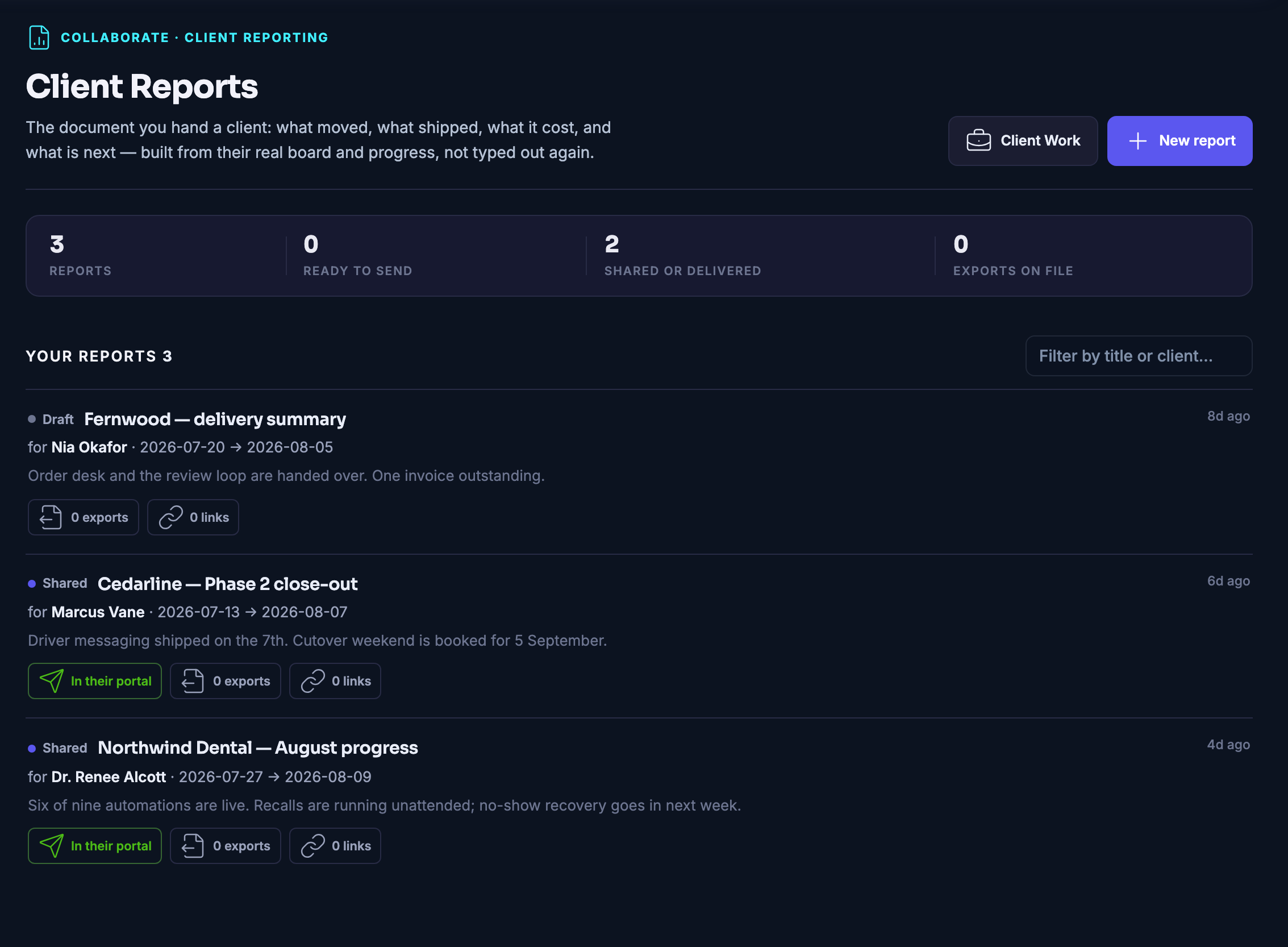
Client Reports: the document you hand a client, built from their real board rather than typed out again — what moved, what shipped and what is next — each one showing whether it is still a draft or already sitting in their portal.Client Reports: the document you hand a client, built from their real board rather than typed out again — what moved, what shipped and what is next — each one showing whether it is still a draft or already sitting in their portal.
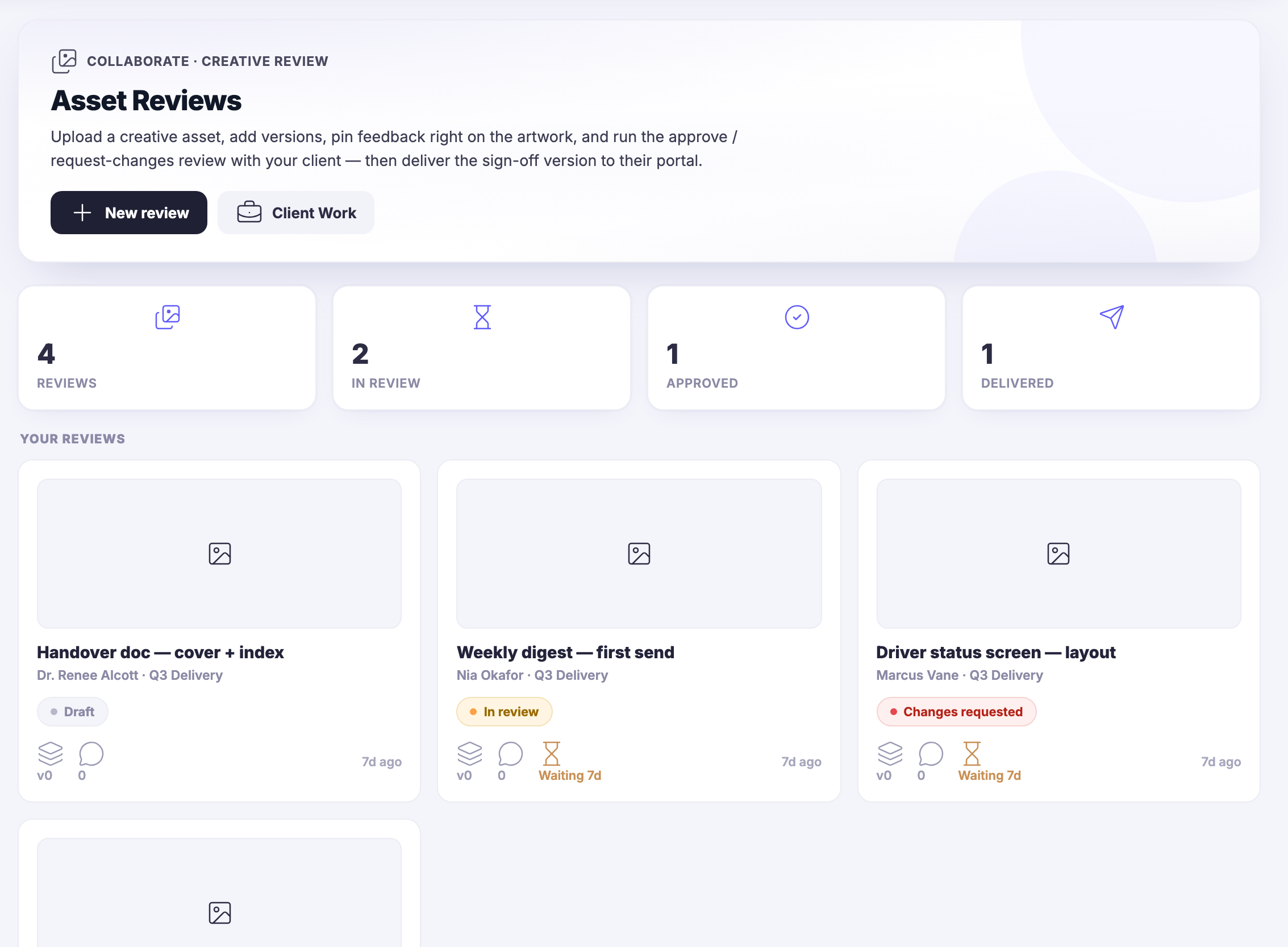
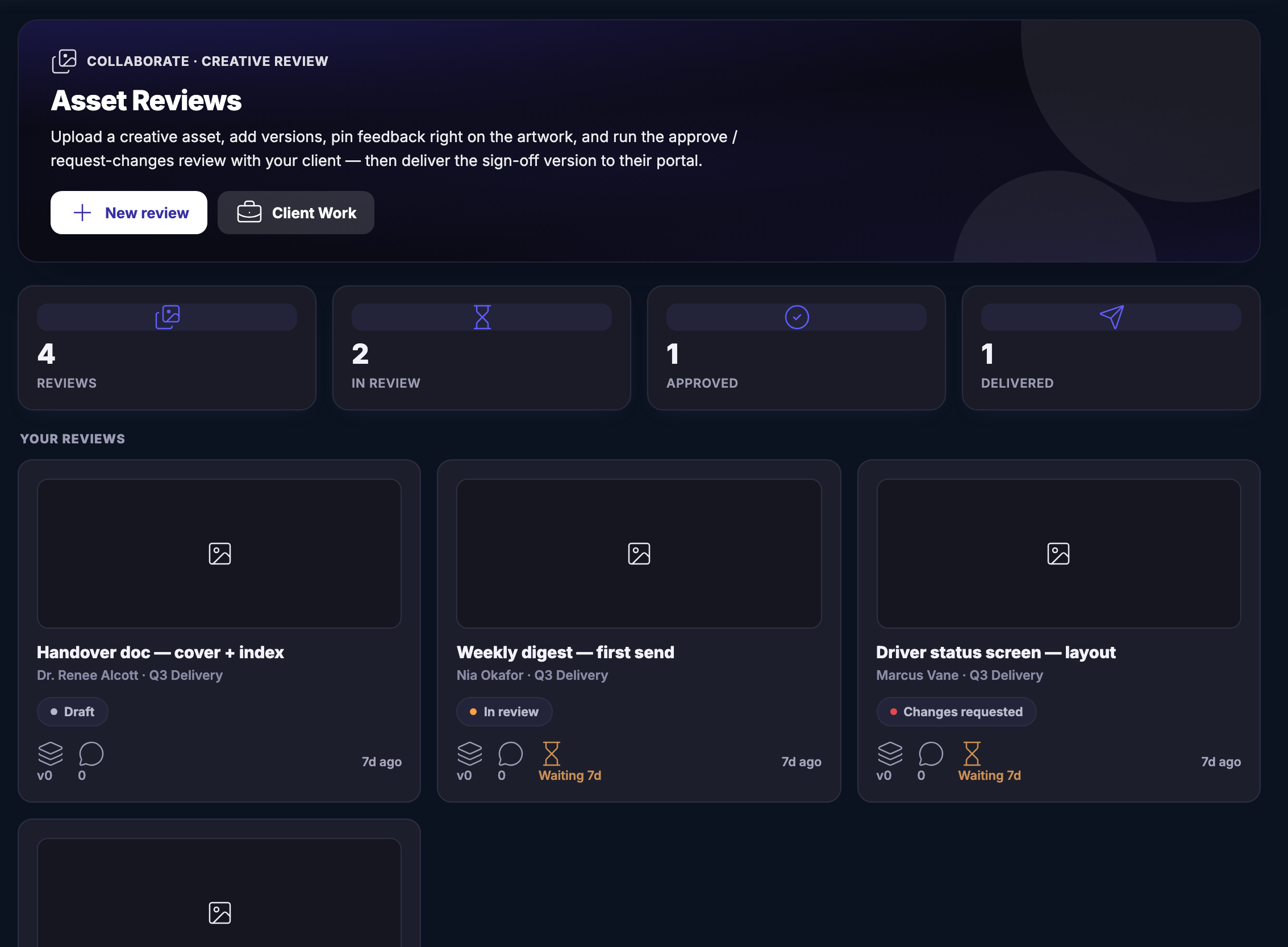
Asset Reviews: the creative-review queue for client work — how many reviews there are all told, and how many are in review, approved and delivered — above the review records themselves, each carrying its title, its client and delivery space, its stage (draft, in review, changes requested) and how long it has been sitting with somebody.Asset Reviews: the creative-review queue for client work — how many reviews there are all told, and how many are in review, approved and delivered — above the review records themselves, each carrying its title, its client and delivery space, its stage (draft, in review, changes requested) and how long it has been sitting with somebody.

Pekerjaan klien

Tutup
The Client Work home: every engagement you are running in one room — how many are active, what is in the pipeline, what is outstanding, what has been paid and how many enquiries are open — above a live pipeline of engagements, each with its client, its next milestone and its due date, and, where there is one, the state of the client’s portal or of the agreement.The Client Work home: every engagement you are running in one room — how many are active, what is in the pipeline, what is outstanding, what has been paid and how many enquiries are open — above a live pipeline of engagements, each with its client, its next milestone and its due date, and, where there is one, the state of the client’s portal or of the agreement.

Pekerjaan klien

Tutup
The Engagements pipeline in full — every piece of client work that is genuinely running, with the work that has closed kept underneath in history — each row carrying its client, its next milestone, its due date and, where there is one, the state of its portal or of its agreement.The Engagements pipeline in full — every piece of client work that is genuinely running, with the work that has closed kept underneath in history — each row carrying its client, its next milestone, its due date and, where there is one, the state of its portal or of its agreement.

Pekerjaan klien

Tutup
Client Reports: the document you hand a client, built from their real board rather than typed out again — what moved, what shipped and what is next — each one showing whether it is still a draft or already sitting in their portal.Client Reports: the document you hand a client, built from their real board rather than typed out again — what moved, what shipped and what is next — each one showing whether it is still a draft or already sitting in their portal.

Pekerjaan klien

Tutup
Asset Reviews: the creative-review queue for client work — how many reviews there are all told, and how many are in review, approved and delivered — above the review records themselves, each carrying its title, its client and delivery space, its stage (draft, in review, changes requested) and how long it has been sitting with somebody.Asset Reviews: the creative-review queue for client work — how many reviews there are all told, and how many are in review, approved and delivered — above the review records themselves, each carrying its title, its client and delivery space, its stage (draft, in review, changes requested) and how long it has been sitting with somebody.

A look inside Client Work

Stills from the product, one after the next.

The Client Work home: every engagement you are running in one room — how many are active, what is in the pipeline, what is outstanding, what has been paid and how many enquiries are open — above a live pipeline of engagements, each with its client, its next milestone and its due date, and, where there is one, the state of the client’s portal or of the agreement.The Client Work home: every engagement you are running in one room — how many are active, what is in the pipeline, what is outstanding, what has been paid and how many enquiries are open — above a live pipeline of engagements, each with its client, its next milestone and its due date, and, where there is one, the state of the client’s portal or of the agreement.
The Engagements pipeline in full — every piece of client work that is genuinely running, with the work that has closed kept underneath in history — each row carrying its client, its next milestone, its due date and, where there is one, the state of its portal or of its agreement.The Engagements pipeline in full — every piece of client work that is genuinely running, with the work that has closed kept underneath in history — each row carrying its client, its next milestone, its due date and, where there is one, the state of its portal or of its agreement.
Client Reports: the document you hand a client, built from their real board rather than typed out again — what moved, what shipped and what is next — each one showing whether it is still a draft or already sitting in their portal.Client Reports: the document you hand a client, built from their real board rather than typed out again — what moved, what shipped and what is next — each one showing whether it is still a draft or already sitting in their portal.
Asset Reviews: the creative-review queue for client work — how many reviews there are all told, and how many are in review, approved and delivered — above the review records themselves, each carrying its title, its client and delivery space, its stage (draft, in review, changes requested) and how long it has been sitting with somebody.Asset Reviews: the creative-review queue for client work — how many reviews there are all told, and how many are in review, approved and delivered — above the review records themselves, each carrying its title, its client and delivery space, its stage (draft, in review, changes requested) and how long it has been sitting with somebody.

Because you said I want the dull half of my week to disappear.

Ai agents

A bench of specialists, each with one job, a boundary around it, and a plain description of the work it takes on.

One agent, one jobA marketing brain, a social strategist, a researcher, a designer, someone for the fiddly technical work nobody enjoys. Each one is named, briefed, and pointed at the thing it is good at.
They work on your real recordsNot on a paragraph describing your business. On the leads, the threads and the boards that are actually there — which is why what comes back fits your business rather than a generic one.
Taken on by the taskHand one an afternoon of work and pay in credits. There is nothing to hire and nothing to unwind afterwards.
Read more about Ai agents

A bench of specialists, each with one job and a boundary around it.

Each agent has a job and a boundary printed with it. One writes the marketing, one keeps the content calendar honest, one goes and finds out what the competition is up to, one looks after the fiddly technical work nobody enjoys. You are not briefing a general-purpose helper every morning; you are handing a named specialist the thing it already does.

They work on the things already in the platform. That is the difference between an agent and a clever prompt: it reads the real lead, the real thread and the real board rather than a description you had to write out first, so what comes back fits your business instead of a plausible one.

What an agent knows can be topped up. Send one to learn from a guide, one of your own pages or a document you upload, and what it learns becomes something it can look up. It never becomes a new instruction, and it never changes what that agent is allowed to do — the product says so on the screen where you do it.

You take one on by the task and pay in credits, so the commitment is the piece of work in front of you rather than a standing arrangement. That is why you can hand over the dull half of the week without handing over the judgement.

What it actually does

  • One agent, one job, one clear boundary
  • Working on your real records, not a description of them
  • A boundary printed on the agent itself

What that changes for you

  • The dull half of the week stops being yours
  • You hire for the task, not for the month
  • Capacity that does not need to be hired

You come away with a teammate that was working while you were not.

A look inside Ai agents

Wednesday · 8:14 · Who is carrying what

Who has this. Answered in one look.

Teamwork lays every board across one grid: people down the side, the state of the work across the top. Hover a person and their pieces light up across every board they touch. The one that is waiting on someone is already lifted out.

OpenIn progressIn reviewWaitingDone
The review packWaiting on

Maven adds this one: the work does not get lighter when there are more of you — it gets harder to see.

Kerja sama tim

One picture of the work — who is carrying what, and what is waiting on somebody.

Who is carrying what, in one viewEvery person and every board at once: what is open, what is in progress, what is in review, what is waiting on an approval, what is done. No round of asking.
Handing work over costs a minuteThe work, its history and everything said about it live with the board rather than with a person. Somebody new opens it and can carry on.
Decisions weighed before anyone commitsAnyone can put a call on the table, everyone’s read goes on record, and the final call is yours — written down where the work is, not lost in a thread.
Read more about Teamwork

Everyone working with you, and what they are carrying right now.

The question a small team actually has is not “what is the plan”, it is “who has this”. Teamwork answers it on one screen: each person with the work they are carrying, broken into open, in progress, in review, waiting on an approval and done, across every board rather than one at a time.

Underneath it is a board you can move. The Kanban view holds every task across the workspace, arranged by status and tagged with the client or the project it belongs to, so moving something is a drag rather than a message. At a Glance sits above both: active projects, open tasks, approvals pending and active clients, summarised and read-only.

Decisions get the same treatment as work. Anyone can propose one, everyone’s reasoning goes on the record, and you make the call — so the reason a thing was decided outlives the week it was decided in. Team activity runs alongside it, so a change is visible without anybody announcing it.

And because the work carries its own history, handover is not an event. A new person opens the board and finds the brief, the files, the approvals and the conversation already there. Nobody has to be interviewed to find out where things stand.

What it actually does

  • Who is carrying what, across every board at once
  • Handover that does not depend on one person
  • Decisions proposed, weighed and recorded where the work is

What that changes for you

  • A new person can pick the work up on day one
  • The status meeting gets shorter or stops
  • Nothing sits untouched without anyone noticing

You come away with one picture of the work, and nobody guessing who has it.

A look inside Teamwork

STORYBOARD · THE SATURDAY LAUNCH ESTABLISHEDOPENHANDED OVER WHAT IS SETTLED · WHAT IS STILL OPEN · WHAT MOVED TO A BOARD FILES · THE LAUNCH FOLDER SPACE · THE ROOM

Thursday · Before the work starts

Work the story out before the work starts.

A StoryBoard holds what is established, what is still open and what has been handed over to a board. Its files live in one folder and its conversation in one Space, so the argument, the assets and the people are one object, not three tabs.

Because you said I want to hand a client a finished website.

Pekerjaan klien

Every engagement you are running, the paper behind it, and what it still owes you.

One engagement, not four placesA retainer, a project or a partnership is one record carrying its own board, its own agreement and its own invoices. What was agreed sits next to what got done.
A door of the client’s ownEach client gets a portal that shows only their work — what you delivered, what is waiting on a signature, and what happens next. The status update becomes something they read rather than something you write.
Milestones that carry the moneySet what each stage is worth and mark it delivered. What is outstanding and what has been paid are read off the engagement itself, not reconstructed from memory.
Read more about Client Work

Every engagement you are running, the paper behind it, and the money it owes you — in one room.

An engagement is one piece of client work — a retainer, a project, a brand partnership — and it carries its own board, its own agreements and its own invoices. The pipeline shows what is genuinely running and what has closed; completed work moves to history so the live view stays honest about what is actually live.

The client sees their own side and nothing else. A portal is the link you actually send: one row per client, so you can see who can get in, who has been in, and what is sitting there waiting for them. Signed, delivered and still-to-open are states you read at a glance rather than states you have to ask about.

Reports are built from the client’s real board rather than typed out again — what moved, what shipped, what it cost, what is next — and drop straight into their portal. Asset reviews run the same way: a version, feedback pinned on the artwork itself, and an approve-or-request-changes loop that ends in a sign-off you can deliver.

Money is part of the record, not a separate exercise. Each engagement carries its milestones and what each one is worth, a budget you set and spend against, and a position on what is outstanding — all of it feeding the same month as every other way you earn.

What it actually does

  • One engagement holding the brief, the board, the agreement and the invoices
  • A client view that shows only their work
  • Budgets per engagement, with spend read against them

What that changes for you

  • Approvals stop living in somebody’s inbox
  • Clients stop asking for a status update
  • Nothing delivered goes unbilled

You come away with work a client can watch, and a milestone that bills itself.

A look inside Client Work

Friday · Before lunch · The client

The client sees their own side, and nothing else.

Client Work keeps the engagement whole on your side: the agreement, the invoices and the board. The client gets a portal with only their rows, the approved tick and the three review states; sign-off is recorded on the piece, not remembered. It was approved before lunch. Pull the line and watch what they never see.

Your side · the engagement
Agreement
Invoice · this month
Board · the Saturday launch
Hours logged
Internal notes
Team decision
Client portal · their side
Agreement
Invoice · this month
The Saturday launch · progress
Hours logged
Internal notes
Team decision
DraftIn reviewApproved
Drag the line · what stays yours never crosses it

Collaborate · included

Nobody had to ask where the work was.

Get started now

Next Up: Design assets

Brand-ready images, video and copy.

Tanya Maven