Messages

This is the product's own frame. Your conversations appear here once you have an account.

Get started now
Notifications

This is the product's own frame. Alerts about your business appear here once you have an account.

English
Tuesday already knows what it is

Your week, assembled.

Calls, deadlines, sends and bookings from every corner of the business, laid into one week view that fills itself.

Why it matters

One week, with everything that is actually in it.

Everything lands hereBookings from your links, tasks from your boards, sends from your campaigns — one week, one truth.
Booked while you sleptShare your booking link and the calendar accepts work on your behalf, inside rules you set.
No double-lifeThe business calendar and "the calendar you actually check" stop being two different things.
Part of one platform — works hand-in-hand withCustomers & Leads·Automation

Maven adds this one: every other tool here makes commitments on your behalf — this is the one place they all land.

My Calendar

One week with everything that is actually in it — bookings, meetings, sends, team work and sessions, on a single grid.
Every layer on one gridBookings, meetings and sessions, content and social, team work, course sessions and your own availability — each one a layer you switch on or off, in month, week, day or agenda.
It shows you a heavy week before you live itA strip along the month marks where the load actually falls, and anything landing on top of something else is flagged where it sits rather than found out on the day.
Booked while you are elsewhereShare your booking link and the calendar accepts work on your behalf, inside the availability you decide to give away.
Read more about My Calendar

The calendar you actually check.

Most businesses end up running two calendars: the one the business writes into, and the one the owner actually looks at. This is the first one, made worth looking at. Every tool here that makes a commitment on your behalf writes into it — a booking taken from your link, a session on a course you teach, a post scheduled to go out, a piece of work somebody on the team owes on Thursday.

Each of those is a layer, and layers switch off. A week with everything on it at once is a week nobody can read; a week showing only what you owe and only what has been booked is a week you can plan against. Month, week, day and agenda are four ways of looking at the same set, not four places to keep it.

It also tells you a week is too full while there is still time to do something about it. A strip along the month marks where the load actually falls, and anything landing on top of something else is marked where it sits — so a clash is a thing you move on Monday rather than a thing you discover on Thursday.

And it takes work while you are doing something else. Your booking link offers people the availability you have decided to give away, and what they take arrives here as an entry like any other — not as an email you have to copy across into a second calendar that then disagrees with the first.

What it actually does

  • Bookings, meetings, content, team work and sessions on one grid
  • Layers you switch on and off, in month, week, day or agenda
  • A booking link that fills the week inside the availability you set

What that changes for you

  • One calendar to check, instead of two that disagree
  • A heavy week is visible while you can still move something
  • Time gets booked while you are working on something else

You come away with a week you can read at a glance, and a booking link doing the asking.

A look inside My Calendar

My Calendar — platform screenshots

Real screens from the product. Open any one full size, or switch the set to light or dark.

Close
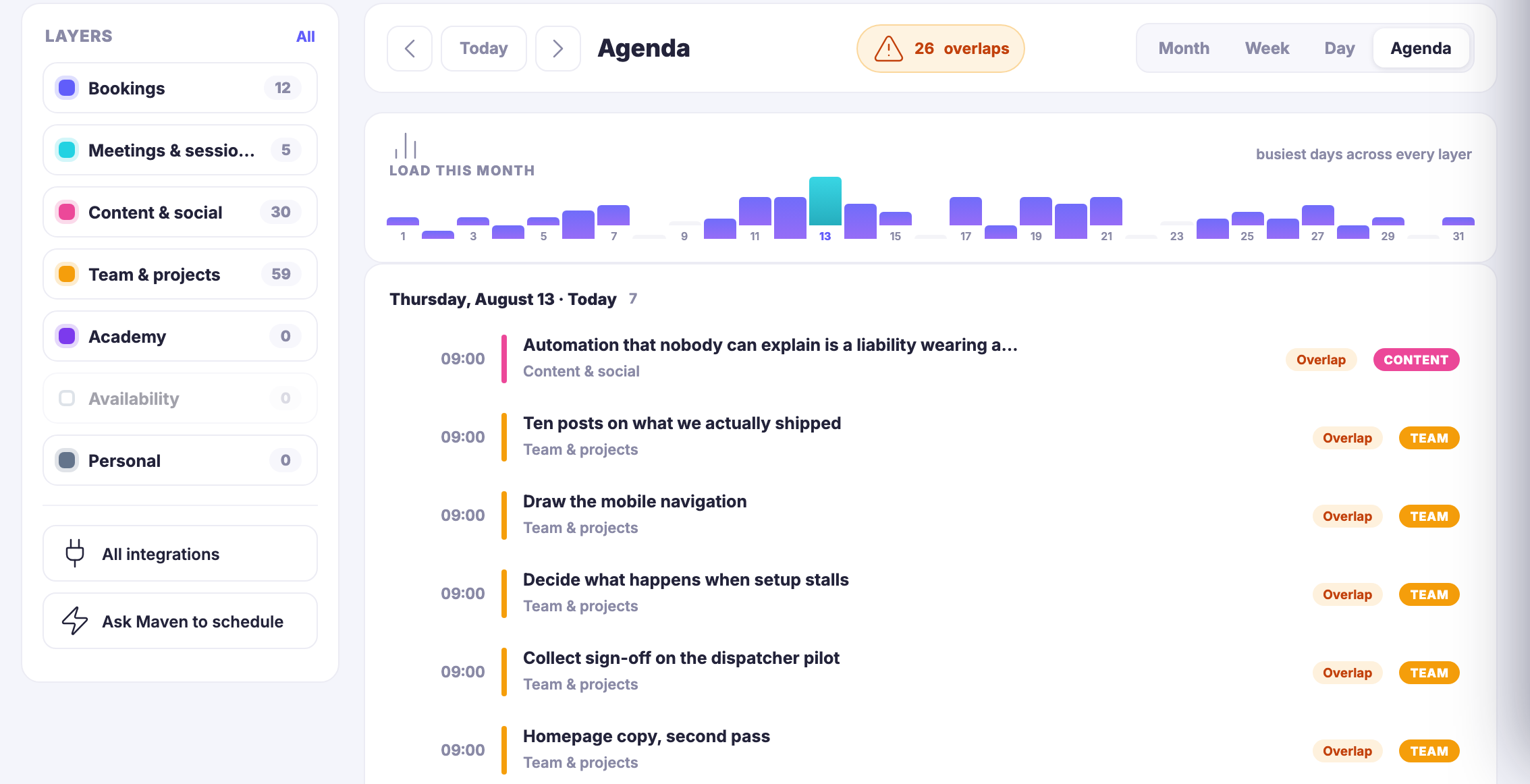
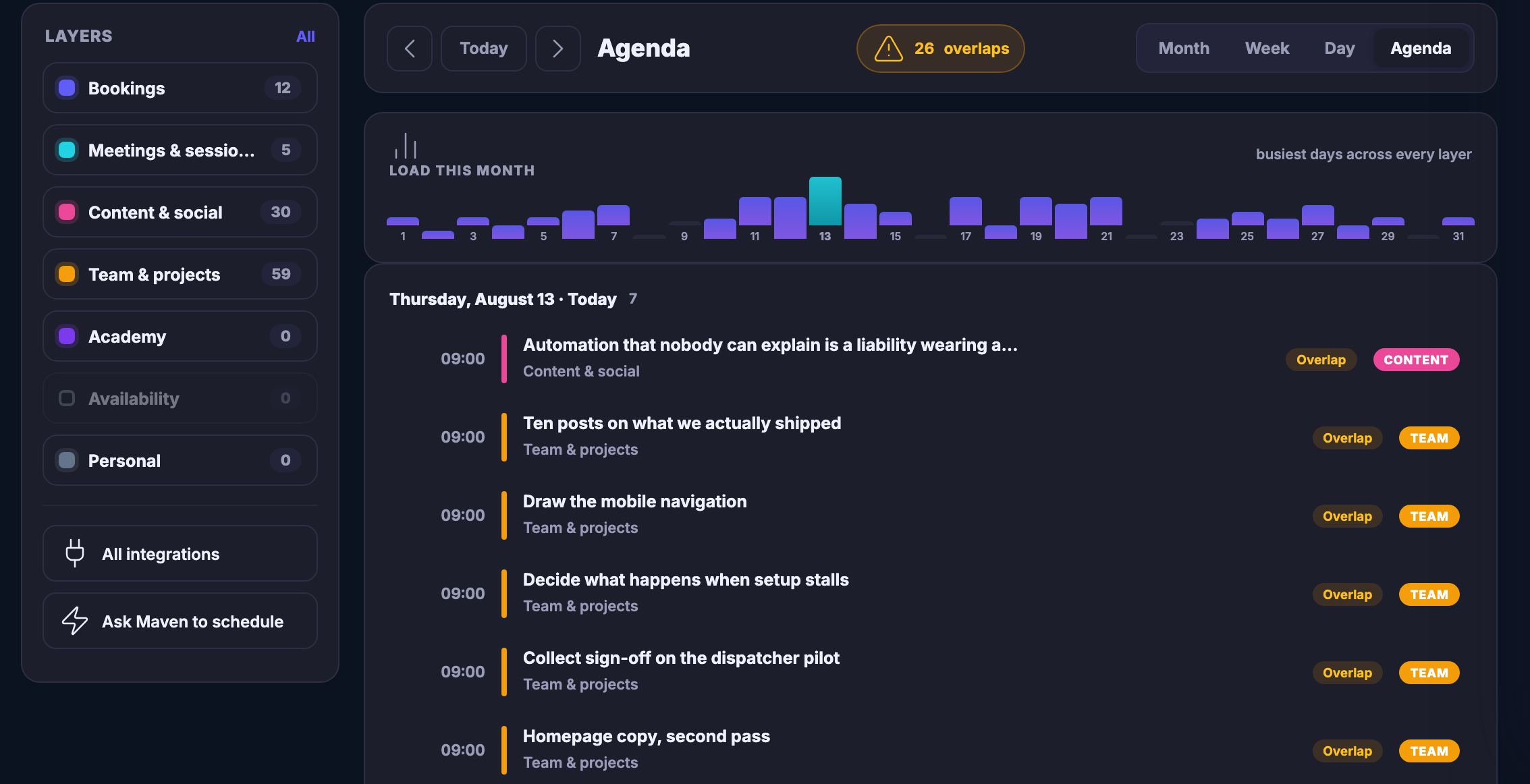
The unified calendar in Mission Control. On the left of the content field the layer panel: a control to show them all, then one row per layer, each with its own colour dot and a count beside it — bookings, meetings and sessions, content and social, team and projects, Academy, availability, and personal. Availability is greyed out and switched off; Academy and personal carry nothing. Under them a control opening all integrations and one offering to ask Maven to schedule something. To the right, the agenda toolbar: arrows either side of a control returning to today, the word Agenda, an amber warning pill counting the clashes in view, and the four ways of looking at the same set — month, week, day and agenda, with agenda chosen. Below it a bar strip labelled load this month, numbered along the days and noted as the busiest days across every layer. Then the agenda itself, grouped by day with the date and a count of what is on it: a single day, named, dated and marked as today, everything on it starting at the same hour — a post about automation filed under content and social and badged content, then a run of entries filed under team and projects and badged team, covering posts on what was shipped, drawing the mobile navigation, deciding what happens when setup stalls, collecting sign-off on the dispatcher pilot, and a second pass at the homepage copy. Every entry in view is marked as overlapping something else, and the last of them runs out at the bottom edge.The unified calendar in Mission Control. On the left of the content field the layer panel: a control to show them all, then one row per layer, each with its own colour dot and a count beside it — bookings, meetings and sessions, content and social, team and projects, Academy, availability, and personal. Availability is greyed out and switched off; Academy and personal carry nothing. Under them a control opening all integrations and one offering to ask Maven to schedule something. To the right, the agenda toolbar: arrows either side of a control returning to today, the word Agenda, an amber warning pill counting the clashes in view, and the four ways of looking at the same set — month, week, day and agenda, with agenda chosen. Below it a bar strip labelled load this month, numbered along the days and noted as the busiest days across every layer. Then the agenda itself, grouped by day with the date and a count of what is on it: a single day, named, dated and marked as today, everything on it starting at the same hour — a post about automation filed under content and social and badged content, then a run of entries filed under team and projects and badged team, covering posts on what was shipped, drawing the mobile navigation, deciding what happens when setup stalls, collecting sign-off on the dispatcher pilot, and a second pass at the homepage copy. Every entry in view is marked as overlapping something else, and the last of them runs out at the bottom edge.
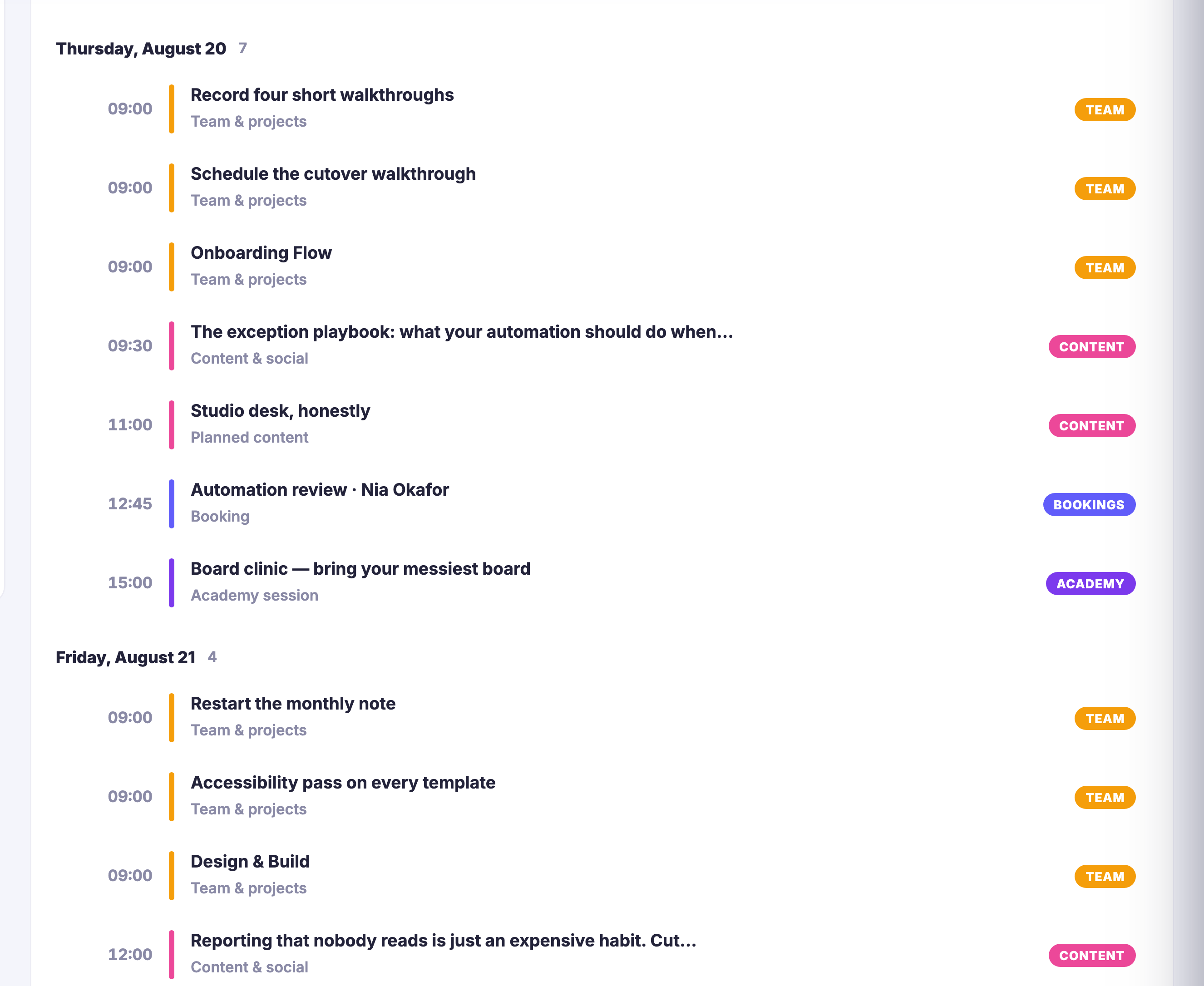
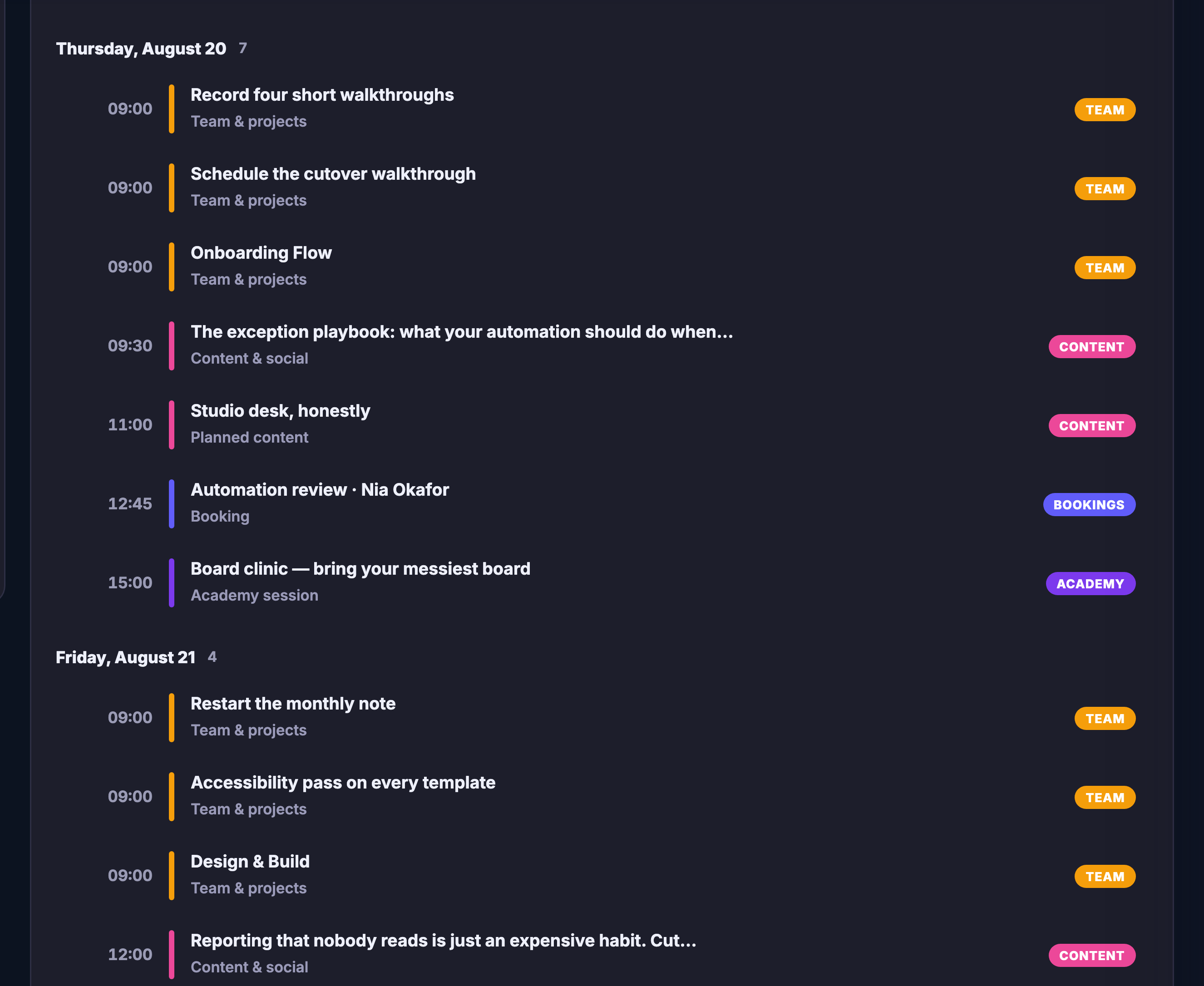
The same agenda scrolled on into the month. Day after day, each date carrying a count of what sits on it, and under each date its entries — the time on the left, a coloured bar marking which layer the entry came from, the layer named underneath it, and a badge on the right. Team-and-projects work, planned content, bookings with a named client, a teaching session, and social posts whose titles run past the edge of the row into an ellipsis all sit under the same dates, each badged for the layer it came from.The same agenda scrolled on into the month. Day after day, each date carrying a count of what sits on it, and under each date its entries — the time on the left, a coloured bar marking which layer the entry came from, the layer named underneath it, and a badge on the right. Team-and-projects work, planned content, bookings with a named client, a teaching session, and social posts whose titles run past the edge of the row into an ellipsis all sit under the same dates, each badged for the layer it came from.

My Calendar

Close
The unified calendar in Mission Control. On the left of the content field the layer panel: a control to show them all, then one row per layer, each with its own colour dot and a count beside it — bookings, meetings and sessions, content and social, team and projects, Academy, availability, and personal. Availability is greyed out and switched off; Academy and personal carry nothing. Under them a control opening all integrations and one offering to ask Maven to schedule something. To the right, the agenda toolbar: arrows either side of a control returning to today, the word Agenda, an amber warning pill counting the clashes in view, and the four ways of looking at the same set — month, week, day and agenda, with agenda chosen. Below it a bar strip labelled load this month, numbered along the days and noted as the busiest days across every layer. Then the agenda itself, grouped by day with the date and a count of what is on it: a single day, named, dated and marked as today, everything on it starting at the same hour — a post about automation filed under content and social and badged content, then a run of entries filed under team and projects and badged team, covering posts on what was shipped, drawing the mobile navigation, deciding what happens when setup stalls, collecting sign-off on the dispatcher pilot, and a second pass at the homepage copy. Every entry in view is marked as overlapping something else, and the last of them runs out at the bottom edge.The unified calendar in Mission Control. On the left of the content field the layer panel: a control to show them all, then one row per layer, each with its own colour dot and a count beside it — bookings, meetings and sessions, content and social, team and projects, Academy, availability, and personal. Availability is greyed out and switched off; Academy and personal carry nothing. Under them a control opening all integrations and one offering to ask Maven to schedule something. To the right, the agenda toolbar: arrows either side of a control returning to today, the word Agenda, an amber warning pill counting the clashes in view, and the four ways of looking at the same set — month, week, day and agenda, with agenda chosen. Below it a bar strip labelled load this month, numbered along the days and noted as the busiest days across every layer. Then the agenda itself, grouped by day with the date and a count of what is on it: a single day, named, dated and marked as today, everything on it starting at the same hour — a post about automation filed under content and social and badged content, then a run of entries filed under team and projects and badged team, covering posts on what was shipped, drawing the mobile navigation, deciding what happens when setup stalls, collecting sign-off on the dispatcher pilot, and a second pass at the homepage copy. Every entry in view is marked as overlapping something else, and the last of them runs out at the bottom edge.

My Calendar

Close
The same agenda scrolled on into the month. Day after day, each date carrying a count of what sits on it, and under each date its entries — the time on the left, a coloured bar marking which layer the entry came from, the layer named underneath it, and a badge on the right. Team-and-projects work, planned content, bookings with a named client, a teaching session, and social posts whose titles run past the edge of the row into an ellipsis all sit under the same dates, each badged for the layer it came from.The same agenda scrolled on into the month. Day after day, each date carrying a count of what sits on it, and under each date its entries — the time on the left, a coloured bar marking which layer the entry came from, the layer named underneath it, and a badge on the right. Team-and-projects work, planned content, bookings with a named client, a teaching session, and social posts whose titles run past the edge of the row into an ellipsis all sit under the same dates, each badged for the layer it came from.

A look inside My Calendar

Stills from the product, one after the next.

The unified calendar in Mission Control. On the left of the content field the layer panel: a control to show them all, then one row per layer, each with its own colour dot and a count beside it — bookings, meetings and sessions, content and social, team and projects, Academy, availability, and personal. Availability is greyed out and switched off; Academy and personal carry nothing. Under them a control opening all integrations and one offering to ask Maven to schedule something. To the right, the agenda toolbar: arrows either side of a control returning to today, the word Agenda, an amber warning pill counting the clashes in view, and the four ways of looking at the same set — month, week, day and agenda, with agenda chosen. Below it a bar strip labelled load this month, numbered along the days and noted as the busiest days across every layer. Then the agenda itself, grouped by day with the date and a count of what is on it: a single day, named, dated and marked as today, everything on it starting at the same hour — a post about automation filed under content and social and badged content, then a run of entries filed under team and projects and badged team, covering posts on what was shipped, drawing the mobile navigation, deciding what happens when setup stalls, collecting sign-off on the dispatcher pilot, and a second pass at the homepage copy. Every entry in view is marked as overlapping something else, and the last of them runs out at the bottom edge.The unified calendar in Mission Control. On the left of the content field the layer panel: a control to show them all, then one row per layer, each with its own colour dot and a count beside it — bookings, meetings and sessions, content and social, team and projects, Academy, availability, and personal. Availability is greyed out and switched off; Academy and personal carry nothing. Under them a control opening all integrations and one offering to ask Maven to schedule something. To the right, the agenda toolbar: arrows either side of a control returning to today, the word Agenda, an amber warning pill counting the clashes in view, and the four ways of looking at the same set — month, week, day and agenda, with agenda chosen. Below it a bar strip labelled load this month, numbered along the days and noted as the busiest days across every layer. Then the agenda itself, grouped by day with the date and a count of what is on it: a single day, named, dated and marked as today, everything on it starting at the same hour — a post about automation filed under content and social and badged content, then a run of entries filed under team and projects and badged team, covering posts on what was shipped, drawing the mobile navigation, deciding what happens when setup stalls, collecting sign-off on the dispatcher pilot, and a second pass at the homepage copy. Every entry in view is marked as overlapping something else, and the last of them runs out at the bottom edge.
The same agenda scrolled on into the month. Day after day, each date carrying a count of what sits on it, and under each date its entries — the time on the left, a coloured bar marking which layer the entry came from, the layer named underneath it, and a badge on the right. Team-and-projects work, planned content, bookings with a named client, a teaching session, and social posts whose titles run past the edge of the row into an ellipsis all sit under the same dates, each badged for the layer it came from.The same agenda scrolled on into the month. Day after day, each date carrying a count of what sits on it, and under each date its entries — the time on the left, a coloured bar marking which layer the entry came from, the layer named underneath it, and a badge on the right. Team-and-projects work, planned content, bookings with a named client, a teaching session, and social posts whose titles run past the edge of the row into an ellipsis all sit under the same dates, each badged for the layer it came from.
A pastel wall calendar with a pencil lying across it

See it in your own business.

Everything on this page comes with the platform — start free and try it on your real work.

Get started now

Next Up: Bookings & calendar

Turn interest into protected time and connected client work.

Ask Maven