Nachrichten

This is the product's own frame. Your conversations appear here once you have an account.

Get started now
Benachrichtigungen

This is the product's own frame. Alerts about your business appear here once you have an account.

Deutsch

Email that lands.

Sent on time, answered in one place.

Thursday · 10:10 · The audience is already there

Send the next right message.

Your audience does not begin as a CSV. Everyone who asked, replied or booked this week is already a contact with a tag. Gather the ones who asked, and Maven writes the first draft from what they said. It is a draft, not a decision: you change a line, and it goes.

Get started now

Free plan. Email Campaigns is included.

ASKED ABOUT THE WORKSHOP ASKED ABOUT THE WORKSHOP ASKED ABOUT THE WORKSHOP THE LIST MAVEN'S DRAFT · YOUR EDIT SEND TO · ASKED ABOUT THE WORKSHOP

Because you said grow an audience.

E-Mail-Kampagnen

A send to the people it was actually for — and plain facts about what it did.
The audience is already thereYour lists are built from what people actually did — where they arrived, what they asked, what they bought — not from a file you exported and re-imported.
Four shapes of sendA designed campaign, a plain note that reads like a person wrote it, a split test on a slice of the list, or a journey that carries itself. Same audience, different form.
What happened is written underneath itWho opened, who clicked and what it was, what bounced, who unsubscribed — in the same place as the campaign that caused them, in plain words.
Read more about Email Campaigns

A send is only as good as who it went to — so the audience comes first, and the facts come after.

Your audience does not begin as a file. Someone arrives through a page, a form, a booking or a conversation, and they are already in the same record your campaigns draw from. Lists and segments slice that record by what people have actually done, so a newsletter to everyone and a different letter to people who have bought are the same list read two ways — and a person only ever gets one of them.

Then pick the shape the moment deserves. A designed campaign built from blocks, or from a design that has already picked up your brand. A plain note, because sometimes that is what it should be. A split test on a slice of the list, with the winner going to everyone else. Or a journey that keeps carrying itself after the first send.

A journey does not have to run on a blind timer. Something happens — a person joins, a tag lands, a lead turns up, a call gets booked — and the next step is the one that fits. It can send, wait, tag, update the record, branch on what somebody did, move them along the pipeline, or ask Maven for a draft of the next letter.

And afterwards you read it the way you read anything else: top to bottom, no decoding. Who opened the door, who wrote back, what bounced, where each campaign stands, how the audience is changing. Before you have sent anything these are empty, and they say so — no sample data dressed up as a result.

What it actually does

  • One list, split by what people have actually done
  • A designed campaign, a plain note, a split test or a journey — from the same audience
  • What happened, written under the campaign that caused it

What that changes for you

  • Nobody gets the wrong letter for who they are
  • The list keeps working the week you are ill
  • You find out what moved without opening a second tool

You come away with a send that reached the right people, and the plain facts about it.

A look inside Email Campaigns

STEP 1 · SEND STEP 2 · WAIT STEP 3 · SEND AGAIN CLICKED BOOKED WENT QUIET CONFIRM · THEN STOP A REPLY · FRI 3:12 BACK TO CONVERSATIONS · THE SEQUENCE STOPS HERE

Friday · Something happens

Let the campaign keep listening.

Email Workflows run on what people do. The one who clicked gets the details. The one who booked gets the confirmation and nothing more. The one who went quiet gets one nudge next week. And the moment anyone replies, the sequence stops for them, because a reply never disappears into another system: it lands back in Conversations with the whole path behind it.

Back to the thread

Email Campaigns — platform screenshots

Real screens from the product. Open any one full size, or switch the set to light or dark.

Schließen
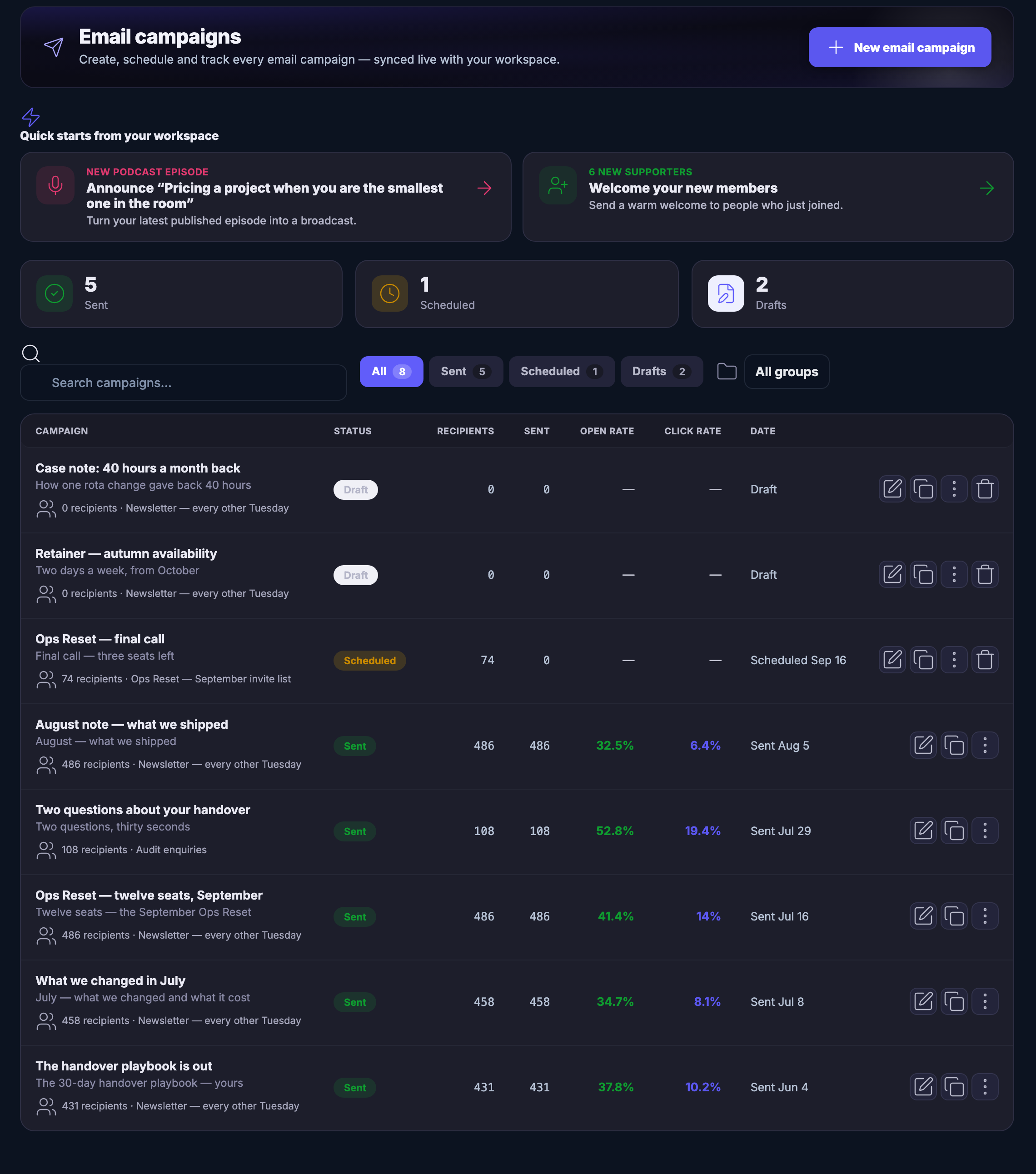
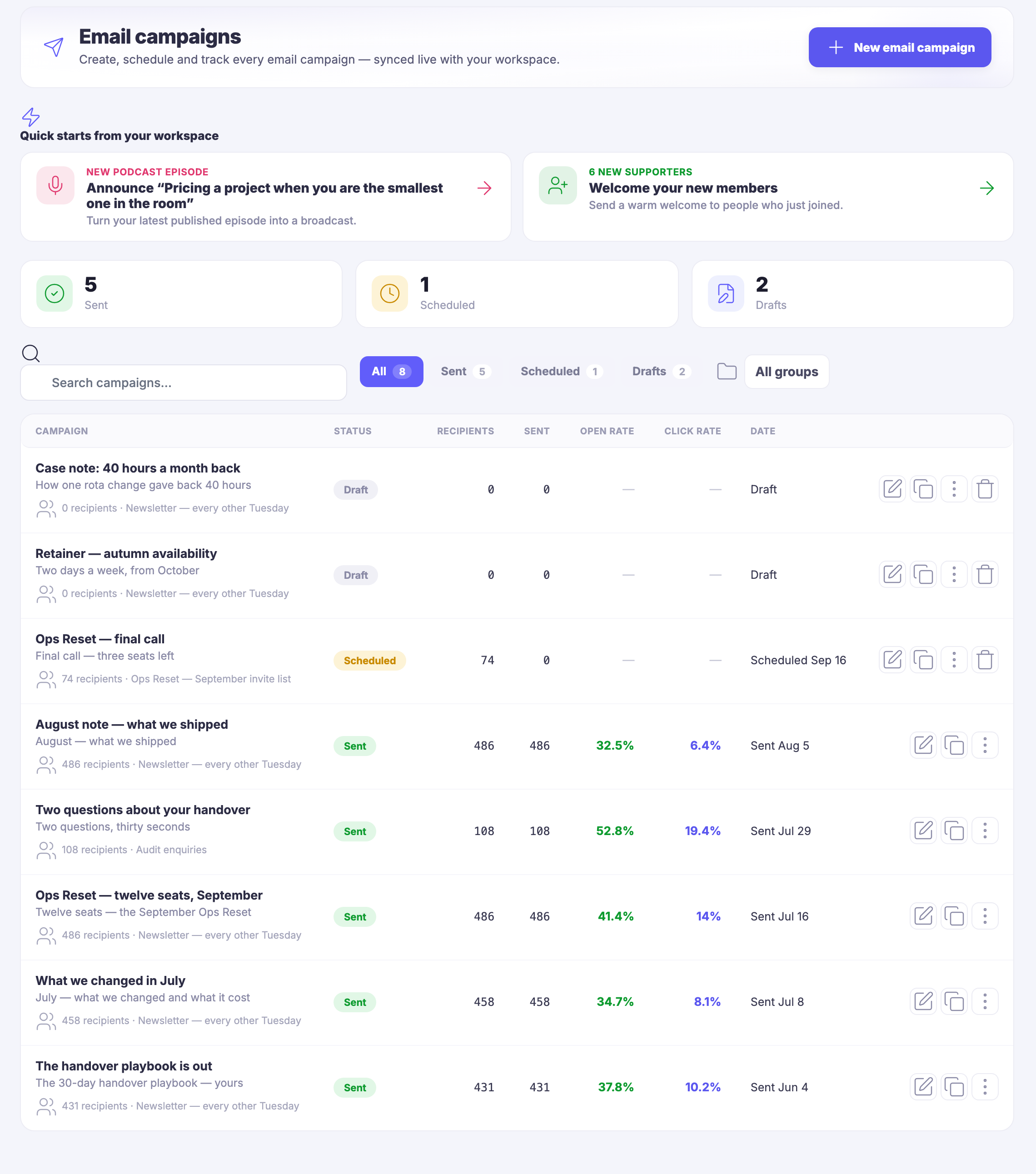
The Email Campaigns list: every campaign you have sent, scheduled or drafted in one table — each with its subject, the list it went to, how many people it reached, whether it has gone out yet, and what came back after it did.The Email Campaigns list: every campaign you have sent, scheduled or drafted in one table — each with its subject, the list it went to, how many people it reached, whether it has gone out yet, and what came back after it did.
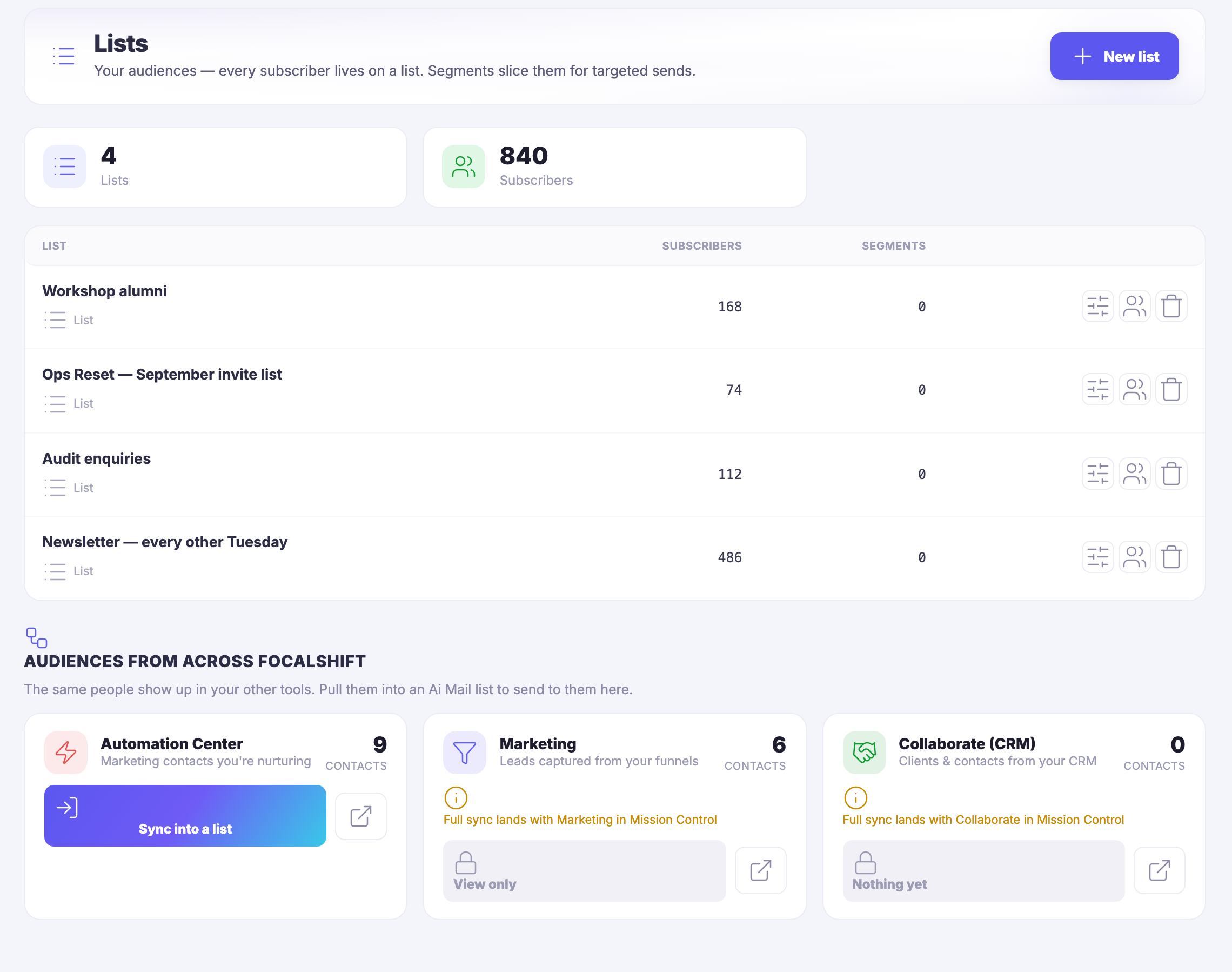
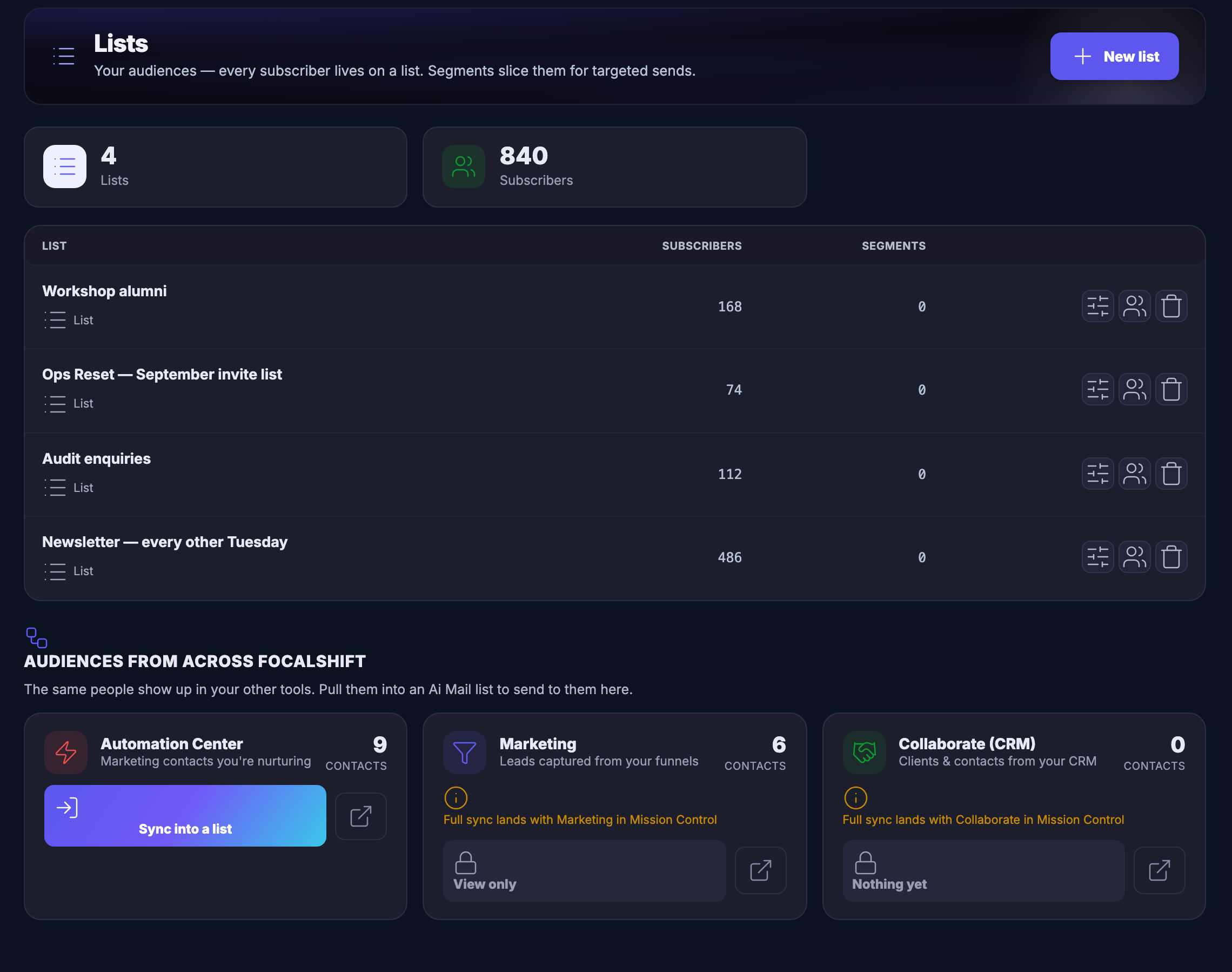
Lists: your audiences, each one a real list with the people who are on it — a newsletter, a workshop group, an enquiry list and an invite list — and beneath them a band pulling audiences in from the rest of the platform, so the same person never becomes two subscribers — one source syncing into a list today, the other two padlocked and read-only until their own full sync lands.Lists: your audiences, each one a real list with the people who are on it — a newsletter, a workshop group, an enquiry list and an invite list — and beneath them a band pulling audiences in from the rest of the platform, so the same person never becomes two subscribers — one source syncing into a list today, the other two padlocked and read-only until their own full sync lands.
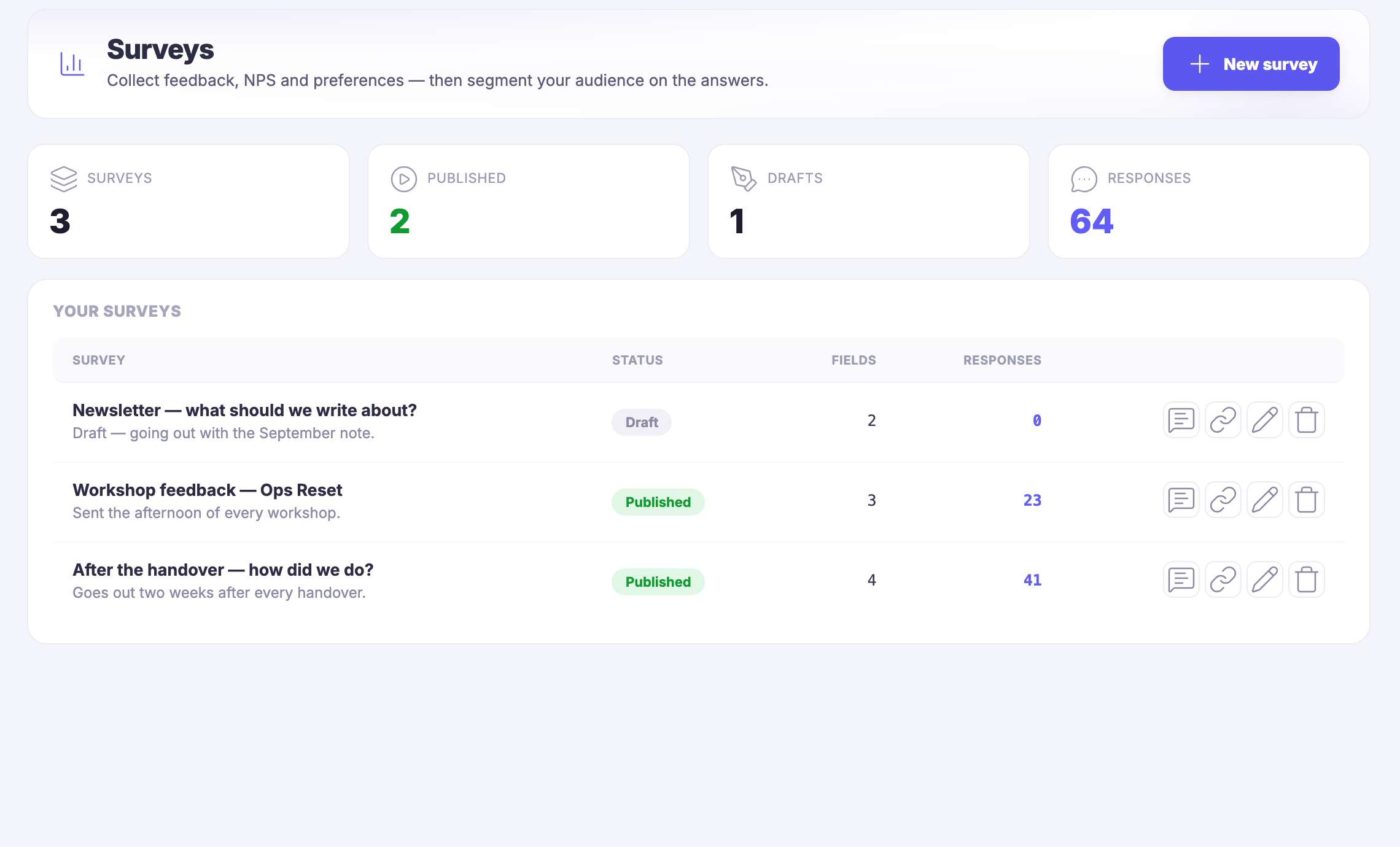
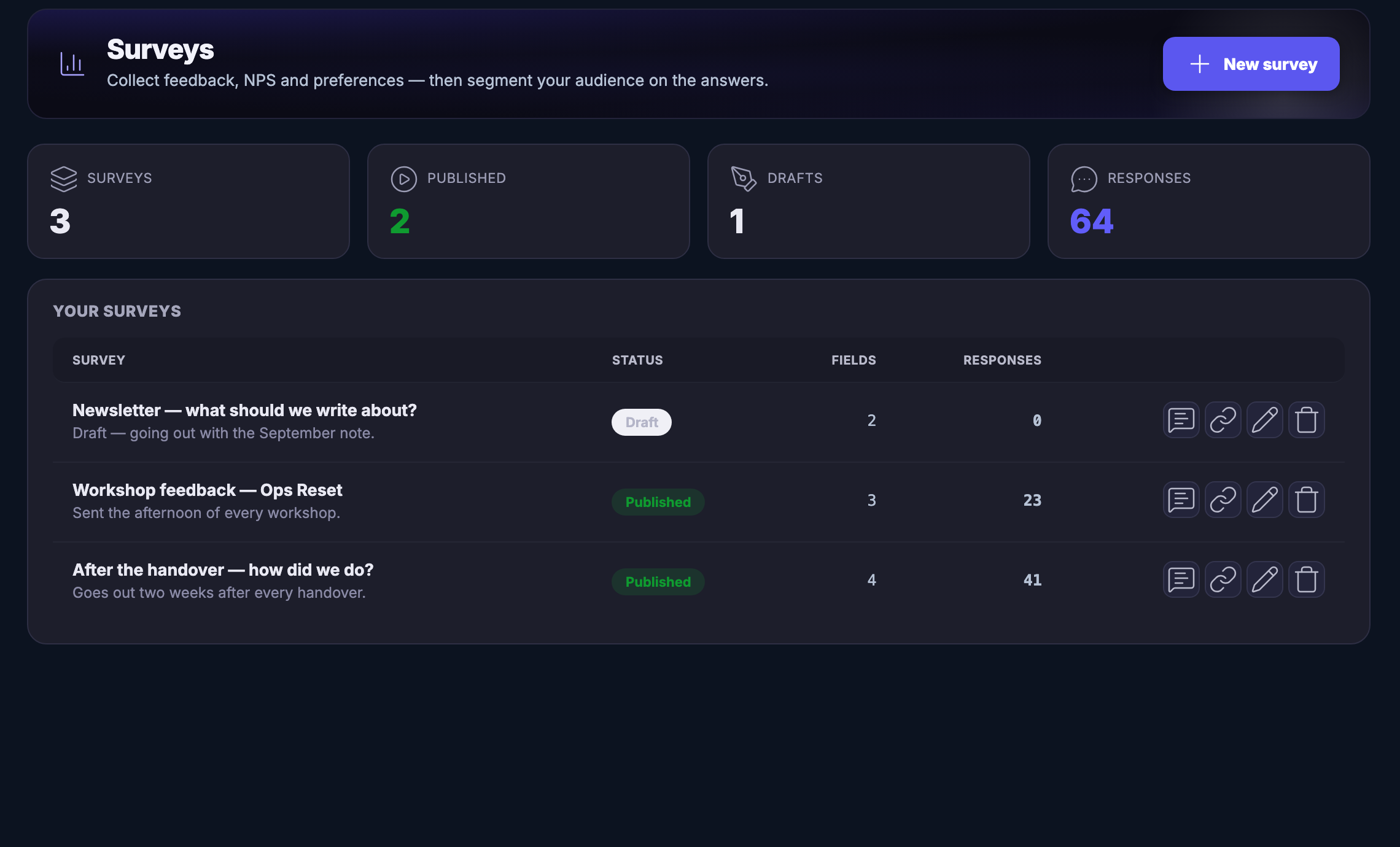
Surveys: a question put to a list — what the newsletter should cover, how a workshop went, how a handover landed — each showing whether it is published or still a draft, how much it asks and how many people have answered, so the answers can slice the audience.Surveys: a question put to a list — what the newsletter should cover, how a workshop went, how a handover landed — each showing whether it is published or still a draft, how much it asks and how many people have answered, so the answers can slice the audience.

E-Mail-Kampagnen

Schließen
The Email Campaigns list: every campaign you have sent, scheduled or drafted in one table — each with its subject, the list it went to, how many people it reached, whether it has gone out yet, and what came back after it did.The Email Campaigns list: every campaign you have sent, scheduled or drafted in one table — each with its subject, the list it went to, how many people it reached, whether it has gone out yet, and what came back after it did.

E-Mail-Kampagnen

Schließen
Lists: your audiences, each one a real list with the people who are on it — a newsletter, a workshop group, an enquiry list and an invite list — and beneath them a band pulling audiences in from the rest of the platform, so the same person never becomes two subscribers — one source syncing into a list today, the other two padlocked and read-only until their own full sync lands.Lists: your audiences, each one a real list with the people who are on it — a newsletter, a workshop group, an enquiry list and an invite list — and beneath them a band pulling audiences in from the rest of the platform, so the same person never becomes two subscribers — one source syncing into a list today, the other two padlocked and read-only until their own full sync lands.

E-Mail-Kampagnen

Schließen
Surveys: a question put to a list — what the newsletter should cover, how a workshop went, how a handover landed — each showing whether it is published or still a draft, how much it asks and how many people have answered, so the answers can slice the audience.Surveys: a question put to a list — what the newsletter should cover, how a workshop went, how a handover landed — each showing whether it is published or still a draft, how much it asks and how many people have answered, so the answers can slice the audience.

A look inside Email Campaigns

Stills from the product, one after the next.

The Email Campaigns list: every campaign you have sent, scheduled or drafted in one table — each with its subject, the list it went to, how many people it reached, whether it has gone out yet, and what came back after it did.The Email Campaigns list: every campaign you have sent, scheduled or drafted in one table — each with its subject, the list it went to, how many people it reached, whether it has gone out yet, and what came back after it did.
Lists: your audiences, each one a real list with the people who are on it — a newsletter, a workshop group, an enquiry list and an invite list — and beneath them a band pulling audiences in from the rest of the platform, so the same person never becomes two subscribers — one source syncing into a list today, the other two padlocked and read-only until their own full sync lands.Lists: your audiences, each one a real list with the people who are on it — a newsletter, a workshop group, an enquiry list and an invite list — and beneath them a band pulling audiences in from the rest of the platform, so the same person never becomes two subscribers — one source syncing into a list today, the other two padlocked and read-only until their own full sync lands.
Surveys: a question put to a list — what the newsletter should cover, how a workshop went, how a handover landed — each showing whether it is published or still a draft, how much it asks and how many people have answered, so the answers can slice the audience.Surveys: a question put to a list — what the newsletter should cover, how a workshop went, how a handover landed — each showing whether it is published or still a draft, how much it asks and how many people have answered, so the answers can slice the audience.

Sender reputation — platform screenshots

Real screens from the product. Open any one full size, or switch the set to light or dark.

Schließen
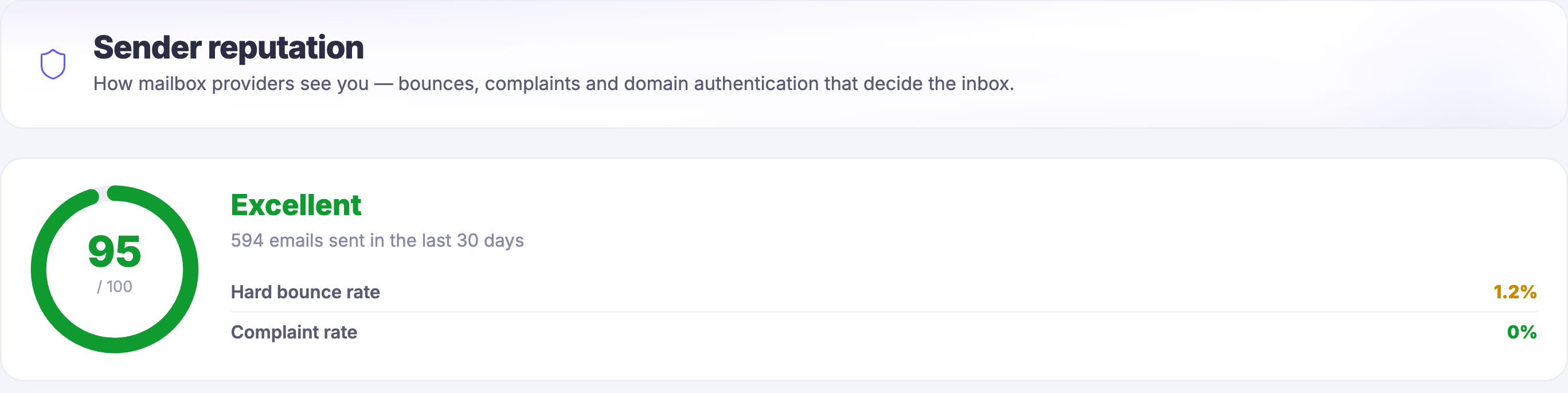
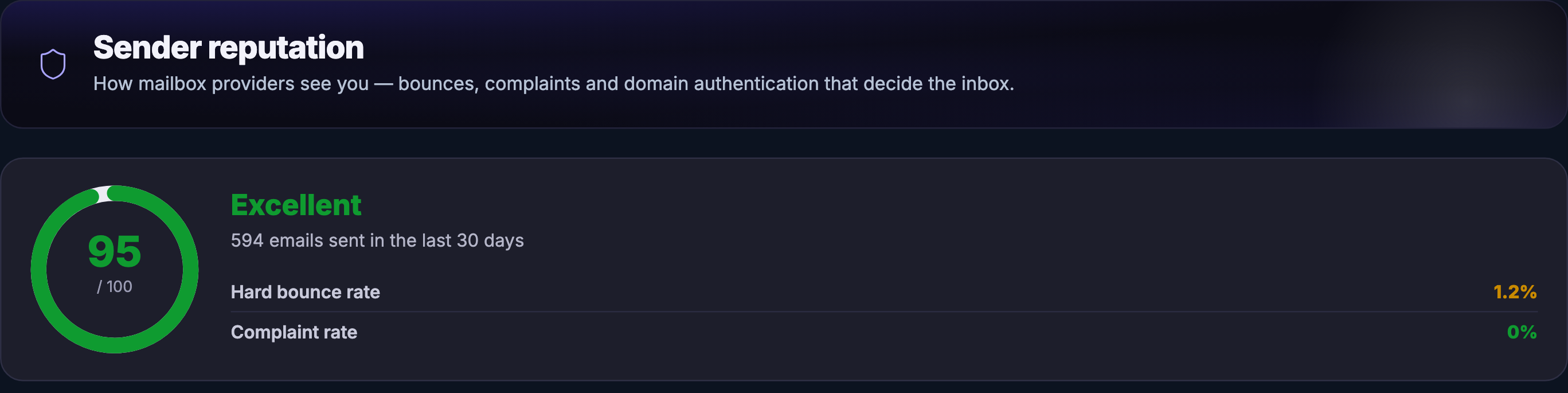
A close-up of the Sender reputation screen inside FocalShift Mail, cut away from the app frame, the icon rail and the module list. A wide panel names the screen over the line that it is how mailbox providers see you — bounces, complaints and domain authentication that decide the inbox. Beneath it a card carries a heavy ring drawn almost all the way round, with a score against a total inside it, and beside the ring the word Excellent in green over a count of emails sent in the last thirty days. Under that, two hairline rows read a hard bounce rate, its figure in amber, and a complaint rate, its figure in green.A close-up of the Sender reputation screen inside FocalShift Mail, cut away from the app frame, the icon rail and the module list. A wide panel names the screen over the line that it is how mailbox providers see you — bounces, complaints and domain authentication that decide the inbox. Beneath it a card carries a heavy ring drawn almost all the way round, with a score against a total inside it, and beside the ring the word Excellent in green over a count of emails sent in the last thirty days. Under that, two hairline rows read a hard bounce rate, its figure in amber, and a complaint rate, its figure in green.
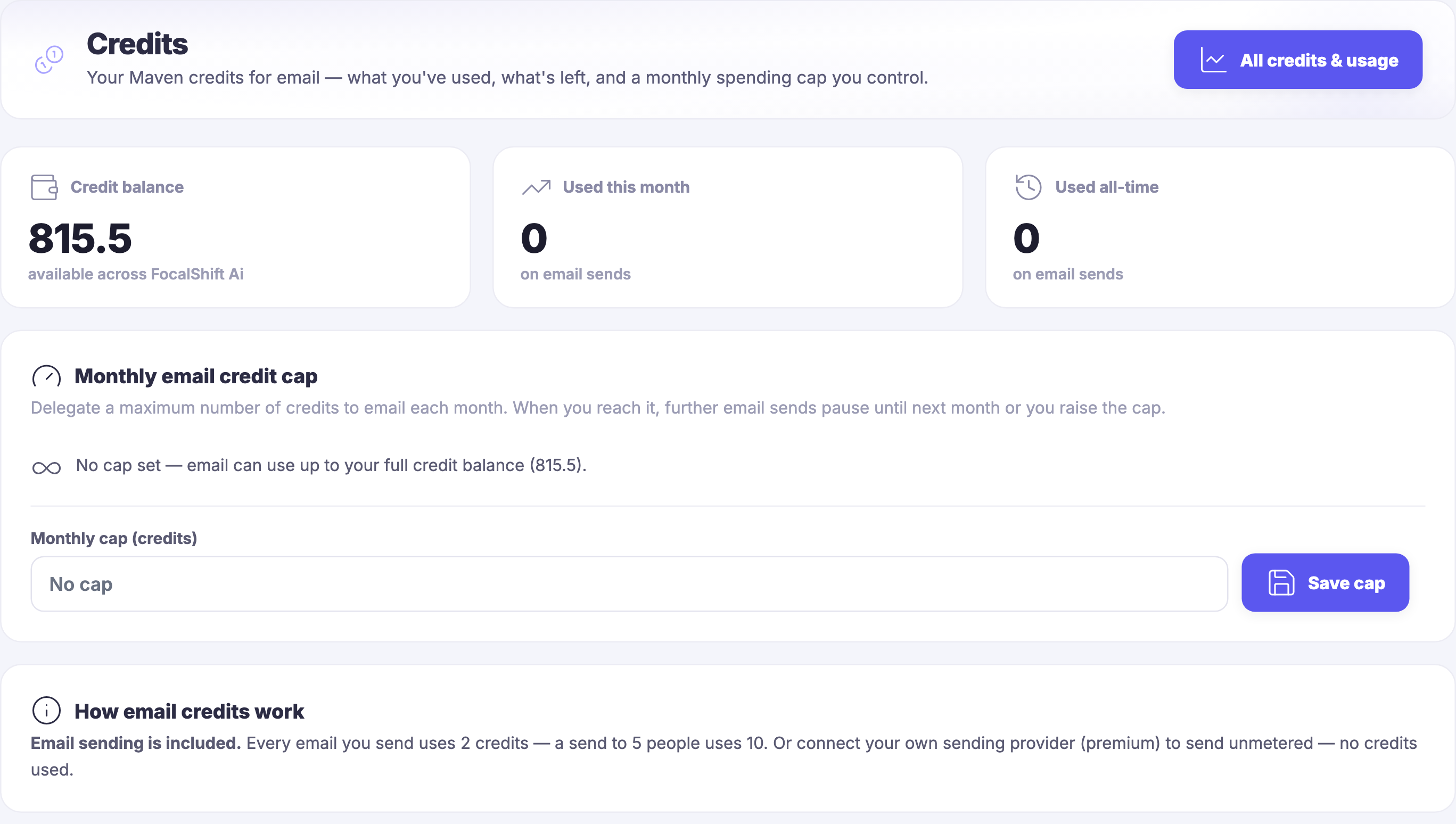
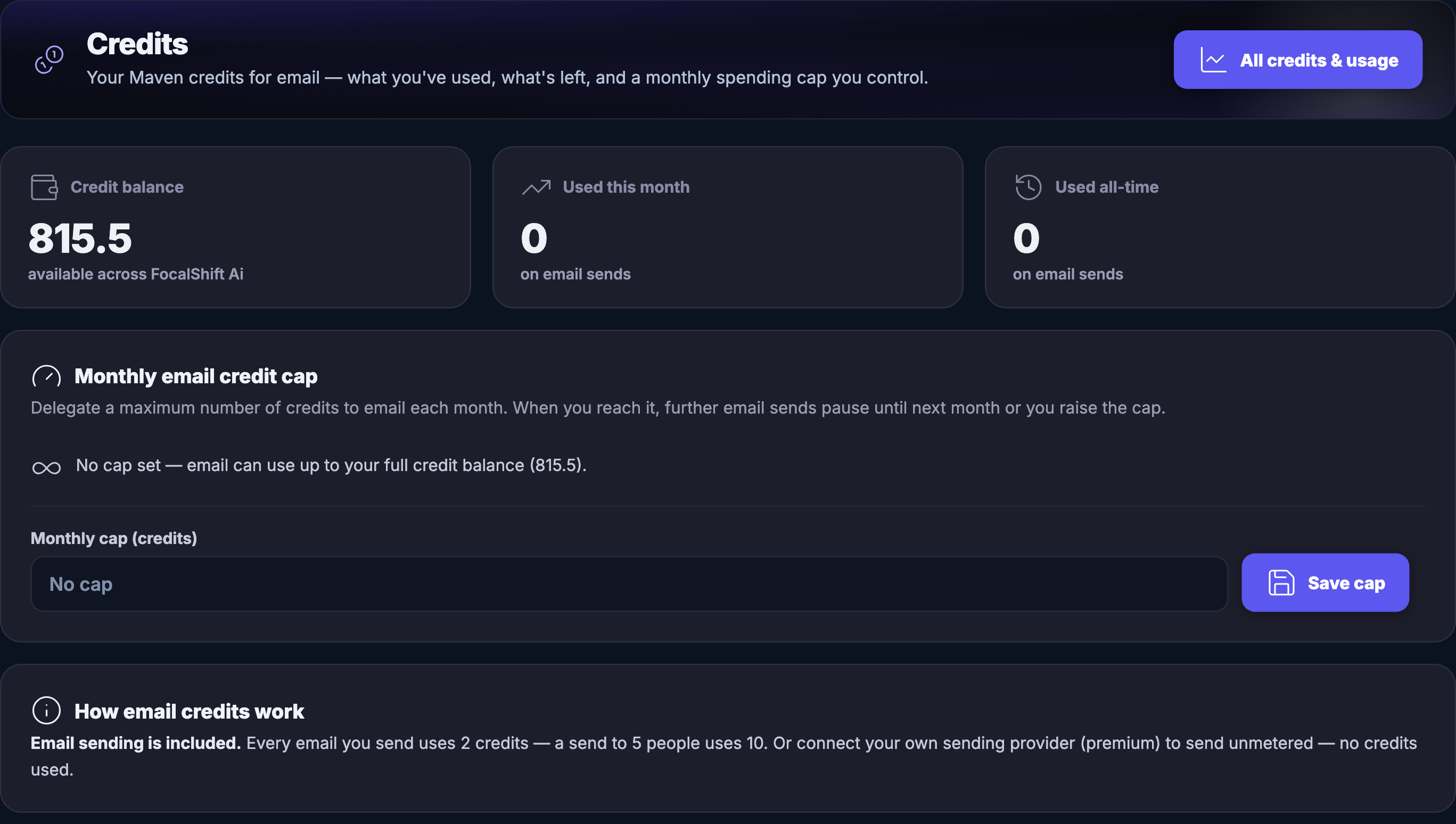
A close-up of the Credits screen inside the same module, cut to the same box. A panel names it over the line that these are your Maven credits for email — what you have used, what is left, and a monthly spending cap you control — with a control at the far right to open all credits and usage. Below it three tiles sit side by side: a credit balance carrying a figure and the note that it is available across FocalShift, and then what has been used this month and what has been used all time on email sends, both of which read nothing. Under those a panel headed Monthly email credit cap explains that sends pause when the cap is reached until the next month or you raise it, states that no cap is set so email can use up to the full balance, and offers an empty cap field beside a save control. A last panel says email sending is included, states what each email costs in credits and what a send to several people costs, and offers your own sending provider instead, unmetered.A close-up of the Credits screen inside the same module, cut to the same box. A panel names it over the line that these are your Maven credits for email — what you have used, what is left, and a monthly spending cap you control — with a control at the far right to open all credits and usage. Below it three tiles sit side by side: a credit balance carrying a figure and the note that it is available across FocalShift, and then what has been used this month and what has been used all time on email sends, both of which read nothing. Under those a panel headed Monthly email credit cap explains that sends pause when the cap is reached until the next month or you raise it, states that no cap is set so email can use up to the full balance, and offers an empty cap field beside a save control. A last panel says email sending is included, states what each email costs in credits and what a send to several people costs, and offers your own sending provider instead, unmetered.

Absenderreputation

Schließen
A close-up of the Sender reputation screen inside FocalShift Mail, cut away from the app frame, the icon rail and the module list. A wide panel names the screen over the line that it is how mailbox providers see you — bounces, complaints and domain authentication that decide the inbox. Beneath it a card carries a heavy ring drawn almost all the way round, with a score against a total inside it, and beside the ring the word Excellent in green over a count of emails sent in the last thirty days. Under that, two hairline rows read a hard bounce rate, its figure in amber, and a complaint rate, its figure in green.A close-up of the Sender reputation screen inside FocalShift Mail, cut away from the app frame, the icon rail and the module list. A wide panel names the screen over the line that it is how mailbox providers see you — bounces, complaints and domain authentication that decide the inbox. Beneath it a card carries a heavy ring drawn almost all the way round, with a score against a total inside it, and beside the ring the word Excellent in green over a count of emails sent in the last thirty days. Under that, two hairline rows read a hard bounce rate, its figure in amber, and a complaint rate, its figure in green.

Absenderreputation

Schließen
A close-up of the Credits screen inside the same module, cut to the same box. A panel names it over the line that these are your Maven credits for email — what you have used, what is left, and a monthly spending cap you control — with a control at the far right to open all credits and usage. Below it three tiles sit side by side: a credit balance carrying a figure and the note that it is available across FocalShift, and then what has been used this month and what has been used all time on email sends, both of which read nothing. Under those a panel headed Monthly email credit cap explains that sends pause when the cap is reached until the next month or you raise it, states that no cap is set so email can use up to the full balance, and offers an empty cap field beside a save control. A last panel says email sending is included, states what each email costs in credits and what a send to several people costs, and offers your own sending provider instead, unmetered.A close-up of the Credits screen inside the same module, cut to the same box. A panel names it over the line that these are your Maven credits for email — what you have used, what is left, and a monthly spending cap you control — with a control at the far right to open all credits and usage. Below it three tiles sit side by side: a credit balance carrying a figure and the note that it is available across FocalShift, and then what has been used this month and what has been used all time on email sends, both of which read nothing. Under those a panel headed Monthly email credit cap explains that sends pause when the cap is reached until the next month or you raise it, states that no cap is set so email can use up to the full balance, and offers an empty cap field beside a save control. A last panel says email sending is included, states what each email costs in credits and what a send to several people costs, and offers your own sending provider instead, unmetered.

A look inside Sender reputation

Stills from the product, one after the next.

A close-up of the Sender reputation screen inside FocalShift Mail, cut away from the app frame, the icon rail and the module list. A wide panel names the screen over the line that it is how mailbox providers see you — bounces, complaints and domain authentication that decide the inbox. Beneath it a card carries a heavy ring drawn almost all the way round, with a score against a total inside it, and beside the ring the word Excellent in green over a count of emails sent in the last thirty days. Under that, two hairline rows read a hard bounce rate, its figure in amber, and a complaint rate, its figure in green.A close-up of the Sender reputation screen inside FocalShift Mail, cut away from the app frame, the icon rail and the module list. A wide panel names the screen over the line that it is how mailbox providers see you — bounces, complaints and domain authentication that decide the inbox. Beneath it a card carries a heavy ring drawn almost all the way round, with a score against a total inside it, and beside the ring the word Excellent in green over a count of emails sent in the last thirty days. Under that, two hairline rows read a hard bounce rate, its figure in amber, and a complaint rate, its figure in green.
A close-up of the Credits screen inside the same module, cut to the same box. A panel names it over the line that these are your Maven credits for email — what you have used, what is left, and a monthly spending cap you control — with a control at the far right to open all credits and usage. Below it three tiles sit side by side: a credit balance carrying a figure and the note that it is available across FocalShift, and then what has been used this month and what has been used all time on email sends, both of which read nothing. Under those a panel headed Monthly email credit cap explains that sends pause when the cap is reached until the next month or you raise it, states that no cap is set so email can use up to the full balance, and offers an empty cap field beside a save control. A last panel says email sending is included, states what each email costs in credits and what a send to several people costs, and offers your own sending provider instead, unmetered.A close-up of the Credits screen inside the same module, cut to the same box. A panel names it over the line that these are your Maven credits for email — what you have used, what is left, and a monthly spending cap you control — with a control at the far right to open all credits and usage. Below it three tiles sit side by side: a credit balance carrying a figure and the note that it is available across FocalShift, and then what has been used this month and what has been used all time on email sends, both of which read nothing. Under those a panel headed Monthly email credit cap explains that sends pause when the cap is reached until the next month or you raise it, states that no cap is set so email can use up to the full balance, and offers an empty cap field beside a save control. A last panel says email sending is included, states what each email costs in credits and what a send to several people costs, and offers your own sending provider instead, unmetered.

Maven adds this one: every other card here is about writing the letter — this is the one about whether it ever arrived.

Absenderreputation

Whether your mail is landing in the inbox at all — and what a send costs you.

Landing in the inbox is a thing you can look atA grade off your own recent sends, the addresses that came back, the people who marked you as unwanted, and the domain the mail goes out under — managed and authenticated for you unless you would rather bring your own.
The messages that have to arriveReceipts, confirmations and password resets are not campaigns and they cannot wait. They go out from your own systems and land in the same log as everything else, each one carrying who it was for and what became of it.
A question put to the list, and the answers keptAsk the people who already hear from you what they want next, how something went, or how a handover landed — and the answers stay where the next letter can read them.
Read more about Sender reputation

A letter you never see is the one that was quietly set aside before anybody read it.

Sending is not arriving. Every send you make leaves a trace with the places that receive it — the addresses that came back, the people who marked the mail as unwanted, the ones taken off the list because there is no point trying again — and those traces decide whether the next letter reaches an inbox or a folder nobody opens. So they are gathered into one screen and turned into a plain grade, with the sending domain named underneath it.

Some mail is not a campaign at all. A receipt, a confirmation, a password reset: nobody signed up for those and nobody may miss them. They are sent from your own systems and written into the same log as everything else, so a message that failed is a thing you can see rather than a complaint you find out about later.

And sometimes the useful thing is not to tell but to ask. A question put to the list — what should we write about, how did the workshop go, how did the handover land — can sit as a draft until the next letter carries it, and the answers are kept where the audience is, so what people said can decide who hears what next.

All of which costs something, and the cost is on the same shelf as the rest of it. Sending is included, every email costs the same, and you can set a ceiling for the month so a list that grows faster than you expected cannot quietly spend it. Or you bring your own sending provider and the meter stops entirely.

What it actually does

  • A grade for how the places you send to see you, off your own recent sends
  • Receipts, confirmations and resets logged beside everything else you send
  • A question put to the list, with the answers kept where the audience is
  • A ceiling for the month, set by you, on what email is allowed to spend

What that changes for you

  • You find out that mail stopped arriving before your customers tell you
  • The message somebody is actually waiting for is not the one that failed quietly
  • What people want next comes from asking them, not from guessing
  • Nothing about sending can run away with the month behind your back

You come away with a plain answer to whether your mail is arriving, and what the sending is costing you.

A look inside Sender reputation

Did it arrive at all?

Landing in the inbox is its own job.

Sender reputation gives each send a plain grade, read off your own sends, and shows what the send cost beside it. When something slips, it says so in a sentence and tells you the fix.

THEIR INBOX A WHAT THIS SEND COST

Ai Mail · included

The next message already has somewhere to start.

Get started now or say hello to Maven first →

Next Up: Automations & workflows

Keep work moving across the platform while you sleep.

Maven fragen